Manual Quantization
This section describes how to manually modify a model by inserting quantization operators to implement the quantization function.
Function Description
You can choose proper tools based on the framework in use to perform quantization and inject the quantization parameters (scaled, scalew, and offsetd) into your model when building it.

- Currently, only the Conv2D, DepthwiseConv2D, and FullyConnection operators support quantization.
- When the channel dimension of the input data for the Conv2D, DepthwiseConv2D, or FullyConnection operator is less than or equal to 16, INT8 quantization yields no performance gain due to padding. Therefore, for these operators, the channel dimension of the input data must be greater than 16. Otherwise, no performance gain can be obtained.
Take INT8 quantization of the Conv2D operator as an example. Model quantization is implemented by inserting the AscendQuant operator before the Conv2D operator and the AscendDequant operator after the Conv2D operator, as shown in Figure 1.
The AscendQuant operator converts float data to int8 data as in the following formula: dataint8 = round[(datafloat × scale) + offset], where scale = 1/scaled, and offset = offsetd. The round algorithm here is similar to the FE_TONEAREST mode of rint in C language.
The AscendDequant operator converts int32 data to float32 data as in the following formula: datafloat32 = dataint32 × deq_scale, where deq_scale = scaled × scalew.
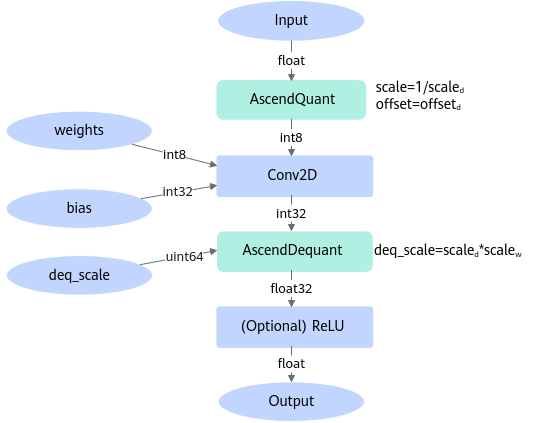
Inserting AscendQuant Before Conv2D
AscendQuant operator prototype definition is as follows.
1 2 3 4 5 6 7 8 9 | REG_OP(AscendQuant) .INPUT(x, TensorType({DT_FLOAT16, DT_FLOAT32})) .OUTPUT(y, TensorType({DT_INT8, DT_INT4})) .REQUIRED_ATTR(scale, Float) .REQUIRED_ATTR(offset, Float) .ATTR(sqrt_mode, Bool, false) .ATTR(round_mode, String, "Round") .ATTR(dst_type, Int, DT_INT8) .OP_END_FACTORY_REG(AscendQuant) |
For details about the operator prototype definition, see "Prototype Definition (REG_OP)" under "Basic Data Structures and APIs of Graphs" in GE APIs.
The AscendQuant operator has one input (x), two required attributes (scale and offset), and three optional attributes (sqrt_mode, round_mode, and dst_type).
- x: input of the AscendQuant operator, which is a tensor of type float16 or float32.
- y: operator output, which is a tensor of type int8 or int4.
- scale: quantization coefficient (scale = 1/scaled). The supported data types are float32 and float16. It is recommended that the value be within the representable range of float16. If the value exceeds the representable range of float16, set sqrt_mode to True.
- offset: quantization offset (offset = 1/offsetd). The supported data types are float32 and float16.
- sqrt_mode: whether to perform square root operation on scale. The value can be False or True. You are advised to retain the default value False. If the value of scale exceeds the representable range of float16, set sqrt_mode to True to prevent precision loss. The system will perform the square root operation on scale.
- round_mode: mode for converting the float type to the int type, which can be Round (default), Floor, Ceiling, and Truncate.
- dst_type: data type of the output. The default value is 2, indicating that the data type is DT_INT8.
Create an AscendQuant operator instance based on the operator prototype definition.
1 2 3 4 | auto quant = op::AscendQuant("quant") .set_input_x(data) .set_attr_scale(1.00049043) // Specify the quantization coefficient. .set_attr_offset(-128.0); // Specify the offset. |
Conv2D
The input of the Conv2D operator comes from the AscendQuant operator, and the output type of Conv2D is set to int32.
1 2 3 4 5 6 7 8 9 10 11 12 13 14 15 16 17 18 19 20 21 22 23 24 25 26 27 28 29 30 31 32 33 34 35 36 37 38 39 40 41 42 43 44 45 | // const op: conv2d weight auto weight_shape = ge::Shape({ 5,17,1,1 }); // Set the shape of the weight tensor. TensorDesc desc_weight_1(weight_shape, FORMAT_NCHW, DT_INT8); // Set the weight tensor description and data type (INT8). Tensor weight_tensor(desc_weight_1); // Create a weight tensor. uint32_t weight_1_len = weight_shape.GetShapeSize(); // Calculate the number of elements in the weight tensor. bool res = GetConstTensorFromBin(PATH+"const_0.bin", weight_tensor, weight_1_len); // Read the weight data from the file. if(!res) { std::cout << "GetConstTensorFromBin Failed!" << std::endl; return -1; } auto conv_weight = op::Const("const_0") // Create a Const node (weight). .set_attr_value(weight_tensor); // Set the weight tensor for the Const node. // const op: conv2d bias auto bias_shape = ge::Shape({ 5 }); // Set the shape of the bias tensor. TensorDesc desc_bias(bias_shape, FORMAT_NCHW, DT_INT32); // Set the bias tensor description and data type (INT32). Tensor bias_tensor(desc_bias); // Create a bias tensor. uint32_t bias_len = bias_shape.GetShapeSize() * sizeof(int32_t); // Calculate the size of the bias tensor, in bytes. res = GetConstTensorFromBin(PATH + "const_1.bin", bias_tensor, bias_len); // Read the bias data from the file. if(!res) { std::cout << "GetConstTensorFromBin Failed!" << std::endl; return -1; } auto conv_bias = op::Const("const_1") // Create a Const node (bias). .set_attr_value(bias_tensor); // conv2d op auto conv2d = op::Conv2D("Conv2d") // Create a Conv2D node. .set_input_x(quant) // Set the input of the Conv2D operator to the output of AscendQuant. .set_input_filter(conv_weight) // Set the weight of the convolution kernel. .set_input_bias(conv_bias) // Set the convolution bias. .set_attr_strides({ 1, 1, 1, 1 }) // stride .set_attr_pads({ 0, 0, 0, 0 }) // padding .set_attr_dilations({ 1, 1, 1, 1 }); // dilation // Set the descriptions of the input and output tensors of the Conv2D node. TensorDesc conv2d_input_desc_x(ge::Shape(), FORMAT_NCHW, DT_INT8); // After quantization, set the data type of the input x to INT8. TensorDesc conv2d_input_desc_filter(ge::Shape(), FORMAT_NCHW, DT_INT8); TensorDesc conv2d_input_desc_bias(ge::Shape(), FORMAT_NCHW, DT_INT32); TensorDesc conv2d_output_desc_y(ge::Shape(), FORMAT_NCHW, DT_INT32); // Update descriptions. conv2d.update_input_desc_x(conv2d_input_desc_x); conv2d.update_input_desc_filter(conv2d_input_desc_filter); conv2d.update_input_desc_bias(conv2d_input_desc_bias); conv2d.update_output_desc_y(conv2d_output_desc_y); |
For details about how to implement the GetConstTensorFromBin function, see "Programming Guide > Graph Construction> Using Graph Engine APIs to Construct a New Graph > Expression Examples of Operators in a Graph > Reading Weight Data from a File" in Graph Development.
Inserting AscendDequant After Conv2D
AscendDequant operator prototype definition is as follows.
1 2 3 4 5 6 7 8 | REG_OP(AscendDequant) .INPUT(x, TensorType({DT_INT32})) .INPUT(deq_scale, TensorType({DT_FLOAT16, DT_UINT64})) .OUTPUT(y, TensorType({DT_FLOAT16, DT_FLOAT})) .ATTR(sqrt_mode, Bool, false) .ATTR(relu_flag, Bool, false) .ATTR(dtype, Int, DT_FLOAT) .OP_END_FACTORY_REG(AscendDequant) |
The AscendDequant operator has two inputs (x and deq_scale) and three optional attributes (sqrt_mode, relu_flag, and dtype).
- x: input of the AscendDequant operator, which is a tensor of type int32.
- deq_scale: dequantization coefficient (deq_scale = scaled × scalew, which is a tensor of type uint64. shape of deq_scale can be 1 or the same as the channel dimension of the Conv2D output.
You need to convert the float32 value obtained by multiplying the scaled and scalew to the uint64 type before filling the value into the lower 32 bits of deq_scale. The upper 32 bits must all be 0.
1
2
3
4
5
6
7
import numpy as np
def trans_float32_scale_deq_to_uint64(scale_deq):
    float32_scale_deq = np.array(scale_deq, np.float32)
    uint32_scale_deq = np.frombuffer(float32_scale_deq, np.uint32)
    uint64_result = np.zeros(float32_scale_deq.shape, np.uint64)
    uint64_result |= np.uint64(uint32_scale_deq)
    return uint64_result
- sqrt_mode: whether to perform square root operation on deq_scale. The value can be False or True. You are advised to retain the default value False. If the value of deq_scale exceeds the representable range of float16, set sqrt_mode to True and fill in the square root of deq_scale to prevent precision loss.
- relu_flag: whether to perform ReLU. The value can be False (default) or True.
- dtype: data type of the output. The default value is 0, indicating that the data type is DT_FLOAT.
Create an AscendDequant operator instance based on the operator prototype definition.
1 2 3 4 5 6 7 8 9 10 11 12 13 14 15 16 | // Construct dequant_scale. TensorDesc desc_dequant_shape(ge::Shape({ 5 }), FORMAT_NCHW, DT_UINT64); Tensor dequant_tensor(desc_dequant_shape); uint32_t dequant_scale_len = 5 * sizeof(uint64_t); res = GetConstTensorFromBin(PATH + "const_2.bin", dequant_tensor, dequant_scale_len); if(!res) { std::cout << "GetConstTensorFromBin Failed!" << std::endl; return -1; } auto dequant_scale = op::Const("dequant_scale") // Create a Const node (dequant_scale). .set_attr_value(dequant_tensor); // Define the AscendDequant operator. auto dequant = op::AscendDequant("dequant") .set_input_x(conv2d) // Set the output of Conv2D as the input of the AscendDequant operator. .set_input_deq_scale(dequant_scale); |
For details about how to implement the GetConstTensorFromBin function, see "Programming Guide > Graph Construction> Using Graph Engine APIs to Construct a New Graph > Expression Examples of Operators in a Graph > Reading Weight Data from a File" in Graph Development.
Set the output of AscendDequant as the input of other operators, or as the output of the entire graph.
1 2 3 4 | auto bias_add_1 = op::BiasAdd("bias_add_1") .set_input_x(dequant) .set_input_bias(bias_weight_1) .set_attr_data_format("NCHW"); |