FA3 Quantization
Overview
Flash Attention 3 (FA3) quantization is similar to attention quantization. The difference is that DeepSeek uses the MLA algorithm and the value of K RoPE changes too much, which is not suitable for quantization. Therefore, in this quantization method, the non-rope tensor of k is quantized to 8-bit, and the rope tensor of k is not quantized. The currently used quantization scheme is perhead quantization. Partial quantization of k is performed to reduce the graphics memory usage of the KV cache, optimize the speed of the attention operator in the decode phase, and improve the throughput.
- The Atlas 800I A2 inference server and Atlas 800I A3 SuperPoD server support FA3 quantization.
- W8A8 can be used together.
- Only DeepSeek R1, DeepSeek V3, and DeepSeek-R1-0528 are supported.
- Only float16 is supported.
- The NZ format must be enabled for the KV cache.
Directory structure of quantized weights after FA3 and W8A8 quantization:
├─ config.json
├─ quant_model_weight_w8a8.safetensors
├─ quant_model_description.json
├─ tokenizer_config.json
├─ tokenizer.json
└─ tokenizer.model- Quantization output includes:
quant_model_weight_w8a8.safetensors(weight file) andquant_model_description.json(weight description file). - The other files in the directory are required for inference, and they vary slightly by model.
The following is a partial view of quant_model_description.json after quantization:
{
  "model_quant_type": "W8A8_DYNAMIC",
  "fa_quant_type": "FAKQuant",
  "model.embed_tokens.weight": "FLOAT",
  "model.layers.0.self_attn.q_proj.weight": "W8A8",
  "model.layers.0.self_attn.q_proj.input_scale": "W8A8",
  "model.layers.0.self_attn.q_proj.input_offset": "W8A8",
  "model.layers.0.self_attn.q_proj.quant_bias": "W8A8",
  "model.layers.0.self_attn.q_proj.deq_scale": "W8A8",
  "model.layers.0.self_attn.k_proj.weight": "W8A8",
  "model.layers.0.self_attn.k_proj.input_scale": "W8A8",
  "model.layers.0.self_attn.k_proj.input_offset": "W8A8",
  "model.layers.0.self_attn.k_proj.quant_bias": "W8A8",
  "model.layers.0.self_attn.k_proj.deq_scale": "W8A8",
  "model.layers.0.self_attn.v_proj.weight": "W8A8",
  "model.layers.0.self_attn.v_proj.input_scale": "W8A8",
  "model.layers.0.self_attn.v_proj.input_offset": "W8A8",
  "model.layers.0.self_attn.v_proj.quant_bias": "W8A8",
  "model.layers.0.self_attn.v_proj.deq_scale": "W8A8",
  "model.layers.0.self_attn.o_proj.weight": "W8A8",
  "model.layers.0.self_attn.o_proj.input_scale": "W8A8",
  "model.layers.0.self_attn.o_proj.input_offset": "W8A8",
  "model.layers.0.self_attn.o_proj.quant_bias": "W8A8",
  "model.layers.0.self_attn.o_proj.deq_scale": "W8A8"
}
Compared with the W8A8 weight quantization, description field fa_quant_type as well as field self_attn and its content are added. input_scale is used to quantize the q and k features to the INT8 type, and deq_scale is used to dequantize the q and k output to the floating-point type.
Figure 1 Inference process for FA3 weight quantization
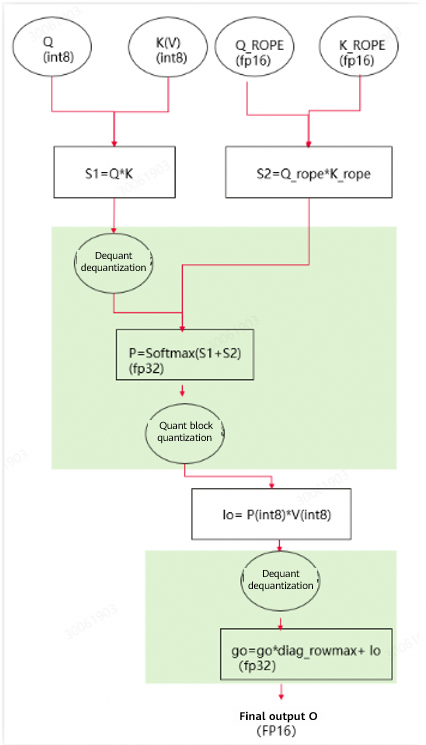
Table 1 dtype and shape information after float16 weight quantization (assuming that shape of the original weight is [n, k])
| Tensor | dtype | shape |
|---|---|---|
| q_scale | float16 | [q_head_num, head_dim] |
| q_offset | float16 | [q_head_num, head_dim] |
| k_scale | float16 | [kv_head_num, head_dim] |
| k_offset | float16 | [kv_head_num, head_dim] |
Weight Generation
Install msModelSlim.
Complete the required checks before running DeepSeek-V3/R1. For details, see the msModelSlim quantization description.
Go to the
msmodelslim/example/DeepSeek/directory and run the following quantization command:python3 quant_deepseek_w8a8.py --model_path {*Floating-point weight path*} --save_path {*W8A8-quantized weight path*} --batch_size 4 --fa_quant --mindie_formatThe quant_model_description.json file of the FA3 quantized weights must contain the "fa_quant_type": "FAKQuant" key-value pair.
Inference
Enable the NZ format for the KV cache.
For pure model inference: Set
"enable_nz": truein${ATB_SPEED_HOME_PATH}/atb_llm/conf/config.json.For serving inference: Add the
"enable_nz"field under"ModelConfig"in{MindIE_install_dir}/mindie_llm/conf/config.jsonas shown below."ModelConfig" : [ { "modelInstanceType" : "Standard", "modelName" : "deepseekr1", "modelWeightPath" : "/mnt/nfs/weight/R1_W8A8_FA3_Clamp", "worldSize" : 8, "cpuMemSize" : 5, "npuMemSize" : -1, "backendType" : "atb", "trustRemoteCode" : false, "sp": 1, "tp": 8, "dp": 2, "moe_ep": 4, "moe_tp": 4, "plugin_params": "{\"plugin_type\":\"mtp\",\"num_speculative_tokens\": 1}", "models": { "deepseekv2": { "kv_cache_options": { "enable_nz": true } } } } ]
During PD disaggregation inference, set
enable_nztotruein the configuration file.You can run the following commands to perform a dialog test. The inference content is "What's deep learning?".
cd ${ATB_SPEED_HOME_PATH}
bash examples/models/deepseekv2/run_pa.sh {W8A8 quantized weight path}