Customized Stream Test
Function
- Ascend 950PR and 950DT products: The customized stream test decouples the individual steps of one-click stream testing, allowing you to flexibly control the TX and RX switches for the stream test.
- Other products: The customized stream test decouples the individual steps of one-click stream testing, allowing you to flexibly control the TX and RX directions and specify the specific lane for stream testing.
Test Principle
The custom stream test supports the following modes:
- External NPU loopback
- CDR loopback: See Test Principle. The Ascend 950PR and 950DT products does not support CDR loopback.
- Fiber optic circulator: See Test Principle.
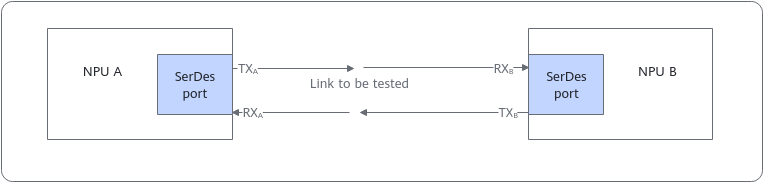
- Direct NPU connection: After the SerDes port of NPU A initiates stream generation in the TX direction, data flows reach the SerDes port of NPU B through the link to be tested. In RX direction, NPU B compares the data based on a matching pattern and collects bit errors on the received data to check the signal quality of the link between the two NPUs.Figure 1 Stream test in direct NPU connection mode

- External loopback: Ensure that the TX direction is enabled before the RX direction.
- Direct NPU connection: When NPU A sends streams and NPU B receives streams, enable the TXA direction and then the RXB direction. When NPU B sends streams and NPU A receives streams, enable the TXB direction and then the RXA direction. Otherwise, the number of bit errors will reach the upper limit.
- The operations performed on different lanes of the same device during the stream test must be the same. Otherwise, the NPU and CDR re-adaptation will affect the test result. For example, if other lanes are enabled or disabled during the stream test on lane 0, the number of bit errors on lane 0 may reach the maximum.
Preparations
- The stream test will interrupt training or inference services. Before the test, ensure that no service is running.
- If an external fiber optic circulator is used or two NPUs are directly connected, no additional configuration is required before the stream test.
- For products other than the Ascend 950PR and 950DT products, if CDR loopback is used, ensure that the optical module is present and CDR loopback is configured.
Parameters
You can run either of the following commands to list the parameters of the stream test command:
ascend-dmi --prbs-check -h
ascend-dmi --prbs-check --help
Table 1 lists only a test-specific parameter. For details about other common parameters, see Common Parameters.
- Before the stream test, run the --clear command to clear the historical information stored in the current device register.
- For the Ascend 950PR and 950DT products, if stream is sent for multiple consecutive times, the command execution interval must be greater than 15 seconds.
Parameter |
Description |
Restrictions |
Mandatory |
|---|---|---|---|
[-pc, --pc, --prbs-check] |
Performs a PRBS stream test. |
- |
Yes |
[--prbs-mode] |
Specifies whether to switch the stream test status. -- EN (Enable): enabled -- DS (Disable): disabled
|
This parameter is not supported by the Ascend 950PR and 950DT products. |
Yes |
[--generator-lanes] |
Specifies the lane of the TX end.
|
This parameter is not supported by the Ascend 950PR and 950DT products. |
No |
[--checker-lanes] |
Specifies the lane of the RX end.
|
This parameter is not supported by the Ascend 950PR and 950DT products. |
No |
[-show, --show, --show-diagnostic-info] |
Displays the stream test result.
|
This parameter is not supported by the Ascend 950PR and 950DT products. |
No |
[-clear, --clear, --clear-diagnostic-info] |
Clears the stream test result.
|
This parameter is not supported by the Ascend 950PR and 950DT products. |
No |
[-dur, --dur, --duration] |
Specifies the duration of a stream test.
|
This parameter is supported only by the Ascend 950PR and 950DT products. |
No |
[-ds, --ds, --device-src] |
Specifies the ID of the source device for a stream test. This parameter cannot be specified together with [-dd, --dd, --device-dst]. |
This parameter is supported only by the Ascend 950PR and 950DT products. |
No |
[-dd, --dd, --device-dst] |
Specifies the ID of the destination device for a stream test. This parameter cannot be specified together with [-ds, --ds, --device-src]. |
This parameter is supported only by the Ascend 950PR and 950DT products. |
No |
[-lt, --lt, --link-type] |
Specifies the link type corresponding to a port. For customized stream testing, only the value uboe is supported, indicating the UnifiedBus over Ethernet (UBoE) link. |
This parameter is supported only by the Ascend 950PR and 950DT products. |
Yes |
Example (Ascend 950 Product)
Figure 2 describes how to perform a customized stream test.
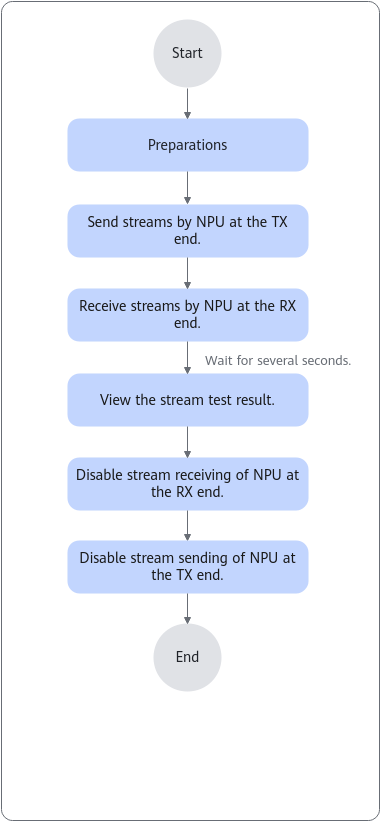
The following uses device 0 as an example to describe how to perform a stream test.
First, execute the following command to enable TX stream testing on device 0, configuring the transmitting end with 4 lanes and a PRBS31 pattern:
[***@***]# ascend-dmi -pc -ds 0 -lt uboe -q
TX enabled on device 0, waiting for 13s.
TX disabled on device 0
Then, open a separate terminal session and execute the following command to enable RX stream testing on device 0, configuring the receiving end with 4 lanes and a PRBS31 pattern:
[***@***]# ascend-dmi -pc -dd 0 -lt uboe -q
PRBS31 on device 0:
----------------------------------------------------------------------------------------------------
lane                error count         error rate          alos                time(ms)
----------------------------------------------------------------------------------------------------
0                   1                   0.0000000003%       0                   3000
1                   1                   0.0000000003%       0                   3000
2                   35                  0.0000000104%       0                   3000
3                   2                   0.0000000006%       0                   3000
----------------------------------------------------------------------------------------------------
Table 2 describes the parameters in the command output.
Parameter |
Description |
|---|---|
device |
Logic ID of an NPU |
lane |
Lane ID of a port |
error count |
Number of errors. The maximum value is 67108863, indicating that the number of errors reaches the upper limit. |
error rate |
Bit error rate. If the BER is less than 10-5, the signal quality is normal. |
alos |
The value options are as follows: The value 0 indicates that the input signal amplitude is normal. The value 1 indicates that the input signal amplitude is too low. |
time(ms) |
Stream test duration |
The number of bit errors may reach 67108863 in the following situations:
|
|
Example (Other Products)
Figure 3 describes how to perform a customized stream test.
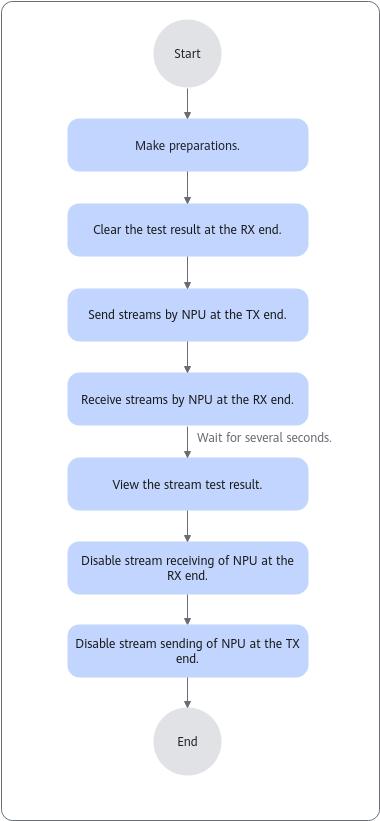
- Default values used as an example
ascend-dmi -pc --clear  -q
ascend-dmi -pc --prbs-mode EN -q
Description: Start a stream test on all devices. The TX end has four lanes and the code type is PRBS31. The RX end has four lanes and the code type is PRBS31.
Figure 4 Example of using default values for the stream test
- Stream test on device 8, with two lanes (0 and 1) at the TX end and four lanes at the RX end
[***@***]# ascend-dmi -pc --clear --device 8 -q
Operation succeeded.
[***@***]# ascend-dmi -pc --prbs-mode EN -q --device 8 --generator-lanes 0,1
Operation succeeded.
[***@***]# ascend-dmi --pc --show -d 8 -q
Device 8:
-----------------------------------------------------------------------------------------------
Lane      Check Enable    Pattern    Error-Bits     Bit-Error Rate(BER)    ALOS      Period(ms)
----------------------------------------------------------------------------------------------------
0         1               PRBS31     206            0.0000000032%          0         120193
1         1               PRBS31     385            0.0000000060%          0         120187
2         1               PRBS31     67092480       0.0010508065%          0         120186
3         1               PRBS31     67092480       0.0010507844%          0         120189
-----------------------------------------------------------------------------------------------
- Disabling the stream test
ascend-dmi -pc --prbs-mode DS -d 8,9 -q
This command disables the stream test in the TX and RX directions of the four lanes on devices 8 and 9.

- Clearing the stream test result
ascend-dmi -pc --clear-diagnostic-info -d 8,9 -q
This command clears the bit error data recorded on devices 8 and 9.

Table 3 describes the parameters in the command output.
Parameter |
Description |
|---|---|
Lane |
Lane ID of the corresponding RoCE link. |
Check Enable |
Check status of the RX end. 0: disabled 1: enabled |
Pattern |
Check code pattern in the RX direction. |
Error-Bits |
Number of bit errors. The upper limit is 67092480. |
Bit-Error Rate(BER) |
BER = Number of bit errors/Total number of transmitted bits x 100% If the BER is less than 0.001%, the signal quality is normal. |
ALOS |
The value must be 0 for a normal stream test. If the value is 1, the signal amplitude is too low. If no stream test is conducted, ignore it. |
Period |
Time since the last operation of controlling streams or reading the check result. |
The number of bit errors may reach 67092480 in the following situations:
|
|
Follow-up Procedure
- For the Ascend 950PR and 950DT products, after stopping PRBS stream generation, wait for 15 seconds to confirm that the port is UP before running services normally.
- For products other than the Ascend 950PR and 950DT products, to prevent the running training or inference service from being affected, disable stream testing after it is finished.
- For products other than the Ascend 950PR and 950DT products, if the CDR loopback is used for the stream test, release the CDR loopback after the test. Otherwise, services cannot run properly.