One-Click Stream Test
Function
- Ascend 950PR and 950DT products: Test streams of UB direct-connect links between NPUs within a single node.
- Other products: Test the TX and RX streams over the NPU's RoCE network port within an external loopback setup (such as a CDR loopback or an external fiber optic circulator).
Test Principle
- Ascend 950PR and 950DT products
One-click stream test: Supported exclusively in direct-connection scenarios. For two NPUs directly connected through a UB, a test stream is transmitted from NPU A (TX) and then received and verified by NPU B (RX). This is used to inspect the signal quality of the direct link between the two NPUs.
Figure 1 Stream test in direct-connection mode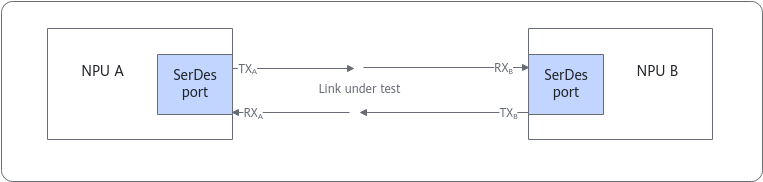
- Other products
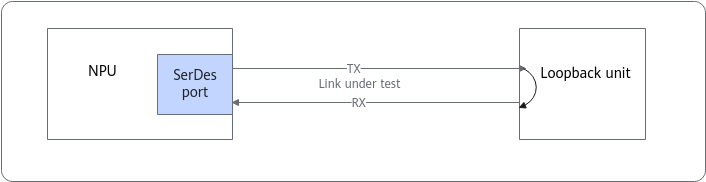
After streams are sent in the TX direction on the SerDes port of a specified NPU, data flows are transmitted to the loopback unit (CDR or fiber optic circulator) through the link under test, and then sent back through the link in the RX direction. The RX side tracks the bit errors that occur as the data stream traverses the link during stream generation, allowing the system to evaluate the link's signal quality.
One-click stream test supports the following two modes:
- CDR loopback: A single device sends and receives streams at the same time, which is used to check the signal quality between the physical SerDes port of the NPU and the CDR unit. Before stream test, ensure that the optical module can work properly and then configure the CDR loopback.
- Fiber optic circulator: A single device sends and receives streams at the same time without setting a loopback, which is used to check the signal quality between the physical SerDes port of the NPU and the optical module.Figure 2 Stream test in loopback mode
Application Scenario
- Ascend 950PR and 950DT products: Query the metrics of signal quality of UB direct-connect links. To locate signal quality issues on UB direct-connect links, see PRBS Stream Diagnosis.
- Other products: Query the metrics of signal quality of the RoCE network port. To locate signal quality issues on the RoCE network port, see PRBS Stream Diagnosis.
Preparations
- The stream test will interrupt training or inference services. Before the test, ensure that no service is running.
- For products other than the Ascend 950PR and 950DT products, if an external fiber optic circulator is used for the stream test, no additional configuration is required. If a CDR loopback is used, ensure that the optical module can work properly before configuring the CDR loopback.
Parameters
You can run either of the following commands to list the parameters of the stream test command:
ascend-dmi --prbs-check -h
ascend-dmi --prbs-check --help
Table 1 lists only a test-specific parameter. For details about other common parameters, see Common Parameters.

For the Ascend 950PR and 950DT products, if stream is sent for multiple consecutive times, the command execution interval must be greater than 15 seconds.
Parameter |
Description |
Restrictions |
Mandatory |
|---|---|---|---|
[-pc, --pc, --prbs-check] |
Performs a PRBS stream test. |
- |
Yes |
[-dur, --dur, --duration] |
Specifies the duration of a stream test.
|
- |
No |
[-ds, --ds, --device-src] |
Specifies the ID of the source device for a stream test. This parameter must be used together with [-dd, --dd, --device-dst]. The values following the parameters must be different. If neither of the two parameters is specified, all Ascend NPUs are tested. |
This parameter is supported only by the Ascend 950PR and 950DT products. |
No |
[-dd, --dd, --device-dst] |
Specifies the ID of the destination device for a stream test. This parameter must be used together with [-ds, --ds, --device-src]. The values following the parameters must be different. If neither of the two parameters is specified, all Ascend NPUs are tested. |
This parameter is supported only by the Ascend 950PR and 950DT products. |
No |
[-lt, --lt, --link-type] |
Specifies the link type corresponding to a port. For one-click stream testing, the value can only be mesh, indicating UB direct-connect links. |
This parameter is supported only by the Ascend 950PR and 950DT products. |
No |
Example
- Stream test on device 8 and device 9 for the Atlas 800T A2 training server
[***@***]# ascend-dmi --prbs-check -d 8,9 -dur 5
This operation will make network port on devices down, please make sure no business is running on devices.
 Do you want to continue?(Y/N)y
PRBS31 on device 8:
-----------------------------------------------------------------------------------------------
lane                error count         error rate          alos                time(ms)
-----------------------------------------------------------------------------------------------
0                   21                  0.0000000079%       0                   5020
1                   12                  0.0000000045%       0                   5020
2                   34                  0.0000000128%       0                   5014
3                   4                   0.0000000015%       0                   5015
-----------------------------------------------------------------------------------------------
PRBS31 on device 9:
-----------------------------------------------------------------------------------------------lane                error count         error rate          alos                time(ms)
-----------------------------------------------------------------------------------------------
0                   24                  0.0000000090%       0                   5033
1                   71                  0.0000000266%       0                   5027
2                   12                  0.0000000045%       0                   5026
3                   70                  0.0000000262%       0                   5023
-----------------------------------------------------------------------------------------------
- Stream test on links between device 0 and device 1 for the Ascend 950PR and 950DT products
[***@***]# ascend-dmi --prbs-check -ds 0 -dd 1 -dur 5
This operation will make network port on devices down, please make sure no business is running on devices.
 Do you want to continue?(Y/N)y
PRBS31 from device 0 to device 1:
-----------------------------------------------------------------------------------------------
lane                error count         error rate          alos                time(ms)
-----------------------------------------------------------------------------------------------
0                   25321               0.0000071528%       0                   5023
1                   5483                0.0000015489%       0                   5015
2                   884                 0.0000002497%       0                   5032
3                   5346                0.0000015102%       0                   5020
-----------------------------------------------------------------------------------------------
- Output in JSON format for the Atlas 800T A2 training server
ascend-dmi -pc -d 9 -dur 5 -fmt json
If the following information is displayed, the bit error rate (BER) falls in a normal range.
[***@***]# ascend-dmi -pc -d 9 -dur 5 -fmt json This operation will make network port on devices down, please make sure no business is running on devices. Do you want to continue?(Y/N)y { "prbs": [ { "device": 9, "pattern": "PRBS31", "prbs_result": [ { "alos": 0, "error_cnt": 19, "error_rate": "0.0000000071%", "lane": 0, "time": 5018 }, { "alos": 0, "error_cnt": 194, "error_rate": "0.0000000728%", "lane": 1, "time": 5017 }, { "alos": 0, "error_cnt": 12, "error_rate": "0.0000000045%", "lane": 2, "time": 5019 }, { "alos": 0, "error_cnt": 6, "error_rate": "0.0000000023%", "lane": 3, "time": 5017 } ] } ] } - Output in JSON format for the Ascend 950PR and 950DT products
ascend-dmi -pc -ds 0 -dd 1 -dur 5 -fmt json
If the following information is displayed, the BER falls in a normal range.
[***@***]# ascend-dmi -pc -ds 0 -dd 1 -dur 5 -fmt json
This operation will make network port on devices down, please make sure no business is running on devices.
 Do you want to continue?(Y/N)y
{
    "prbs": [
        {
            "device": 1,
            "pattern": "PRBS31",
            "prbs_result": [
                {
                    "alos": 0,
                    "error_cnt": 33683,
                    "error_rate": "0.0000075185%",
                    "lane": 0,
                    "time": 5015
                },
                {
                    "alos": 0,
                    "error_cnt": 4359,
                    "error_rate": "0.0000009730%",
                    "lane": 1,
                    "time": 5015
                },
                {
                    "alos": 0,
                    "error_cnt": 14223,
                    "error_rate": "0.0000031748%",
                    "lane": 2,
                    "time": 5015
                },
                {
                    "alos": 0,
                    "error_cnt": 2123,
                    "error_rate": "0.0000004739%",
                    "lane": 3,
                    "time": 5015
                }
            ],
            "src_device": 0
        }
    ]
}
The table below describes the parameters in the command output.
Table 2 Parameters in the command output Parameter
Description
device
Logic ID of an NPU
lane
Lane ID of a link.
error count
Number of errors. In JSON format, the parameter is represented by error_cnt.
The maximum value is 67108863 for the Ascend 950PR and 950DT products and 67092480 for other products, both of which indicate full bit errors.
error rate
Bit error rate. In JSON format, the parameter is represented by error_rate.
If the BER is less than 10-5, the signal quality is normal.
alos
The value options are as follows:
The value 0 indicates that the input signal amplitude is normal.
The value 1 indicates that the input signal amplitude is too low.
time(ms)
Stream generation duration. In the JSON format, the parameter is represented by time.
src_device
Logical ID of the NPU at the stream's transmitting end.
For products other than the Ascend 950PR and 950DT products, the number of bit errors may reach 67092480 in the following situations:
- The NPU and CDR adaptation is automatically disabled during the stream test. However, multiple executions of the stream test command can repeatedly enable and disable adaptation. If the adaptation process is not completed in a timely manner, the number of bit errors can reach 67092480 at certain time.
- In the CDR loopback scenario, no CDR loopback is configured or the loopback configuration fails.
Follow-up Procedure
- To prevent the running training or inference service from being affected, disable the stream test after it is finished.
- For the Ascend 950PR and 950DT products, after stopping PRBS stream generation, wait for 15 seconds to confirm that the port is UP before running services normally.
- For products other than the Ascend 950PR and 950DT products, if the CDR loopback is used for the stream test, release the CDR loopback after the test. Otherwise, services cannot run properly.