Cross-Server Stream Test
Function
Cross-server stream test refers to the stream test of UB direct-connect links between NPUs on two servers. This function is supported only by the Atlas 650E server.
Test Principle
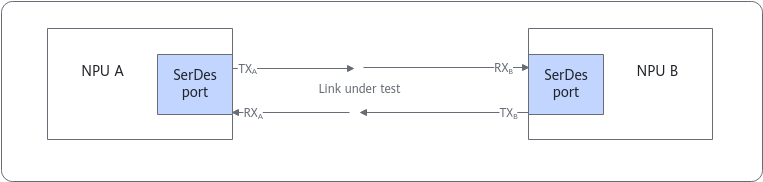
For two NPUs directly connected through UB, a test stream is transmitted from NPU A (TX) of Server 1 and then received and verified by NPU B (RX) of Server 2. This is used to inspect the signal quality of the direct link between the two NPUs.
Application Scenario
Query the metrics of signal quality of UB direct-connect links.
Preparations
- The stream test will interrupt training or inference services. Before the test, ensure that no service is running.
- Cross-server stream test depends on MPI. If MPI is not installed in the environment, install and configure it in advance by referring to Installing and Configuring the MPI in CANN HCCL Performance Tester, and configure the environment variables by referring to Compilation in CANN HCCL Performance Tester. Only Open MPI 4.1.5 is supported. Do not use parameters, configurations, and environment variables that are not mentioned in the description and examples. For details about other Open MPI execution parameters, environment variables, and configuration files, see Open MPI documentation.

Ensure that the entered IP address is valid.
Parameters
You can run either of the following commands to list the parameters of the stream test command:
ascend-dmi --prbs-check -h
ascend-dmi --prbs-check --help
Table 1 lists only test-specific parameters. For details about other common parameters, see Common Parameters.
If stream is sent for multiple consecutive times, the command execution interval must be greater than 15 seconds.
Parameter |
Description |
Mandatory |
|---|---|---|
[-pc, --pc, --prbs-check] |
Performs a PRBS stream test. |
Yes |
[-dur, --dur, --duration] |
Specifies the duration of a stream test.
|
No |
[-ds, --ds, --device-src] |
Specifies the ID of the source device for a stream test. This parameter must be used together with [-dd, --dd, --device-dst]. The values following the parameters must be different. If neither of the two parameters is specified, all Ascend NPUs are tested. |
Yes |
[-dd, --dd, --device-dst] |
Specifies the ID of the destination device for a stream test. This parameter must be used together with [-ds, --ds, --device-src]. The values following the parameters must be different. If neither of the two parameters is specified, all Ascend NPUs are tested. |
Yes |
[-lt, --lt, --link-type] |
Specifies the link type corresponding to a port. The value can only be crossMesh, indicating a cross-server UB direct-connect link. |
Yes |
Example
In the following example, xx.xx.xx.xx and yy.yy.yy.yy indicate the IP addresses of the two servers.
- The following example describes how to perform a stream test on a UB direct-connect link between device 0 on two servers.
[***@***]# mpirun -n 2 --host xx.xx.xx.xx:1,yy.yy.yy.yy:1 ascend-dmi -pc -lt crossMesh -ds 0 -dd 0 -q
Authorized users only. All activities may be monitored and reported.
PRBS31 on device 0:
----------------------------------------------------------------------------------------------------
lane                error count         error rate          alos                time(ms)
----------------------------------------------------------------------------------------------------
0                   1540                0.0000004583%       0                   3000
1                   204                 0.0000000607%       0                   3000
2                   262                 0.0000000780%       0                   3000
3                   76                  0.0000000226%       0                   3000
----------------------------------------------------------------------------------------------------
- Output in JSON format
mpirun -n 2 --host xx.xx.xx.xx:1,yy.yy.yy.yy:1 ascend-dmi -pc -lt crossMesh -ds 0 -dd 0 -q -fmt json
If the following information is displayed, the bit error rate (BER) falls in a normal range.
[***@***]# mpirun -n 2 --host xx.xx.xx.xx:1,yy.yy.yy.yy:1 ascend-dmi -pc -lt crossMesh -ds 0 -dd 0 -q -fmt json
This operation will make network port on devices down, please make sure no business is running on devices.
 Do you want to continue?(Y/N)y
{
    "prbs": [
        {
            "device": 0,
            "pattern": "PRBS31",
            "prbs_result": [
                {
                    "alos": 0,
                    "error_cnt": 780,
                    "error_rate": "0.0000002321%",
                    "lane": 0,
                    "time": 3000
                },
                {
                    "alos": 0,
                    "error_cnt": 118,
                    "error_rate": "0.0000000351%",
                    "lane": 1,
                    "time": 3000
                },
                {
                    "alos": 0,
                    "error_cnt": 346,
                    "error_rate": "0.0000001030%",
                    "lane": 2,
                    "time": 3000
                },
                {
                    "alos": 0,
                    "error_cnt": 74,
                    "error_rate": "0.0000000220%",
                    "lane": 3,
                    "time": 3000
                }
            ]
        }
    ]
}
The table below describes the parameters in the command output.
Table 2 Parameters in the command output Parameter
Description
device
Logic ID of an NPU
lane
Lane ID of a RoCE link.
error count
Number of errors. In JSON format, the parameter is represented by error_cnt.
The maximum value is 67108863, indicating that the number of errors reaches the upper limit.
error rate
Bit error rate. In JSON format, the parameter is represented by error_rate.
If the BER is less than 10-5, the signal quality is normal.
alos
The value options are as follows:
The value 0 indicates that the input signal amplitude is normal.
The value 1 indicates that the input signal amplitude is too low.
time(ms)
Stream generation duration. In the JSON format, the parameter is represented by time.
Follow-up Operations
- To prevent the running training or inference service from being affected, disable the stream test after it is finished.
- After stopping PRBS stream generation, wait for 15 seconds to confirm that the port is UP before running services normally.