Some Ranks Are Not Connected to the Server (EI0015)
Symptom
The CANN logs contain the keyword "topo exchange server get socket timeout!" or "Failed to connect agent".
- Symptom on the server:
[ERROR] HCCL(1041081,all_reduce_test):2000-03-15-01:20:01.624.966 [topoinfo_exchange_server.cc:314] [1041362][InitGroupStage][RanktableDetect]topo exchange server get socket timeout! timeout[120 s]
[ERROR] HCCL(1041081,all_reduce_test):2000-03-15-01:20:01.625.103 [topoinfo_exchange_server.cc:501] [1041362][InitGroupStage][DisplayConnectionedRank]total connected num is [4],line num is [1]
[ERROR] HCCL(1041081,all_reduce_test):2000-03-15-01:20:01.625.112 [topoinfo_exchange_server.cc:503] [1041362][InitGroupStage][DisplayConnectionedRank]need connect rankNum is [8]
[ERROR] HCCL(1041081,all_reduce_test):2000-03-15-01:20:01.625.145 [topoinfo_exchange_server.cc:517] [1041362][InitGroupStage][DisplayConnectionedRank]connected rankinfo[LINE 0]: [0000000000000000],[0000000000000002],[0000000000000004],[0000000000000006];
- Symptom on the agent:
[ERROR] HCCL(1041085,all_reduce_test):2000-03-15-01:20:01.630.122 [topoinfo_exchange_base.cc:145] [1041085][InitGroupStage][RanktableDetect] TopoDetect ERROR occur !!! fault_type[1], fault_info["Failed to connect agent[1,3,5,7,]"]
[ERROR] HCCL(1041085,all_reduce_test):2000-03-15-01:20:01.630.557 [topoinfo_exchange_agent.cc:552] [1041085][InitGroupStage][RanktableDetect]rank num[8]is different with rank list size[4] in total topo rank info.
Possible Cause
After the server calls the HcclGetRootinfo API, a background thread is started to wait for all ranks to connect until the timeout period expires. Therefore, if some ranks in the communicator fail to connect to the server thread within the timeout period, the server thread reports a timeout error. In addition, the server thread prints the list of connected ranks after the timeout error is reported. You can locate the ranks that fail to be connected based on this list and further locate the connection failure cause.
Solution
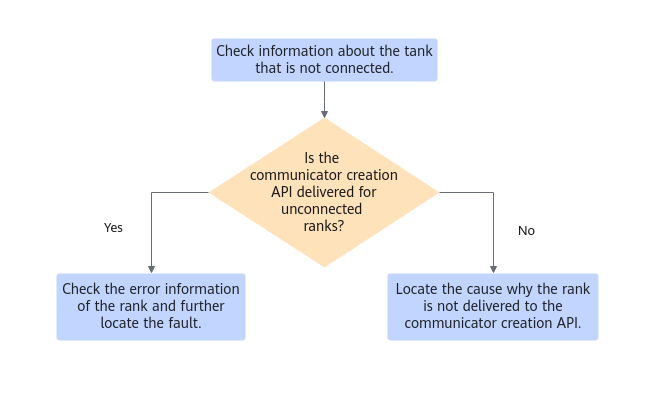
- Locate the ranks that are not connected based on the error information.
- Server: After a waiting timeout occurs, the server prints information about the connected ranks. The rank IDs in the communicator are in the sequence of [0, rankSize – 1]. Therefore, you can calculate the ranks that are not connected based on the information about the connected ranks. The preceding log example indicates that rank 9 is not connected. Therefore, you need to further locate the cause why rank 9 is not connected.
- Agent: Connected agents will receive the error information broadcast by the server to indicate unconnected ranks in the cluster after the waiting timeout occurs on the server. Therefore, you can directly confirm the unconnected ranks based on "Failed to connect agent" in the error information and further confirm the cause why the ranks fail to be connected. The preceding log example indicates that rank 9 is not connected. Therefore, you need to further locate the cause why rank 9 is not connected.
- Check whether the communicator creation API is delivered for unconnected ranks.
During communicator creation, HCCL records default logs in the run directory of CANN logs. Therefore, you can check whether the communicator of the corresponding rank is delivered in the logs of the entire cluster. For example, run the following command to check whether the communicator of rank 9 is created and delivered. If there are multiple communicators, there may be multiple log records. You can check whether the communicators are the same based on the communicator name identifier in the logs.
grep -r "Entry-HcclCommInitRootInfoInner" | grep "rank\[9\]"
- If the communicator creation API is delivered for the corresponding rank, obtain the node and process ID of the unconnected rank based on the search result, and then check the related error log information based on the CANN logs of the unconnected rank.
- If no log indicating that the communicator creation API is delivered for the corresponding rank is found in the cluster logs, check the service to determine the reason why the communicator creation API is not delivered for the rank.