Graph Integration Process
This section uses PyTorch + TorchAir as the frontend framework to describe the complete process of integrating custom operators into a GE graph. For details about the graph integration processes and deliverables of other frameworks, see Custom Operator Graph Integration Deliverables in Other Frameworks.
Environment Setup
- Install the CANN software package by referring to Environment Setup and set environment variables.
- Install PyTorch, Ascend for PyTorch, and TorchAir. For details about the version mapping between them and the CANN software package, click here and see "Release Notes" > Related Product Version Mapping."
For details about the installation method, click here and see "Installation Guide" > "Installing TorchNPU." TorchAir is installed together with the Ascend for PyTorch package as a third-party library of Ascend for PyTorch.
Graph Integration Process
The process of integrating custom operators into a graph consists of five progressive phases. You can complete the deliverables for each phase in sequence for graph integration. The following figure shows the deliverables on PyTorch and GE.
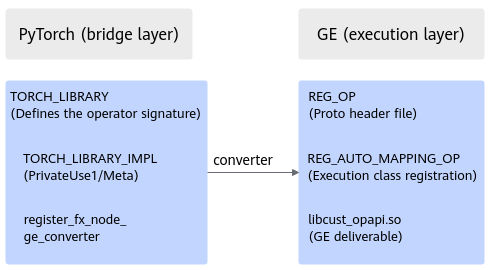
The responsibilities and deliverables of each phase are described in the table below.
Phase |
Responsibility |
Deliverable Involved |
|---|---|---|
Phase 1: Operator definition |
Declare operator metadata (inputs, outputs, and attributes). |
Proto header files (op_graph/include/.h + python/.py) |
Phase 2: Frontend integration |
Map PyTorch operators to GE types. |
Parsing plugin (.so) (python/*_converter.py) |
Phase 3: Graph construction and integration |
Convert the PyTorch FX graph into a GE computational graph. |
No additional deliverables (automatically converted by TorchAir) |
Phase 4: Graph compilation |
Compile-time inference and compilation |
Callback implementation in the GE deliverable (.so) (op_graph/lib//.so) |
Phase 5: Graph execution |
Runtime kernel execution |
Callback implementation in the GE deliverable (.so) (op_graph/lib//.so) |
The following table describes the relationships between each phase and execution scenarios in Execution Scenarios.
Execution Scenario |
Phases 1–3 |
Phase 4 |
Phase 5 |
|---|---|---|---|
Online execution of dynamic graphs |
Must be completed |
Can be skipped |
Execute |
Online build + execution |
Must be completed |
Compile |
Execute |
Offline OM offloading |
Must be completed |
Compile + Serialize |
Deserialize + Execute |
Each phase and its deliverables are described in detail as follows:
- Phase 1: Operator definition
In the operator definition phase, operator metadata, such as the inputs, outputs, and attributes, is declared for use in subsequent phases. In the PyTorch scenario, parallel definition on both the GE and PyTorch is required.
Frontend Framework
Definition Method
Deliverable
Description
GE
REG_OP header file
op_graph/include/*.h
Manually written proto definition
PyTorch
TORCH_LIBRARY
python/*.py
Defined schema (function signature)
- Example of REG_OP on the GE:
// Register the GE operator prototype: define the inputs, outputs, and attributes of the operator. // op_graph/include/add_custom.h REG_OP(AddCustom) .INPUT(x, TensorType({DT_FLOAT, DT_FLOAT16})) // Declare input x. .INPUT(y, TensorType({DT_FLOAT, DT_FLOAT16})) // Declare input y. .OUTPUT(z, TensorType({DT_FLOAT, DT_FLOAT16})) // Declare output z. .OP_END_FACTORY_REG(AddCustom); - Example of TORCH_LIBRARY on the PyTorch:
# python/add_custom.py
import torch

# Define the operator schema, which must be the same as the input and output of REG_OP.
torch.library.define("my_ops", "add_custom(Tensor x, Tensor y) -> Tensor")
Consistency requirements: The number and types of inputs and outputs in the PyTorch schema must be strictly consistent with those defined in REG_OP. Otherwise, an error will be reported during graph conversion.
- Example of REG_OP on the GE:
- Phase 2: Frontend integration
In the frontend integration phase, map PyTorch FX nodes to GE operator types. The TorchAir converter mechanism is used in the PyTorch scenario, which requires deliverables on both sides.
Frontend Framework
Integration Method
Deliverable Involved
Key Point
PyTorch
TorchAir converter
Python converter function
register_fx_node_ge_converter
On the Python, the following steps are required:
- Define the operator schema using TORCH_LIBRARY.
- Register keys such as PrivateUse1 (NPU execution), Meta (shape inference), and XLA (graph compilation) using TORCH_LIBRARY_IMPL.
- Use @torchair.register_fx_node_ge_converter to map PyTorch FX nodes to GE operator types.
Integration code on the Python:
# python/add_custom_converter.py
import torch
import torchair

# Define the operator schema.
torch.library.define("my_ops", "add_custom(Tensor x, Tensor y) -> Tensor")

# Register the implementation (PrivateUse1 = NPU execution).
@torch.library.impl("my_ops.add_custom", "PrivateUse1")
def add_custom_impl(x, y):
    return torch.empty_like(x)  # Placeholder. The actual execution is handled by GE.

# Register the GE converter to map the FX node to the GE operator.
@torchair.register_fx_node_ge_converter(torch.ops.my_ops.add_custom.default)
def convert_add_custom(x, y, meta_outputs=None):
    return torchair.ge.custom_op(
        "AddCustom",           # GE operator type (must be the same as REG_AUTO_MAPPING_OP)
        inputs={"x": x, "y": y},
        outputs=["z"]
    )
Deliverable structure example:
custom_opp/ ├── op_graph/ │ ├── include/add_custom.h # REG_OP │ └── lib/linux/x86_64/libcust_opapi.so # GE deliverable └── python/ ├── add_custom.py # TORCH_LIBRARY definition └── add_custom_converter.py # Converter registration - Phase 3: Graph construction and integration
In the graph construction and integration phase, the PyTorch FX graph is automatically converted into a GE computational graph.
Frontend Framework
Graph Integration Path
Conversion Mechanism
PyTorch
FX Graph → GE Graph
TorchAir
This phase is automatically completed by TorchAir, and you do not need to provide any additional deliverables. After the graph integration is complete, the GE graph already contains the custom operator node.
- Phase 4: Graph compilation
The callback APIs for graph compilation are triggered during GE compilation and are used for shape inference, kernel compilation, and serialization. Callback APIs and triggering timing are described in the table below.
Callback API
Triggering Timing
Application Scenario
InferShape
Compile-time shape inference
All scenarios (optional)
InferDataType
Compile-time data type inference
All scenarios (optional)
Compile
Compile-time RTC kernel compilation
Online compilation/Offline OM
Serialize
Writing data to the OM during ATC compilation
Offline OM
For details about the callback API examples, see Callback APIs.
- Phase 5: Graph execution
This phase is the core of custom operator integration. GE calls back the Execute API during execution.
Callback APIs and triggering timing are described in the table below.
Callback API
Triggering Timing
Application Scenario
Execute
Runtime kernel execution
All scenarios (mandatory)
Deserialize
Restoring binary during OM loading
Offline OM
UpdateHostArgs
Updates upon I/O address changes
Static graph offloading
For details about the callback API examples, see Callback APIs.
Project Compilation and Deployment
Key elements for CMake build:
# Header file paths (mandatory)
target_include_directories(my_op PRIVATE
    ${ASCEND_HOME_PATH}/include
    ${ASCEND_HOME_PATH}/include/graph
    ${ASCEND_HOME_PATH}/include/register
    ${ASCEND_HOME_PATH}/include/external
)

# Link libraries (optional)
target_link_libraries(my_op PRIVATE
    ascendcl acl_rt ge_compiler ge_executor
)

# Output the .so library.
add_library(my_op SHARED custom_op.cpp)
Additional dependencies in the PyTorch scenario: links to Ascend for PyTorch, c10, lowering, and other related libraries, and the Ascend for PyTorch header file paths included The build artifact must be installed according to the OPP package specifications, as shown below:
output/                              # ASCEND_CUSTOM_OPP_PATH points to this directory.
├── op_graph/
│   ├── include/my_op.h              # .proto header file (for graph construction)
│   └── lib/linux/x86_64/
│       ├── libcust_opapi.so         # Deliverable
│       └── my_kernel.cpp            # Kernel source code (required in RTC scenarios)
└── bin/
    └── my_kernel.bin                # Kernel binary (optional)