Programming Model
Host and Device Programming Model
Host: A host is an x86 or Arm server CPU that connects to one or more devices through a bus. The host utilizes the compute capabilities (for example, Neural-Network [NN]) provided by the device to implement services.
Device (NPU): A device refers to the hardware equipped with AI processors. It connects to the host through a bus (such as PCIe and HCCS), providing compute capabilities (for example, NN). HCCS stands for Huawei Cache Coherence System.
The following figure shows the relationship between the host and the device.
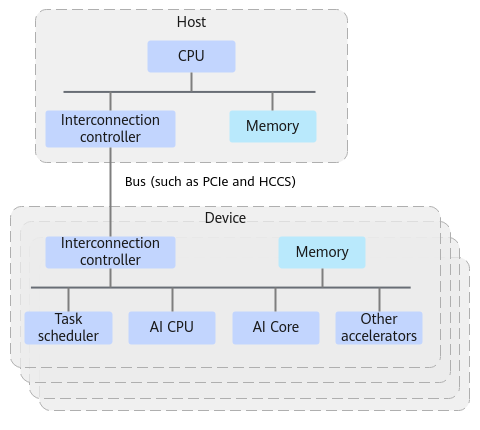
In summary:
- The host and device each possess independent memory spaces.
Runtime provides memory allocation APIs for both the host and device, along with memory copy APIs to transfer data between them. During programming, you must distinguish between host and device memory allocations and explicitly call the memory copy APIs to transfer data from the host to the device. This ensures that the device hardware accelerator achieves optimal performance when accessing its local memory.
- The host and device use the asynchronous parallel execution mode.
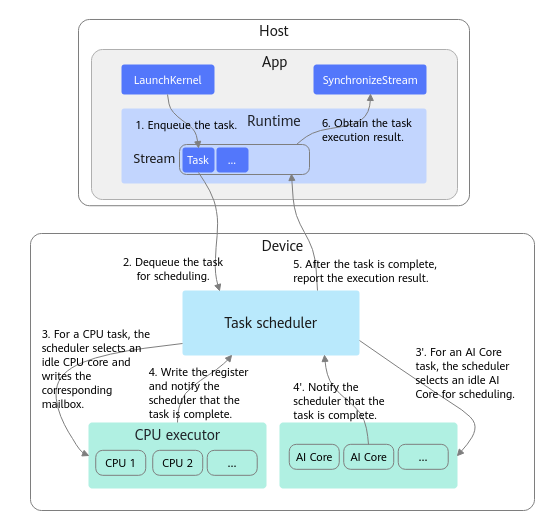
After the host dispatches a task to the device, the host does not wait for the task to complete on the device and immediately returns. The device then starts scheduling and executing the dispatched task. The CPU on the host can work in parallel with the accelerator on the device. Asynchronous task submission APIs typically include a stream parameter, indicating that the task is dispatched into the specified stream for execution.
When the host needs to obtain the compute result from the device, it must explicitly call a synchronous API. The synchronous API blocks the host CPU until the task on the device is complete.
This asynchronous parallel execution mechanism effectively hides the host processing time or the data transfer latency between the host and the device, improving throughput and shortening the end-to-end execution time.
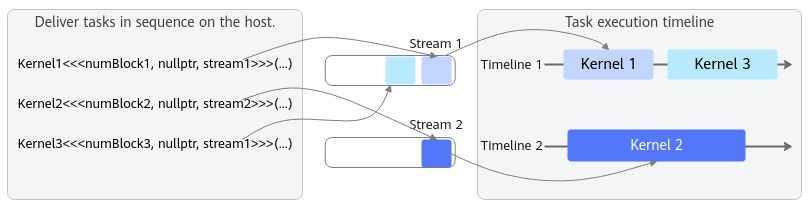
- The asynchronous task is dispatched to the stream for execution.
Tasks in a stream are executed in order, and tasks in different streams are executed in parallel. For example, in the following figure, the host starts the Kernel 1, Kernel 2, and Kernel 3 tasks in sequence. The execution sequence is as follows:
- Kernel 1 and Kernel 3 are in the same stream. Therefore, Kernel 3 is started only after Kernel 1 is completed.
- Kernel 2 is not in the same stream as Kernel 1 and Kernel 3. Therefore, Kernel 2 can be executed in parallel with Kernel 1 and Kernel 3.
Typical Execution Process
The following figure shows the typical execution process based on Runtime programming.
|
API Call |
Handling |
|---|---|
|
int32_t devId=0; aclrtSetDevice(devId); |
Initializes device 0, including the following operations: 1. Creates and initializes a device object. 2. Creates a default context for the device. 3. Creates a default stream for the default context. 4. Starts the CPU executor process on the device. |
|
aclrtStream stream1; aclrtCreateStream(&stream1); |
Creates a stream in the current context. 1. Calls the driver to create a task queue. 2. Creates a stream object on Runtime and associates the stream with the task queue. 3. Adds the stream to the current context for management. |
|
uint64_t size=1024; void *hostPtr=nullptr; aclrtMallocHost(&hostPtr, size); |
Allocates the host memory. |
|
void *devPtr=nullptr; aclrtMalloc(&devPtr, size, ACL_MEM_MALLOC_HUGE_FIRST); |
Allocates the device memory. |
|
aclrtMemcpy(devPtr, size, hostPtr, size, ACL_MEMCPY_HOST_TO_DEVICE) |
Synchronous memory copy from the host to the device. The main operations are as follows: 1. Constructs a Direct Memory Access (DMA) descriptor based on the source and destination addresses, and then submits a DMA task. 2. Returns after the DMA task is complete. |
|
myKernel<<<numBlocks, nullptr, stream1>>>(devPtr); |
|
|
aclrtSynchronizeStream(stream1); |
Stream synchronization. The detailed operations are as follows: 1. Blocks the current CPU thread. 2. Synchronizes the execution status of the task queue corresponding to the stream using the polling + interrupt mechanism. 3. Returns after all tasks in the stream are executed. |
|
aclrtMemcpy(hostPtr, size, devPtr, size, ACL_MEMCPY_DEVICE_TO_HOST); |
Synchronous memory copy from the device to the host. The API copies the result back to the host: 1. Constructs a DMA descriptor based on the source and destination addresses, and then submit a DMA task. 2. Returns after the DMA task is complete. |
|
aclrtFree(devPtr); aclrtFreeHost(hostPtr); |
Frees the device memory. Frees the host memory. |
|
aclrtResetDeviceForce(devId); |
Resets the device. |
Main Programming Concepts of Runtime
- A host is the abstraction of Runtime on the host.
- A device represents the abstraction of the hardware device where the AI processor is installed. Typically, one host maps to N devices. The user application can call acl APIs such as aclrtSetDevice to specify the compute device.
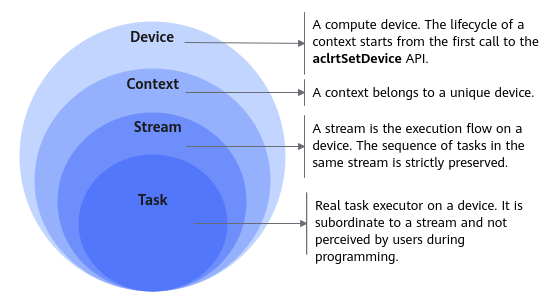
- A context is the logical operating environment of a device. The relationship between contexts and devices is N:1, meaning that each context must belong to a unique device. A context manages the lifetime of its runtime resource objects (including streams, events, and Notifys, but excluding memory). Each unique context has isolated objects, and they cannot be synchronized with one another. Runtime errors are also isolated at the context level.
- A stream is a logical task execution queue provided by a device. Tasks can be asynchronously added to a stream, and tasks in the same stream are strictly executed in FIFO mode. The relationship between streams and contexts is N:1. A stream must belong to a unique context.
- A task is an execution task that can be added to a stream. Tasks can be classified into compute tasks, memory copy tasks, and event synchronization tasks. The relationship between tasks and streams is N:1. A task will be added to a unique stream.
The following figure shows the relationship among the device, context, and stream.
Thread-Context Association
Most Runtime APIs do not have the device ID parameter because the device on which these APIs operate is obtained from the context associated with the calling thread. Therefore, when a host thread calls a Runtime API, the following requirements must be met:
- A thread (CPU thread on the host) can correctly call Runtime APIs only after being associated with a context.
- A thread can be associated with only one context at a time.
- Applications can explicitly create contexts to meet the requirements of runtime resource isolation. In this scenario, the context is visible to all threads in the same process, and the threads can switch the context by calling aclrtGetCurrentContext and aclrtSetCurrentContext.
1 2 3 4 5 6 7 8 9 10 11 12 13 14 15 16 17 18 19 20 21 22 23 24 25 26 27 28 29 30 31 32 |
// Initially, the thread is not associated with any context. aclInit(nullptr); aclrtSetDevice(0); // aclrtSetDevice creates a default context and associates the thread with the default context. // Context associated with the thread: default context aclrtContext ctx1, ctx2, current_ctx; aclrtCreateContext(&ctx1, 0); // Device 0 explicitly creates ctx1 and associates the thread with ctx1. // Context associated with the thread: ctx1 aclrtGetCurrentContext(¤t_ctx); // Get the context associated with the current thread. In this case, the returned current_ctx is ctx1. // Context associated with the thread: ctx1 aclrtCreateContext(&ctx2, 0); // Device 0 explicitly creates ctx2 and associates the thread with ctx2. // Context associated with the thread: ctx2 aclrtSetCurrentContext(current_ctx); // Switch the context. Because current_ctx=ctx1, the thread is associated with ctx1. // Context associated with the thread: ctx1 aclrtSetCurrentContext(ctx2); // Switch the context. // Context associated with the thread: ctx2 ..... aclrtDestroyContext(ctx2); // The current thread is associated with ctx2. When ctx2 is destroyed, the thread is also disassociated from ctx2. // Context associated with the thread: NA // ctx2 has been destroyed. Switch to another ctx (for example, ctx1). aclrtSetCurrentContext(ctx1); // Context associated with the thread: ctx1 ..... aclrtDestroyContext(ctx1); // The current thread is associated with ctx1. When ctx1 is destroyed, the thread is also disassociated from ctx1. // Context associated with the thread: NA aclrtResetDeviceForce(0); |
Application Scenarios of Default Contexts and Default Streams
- A context and a stream must exist before operations for execution are dispatched on a device, and these can be created either explicitly or implicitly. The implicitly created context and stream are the default context and stream.
To pass the default stream to any API call, pass NULL directly.
- If the default context is used, aclrtGetCurrentContext, aclrtSetCurrentContext, and aclrtDestroyContext are not available.
- The default context and default stream are applicable to simple applications where only one compute device is needed. For a multithreaded application, you are advised to use the explicitly created context and stream.
The following is a code example. It is for reference only and cannot be directly copied for compilation or running:
1 2 3 4 5 6 7 8 9 10 11 12 13 14 15 16 |
// ...... uint32_t numBlocks = 32; uint64_t size = 1024; void *devPtr = nullptr; aclInit(nullptr); aclrtSetDevice(0); /* A default context has been created. In the default context, a default stream is created and is available in the current thread. */ ...... aclrtMalloc(&devPtr, size, ACL_MEM_MALLOC_HUGE_FIRST); myKernel<<<numBlocks, nullptr, nullptr>>>(devPtr); // The third parameter nullptr in <<< >>> indicates that the operation is performed on the default stream. aclrtSynchronizeStream(nullptr); /* Output the result as required when all compute tasks are complete. */ ...... aclrtResetDeviceForce(0); // Reset device 0. The lifetime of the corresponding default context and default stream ends. |
Suggestions for Compiling High-Performance Applications
Comply with the following basic principles:
- Perform asynchronous execution on the host and device. The host must be able to dispatch sufficient tasks to the device in a timely manner to ensure that the acceleration hardware is always in the compute state.
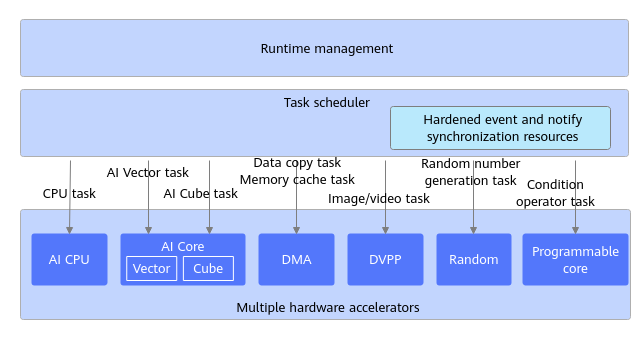
- Use the multi-stream mode to fully utilize different types of hardware accelerators on the device to implement concurrent execution. As shown in the following figure, CANN Runtime can schedule multiple types of hardware accelerators. The supported hardware accelerators vary with the AI processor generations. For details, see the actual hardware user manual.
The following is recommended:
- Create and use multiple streams in a single thread. If a single thread can keep up with submitting tasks to multiple streams to fully utilize the compute power of the device, the single-threaded mode is recommended.
- When the performance of a single thread is insufficient, the multi-threaded mode can be used to improve the task submission performance on the host. It is recommended that each thread create and use its own stream to submit tasks. It is not recommended that multiple threads concurrently submit tasks to the same stream, as this introduces lock operations and the tasks submitted by multiple threads are out of order.
- If a single task submitted by a stream does not fully utilize the AI Core, multiple streams can be used to submit tasks that can be executed in parallel to fully utilize AI Core resources.
- The AI processor contains multiple types of hardware accelerators, such as AI Core, AI CPU, Digital Vision Pre-Processing (DVPP), and Random (random number generator). These hardware accelerators correspond to different types of tasks. It is recommended that multiple streams be created based on the operator execution hardware.