CANN Built-in Operator Call
Overview
The CANN operator library provides a series of extensive, deeply optimized, and hardware-affinity high-performance built-in operators that can be directly applied to AI services. An operator consists of kernel implementation on the device and call on the host. To facilitate call on the host, each operator provides corresponding C-language APIs, which are referred to as single-operator APIs (or operator host APIs) in this document.
1 2 |
aclnnStatus aclnnXxxGetWorkspaceSize(const aclTensor *src, ..., aclTensor *out, ..., uint64_t *workspaceSize, aclOpExecutor **executor) aclnnStatus aclnnXxx(void *workspace, uint64_t workspaceSize, aclOpExecutor *executor, aclrtStream stream) |
In the format, Xxx indicates the corresponding operator type, for example, the Add operator. The functions of the two-phase APIs are as follows:
- First-phase API aclnnXxxGetWorkspaceSize: This API verifies input parameters, infers the output shape in dynamic shape scenarios, tiles data, and computes the workspace memory size required for operator execution.
- Second-phase API aclnnXxx: The executor perform computation, and the framework automatically calls the DFX (such as dump and overflow/underflow detection) and the LaunchKernel API provided by Runtime.
Operator Classification
CANN operators fall into the following types:
- Math operators: numerical calculation operators, like Add and Abs, for use cases such as tensor shape transformation, basic mathematical operations, and random number generation.
- NN operators: neural network operators, common in deep learning models, for use cases such as convolution, matrix multiplication, activation functions, and normalization.
- CV operators: computer vision operators, such as GridSample, for image processing and object detection.
- Transformer operators: foundation model computation operators in major classes such as Attention, LayerNorm, and merged compute and communication (MC2).
The operators that implement fusion and parallelism of collective communication and MatMul computation are called MC2 operators, such as AllGatherMatmul, AlltoAllAllGatherBatchMatMul, BatchMatMulReduceScatterAlltoAll, MatMulAllReduce, MatMulAllReduceAddRmsNorm, and MatMulReduceScatter.
For details about the operator Intermediate Representation (IR) specifications, see "Ascend IR Operator Specifications" in Operator Libraries. For details about the operator API reference, see "Operator APIs (aclnn)" in Operator Libraries.
When calling operator APIs, include the necessary header files and library files. Replace ${INSTALL_DIR} with the CANN component directory. For example, if the installation is performed by the root user, the default file storage path is /usr/local/Ascend/cann.
-
Header file path: The default path is ${INSTALL_DIR}/include/. You can reference the general header file of each type of operator, such as aclnnop/aclnn_ops_math.h, aclnnop/aclnn_ops_nn.h, aclnnop/aclnn_ops_cv.h, or aclnnop/aclnn_ops_transformer.h, or reference the header file of a single operator (for example, aclnnop/aclnn_*.h, where * indicates the operator name).
- Library file path: Generally, library files are stored in the ${INSTALL_DIR}/lib64/ directory by default. You can reference the general library files of each type of operator, such as libopapi_math.so, libopapi_nn.so, libopapi_cv.so, or libopapi_transformer.so. Note that the general library file libopapi.so for all operators will be deprecated in CANN 8.5.0 and later versions. Do not use it.
For more information about CANN operator library implementation, visit the CANN open-source project to learn about the process of implementing the operator source code.
Single-Operator API Call Process
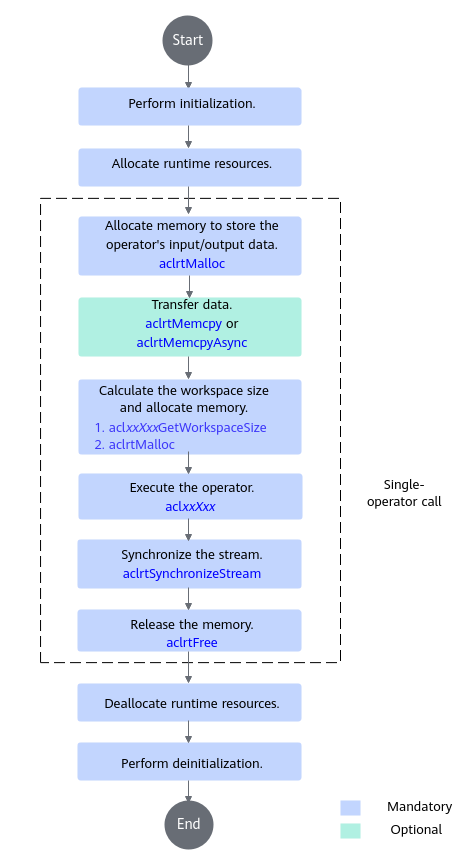
-
Call APIs such as aclrtSetDevice and aclrtCreateStream to allocate runtime resources, such as devices, contexts, and streams, in sequence.
- Allocate and transfer data memory.
- Call aclrtMalloc to allocate device memory to store the input and output data of the operator to be executed.
- Call APIs such as aclCreateTensor and aclCreateIntArray to construct the input and output parameters of the operator. For details about the APIs, see common APIs in Operator Libraries.
To transfer data from the host to the device, call aclrtMemcpy (synchronous mode) or aclrtMemcpyAsync (asynchronous mode) to copy the memory.
- Calculate the workspace and execute the operator.
- Call aclxxXxxGetWorkspaceSize to obtain the argument of the operator and compute the workspace size required for executing the operator.
- Call aclrtMalloc to allocate device memory based on the workspace size.
- Call aclxxXxx to perform computation and obtain the result.
- Call aclrtSynchronizeStream to block the app until all tasks in the specified stream are complete.
- Call aclrtFree to free the memory.
Call aclrtMemcpy (synchronous mode) or aclrtMemcpyAsync (asynchronous mode) to transfer data from the device to the host using memory copy and then free the memory.
- Deallocate runtime resources.
- Call APIs such as aclDestroyTensor and aclDestroyIntArray to destroy the input and output parameters of the operator. For details about the APIs, see common APIs in Operator Libraries.
- After all data is destroyed, call APIs such as aclrtDestroyStream and aclrtResetDevice to free runtime resources (streams, contexts, and devices) in sequence.
- Call aclFinalize to perform deinitialization.
Sample Code
The following uses the Add operator API as an example to describe the basic logic of calling the two-phase APIs of the operator. The call process is similar for other operators. Modify the code based on your actual need.
The Add operator implements tensor addition. The calculation formula is y = x1 + αxx2. You can use the following sample code for reference and name the file test_add.cpp:
1 2 3 4 5 6 7 8 9 10 11 12 13 14 15 16 17 18 19 20 21 22 23 24 25 26 27 28 29 30 31 32 33 34 35 36 37 38 39 40 41 42 43 44 45 46 47 48 49 50 51 52 53 54 55 56 57 58 59 60 61 62 63 64 65 66 67 68 69 70 71 72 73 74 75 76 77 78 79 80 81 82 83 84 85 86 87 88 89 90 91 92 93 94 95 96 97 98 99 100 101 102 103 104 105 106 107 108 109 110 111 112 113 114 115 116 117 118 119 120 121 122 123 124 125 126 127 128 129 130 131 132 133 134 135 136 137 138 139 140 141 142 |
#include <iostream> #include <vector> #include "acl/acl.h" #include "aclnnop/aclnn_add.h" #define CHECK_RET(cond, return_expr) \ do { \ if (!(cond)) { \ return_expr; \ } \ } while (0) #define LOG_PRINT(message, ...) \ do { \ printf(message, ##__VA_ARGS__); \ } while (0) int64_t GetShapeSize(const std::vector<int64_t>& shape) { int64_t shape_size = 1; for (auto i : shape) { shape_size *= i; } return shape_size; } int Init(int32_t deviceId, aclrtStream* stream) { // (Fixed writing) Perform initialization. auto ret = aclInit(nullptr); CHECK_RET(ret == ACL_SUCCESS, LOG_PRINT("aclInit failed. ERROR: %d\n", ret); return ret); ret = aclrtSetDevice(deviceId); CHECK_RET(ret == ACL_SUCCESS, LOG_PRINT("aclrtSetDevice failed. ERROR: %d\n", ret); return ret); ret = aclrtCreateStream(stream); CHECK_RET(ret == ACL_SUCCESS, LOG_PRINT("aclrtCreateStream failed. ERROR: %d\n", ret); return ret); return 0; } template <typename T> int CreateAclTensor(const std::vector<T>& hostData, const std::vector<int64_t>& shape, void** deviceAddr, aclDataType dataType, aclTensor** tensor) { auto size = GetShapeSize(shape) * sizeof(T); // Call aclrtMalloc to allocate device memory. auto ret = aclrtMalloc(deviceAddr, size, ACL_MEM_MALLOC_HUGE_FIRST); CHECK_RET(ret == ACL_SUCCESS, LOG_PRINT("aclrtMalloc failed. ERROR: %d\n", ret); return ret); // Call aclrtMemcpy to copy the data on the host to the memory on the device. ret = aclrtMemcpy(*deviceAddr, size, hostData.data(), size, ACL_MEMCPY_HOST_TO_DEVICE); CHECK_RET(ret == ACL_SUCCESS, LOG_PRINT("aclrtMemcpy failed. ERROR: %d\n", ret); return ret); // Compute the strides of the contiguous tensor. std::vector<int64_t> strides(shape.size(), 1); for (int64_t i = shape.size() - 2; i >= 0; i--) { strides[i] = shape[i + 1] * strides[i + 1]; } // Call aclCreateTensor to create an aclTensor. *tensor = aclCreateTensor(shape.data(), shape.size(), dataType, strides.data(), 0, aclFormat::ACL_FORMAT_ND, shape.data(), shape.size(), *deviceAddr); return 0; } int main() { // 1. (Fixed writing) Initialize the device/stream. // Set deviceId based on the actual device. int32_t deviceId = 0; aclrtStream stream; auto ret = Init(deviceId, &stream); // Use check as required. CHECK_RET(ret == 0, LOG_PRINT("Init acl failed. ERROR: %d\n", ret); return ret); // 2. Construct the input and output based on the API. std::vector<int64_t> selfShape = {4, 2}; std::vector<int64_t> otherShape = {4, 2}; std::vector<int64_t> outShape = {4, 2}; void* selfDeviceAddr = nullptr; void* otherDeviceAddr = nullptr; void* outDeviceAddr = nullptr; aclTensor* self = nullptr; aclTensor* other = nullptr; aclScalar* alpha = nullptr; aclTensor* out = nullptr; std::vector<float> selfHostData = {0, 1, 2, 3, 4, 5, 6, 7}; std::vector<float> otherHostData = {1, 1, 1, 2, 2, 2, 3, 3}; std::vector<float> outHostData = {0, 0, 0, 0, 0, 0, 0, 0}; float alphaValue = 1.2f; // Create a self aclTensor. ret = CreateAclTensor(selfHostData, selfShape, &selfDeviceAddr, aclDataType::ACL_FLOAT, &self); CHECK_RET(ret == ACL_SUCCESS, return ret); // Create other aclTensor. ret = CreateAclTensor(otherHostData, otherShape, &otherDeviceAddr, aclDataType::ACL_FLOAT, &other); CHECK_RET(ret == ACL_SUCCESS, return ret); // Create an alpha aclScalar. alpha = aclCreateScalar(&alphaValue, aclDataType::ACL_FLOAT); CHECK_RET(alpha != nullptr, return ret); // Create an out aclTensor. ret = CreateAclTensor(outHostData, outShape, &outDeviceAddr, aclDataType::ACL_FLOAT, &out); CHECK_RET(ret == ACL_SUCCESS, return ret); // 3. Call the CANN operator library API, which needs to be changed to a specific operator API. uint64_t workspaceSize = 0; aclOpExecutor* executor; // Call the first-phase API of aclnnAdd. ret = aclnnAddGetWorkspaceSize(self, other, alpha, out, &workspaceSize, &executor); CHECK_RET(ret == ACL_SUCCESS, LOG_PRINT("aclnnAddGetWorkspaceSize failed. ERROR: %d\n", ret); return ret); // Allocate device memory based on workspaceSize calculated by the first-phase API. void* workspaceAddr = nullptr; if (workspaceSize > 0) { ret = aclrtMalloc(&workspaceAddr, workspaceSize, ACL_MEM_MALLOC_HUGE_FIRST); CHECK_RET(ret == ACL_SUCCESS, LOG_PRINT("allocate workspace failed. ERROR: %d\n", ret); return ret;); } // Call the second-phase API of aclnnAdd. ret = aclnnAdd(workspaceAddr, workspaceSize, executor, stream); CHECK_RET(ret == ACL_SUCCESS, LOG_PRINT("aclnnAdd failed. ERROR: %d\n", ret); return ret); // 4. (Fixed writing) Wait until the task execution is complete. ret = aclrtSynchronizeStream(stream); CHECK_RET(ret == ACL_SUCCESS, LOG_PRINT("aclrtSynchronizeStream failed. ERROR: %d\n", ret); return ret); // 5. Obtain the output value and copy the result from the device memory to the host. Modify the configuration based on the API definition. auto size = GetShapeSize(outShape); std::vector<float> resultData(size, 0); ret = aclrtMemcpy(resultData.data(), resultData.size() * sizeof(resultData[0]), outDeviceAddr, size * sizeof(float), ACL_MEMCPY_DEVICE_TO_HOST); CHECK_RET(ret == ACL_SUCCESS, LOG_PRINT("copy result from device to host failed. ERROR: %d\n", ret); return ret); for (int64_t i = 0; i < size; i++) { LOG_PRINT("result[%ld] is: %f\n", i, resultData[i]); } //6. Release aclTensor and aclScalar. Modify the configuration based on the API definition. aclDestroyTensor(self); aclDestroyTensor(other); aclDestroyScalar(alpha); aclDestroyTensor(out); // 7. Release device resources. Modify the configuration based on the API definition. aclrtFree(selfDeviceAddr); aclrtFree(otherDeviceAddr); aclrtFree(outDeviceAddr); if (workspaceSize > 0) { aclrtFree(workspaceAddr); } aclrtDestroyStream(stream); aclrtResetDevice(deviceId); aclFinalize(); return 0; } |
CMakeLists File
Take the Add operator as an example. The CMake file is defined below. Modify the file as needed.
1 2 3 4 5 6 7 8 9 10 11 12 13 14 15 16 17 18 19 20 21 22 23 24 25 26 27 28 29 30 31 32 33 34 35 36 37 38 |
# CMake lowest version requirement cmake_minimum_required(VERSION 3.14) # Set the project name. project(ACLNN_EXAMPLE) # Compile options add_compile_options(-std=c++11) # Set compilation options. set(CMAKE_RUNTIME_OUTPUT_DIRECTORY "./bin") set(CMAKE_CXX_FLAGS_DEBUG "-fPIC -O0 -g -Wall") set(CMAKE_CXX_FLAGS_RELEASE "-fPIC -O2 -Wall") # Set the executable file name (for example, opapi_test) and specify the directory where the operator file (*.cpp) is stored. add_executable(opapi_test test_add.cpp) # Set ASCEND_PATH (CANN package directory, which needs to be changed as needed) and INCLUDE_BASE_DIR (header file directory). if(NOT "$ENV{ASCEND_CUSTOM_PATH}" STREQUAL "") set(ASCEND_PATH $ENV{ASCEND_CUSTOM_PATH}) else() set(ASCEND_PATH "/usr/local/Ascend/cann") endif() set(INCLUDE_BASE_DIR "${ASCEND_PATH}/include") include_directories( ${INCLUDE_BASE_DIR} ${INCLUDE_BASE_DIR}/aclnn ) # Set the link library file paths. target_link_libraries(opapi_test PRIVATE ${ASCEND_PATH}/lib64/libascendcl.so ${ASCEND_PATH}/lib64/libnnopbase.so ${ASCEND_PATH}/lib64/libopapi_${ops_project}.so) # The executable file is in the bin folder of the directory where the CMakeLists file is located. install(TARGETS opapi_test DESTINATION ${CMAKE_RUNTIME_OUTPUT_DIRECTORY}) |
In the code, ${ops_project} indicates different types of operator libraries. Reference them as required.
- Math operators: Reference libopapi_math.so.
- NN operators: Reference libopapi_math.so and libopapi_nn.so.
- CV operators: Reference libopapi_math.so and libopapi_cv.so.
- Transformer operators: Reference libopapi_math.so and libopapi_transformer.so.
1 2 3 4 5 6 7 8 |
# Set the link library file paths. find_package(Threads REQUIRED) target_link_libraries(opapi_test PRIVATE ${ASCEND_PATH}/lib64/libascendcl.so ${ASCEND_PATH}/lib64/libnnopbase.so ${ASCEND_PATH}/lib64/libopapi_${ops_project}.so ${ASCEND_PATH}/lib64/libhccl.so # HCCL file ${CMAKE_THREAD_LIBS_INIT}) # Library file on which multithreading depends |
find_package(Threads REQUIRED) is a command used by CMake to search for the thread library. It can automatically link the header files that the thread library depends on and other library files that the thread library indirectly depends on.
Compilation and Running
In this example, the development and operating environments are co-deployed, where the server with the AI processor is used as both the development environment and operating environment. In this scenario, code development and code running are performed on the same machine.
- Prepare the operator call code (*.cpp) and compilation script (CMakeLists.txt) in advance based on the sample code and CMakeLists File.
- Set the environment variables.
After installing the CANN software, log in to the environment as the CANN running user and run the following command to make the environment variables take effect:
- Compile and run the script.
- Go to the directory where CMakeLists.txt is stored and run the following command to create the build folder to store the generated compilation file.
mkdir -p build
- Go to the directory where build is located, run the cmake command for build, and then run the make command to generate an executable file.
1
2
3
cd build
cmake ../ -DCMAKE_CXX_COMPILER=g++ -DCMAKE_SKIP_RPATH=TRUE
make
After the compilation is successful, the opapi_test executable file is generated in the bin folder in the build directory.
- Go to the bin directory and run the executable file opapi_test.
cd bin
./opapi_test
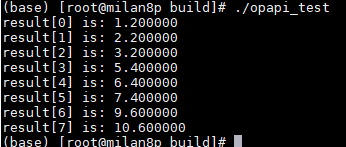
Take the Add operator as an example. The following figure shows the running result.
- Go to the directory where CMakeLists.txt is stored and run the following command to create the build folder to store the generated compilation file.