--op_precision_mode
Applicable Products
All processors
Description
Sets the precision mode of one or more specified operators during internal processing.
See Also
- This option is mutually exclusive with --op_select_implmode and --optypelist_for_implmode. If they are used together, only the mode specified by --op_precision_mode takes effect.
- For the same operator, if enable_hi_float_32_execution or enable_float_32_execution is configured using --op_precision_mode, you are not advised using this option together with --allow_hf32. If they are used together, the priority is as follows:
op_precision_mode(ByNodeName) > allow_hf32 > op_precision_mode(ByOpType)
Figure 1 shows the associated options.
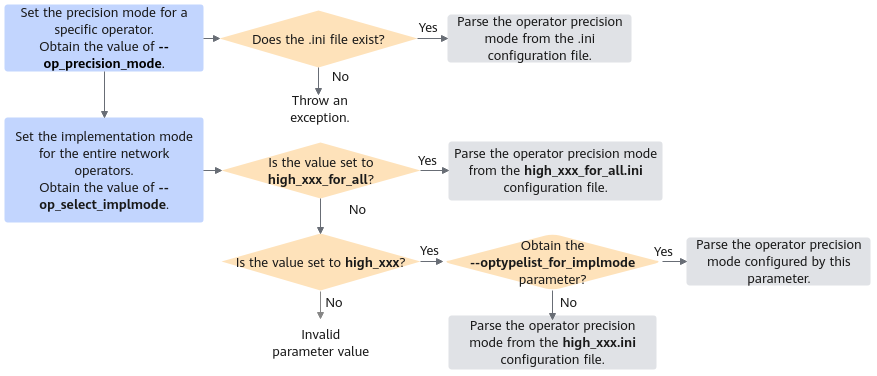
To set the operator precision mode:
- Obtain the --op_precision_mode option and check whether the .ini configuration file exists. If the file exists, parse the file and read the operator precision mode. Otherwise, an error is reported.
- If --op_precision_mode does not exist, read --op_select_implmode.
- Check whether this option is set to high_xxx_for_all. If yes, parse the high_xxx_for_all.ini file and read the operator precision mode.
- If the high_xxx option is configured, check whether --optypelist_for_implmode is configured. If yes, read the operator precision mode specified by this option. If no, parse the high_xxx.ini file and read the operator precision mode.
Arguments
Argument: Directory (including the file name) of the .ini configuration file. The following precision mode is supported:
- high_precision
- high_performance
- enable_float_32_execution: The FP32 data type is used for internal processing of operators. In this scenario, the FP32 data type is not automatically converted to the HF32 data type. If you are using the HF32 data type for computation and find that the accuracy drop exceeds your expectation, you can enable this configuration to specify the use of FP32 for internal computation of certain operators in order to maintain accuracy.
This option is supported only by the following products:
Ascend 950PR /Ascend 950DT Atlas A2 training products /Atlas A2 inference products Atlas A3 training products /Atlas A3 inference products - enable_hi_float_32_execution: The HF32 data type is used for internal processing of operators. After this option is enabled, the FP32 data type is automatically converted to HF32. This can reduce the space occupied by data and improve performance.
This option is not supported in the current version.
- support_out_of_bound_index: indicates that the out-of-bounds verification is performed on the indices of the gather, scatter, and segment operators. The verification deteriorates the operator execution performance.
- keep_fp16: The FP16 data type is used for internal processing of operators. In this mode, the FP16 data type is not automatically converted to FP32. If FP32-based computation fails to meet performance expectations and high accuracy is not required, you can enable the keep_fp16 mode. This low-precision mode trades accuracy for performance and is not recommended.
- super_performance: Indicates ultra-high performance. Compared with high performance, the algorithm calculation formula is optimized.
You can view the precision or performance mode supported by an operator in the opp/built-in/op_impl/ai_core/tbe/impl_mode/all_ops_impl_mode.ini file in the file storage path with the CANN software installed.
Format: The directory (including the file name) can contain letters, digits, underscores (_), hyphens (-), periods (.), and Chinese characters.
Restrictions:
- Currently, the operator precision can be set only by using the .ini configuration file. The configuration file content is formatted as Operator type=Precision mode (key-value pairs). Each line sets the precision mode for one operator.
- The operator type must be OpType of the Ascend IR–defined operator. For details about how to view the operator type, see How Do I Determine the Mapping Between Operators in the Original Network Model and Operators Supported by AI processors?.
Suggestions and Benefits
- You are advised not to set this option. It is used if you need to adjust the precision of a specific operator using the .ini configuration file in the case that you fail to obtain optimal network performance or accuracy in high-performance or high-precision mode.
- You are advised to load the .ini configuration file saved by using the --op_select_implmode option. For details, see Suggestions and Benefits.
Example
Create the op_precision.ini configuration file to set operator precision modes. Set a precision mode by operator type (low priority) or by node name (high priority) in each line of the file.
The configuration example is as follows:
[ByOpType]
optype1=high_precision
optype2=high_performance
optype3=enable_hi_float_32_execution
optype4=support_out_of_bound_index

[ByNodeName]
nodename1=high_precision
nodename2=high_performance
nodename3=enable_hi_float_32_execution
nodename4=support_out_of_bound_index
Upload the configured op_precision.ini file to any directory (for example, $HOME/conf) on the server where ATC is located.
--op_precision_mode=$HOME/conf/op_precision.ini
Dependencies and Restrictions
None