--input_shape
Applicable Products
All processors
Description
Sets the shape of each input.
See Also
- In dynamic profile scenarios, use this option together with --dynamic_batch_size (for setting the batch size profiles), --dynamic_image_size (for setting the image size profiles), or --dynamic_dims (for setting the specified dimension profiles).
Arguments
Argument:
- If the original model has a static shape, --input_shape is optional.
- If the model has a single input, the shape format is "input_name:n,c,h,w".
- If the model has multiple inputs, separate the shapes with semicolons (;). The format is "input_name1:n1,c1,h1,w1;input_name2:n2,c2,h2,w2".
- If the original model has a non-static shape, --input_shape is required.If dimension values of the input data in the original model are not fixed, the model can be converted by setting the dynamic profiles or shape ranges:
- Setting the dynamic profiles (static shape): The shape profiles include the batch size, image size, and specified dimension profiles.
When setting --input_shape, set the corresponding dimension value to -1 and use --dynamic_batch_size (setting the batch size profile), --dynamic_image_size (setting the image size profile), or --dynamic_dims (setting the specified dimension profile) together.
- Setting the shape ranges (dynamic shape):
The
Atlas 200I/500 A2 inference products does not support shape range setting.When setting --input_shape, you can define the corresponding dimension with a range of valid values, for example, 1–10.
If you do not want to specify the dimension range or value, set this option to -1, indicating that the dimension can use any value greater than or equal to 0.
- Setting the dynamic profiles (static shape): The shape profiles include the batch size, image size, and specified dimension profiles.
- For an original model whose shape is a scalar:
- Non-dynamic profile scenario
The configuration of a scalar input is optional. For example, if the model has two inputs, input_name1 (a scalar input, with the shape in the [] format) and input_name2 (with the shape in the [n2,c2,h2,w2] format), the shape information is "input_name1:;input_name2:n2,c2,h2,w2". For a scalar input, leave its shape configuration empty.
- Dynamic profile scenario
If the model input has both scalar shape and dynamic-profile shape, the scalar input must be configured. For example, if a model has three inputs, A:[-1,c1,h1,w1], B:[], and C:[n2,c2,h2,w2], the shape information is "A:-1,c1,h1,w1;B:;C:n2,c2,h2,w2". Scalar input B must be configured.
- Non-dynamic profile scenario
Restrictions:
- If the model has multiple inputs, the specified nodes must be enclosed in double quotation marks (""), and different inputs must be separated by semicolons (;). input_name must be the node name in the network model before conversion.
- If a dimension value of the input data for the original model is not fixed, for example, input_name1:? ,h,w,c, input the following information after the model is opened using visualization software such as Netron.
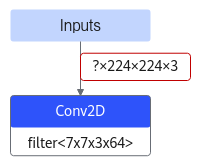 In this scenario, --input_shape must be configured. You can perform the following operations:
- Set the dimension to a fixed value, for example, input_name1:1,h,w,c, to convert an original model with a dynamic dimension in the input data into an offline model with a fixed dimension.
- Set the shape profile, for example, -1. This must be used together with the --dynamic_batch_size option.
- If a dimension is set to -1 in the shape range, it can take any value greater than or equal to 0. The upper limit is the maximum value representable by the int64 data type. However, in practice, the actual limit is constrained by the physical memory on both the host and device, and can be extended by increasing available memory.
- If this option is used and the AIPP function is configured by using --insert_op_conf, the width and height of the AIPP output image must be within the range configured in this option.
Suggestions and Benefits
None
Example
- In static shape scenarios, --input_shape is optional.For example, if the input shape information of a network consists of two inputs (input_0_0 [16,32,208,208] and input_1_0 [16,64,208,208]), the configuration information of --input_shape is as follows:
--input_shape="input_0_0:16,32,208,208;input_1_0:16,64,208,208"
- In non-static shape scenarios, --input_shape is required.
- Static shape
- For details about how to set the batch size profile, see --dynamic_batch_size.
- For details about how to set the image size profile, see --dynamic_image_size.
- For details about how to set the profile for a specified dimension, see --dynamic_dims.
- Dynamic shape
- Static shape
- Scalar shape:
- Non-dynamic profile scenario:
Shape is a scalar input, which is optional. For example, if the model has two inputs — input_name1 is a scalar and input_name2 has the shape of [16,32,208,208], the configuration example is as follows:
--input_shape="input_name1:;input_name2:16,32,208,208"
In the preceding example, input_name1 is optional.
- Dynamic profile scenario:
Scalar inputs must also be included in the configuration. For example, if the model has three inputs with shape information A:[-1,32,208,208], B:[], and C:[16,64,208,208], the configuration example is as follows (A is a dynamic profile input, and the batch size profiles are configured):
--input_shape="A:-1,32,208,208;B:;C:16,64,208,208" --dynamic_batch_size="1,2,4"
- Non-dynamic profile scenario:
Dependencies and Restrictions
- Option usage:
- If the dynamic shape range is configured using --input_shape and dynamic AIPP is configured using --insert_op_conf, the width and height of the AIPP output must be within the range specified by --input_shape.
- If the dynamic shape range is configured using --input_shape and static AIPP is configured using --insert_op_conf:
If the model has only one input, this scenario is not supported. If the model has multiple inputs, you must configure different input nodes accordingly, such as setting one input node with static AIPP and another node with a dynamic shape.
- API usage:
If this option is used to set the shape range during model conversion, call aclmdlSetDatasetTensorDesc to set the actual input tensor description (input shape range) before calling aclmdlExecute during model inference. After model execution, call aclmdlGetDatasetTensorDesc to obtain the tensor description of the output with a dynamic shape. Then, call the APIs under aclTensorDesc to obtain information such as the memory size occupied by the output tensor data, tensor format, and tensor dimensions.
For details about how to use aclmdlSetDatasetTensorDesc and aclmdlGetDatasetTensorDesc, see GE APIs.