Environment Setup
This section describes the deployment architecture of AMCT in different product forms.
Product Models
The AMCT deployment architecture varies by product model. The following describes the product models and then the AMCT deployment architecture in different product models by scenario.
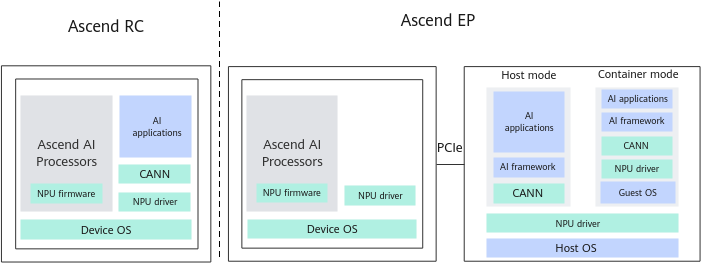
The PCIe working mode of the Ascend AI Processor is used for distinguishing:
- If the PCIe works in active mode and supports peripherals, it is called the
Ascend RC scenario.The CPUs of such products run the AI service software specified by the running user directly and connect to peripherals such as network cameras, I2C sensors, and SPI monitors as slave devices.
- If the PCIe works in standby mode, it is called the
Ascend EP scenario.In the
Ascend EP scenario, the host acts as the master, the device acts as the slave, and the customer's AI applications run on the host. The product, as a device, connects to the host over the PCIe interface, while the host loads AI tasks to the Ascend AI Processor on the device over the PCIe interface. The concepts of host and device are described as follows:- Host: an x86 server or an Arm server connected to the hardware powered by an Ascend AI Processor. It leverages the neural network (NN) compute capability provided by the Ascend AI Processor.
- Device: a hardware backend powered by an Ascend AI Processor. It provides the server with the NN compute capability over the PCIe interface.
- The
Atlas 200I/500 A2 inference products has two working scenarios:Ascend EP andAscend RC .- Products supporting the
Ascend RC scenario: Atlas 200 AI accelerator module and Atlas 200 DK - Products supporting the
Ascend EP scenario: Atlas 500 A2 edge station, Atlas 200I DK A2, and Atlas 200I A2 accelerator module
- Products supporting the
- The following products support only the
Ascend EP scenario:Atlas inference products : Atlas 300I Pro inference cardAtlas training products : Atlas 800 training server and Atlas 300T training cardAtlas A2 training products /Atlas A2 inference products : Atlas 800T A2 training server, Atlas 900 A2 PoD cluster basic unit, and Atlas 200T A2 Box16 heterogeneous subrackAtlas A3 training products /Atlas A3 inference products : Atlas 800T A3 supernode server, Atlas 900 A3 SuperPoD, and Atlas 800I A3 supernode serverAscend 950PR /Ascend 950DT
Figure 1 shows the products and architectures of the two scenarios.
Deployment Architecture in Ascend EP Mode
Figure 2 shows the deployment architecture AMCT. For details about the supported OSs, see Supported OSs. Before running inference, use the ATC to convert the quantized model into an offline model adapted to the AI processor.
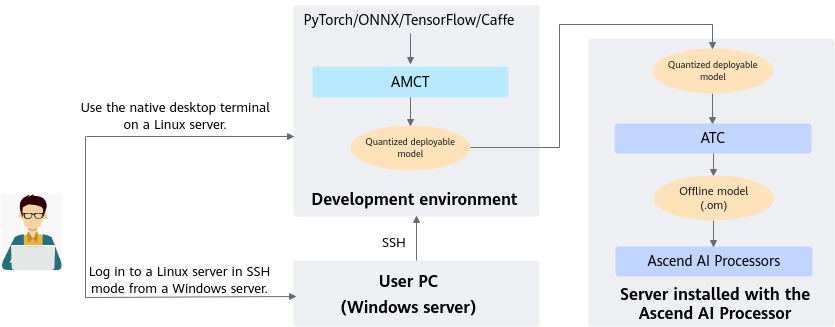
- Deploy AMCT on the server that meets the requirements to compress the model.
- Use ATC to convert the compressed model into an offline model adapted to the AI processor.
- Run inference on the resultant .om offline model obtained in 2 on the server powered by the AI processor.

For PyTorch models that require NPU-based quantization, AMCT installation on an environment with the Ascend AI processor is mandatory (both the driver/firmware and CANN package must be installed). For details, see Checking the OS Requirements and Environment.
Deployment Architecture in Ascend RC Mode
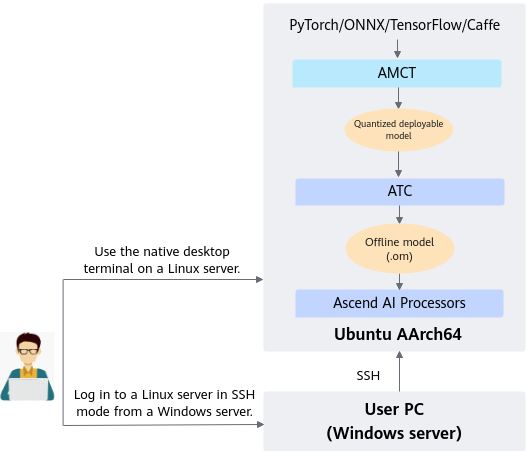
- Install AMCT on an Ubuntu (AArch64) server to perform model compression.
- Use ATC to convert the compressed model into an offline model adapted to the AI processor.
- Run inference on the resultant .om offline model obtained in 2 on the server powered by the AI processor.