Functions
Function Description
Vision Preprocessing Core (VPC): processes YUV and RGB images. It provides the following key functions:
- Cropping: crops one or more selected regions of interest (ROIs) from one or more images.
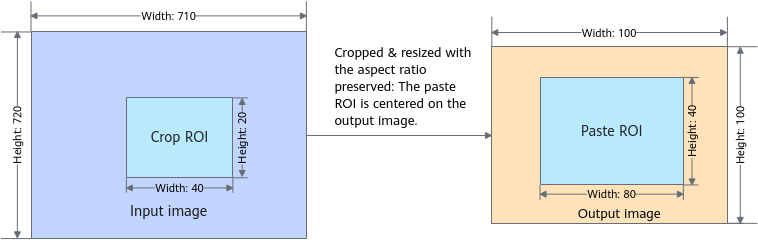
- Resizing: resizes an ROI (supporting uncompressed format) or multiple ROIs from a single image (supporting uncompressed format). The resizing modes include resizing an image without cropping it, resizing an image with the aspect ratio preserved, and more.
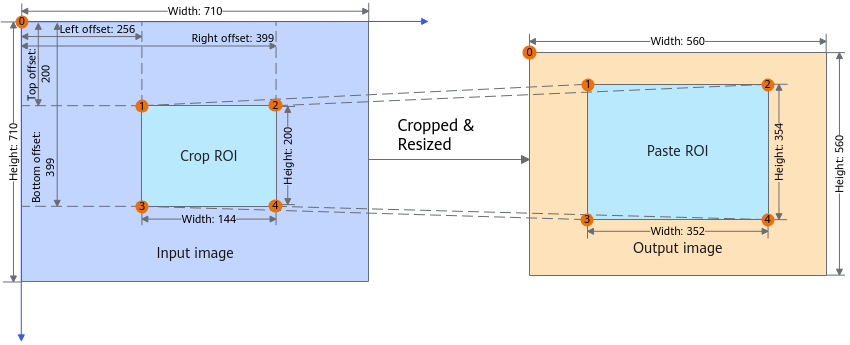
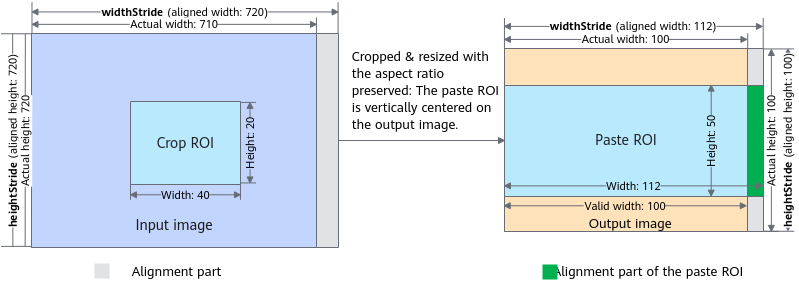
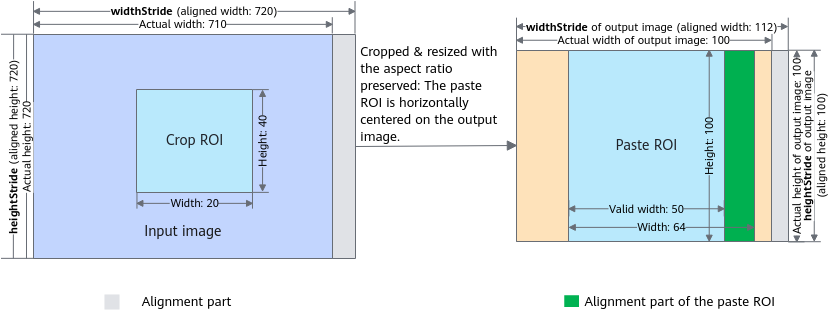
- Overlaying: crops a selected ROI from the input image, resizes the cropped image, and pastes it in the specified region of the output image. The output image may be a blank image (when the allocated output buffer is empty) or an existing image (when an image has been read into the allocated output buffer). Overlaying is performed only when the output image is an existing image.
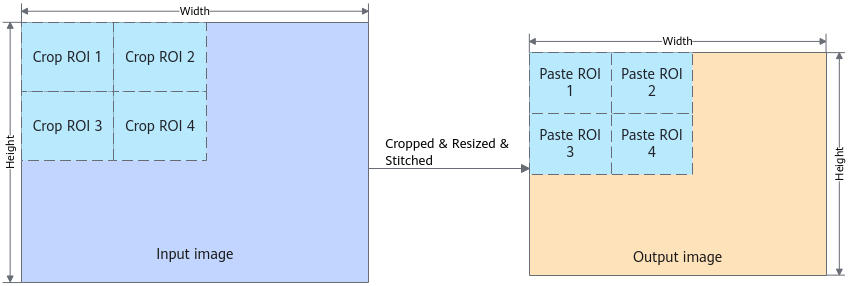
- Stitching: crops selected ROIs from the input image, resizes the cropped ROIs, and loads them to the specified areas in the output image.
- Image pyramid: successively downsamples an image using a Gaussian filter.
- Histogram analysis: collects statistics on the pixel value distribution of each image channel (RGB/YUV).
- Color remapping: remaps an image to a new one based on the given configuration.
- Border making (or padding): creates a border around an image.
- Format conversion: converts between RGB and YUV.
- Image grayscale: converts a color image into a grayscale image. Note that grayscale input images produce only grayscale output images. A YUV400 image is output.
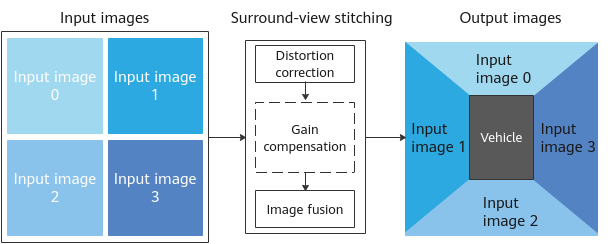
- Surround-view stitching: generates panoramas in vehicle-mounted scenarios. To use this function, four images are input, covering the front, left, back, and right directions. These images are merged into one panoramic image after distortion correction, gain compensation, and image fusion. Gain compensation is an optional step. You can determine whether to perform gain compensation when calling parameter setting APIs. Gain compensation can balance illumination of different cameras to achieve a better effect. In terms of image fusion, the weighted fusion mode is now used, that is, the pixel weighted averaging method.
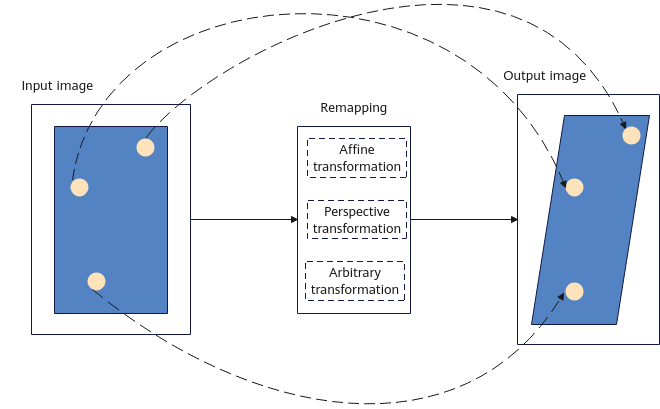
- Remapping: performs geometric deformation on the input image based on the pixel position lookup table (LUT). Typical functions include lens distortion correction, affine transformation, and perspective transformation. The deformation can be described using the following formula: dst(x,y) = src(LUT(x,y)). dst(x,y) is the pixel value of coordinates (x,y) in the output image, and its corresponding horizontal and vertical coordinate values of the input image are represented by pixel position LUT(x,y). And src(LUT(x,y)) is the pixel value of coordinates LUT(x,y) in the input image. The general pixel position LUT can be generated by using map1 (horizontal coordinate mapping matrix) and map2 (vertical coordinate mapping matrix) provided by the user. The pixel position LUT of affine transformation or perspective transformation can also be generated through calculation by using the three or four point pairs provided by the user.
- Filtering: performs filtering on the input image. Currently, median filtering, erosion, dilation, Gaussian filtering, mean filtering, and convolution filtering are supported.
- Rotation: rotates the input image by 90, 180, or 270 degrees.
- Mosaic: performs mosaic processing on the input image.
- Cover: draws covers on part of the input image.
- Line drawing: draws lines on the input image.
- Watermark addition: adds a watermark to the input image.
- Flip: flips the input image horizontally, vertically, or in both directions.
- Blend: blends two images.
Function Support
The following table lists the functions supported by different versions.
|
Function |
|
|
|
|
|
|---|---|---|---|---|---|
|
Cropping |
√ |
√ |
√ |
√ |
√ |
|
Resizing |
√ |
√ |
√ |
√ |
√ |
|
Overlaying |
√ |
√ |
√ |
√ |
√ |
|
Stitching |
√ |
√ |
√ |
√ |
√ |
|
Image pyramid |
√ |
☓ |
☓ |
☓ |
☓ |
|
Histogram analysis |
√ |
√ |
√ |
√ |
√ |
|
Remapping |
√ |
√ |
√ |
√ |
√ |
|
Border making |
√ |
√ |
√ |
√ |
√ |
|
Format conversion |
√ |
√ |
√ |
√ |
√ |
|
Image grayscale |
√ |
√ |
√ |
√ |
√ |
|
Surround-view stitching |
☓ |
☓ |
☓ |
☓ |
☓ |
|
Remapping |
☓ |
√ |
√ |
√ |
√ |
|
Filtering |
☓ |
√ |
√ |
√ |
√ |
|
Rotation |
☓ |
√ |
√ |
√ |
√ |
|
Mosaic |
☓ |
√ |
☓ |
☓ |
☓ |
|
Cover |
☓ |
√ |
☓ |
☓ |
☓ |
|
Line drawing |
☓ |
√ |
☓ |
☓ |
☓ |
|
Watermark addition |
☓ |
√ |
☓ |
☓ |
☓ |
|
Flip |
☓ |
√ |
√ |
√ |
√ |
|
Blend |
☓ |
☓ |
☓ |
☓ |
☓ |
Function Diagrams
The following figures are for reference only. The alignment restrictions vary depending on the product model. For details, see the instructions of each function interface.
Due to different alignment constraints, the
Reference
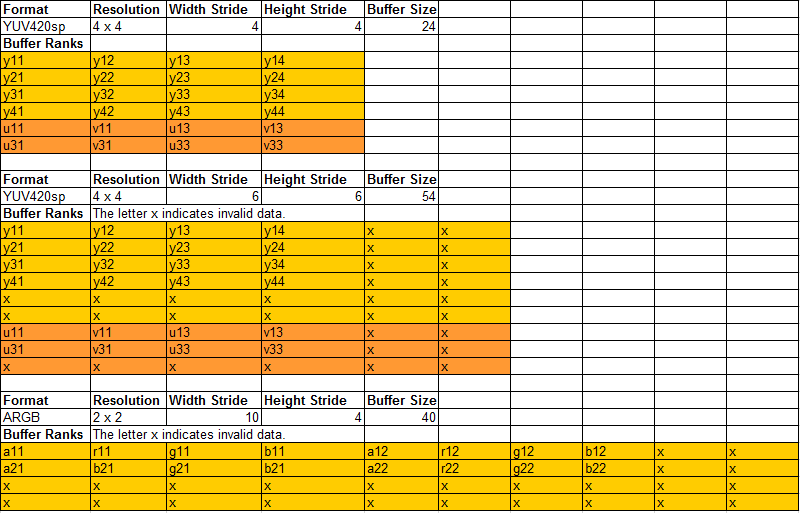
The following figure shows the component layout of the RGB and YUV formats. Two YUV420SP images are used as examples for semi-planar format and an ARGB image is used as an example for Packed and RGB formats.