Functions and Restrictions
Function Description
The overlaid on screen displays (OSDs) and color blocks on a video are called regions. The Region module is used to manage region resources in a unified manner, and display specific information (such as the channel ID and timestamp) on a video, or fill color blocks in a video for covering.
For example, in practice, you can create a region and overlay the region with one or more specified VPSS channels by calling hi_mpi_rgn_attach_to_chn. In addition, you can specify the display attributes of the region in each channel, such as the position, layer, and transparency.
Basic Concepts
|
Concept |
Description |
|---|---|
|
Region type |
The region types are as follows:
OVERLAYEX regions are bound to VPSS channels, and MOSAIC and COVER regions are bound to VPSS groups. For details about the differences between VPSS groups and channels, see Function Description. |
|
Region level |
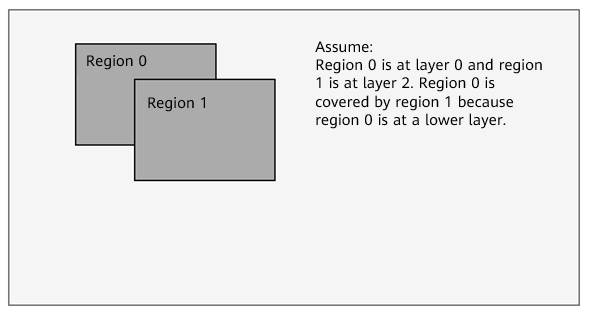
Refers to the overlay level. A higher region level indicates a higher region display level. When regions are overlaid, the low-level region is overlaid with the high-level region.
Figure 1 Region overlaying
|
|
Bitmap filling |
Indicates that the memory value of a bitmap is filled in the region memory from the upper left corner of the region. When the bitmap is smaller than the region, a part of region memory is filled, and the remaining part is retained. When the bitmap is the same as the region, the region memory is filled completely. When the bitmap is greater than the region, the region memory is filled with memory information of the bitmap which has the same size as the region. Bitmap filling is valid only for OVERLAYEX regions. |
|
Region attributes |
After creating a region, you need to set its attributes, including OVERLAYEX information such as pixel format, size, and background color. |
|
Channel display attributes |
Indicates the region display features in a channel. For example, the mosaic channel display attributes include the display position, region size, layer, and mosaic block size. If is_show (indicating whether a region is displayed) in the channel display attributes of a region is TRUE, the region is displayed in the channel. Otherwise, the region exists in the channel but is hidden. |
Restrictions
|
Region Type |
Supported Module (mod_id) |
Channel ID (chn_id) Value Range |
Device ID (dev_id) Value Range |
|---|---|---|---|
|
OVERLAY |
Not supported |
- |
- |
|
COVER |
VPSS (HI_ID_VPSS) |
Value range of the VPSS group ID: [0, 255] |
0 |
|
OVERLAYEX |
VPSS (HI_ID_VPSS) |
Value range of the VPSS group ID: [0, 255] |
[0,1] |
|
COVEREX |
Not supported |
- |
- |
|
LINE |
Not supported |
- |
- |
|
MOSAIC |
VPSS (HI_ID_VPSS) |
Value range of the VPSS group ID: [0, 255] |
0 |
|
MOSAICEX |
Not supported |
- |
- |
|
CORNER_RECTEX |
Not supported |
- |
- |