Functions and Restrictions
Typical Functions
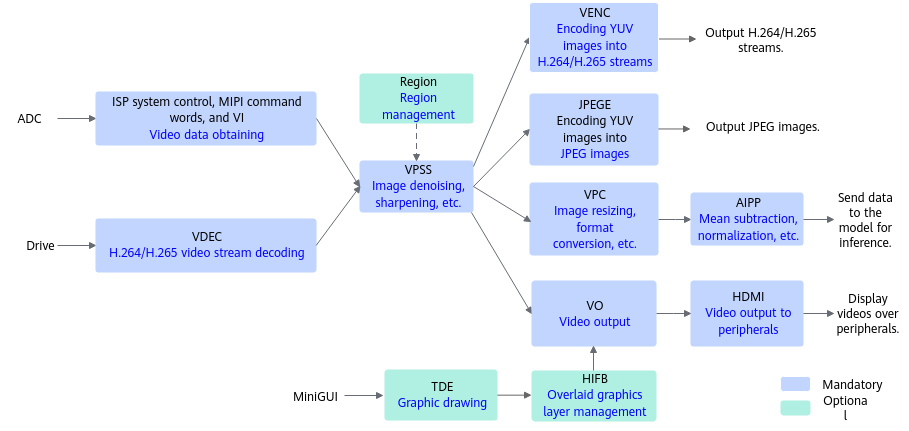
The following table describes the functions. For details about the functions of different media data processing versions supported by each product model, see Functions Supported by Each Product Model. AIPP is supported by all versions.
|
Function |
Sub-Function Module |
Description |
|---|---|---|
|
Obtaining video data |
Image signal processing (ISP) system control |
The system control function is used to register the 3A algorithm and the sensor driver, initialize the ISP firmware, run the ISP firmware, exit the ISP firmware, and configure the ISP attributes. |
|
Obtaining video data |
MIPI RX ioctl command identifiers |
The MIPI RX is a collection unit that supports multiple differential video input interfaces. It receives data from the MIPI, LVDS, sub-LVDS, and HiSPi interfaces through the combo PHY. The MIPI RX supports data transmission at multiple speeds and resolutions through different function modes. It also supports multiple external input devices. |
|
Obtaining video data |
Video Input (VI) |
The VI module captures video images, performs operations such as cropping, color optimization, brightness optimization, and noise removal on the images, and outputs YUV or RAW images. |
|
Displaying video data |
Video Output (VO) |
The VO module receives the images that have been processed by VPSS, controls the playing of the images, and outputs the images to peripheral video devices based on the configured output protocols (only HDMI is supported now). The VO module can work with the two-dimensional engine (TDE) module and HiSilicon Framebuffer (HiFB) module to draw graphics and manage graphics layers by leveraging hardware. |
|
Displaying video data |
High Definition Multimedia Interface (HDMI) |
HDMI is a fully digital video/audio interface for transmitting uncompressed audio and video signals. |
|
Displaying video data |
Two-Dimensional Engine (TDE) |
The TDE is a two-dimensional graphics acceleration engine. It uses hardware to provide fast graphics drawing functions for the On-Screen Display (OSD) and Graphics User Interface (GUI). The functions include quick copy, quick color filling, and pattern filling. (Currently, only alpha blending is supported.) |
|
Displaying video data |
HiSilicon Framebuffer (HiFB) |
The HiFB is used to manage overlaid graphics layers. It not only provides the basic functions of Linux framebuffer, but also provides extended functions such as modifying the display start position of a graphics layer and inter-layer alpha. |
|
Region management |
Region |
The overlaid on screen displays (OSDs) and color blocks on a video are called regions. The Region module is used to manage the region resources in a unified manner. It is used to display specific information (such as the channel ID and PTS) on the video or fill color blocks in the video for covering. Currently, this function must be used together with VPSS. |
|
Image/Video data processing |
Video Process Sub-System (VPSS) |
The VPSS module preprocesses input images in a unified manner, such as denoising, deinterlacing, and cropping, and then processes each channel separately, such as scaling and bordering. |
|
Image data processing |
Artificial Intelligence Pre-Processing (AIPP) |
AIPP implements functions on the AI Core, including image resizing (such as cropping and padding), CSC, mean subtraction, and factor multiplication (for pixel changing).
AIPP supports static and dynamic modes. However, the two modes are mutually exclusive.
|
|
Image/Video data processing |
Digital Vision Pre-Processing (DVPP) |
As an embedded image processing unit of an AI Processor, DVPP provides powerful hardware acceleration capabilities for media processing through media data processing APIs. It delivers the following functions:
AIPP and DVPP can be used separately or together. In combined applications, DVPP is used first to decode, crop, and resize images or videos. However, due to DVPP hardware restrictions, the image format and resolution after DVPP may not meet the model requirements. Therefore, AIPP is required to further perform CSC, image cropping, and border making. For example, in the |
|
Obtaining and outputting audio data |
Audio Input (AI) |
The AI module captures audio data. |
|
Audio Output (AO) |
The AO module plays the audio decoded by the ADEC module. |
|
|
Encoding and decoding audio data |
Audio Encoder (AENC) |
The AENC module encodes the audio obtained by the AI module and outputs audio streams. |
|
Encoding and decoding audio data |
Audio Decoder (ADEC) |
The ADEC module decodes G.711a, G.711u, and other audio streams and plays audios through the AO module. |
Functions Supported by Each Product Model
The following table describes the functions of media data processing V2 supported by each product model.
- √: Supported
- x: Not supported
|
Model |
VPC |
JPEGD |
JPEGE |
PNGD |
VDEC |
VENC |
Video Data Obtaining |
VPSS Video Processing |
Audio Functions (Recording/Playing/Volume Adjustment) |
Video Data Display |
Region Management |
|---|---|---|---|---|---|---|---|---|---|---|---|
|
|
☓ |
☓ |
☓ |
☓ |
☓ |
☓ |
☓ |
☓ |
☓ |
☓ |
☓ |
|
|
√ |
√ |
√ |
√ |
√ |
√ |
☓ |
☓ |
☓ |
☓ |
☓ |
|
|
√ |
√ |
√ |
√ |
√ |
√ |
√ |
√ |
√ |
√ |
√ |
|
|
√ |
√ |
√ |
√ |
√ |
☓ |
☓ |
☓ |
☓ |
☓ |
☓ |
|
|
√ |
√ |
√ |
√ |
√ |
☓ |
☓ |
☓ |
☓ |
☓ |
☓ |
|
|
√ |
√ |
√ |
√ |
☓ |
☓ |
☓ |
☓ |
☓ |
☓ |
☓ |
Restrictions
When using the APIs described in this section, pay attention to the following points:
- About memory allocation and deallocation:
- Before implementing some media data processing functions such as VPC, JPEGD, and JPEGE, you need to allocate memory to store the input or output data. The media data processing functions have higher requirements on the memory for storing the input and output data. Therefore, you need to call dedicated memory allocation APIs. For details, see the restrictions in sections that describe the functions. If multiple functions are used in cascade and the same memory segment needs to be reused, allocate the maximum allowed memory.
- The memory allocated in 1 can be used for media data processing and other tasks. For example, the output of media data processing can be used as the input of model inference to implement memory reuse and reduce memory copy.
- The address space accessed by media data processing is limited. You are advised to call the other memory allocation APIs, such as aclrtMalloc, to allocate memory for other functions (for example, model loading) to ensure sufficient memory during media data processing.
- About channel requirements:
Before implementing each function of media data processing, you must call APIs to create corresponding channels. See the channel creation and destruction APIs in VPC, VDEC/JPEGD, Video Encoder (VENC) and JPEG Encoder (JPEGE), and PNG Decoder (PNGD) to learn about the API descriptions and the maximum number of channels.
Channel creation and destruction involve resource allocation and deallocation. Repeated channel creation and destruction affect service performance. Therefore, you are advised to manage channels based on your actual scenario. For example, to process VPC images continuously, create VPC channels, wait until all VPC functions are called, and then destroy the VPC channels.
Too many channels would affect the CPU usage and memory usage of the device. For details about the number of channels, see the performance specifications in the corresponding function sections.
- This section describes the structures and enumerations. The reserved fields must be manually set to 0 to avoid incompatibility with future versions.
The reserved fields in the structs and enumerations contain a _BUTT suffix, for example, HI_COMPRESS_MODE_BUTT.