Common Matmul and Bias Addition
Applicable Products
|
Hardware Model |
Supported |
Remarks |
|---|---|---|
|
Atlas 350 accelerator cards |
√ |
- |
|
|
√ |
- |
|
|
√ |
- |
|
|
x |
- |
|
|
√ |
- |
|
|
√ |
The input and output tensors of the bf16 data type are not supported. |
Description
Performs normal Matmul. The hasBias parameter can be used to control whether to add a bias.
Formula
Multiplies tensors A (x) and B (weight) to output tensor C.

Adds a bias.

Parameters
|
Member |
Value Range |
Remarks |
|---|---|---|
|
transposeA |
false/true |
If this parameter is set to true, some scenarios are not supported. For details, see Specifications. Only false is supported for the float data type. |
|
transposeB |
false/true |
Only true is supported for the float data type. |
|
hasBias |
false/true |
Only false is supported for the float data type. |
|
outDataType |
ACL_DT_UNDEFINED |
- |
|
enAccum |
false |
- |
|
matmulType |
MATMUL_UNDEFINED |
- |
|
quantMode |
QUANT_UNDEFINED |
- |
Input
|
Parameter |
Dimension |
Data Type |
Format |
Description |
|---|---|---|---|---|
|
x |
[m, k]/[batch, m, k] |
float16/bf16/float |
ND |
Matrix A for matrix multiplication. The dimension [m, k] is supported only for the float data type. |
|
weight |
[k, n]/[batch, k, n]/[1, n / 16, k, 16]/[batch, n / 16, k, 16] |
float16/bf16/float |
ND/NZ |
Weight of matrix B for matrix multiplication. The dimension [k, n] and the ND format are supported only for the float data type. |
|
bias |
[1, n]/[n]/[batch, n] |
float16/bf16/float |
ND |
Added bias matrix. Valid when hasBias is set to true. |
Output
|
Parameter |
Dimension |
Data Type |
Format |
Description |
|---|---|---|---|---|
|
output |
[m, n]/[batch, m, n] |
float16/bf16/float |
ND |
Matrix multiplication result. The dimension [m, n] is supported only for the float data type. |
Specifications
The following table lists the combinations of input and output attributes. The combinations that are not listed in the table are not supported.
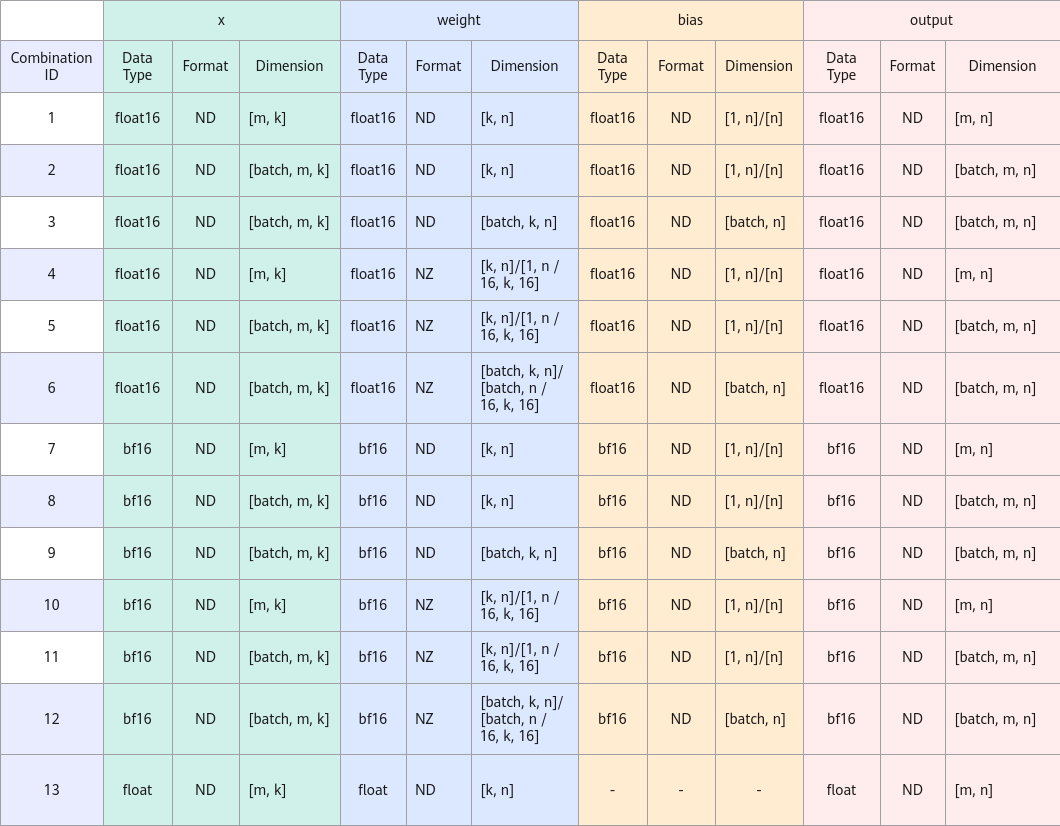
Atlas inference products : Combinations 7 to 13 are not supported.- If transposeA is set to true, combinations 2, 5, 8, and 11 are not supported.
- The data types of all input and output tensors are the same.
- When weight has four dimensions, the values of k and n are integer multiples of 16.
- Combination 13 ensures the performance for only the shape: m = 1 to 256, k = 7168, and n = 256. For other shapes, the performance may deteriorate.
- Atlas 350 accelerator cards:
- Combinations 1 to 12 are supported.
- Combinations 3, 6, 9, and 12 do not support bias addition.
- When inTensor1 (weight) is in NZ format and one of the last two dimensions of the original ND is 1, the weightNz feature cannot be used. This API does not support this scenario.
OP Usage and Typical Scenarios
For details about how to use OP, see the usage process in Operator Usage Guide (ATB C++ APIs). For details about how to construct the Operation parameter as instructed in Single Operator, see the parameter construction in the following scenarios.
- Scenario 1
// Parameter construction
atb::infer::LinearParam param;
param.transposeA = false;
param.transposeB = false;
param.hasBias = false;
param.outDataType = ACL_DT_UNDEFINED;
param.enAccum = false;
param.matmulType = MATMUL_UNDEFINED;
param.quantMode = QUANT_UNDEFINED;
# Example >>> x tensor([[1, 2], [3, 4]]) >>> weight tensor([[1, 2, 3], [4, 5, 6]]) >>> output tensor([[9, 12, 15], [19, 26, 33]]) # 9 = 1 * 1 + 2 * 4 # 12 = 1 * 2 + 2 * 5 # 15 = 1 * 3 + 2 * 6 # 19 = 3 * 1 + 4 * 4 # 26 = 3 * 2 + 4 * 5 # 33 = 3 * 3 + 4 * 6 - Scenario 2
// Parameter construction
atb::infer::LinearParam param;
param.transposeA = true;
param.transposeB = true;
param.hasBias = false;
param.outDataType = ACL_DT_UNDEFINED;
param.enAccum = false;
param.matmulType = MATMUL_UNDEFINED;
param.quantMode = QUANT_UNDEFINED;
# Based on the transposition, the computation in this example is the same as that in the previous example. >>> x tensor([[1, 3], [2, 4]]) >>> weight tensor([[1, 4], [2, 5], [3, 6]]) >>> output tensor([[9, 12, 15], [19, 26, 33]]) - Scenario 3
// Parameter construction
atb::infer::LinearParam param;
param.transposeA = false;
param.transposeB = false;
param.hasBias = true;
param.outDataType = ACL_DT_UNDEFINED;
param.enAccum = false;
param.matmulType = MATMUL_UNDEFINED;
param.quantMode = QUANT_UNDEFINED;
# Example
>>> x
tensor([[1, 2],
        [3, 4]])
>>> weight
tensor([[1, 2, 3],
        [4, 5, 6]])
>>> bias
tensor([1, 2, 3])
>>> output
tensor([[10, 14, 18],
        [20, 28, 36]])
# 10 = 1 * 1 + 2 * 4 + 1
# 14 = 1 * 2 + 2 * 5 + 2
# 18 = 1 * 3 + 2 * 6 + 3
# 20 = 3 * 1 + 4 * 4 + 1
# 28 = 3 * 2 + 4 * 5 + 2
# 36 = 3 * 3 + 4 * 6 + 3
Function Constraints
- Some scenarios are not supported when transposeA is set to true.
- outDataType = ACL_DT_UNDEFINED.
- enAccum = false.