aclnn Operator Integration into the ATB Plugin
Overview
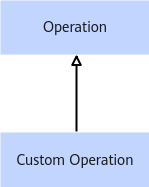
- Create a custom class that inherits the Operation class of the ATB.
- Use the aclnn API to implement specific APIs in the Operation class.
This section describes how to integrate the aclnn operator into the ATB plugin based on the second point in the roadmap.
API |
Custom Operation Class Implementation |
|---|---|
Setup |
Required |
Execute |
Required |
InferShape |
Required |
GetInputNum |
Required |
GetOutputNum |
Required |
GetName |
Yes |
Implementation of the Setup API
The Setup API is used to:
- Prepare the host data required for delivery. For example, data structures and tiling data required by API calls.
- Calculate the size of the display memory required for operator execution and return the result. In the process of integrating the aclnn to the ATB plugin, this step creates the tensor structure and calls the aclnnGetWorkSpaceSize function of the aclnn operator.
atb::Status AclnnBaseOperation::Setup(
    const atb::VariantPack &variantPack, uint64_t &workspaceSize, atb::Context *context)
{
    LOG_INFO(opName_ + " setup start");

    // Call subclass, which creates input and output tensors and saves them to VariantPack.
    int ret = CreateAclnnVariantPack(variantPack);
    if (ret != 0)
    {
        LOG_ERROR(opName_ + " call CreateAclnnVariantPack fail, error: " + std::to_string(ret));
        return atb::ERROR_INVALID_PARAM;
    }

    // Call subclass. In the subclass, call the aclnn API to obtain the executor and workspace.
    ret = SetAclnnWorkspaceExecutor();
    if (ret != 0)
    {
        LOG_ERROR(
            opName_ + " call CreateAclnnVaSetAclnnWorkspaceExecutorriantPack fail, error: " + std::to_string(ret));
        return atb::ERROR_INVALID_PARAM;
    }
    // Return the calculated workspaceSize.
    workspaceSize = workspaceSize_;
    LOG_INFO(opName_ + " setup end");
    return ret;
}
Implementation of the Execute API
The Execute API is used to deliver operator tasks based on the graphics memory address provided by a user. In the process of integrating the aclnn operator to the ATB plugin, this step configures the aclnn API to set the input and dispatch the operator.
atb::Status AclnnBaseOperation::Execute(
    const atb::VariantPack &variantPack, uint8_t *workspace, uint64_t workspaceSize, atb::Context *context)
{
    LOG_INFO(opName_ + " execute start");
    if (!context) {
        LOG_ERROR(opName_ + " execute fail, context param is null");
        return atb::ERROR_INVALID_PARAM;
    }
    // Obtain the execution stream.
    aclrtStream stream = context->GetExecuteStream();
    if (!stream) {
        LOG_ERROR(opName_ + " execute fail, execute stream in context is null");
        return atb::ERROR_INVALID_PARAM;
    }
    // Address to which the updated data is transferred.
    int ret = UpdateAclnnVariantPack(variantPack);
    if (ret != 0) {
        LOG_ERROR(opName_ + " call UpdateAclnnVariantPack fail, error: " + std::to_string(ret));
        return atb::ERROR_CANN_ERROR;
    }
    LOG_INFO("Input workspaceSize " + std::to_string(workspaceSize) + " localCache workspaceSize " +
             std::to_string(workspaceSize_));
    ret = ExecuteAclnnOp(workspace, stream); // Call the aclnn API.
    if (ret != 0) {
        LOG_ERROR(opName_ + " call ExecuteAclnnOp fail, error: " + std::to_string(ret));
        return atb::ERROR_CANN_ERROR;
    }
    LOG_INFO(opName_ + " execute end");
    return ret;
}
InferShape
This API is used to deduce the shape of the output tensor based on the shape of the input tensor and operator parameters. The implementation of this function is related only to the features and APIs of the operator.
atb::Status GeluOperation::InferShape(
    const atb::SVector<atb::TensorDesc> &inTensorDesc, atb::SVector<atb::TensorDesc> &outTensorDesc) const
{
    LOG_INFO(opName_ + " InferShape start");
    outTensorDesc.at(0).format = inTensorDesc.at(0).format;
    outTensorDesc.at(0).dtype = inTensorDesc.at(0).dtype;
    outTensorDesc.at(0).shape.dimNum = inTensorDesc.at(0).shape.dimNum;

    if (inTensorDesc.at(0).shape.dimNum == DIM3)
    {
        LOG_INFO("[input0 dimNum = 3] CHECK " + opName_ + " input shape: [input0] " +
                 std::to_string(inTensorDesc.at(0).shape.dims[DIM0]) + ", " +
                 std::to_string(inTensorDesc.at(0).shape.dims[DIM1]) + ", " +
                 std::to_string(inTensorDesc.at(0).shape.dims[DIM2]));
        outTensorDesc.at(0).shape.dims[DIM0] = inTensorDesc.at(0).shape.dims[DIM0];
        outTensorDesc.at(0).shape.dims[DIM1] = inTensorDesc.at(0).shape.dims[DIM1];
        outTensorDesc.at(0).shape.dims[DIM2] = inTensorDesc.at(0).shape.dims[DIM2];
    }
    else if (inTensorDesc.at(0).shape.dimNum == DIM2)
    {
        LOG_INFO("[input0 dimNum = 2] CHECK " + opName_ + " input shape: [input0] " +
                 std::to_string(inTensorDesc.at(0).shape.dims[DIM0]) + ", " +
                 std::to_string(inTensorDesc.at(0).shape.dims[DIM1]));
        outTensorDesc.at(0).shape.dims[DIM0] = inTensorDesc.at(0).shape.dims[DIM0];
        outTensorDesc.at(0).shape.dims[DIM1] = inTensorDesc.at(0).shape.dims[DIM1];
    }
    else
    {
        LOG_ERROR(opName_ + " invalid dimNum = " + std::to_string(inTensorDesc.at(0).shape.dimNum));
    }

    LOG_INFO(opName_ + " InferShape end");
    return atb::NO_ERROR;
}
GetInputNum and GetOutputNum
The two APIs are used to return the number of input tensors required by the operator and the number of output tensors required by the operator, which are similar to InferShape and are related only to the operator features and APIs.
uint32_t GeluOperation::GetInputNum() const
{
    return 1; // Number of gelu input parameters.
}

uint32_t GeluOperation::GetOutputNum() const
{
    return 1; // Number of gelu output parameters.
}