FAQs
What Are the Common Methods for Tuning LLM Inference Performance?
Operator fusion, quantization, tensor parallelism, and continuous batching.
What to Do If Error "out of Memory, Need Block" Is Reported During Pure Model Inference
Symptom
During pure model inference, the error message "out of memory, need block" is displayed, as shown in the following figure.

Cause Analysis
This typically occurs when sequence length increases due to large images or videos, making the pre-allocated KV cache insufficient.
Solution
Change the value of max_input_length in the run_pa.sh script to a larger value based on the actual application scenario.
What to Do If Chat Interface Performance Degrades When Deploying PD Hybrid Services on a Standalone Atlas 800I A3 SuperPoD Server
Symptom
There are a large number of experts on a single device, and each expert is allocated with a small number of tokens. When the precision is different, the performance of a chat interface may be worse than that of a non-chat interface.
Cause Analysis
The experts activated by the chat interface are more evenly distributed, but the number of experts activated by a single device is larger. As a result, more experts need to be transferred, the performance deteriorates, and the GMM operator performance fluctuates.
Solution
This is an inherent difference between chat and non-chat interfaces, which is normal.
How to Locate the Fault When the Error Message "undefinedsymbols: xxx" Is Displayed
Solution
Check whether MindIE LLM matches ATB, CANN, torch, and TorchNPU, and whether the value of ABI (0 or 1) is correctly selected.
What to Do If MASTER_ADDR or MASTER_PORT Is Missing During Multi-Device Distributed Inference
MASTER_ADDR or MASTER_PORT Is Missing During Multi-Device Distributed InferenceSymptom
When torch.distributed is enabled for multi-device inference, the MASTER_ADDR or MASTER_PORT environment variable does not exist on the server.

Cause Analysis
The environment variable the MASTER_ADDR or MASTER_PORT environment variable is not set.
Solution
You can set the environment variable in either of the following ways:
- Setting in the code
   import os

   os.environ\['MASTER\_ADDR'\] = 'localhost'

   os.environ\['MASTER\_PORT'\] = '5678'
Using environment variables
  export MASTER\_ADDR=localhost

  export MASTER\_PORT=5678
What to Do If Error "Max retries exceeded with url" Is Reported During Model Startup
Symptom
The error message "Max retries exceeded with url" is displayed during model startup, as shown in the following figure.

Cause Analysis
This issue is most likely caused by intranet access.
Solution
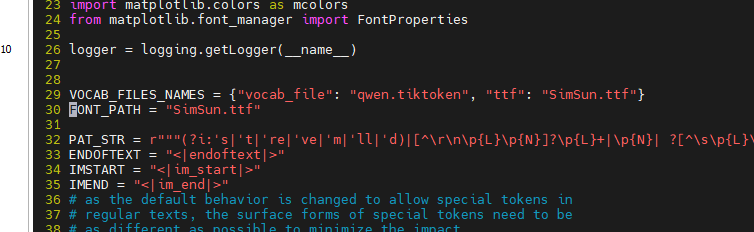
The solution uses Qwen-VL as an example. Open the tokenization_qwen.py file in the weight folder and modify the 29th and 30th lines as follows.
What to Do If Error "Socket bind failed" Is Displayed After a Model Is Loaded
Symptom
After a model is loaded, the program exits quickly, and the error message "Socket bind failed" is displayed, as illustrated in the following figure.

Cause Analysis
MindIE Motor CPP uses HTTP or HTTPS for communication. The client can disconnect first to reduce the server load and ensure proper release of resources, including port resources.
Solution
Modify the port, managementPort, and metricsPort parameters in the configuration file. To avoid this problem, disconnect requests before disconnecting the service process. Alternatively, run the lsof -i :{port} command to check the port status. If the port is still occupied by a residual process, run the kill command to clear the residual process. Replace {port} with the port number to be checked.
What to Do If No Response Is Returned After Serving Is Started
Symptom
After serving is started successfully, no response is returned after a request is sent.
Cause Analysis
Check model logs to see if "out of memory" occurs.
Solution
Change the values of npuDeviceIds and npuMemSize in the configuration file.
How to Check Logs to Locate the Cause of a Serving Startup Failure
If serving fails to be started, check logs, which are stored in /root/mindie/log/debug by default.
What to Do If LLaMA2-13b-hf Failed to Be Started for Serving and a Core Dump Error Related to ProtoBuf Is Reported
Run the pip install protobuf==5.28 command to upgrade ProtoBuf.
What to Do If Error "Check_path: config.json failed" Is Reported During Serving Startup
Symptom
During serving startup, the error message "Check_path: config.json failed" is displayed, as shown in the following figure.

Cause Analysis
The config.json file in the model weight path does not have the 640 permission.
Solution
Use either of the following methods to change the permission:
Change the permission on the
config.jsonfile.chmod 640 {model_path}/config.jsonChange the permission on the entire model weight folder.
chmod -R 640 {model_path}
What to Do If Error "pybind11::error_already_set" Is Reported During Serving Startup
Symptom
The error "pybind11::error_already_set" is reported during service startup, as illustrated in the following figure.

Cause Analysis
The model's third-party dependencies are incorrect.
Solution
Reinstall the third-party dependencies based on the requirements.txt file of the model. The default path of the dependency file is {MindIE_installation_directory}/atb_llm/requirements/models/requirements_{model}.txt.
What to Do If No Core Dump Log Is Reported During Service Startup
Symptom
No core dump log is generated during service startup.
Cause Analysis
The model's third-party dependencies, such as Protobuf, are incorrect.
Solution
Reinstall the third-party dependencies based on the requirements.txt file of the model. The default path of the dependency file is {MindIE_installation_directory}/atb_llm/requirements/models/requirements_{model}.txt.
How to Enable Forcible Synchronization of the Acceleration Library to Locate Errors
Solution
export ATB_STREAM_SYNC_EVERY_KERNEL_ENABLE=1
export ATB_STREAM_SYNC_EVERY_RUNNER_ENABLE=1
export ATB_STREAM_SYNC_EVERY_OPERATION_ENABLE=1
After the environment variable is enabled, run the model inference and further locate the fault based on the first error in the acceleration library log.
What Is Deterministic Computing?
Deterministic computing refers to the process of running an inference application multiple times with unchanged inputs, such as an input dataset, ensuring that the output results are consistent each time.
Why Does the Accuracy Result Fluctuate When the Accuracy Dataset Is Run?
- After the model postprocessing is changed from sampling to greedy, the stability of the output text can be ensured.
- Due to the problem of deterministic computing, the output may be slightly different.
Why Are the Batch Forming Sequence and LLM Model Inference Outputs Different Even with the Same Input?
Solution
- The accumulation sequence of the MatMul operator varies across different rows. Additionally, floating-point precision lacks the commutative property of addition. Consequently, even if the input is the same across different rows, the calculation results are different.
- You can set the environment variable
export ATB_MATMUL_SHUFFLE_K_ENABLEto0to disable the shuffle k function of MatMul. After it is disabled, the operator accumulation sequence on all rows can be the same. However, the performance of MatMul decreases by about 10%.
Why Is the Output Uncertain When the Same Input Is Sent to MindIE Server for Inference?
The scheduling framework code (in block query mode) can ensure deterministic scheduling. However, environmental factors such as CPU load can affect the request arrival time, ultimately impacting deterministic scheduling. For example, after an engine query, 10 requests can be submitted for a customer's external services. During the first run, all 10 requests quickly arrive and form a batch. However, during the second run, some requests arrive late due to environmental factors, and only five requests form a batch. As a result, the results of the two runs are different.
What to Do If Difficult Fault Location Occurs During Asynchronous Execution
Symptom
An error associated with fault location occurs during pure model inference.
Cause Analysis
Model inference involves asynchronous execution, which may result in misleading error messages. Ensure synchronization before performing fault location.
Solution
Set export ASCEND_LAUNCH_BLOCKING to 1 to enable synchronous execution before fault location.
How to Ensure Deterministic Computing When LLM Inference Is Performed on Ascend
Deterministic computing refers to the process of running an inference application multiple times with unchanged inputs, such as an input dataset, ensuring that the output results are consistent each time.
Model level:
Communication operator:
export LCCL_DETERMINISTIC=1
export HCCL_DETERMINISTIC=true
MatMul:
export ATB_MATMUL_SHUFFLE_K_ENABLE=0Inference engine:
MindIE: Obtains new requests based on blocks.
TGI: not supported.
What to Do if LLM Inference Result Contains Garbled Characters
Solution
Check whether the tokenizer uses the correct model path when converting a token to an ID.
What to Do If "Pull kv failed" Is Displayed on the Decode Node in the Prefill-Decode Disaggregation Scenario
Symptom
During inference, the "Pull kv failed" log of the ERROR level is generated when the decode node pulls the KV cache, and the error code "timeout" is displayed in status_code of CANN.

Cause Analysis
In the prefill-decode disaggregation scenario, the KV cache of the decode node needs to be pulled from the prefill node. If this error occurs, the KV cache transmission from the prefill node to the decode node times out, which is probably caused by poor network quality.
Solution
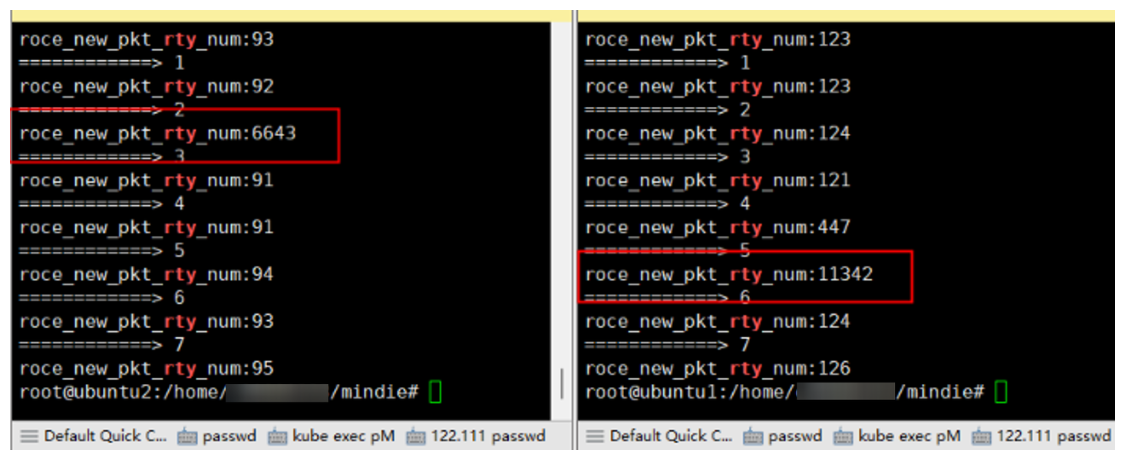
(Recommended) Check the number of network transmission retries. If certain devices exhibit an unusually high retry count, inspect the corresponding optical modules.
for i in $(seq 0 7); do echo "============> $i";hccn_tool -i $i -stat -g |grep rty;doneSet
kv_trans_timeoutto5in theModelDeployConfigfield of the MindIE configuration file, to specify the timeout interval for pulling the KV cache to 5 seconds. However, this setting may mask inference performance degradation caused by network problems. Exercise caution when configuring it.
What to Do If Error Message "LLMPythonModel Initializes Fail" Is Displayed During MindIE LLM Deployment
Symptom
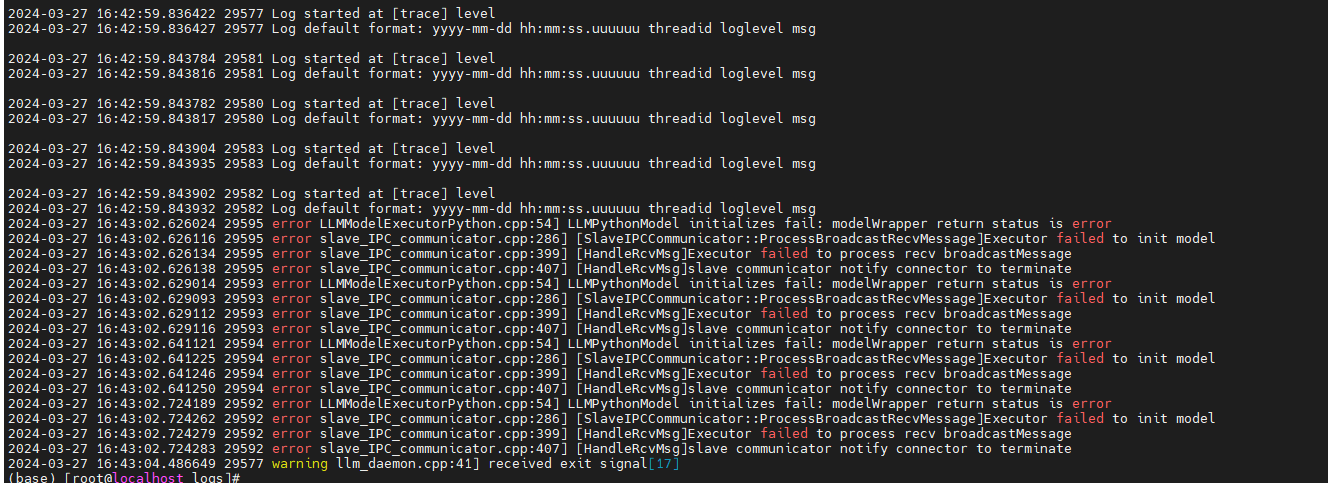
During MindIE LLM deployment, the error message "LLMPythonModel initializes fail" is reported, as shown in the following figure.
Cause Analysis
There is no Python dependency for ibis.
Solution
Go to the /Service_installation_path/logs directory, open Python logs, and install the required dependencies based on the error information in logs.
What to Do If Error Message "out of memory" Is Displayed During Model Loading
Symptom
During MindIE LLM deployment, the error message "out of memory" is displayed when the model is loaded, as shown in the following figure.

Cause Analysis
The weight is too large and the memory is insufficient.
Solution
Set npuMemSize of ModelConfig in the config.json file to a smaller value, for example, 8.
What to Do If Error Message Indicating atb_llm.runner Cannot Be Imported During MindIE LLM Deployment
atb_llm.runner Cannot Be Imported During MindIE LLM DeploymentSymptom
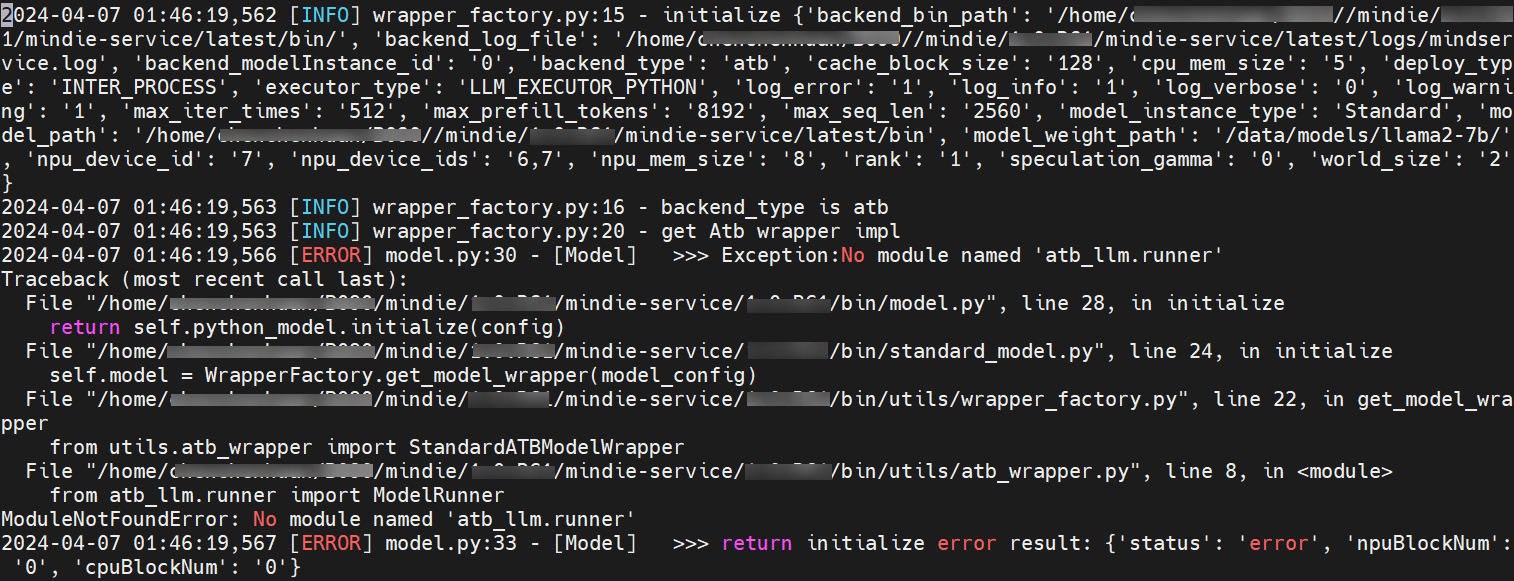
During MindIE LLM deployment, atb_llm.runner cannot be imported, as shown in the following figure.
Cause Analysis
The Python version is not 3.10, or the Python version corresponding to pip is not 3.10. As a result, the corresponding package cannot be found. You can run the python and pip -v commands to check the Python version.
Solution
Open the
bashrcfile.vim ~/.bashrcAdd the following environment variables to the
bashrcfile, save the file, and exit.## For example, if version 3.11 is used, the installation directory is `/usr/local/python3.11`. export LD_LIBRARY_PATH=/usr/local/python3.11/lib:$LD_LIBRARY_PATH export PATH=/usr/local/python3.11/bin:$PATHMake the environment variables take effect.
source ~/.bashrcCreate soft links.
ln -s /usr/local/python3.11/bin/python3.11 /usr/bin/python
ln -s /usr/local/python3.11/bin/pip3.11 /usr/bin/pip
What to Do if Paths Like tlsCert Cannot Be Found During MindIE LLM Deployment
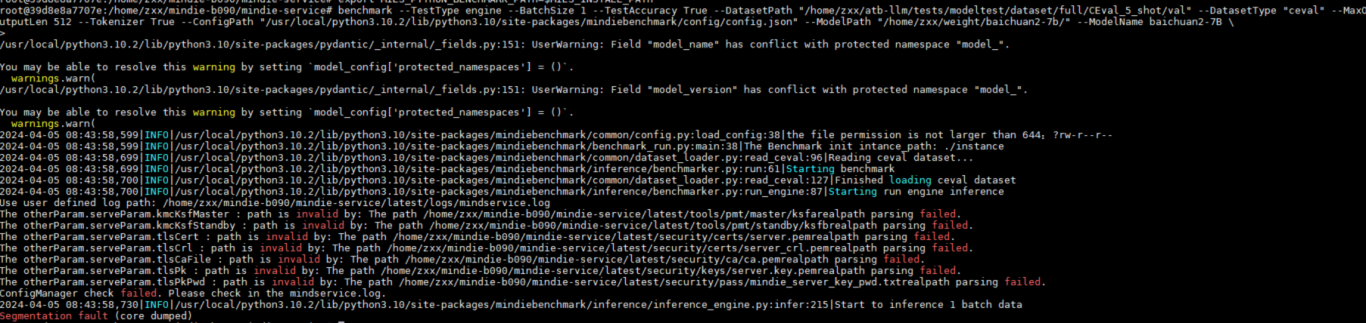
tlsCert Cannot Be Found During MindIE LLM DeploymentSymptom
During MindIE LLM deployment, paths such as tlsCert cannot be found, as shown in the following figure.
Cause Analysis
When the HTTPS service is enabled, the required certificates are not stored in the corresponding directories.
Solution
Save the files required for authentication, such as the server certificate, CA certificate, and server private key, to the corresponding directories.
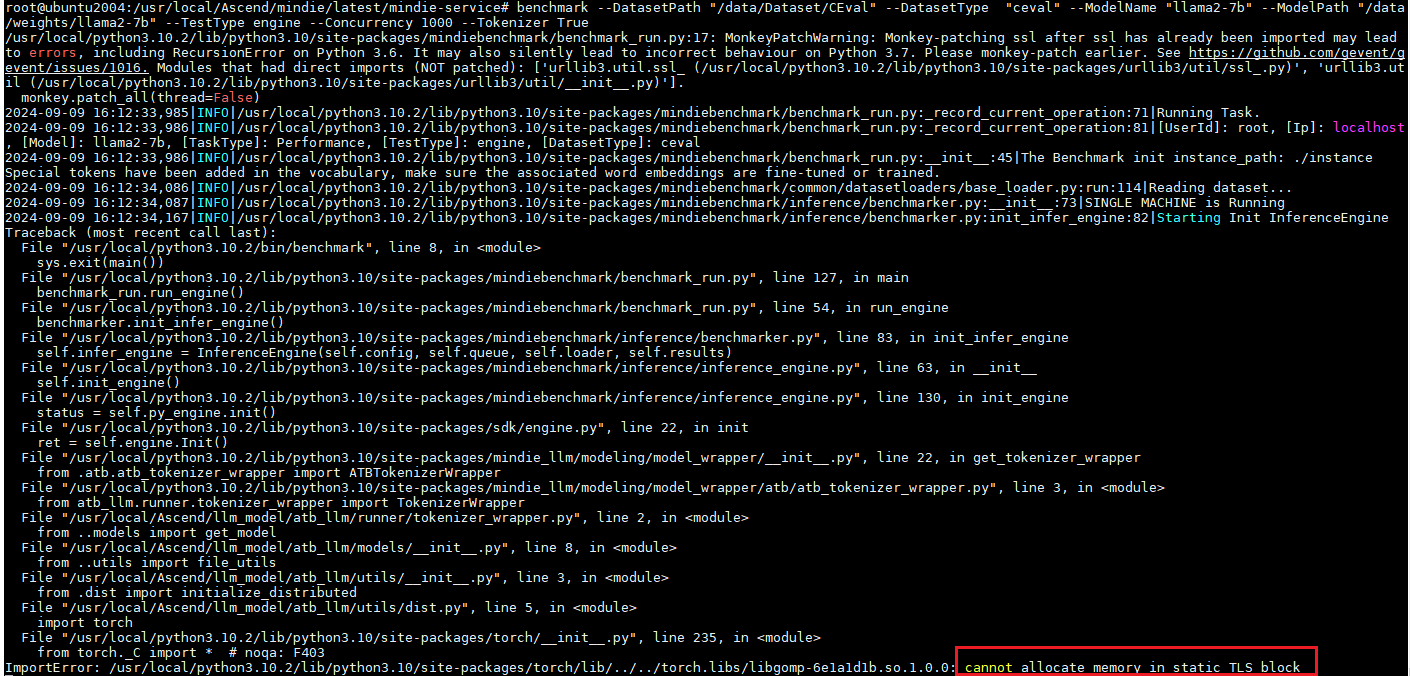
What to Do If Error Message "cannot allocate memory in static TLS block" Is Displayed When Transformers Is Used for Model Inference
Symptom
The following figure displays the error details.
Cause Analysis
The glibc.so file has a bug.
Solution
Run the following command:
export LD_PRELOAD=$LD_PRELOAD:/usr/local/python3.11/lib/python3.11/site-packages/torch/lib/../../torch.libs/libgomp-6e1a1d1b.so.1.0.0Symptom
It takes about 3 hours to load a 1300B model. "B" stands for "Billion".
Cause Analysis
Asynchronous loading is not used.
Solution
Set the environment variable OMP_NUM_THREADS to optimize model loading. OMP_NUM_THREADS is used to set the number of threads of the Open Multi-Processing (OpenMP) parallel programming framework. After the setting, it takes about 10 minutes to load a 1300B model.
export OMP_NUM_THREADS=1In addition, run the following command to start collecting NPU graphics memory fragments:
export PYTORCH_NPU_ALLOC_CONF=expandable_segments:True
export NPU_MEMORY_FRACTION=0.96
What to Do If an Error is Reported Due to the Size Limit During Multi-Modal Model Input
Symptom
When the multimodal model input (image_url/video_url/audio_url) is used, the following error message is displayed:
OpenAI API:
{"error": "Message len not in (0, 4194304], but the length of inputs is xxxxx", "error_type": "Input Validation Error"}vLLM API:
Prompt must be necessary and data type must be string and length in (0, 4194304], but the length of inputs is xxxxxTriton API:
Text_input must be necessary and data type must be string and length in (0, 4194304], but the length of inputs is xxxxx
Cause Analysis
The input image, audio, or video is encoded using Base64 (the data after Base64 encoding is usually 4/3 times that of the original data). As a result, the entire message/prompt/text_input exceeds 4MB, and an error is reported.
Solution
Method 1: Referring to the API restrictions
OpenAI API:
The total size of all fields in the messages parameter in the request cannot exceed 4MB. For details, see inference APIs.
vLLM API:
The total size of all fields under the
promptparameter in the request cannot exceed 4MB. For details, see "API Reference" > "RESTful API Reference" > "EndPoint Service Plane RESTful APIs" > "Compatible with vLLM 0.6.4 APIs" > "Text/Streaming Inference APIs" in MindIE LLM Development Guide.Triton API:
The total size of all fields under the
text_inputparameter in the request cannot exceed 4MB. For details, see "API Description" > "RESTful API Reference" > "EndPoint Service Plane RESTful APIs" > "Compatible with Triton APIs" > "Text Inference APIs" in MindIE LLM Development Guide.NOTE
- If the size of a Base64-encoded image is 1MB and the number of other request characters under
message/prompt/text_inputis greater than 3MB, the total size ofmessage/prompt/text_inputwill exceed 4MB, and an error will be reported. - If
image_url,video_url, oraudio_urlis set to a local image, video, or audio file, or a remote URL, the total number of characters under the URL string and the other request characters undermessage/prompt/text_inputmust be less than 4MB. After the URL is passed, the URL is loaded and parsed to obtain the image, video, or audio file.- Image: no more than 20MB
- Video: no more than 512MB
- Audio: no more than 20MB
- The input encoded using Base64 is more likely to exceed the limit. In the current version, an error is reported because security issues are involved. You are advised to use a web address or local address.
- If the Base64 format is used, do not use the terminal curl. You are advised to use the Python script because the character length of the data after Base64 encoding may exceed the system terminal limit. As a result, the request is truncated.
- If the size of a Base64-encoded image is 1MB and the number of other request characters under
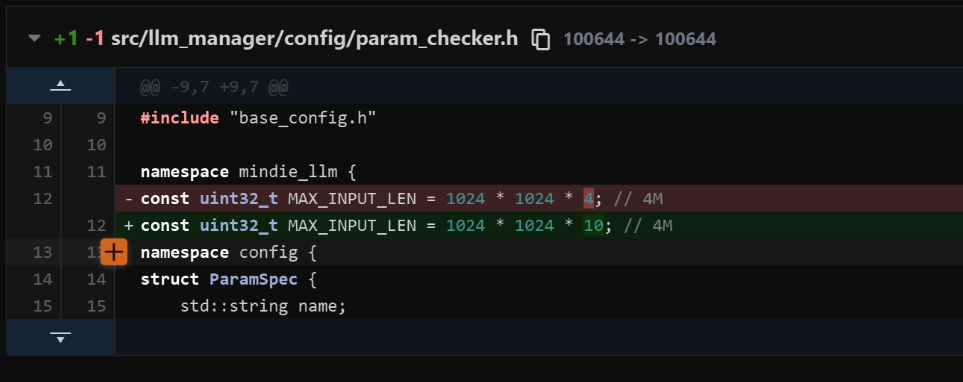
Method 2: Manually modifying the source code
For example, change the upper limit of
inputsto 10MB by modifying the code as follows:Figure 1 Example 1
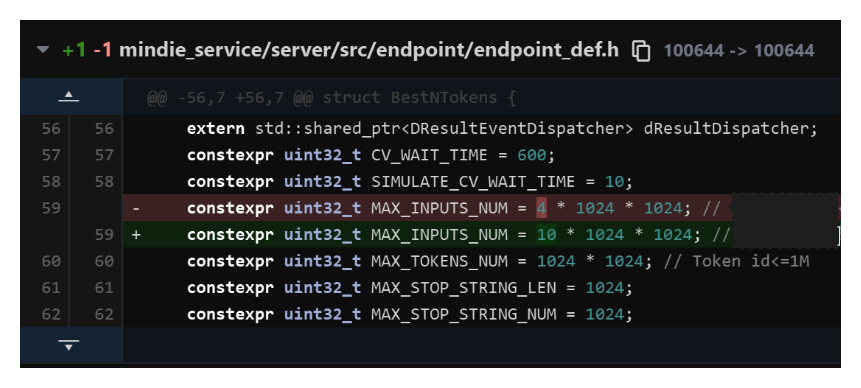
Figure 2 Example 2
What to Do If Error Message "RuntimeError: call calnnCat failed, detail:EZ1001" Is Displayed During Multi-Modal Model Inference
Symptom
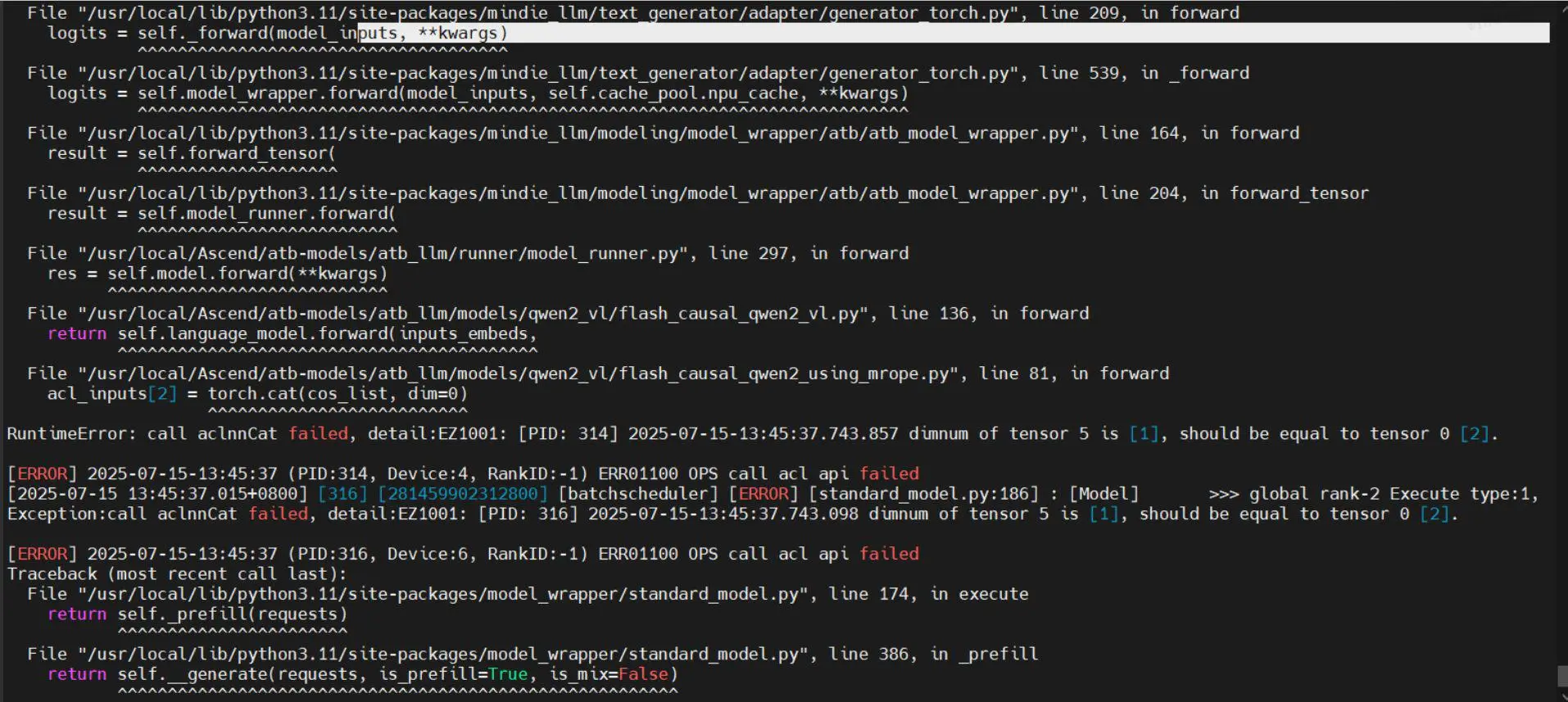
When running inference with the multimodal model, an error similar to the following occurs in MindIE-LLM-master\examples\atb_models\atb_llm\models\qwen2_vl\flash_causal_qwen2_using_mrope.py:
call calnnCat failed, detail:EZ1001: xxxxxxxx dimnum of tensor 5 is [1], should be equal to tensor 0 [2].Figure 1 Error message
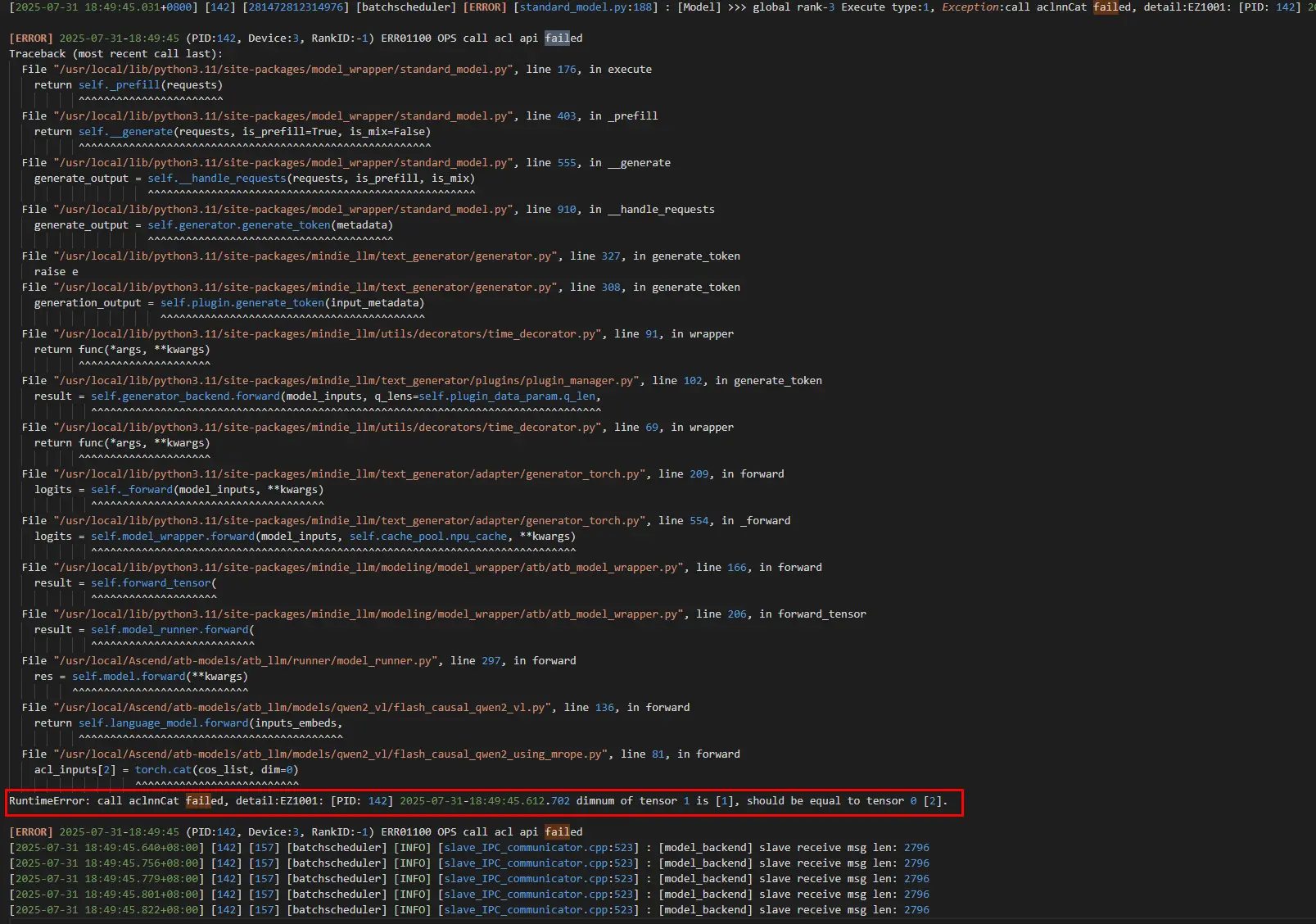
Figure 2 Error file
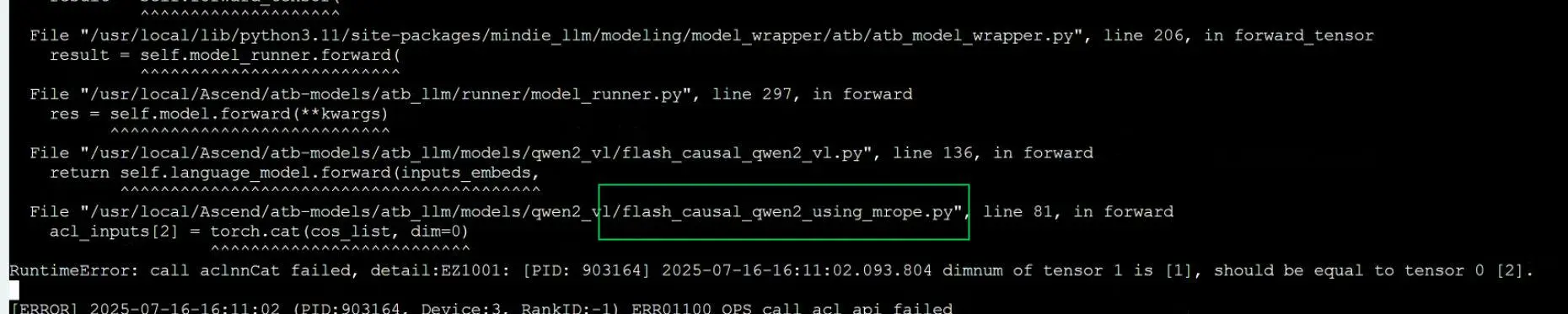
Figure 3 Error file
Cause Analysis
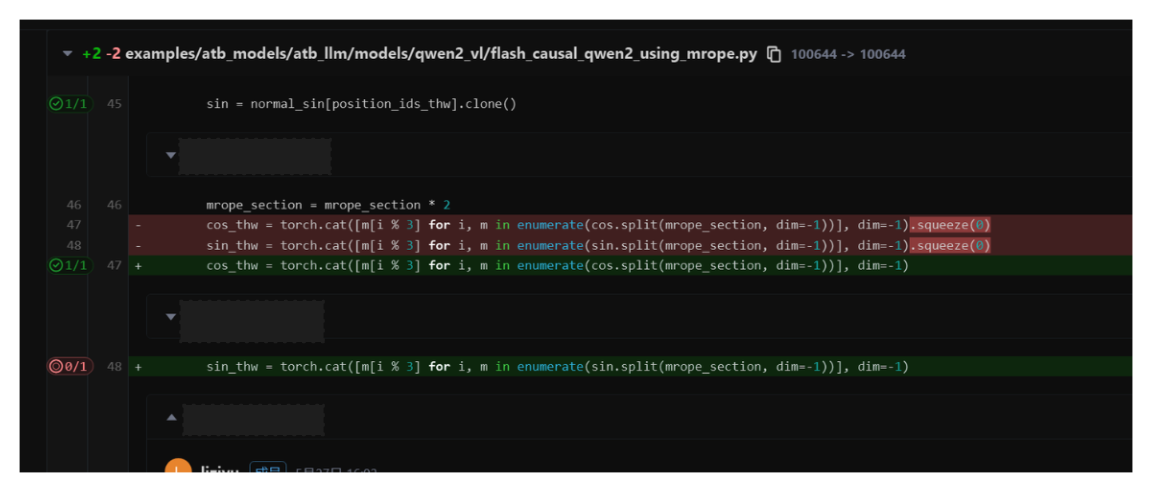
The issue may stem from a concat-related operator where tensor 5 has size 1 in a certain dimension, but the required size is 2, causing a mismatch. This may be related to squeeze, as it removes dimensions of size 1.
Example: If an operator (such as concat or MatMul) expects a dimension to exist and match a specific value (for example, 2), an error will occur if that dimension has been removed by a squeeze operation.
This issue exists in versions earlier than MindIE 2.0 and has been resolved in MindIE 2.0 and later versions.
Solution
Modify the code as follows:
What to Do if Running Qwen2.5-VL Series Models Fails and Reports an Error
Symptom
Running Qwen2.5-VL series models fails, and an error message similar to either of the following is displayed:
Error message 1:
You are using a model of type qwen2_5_vl to instantiate a model of type. This is not supported for all configurations of models and can yield errors.Error message 2:
[ERROR] TBE Subprocess[task_distribute] raise error[], main process disappeared!
Cause Analysis
The model configuration is not supported because the installed dependencies are incorrect. You need to install the corresponding dependency files.
Solution
Handling method for error message 1:
Install the corresponding
requirements.txtfile based on the dependencies required by each model.The path of the common dependency file to be installed for all models is as follows:
{MindIE_installation_directory}/atb_llm/requirements/requirements.txtThe dependency file of each model is in the
modelsdirectory. For example, the dependency file of the Qwen2-VL model is as follows:{MindIE_installation_directory}/atb_llm/requirements/models/requirements_qwen2_vl.txtThe installation command is as follows:
pip install -r {MindIE_installation_directory}/atb_llm/requirements/models/requirements_qwen2_vl.txt
Handling method for error message 2:
Click here to check whether the model is supported by the hardware environment.
Run the following command to check whether the driver version is correct. The driver version must be 23.0.7 or later. You are advised to install the driver of 24.1.RC2 or later.
npu-smi infoCheck whether the initial environment variables have been configured and taken effect.
Check whether the free memory of the system is sufficient.
Run the following command to check the free memory size. Ensure that the size is greater than Weight size/Number of machines.
free -hBased on experience, try to keep
free_mem >= (weight/num_machines) * 1.3.Each time a model is run, check the memory usage on the host to prevent model running failures caused by insufficient memory.
Import the following environment variables:
export HCCL_DETERMINISTIC=false
export HCCL_OP_EXPANSION_MODE="AIV"
export NPU_MEMORY_FRACTION=0.96
export PYTORCH_NPU_ALLOC_CONF=expandable_segments:True
Check whether the multi-node serving parameter settings are consistent.
Restart the server and restart the service.
- Updating the hardware environments, version mapping, drivers, and images to the latest versions can effectively avoid such errors.
- For details about how to handle this error, see handling procedure.
What to Do If an OOM Error is Reported During Model Inference or Serving Startup and Inference
Symptom
During pure model inference and serving startup/inference, various out of memory (OOM) errors are reported. The error information is similar to the following:
RuntimeError: NPU out of memory. Tried to allocate xxx GiB."Cause Analysis
- The model weight file is large.
- The input shape is too large (the batch size is large, the text is too long, or the image, audio, or video is too large).
- The values of some parameters in the configuration file are too large.
Solution
Increase the value of the
NPU_MEMORY_FRACTIONenvironment variable (indicating the memory allocation ratio; default value0.8). The following is an example:export NPU_MEMORY_FRACTION=0.96 export PYTORCH_NPU_ALLOC_CONF=expandable_segments:True export OMP_NUM_THREADS=1Lower the values of parameters such as
maxSeqLen,maxInputTokenLen,maxPrefillBatchSize,maxPrefillTokens, andmaxBatchSizein the serving configuration fileconfig.json. Focus primarily on adjustingmaxPrefillTokens, andmaxSeqLen.The value of
maxPrefillTokensmust be greater than or equal to that ofmaxInputToken.maxPrefillTokensaffects the workspace in the ATB initialization phase. If the value is too large, an OOM error may be reported after the service is started.
Adjust the value of
npuMemSize(the maximum memory a single NPU can allocate for KV cache. The default value is-1, indicating that KV cache is automatically allocated. If the value is greater than 0, KV cache is manually allocated and the KV cache size is fixed based on the set value).npuMemSize= Total memory of a single NPU x Memory allocation ratioUse more NPUs. For example, if two NPUs are used, you can increase the number of NPUs to four or eight. However, you need to confirm the number of NPUs supported by the current model on the current hardware.
What to Do If Error Message "Qwen2VL/Qwen2.5VL_VIT_graph nodes[1] infershape fail" Is Displayed During Multi-Modal Model Inference
Symptom
An error message similar to the following is displayed when the multi-modal model is used for inference:
[standard_model.py:188] : [Model] >>> global rank-2 Execute type:1, Exception:Qwen25VL_VIT_graph nodes[1] infershape fail, enable log: export ASDOPS_LOG_LEVEL=ERROR, export ASDOPS_LOG_TO_STDOUT=1Or
[error] [1256320] [operation_base.cpp:273] Qwen25VL_VIT_layer_0_graph infer shape fail, error code: 8Cause Analysis
The model may not support the hardware environment in the current version.
The input shape is too large, which is not supported by the self-attention operator.
Solution
The model may not support the hardware environment in the current version.
Click here to view the model support of each MindIE version and select the correct MindIE version.
Modify the code in the image. You only need to modify the Python code and do not need to recompile the code. See the following figure.
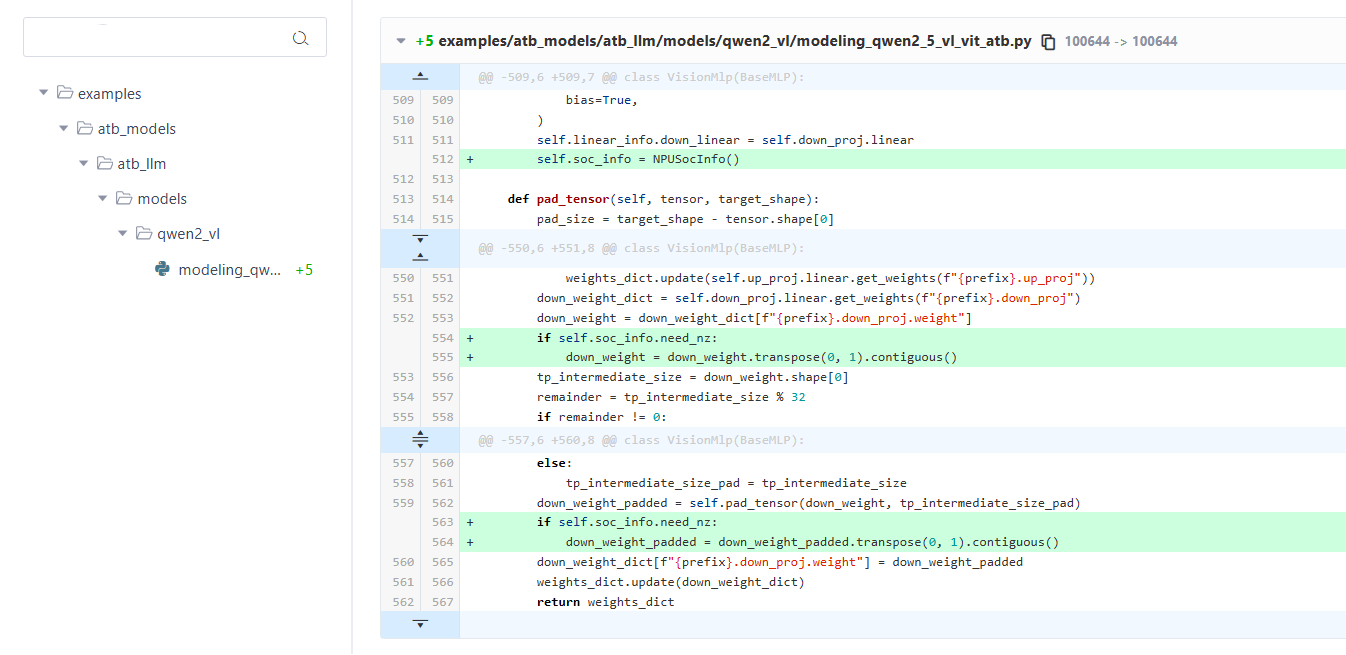
The input shape is too large, which is not supported by the self-attention operator.
Reduce the value of
maxPrefillTokensin the serving configuration fileconfig.json.
What to Do If an Error Is Reported When the image_url, video_url, or audio_url Format Is Used for Multi-Modal Model Inference
image_url, video_url, or audio_url Format Is Used for Multi-Modal Model InferenceSymptom
An error message similar to the following is displayed when the image_url, video_url, or audio_url format is used for multi-modal model inference:
File "/usr/local/lib/python3.11/site-packages/atb_llm/examples/models/qwen2_vl/run_pa.py", line 365, in <module> raise TypeError("The multimodal input field currently only supports 'image' and 'video'.")Cause Analysis
The value in the image_url, video_url, or audio_url parameter does not meet the specified requirements.
Solution
Image
Format 1:
{"type": "image_url", "image_url": image_url}–image_urlsupports local paths, Base64-encoded JPG, and HTTP/HTTPS URLs.Format 2:
{"type": "image_url", "image_url": {"url": {image_url}}}–image_urlsupports local paths, Base64-encoded JPG, and HTTP/HTTPS URLs.Format 3:
{"type": "image_url", "image_url": {"url": "file://{local_path}"}– local paths only.Format 4:
{"type": "image_url", "image_url": {"url": f"data:<mime_type>/<subtype>;base64,<base64_data>"}}– Base64 encoding only. Supports JPG, JPEG, PNG. MIME types are listed below.
| Format | MIME |
|---|---|
| jpg | image/jpeg |
| jpeg | image/jpeg |
| png | image/png |
Video
Format 1:
{"type": "video_url", "video_url": video_url}–video_urlsupports local paths, HTTP, and HTTPS URLs.Format 2:
{"type": "video_url", "video_url": {"url": {video_url}}}–video_urlsupports local paths, HTTP, and HTTPS URLs.Format 3:
{"type": "video_url", "video_url": {"url": "file://{local_path}"}– local paths only.Format 4:
{"type": "video_url", "video_url": {"url": f"data:<mime_type>/<subtype>;base64,<base64_data>"}}– Base64 encoding only. The source format can be MP4, AVI, or WMV. The following table lists the corresponding MIME types. In addition, the length of an encoded video may exceed the maximum length of the MindIE Service request. Therefore, you are advised not to transfer Base64-encoded videos.
| Format | MIME |
|---|---|
| mp4 | video/mp4 |
| avi | video/x-msvideo |
| wmv | video/x-ms-wmv |
Audio
Format 1:
{"type": "audio_url", "audio_url": audio_url}–audio_urlsupports local paths, HTTP, and HTTPS URLs.Format 2:
{"type": "audio_url", "audio_url": {"url": {audio_url}}}–audio_urlsupports local paths, HTTP, and HTTPS URLs.Format 3:
{"type": "audio_url", "audio_url": {"url": "file://{local_path}"}}– local paths only.Format 4:
{"type": "audio_url", "audio_url": {"url": f"data:<mime_type>/<subtype>;base64,<base64_data>"}}– Base64 encoding only. The source format can be MP3, WAV, or FLAC. The following table lists the corresponding MIME types.Format MIME mp3 audio/mpeg wav audio/x-wav flac audio/flac Format 5:
{"type": "input_audio", "input_audio": {"data": f"{audio_base64}", "format": "wav"}}– Whentypeisinput_audio, only Base64-encoded data is supported. The source format can be MP3, WAV, or FLAC, and must be explicitly specified using theformatfield.
What to Do If Error Message "Failed to get vocab size from tokenizer wrapper with exception" Is Displayed When Qwen2-VL Series Models Are Running
Symptom
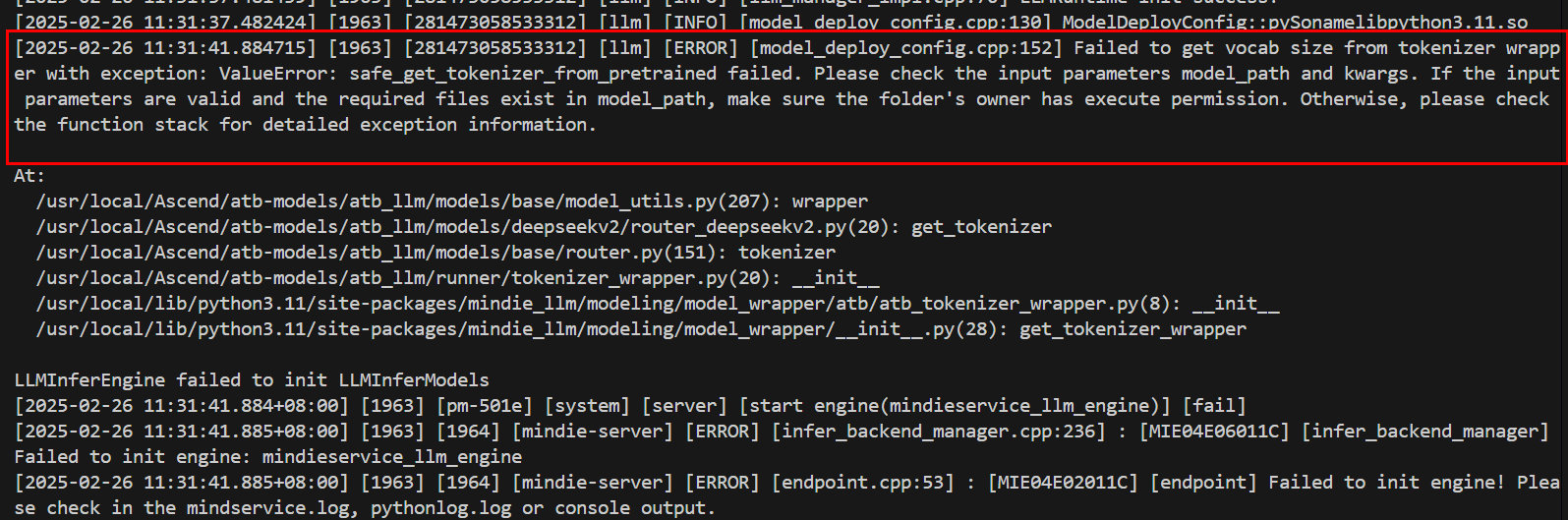
The tokenizer of Qwen2-VL series models reports an error (other models may also report errors, which are irrelevant to the models). The following error message is displayed:
Failed to get vocab size from tokenizer wrapper with exception...Figure 1 Error message
Cause Analysis
- The version of the transformers/tokenizer adapted to the model is incorrect.
- The
trust_remote_codeparameter is set tofalse. - The permissions on the serving
config.jsonfile, model weight path, and modelconfig.jsonfile are incorrect. - The
config.jsonfile may be missing from the model weight files. - The vocabulary file is damaged.
Solution
The version of the
transformers/tokenizeradapted to the model is incorrect.Check the required
transformersversion for each model, typically listed in the model'srequirements.txtfile. Then, check whether thetransformersversion in theconfig.jsonfile under the model weight path is the same as that in theconfig.jsonfile under the model weight path.Use the following
tokenizerverification method to create a Python script. If the script runs successfully, thetokenizercan be loaded correctly.from transformers import AutoTokenizer tokenizer = AutoTokenizer.from_pretrained('path/to/model')
The value of
trust_remote_codeisfalse.- Set the
trust_remote_codeparameter totrue.
- Set the
The permissions on the serving
config.jsonfile, model weight path, and modelconfig.jsonfile are incorrect.- Change the permissions on the serving
config.jsonfile, model weight path, and modelconfig.jsonfile to640.
- Change the permissions on the serving
The
config.jsonfile may be missing from the model weight files.- If the
config.jsonfile is missing, add it.
- If the
The vocabulary file is damaged.
Run the following command to check the integrity of the
tokenizer.jsonfile:sha256sum tokenizer.json # Hash verification. Compare the output value with the original weight file.
What to Do If an Error Is Reported When a Qwen2.5 Series Model Is Deployed on MindIE for Quantization Inference
Symptom
The following error message is displayed when a Qwen2.5 series model is deployed on MindIE for quantization inference:
ValueError: linear type not matched,please check 'config.json' 'quantize' parameterAlternatively,
AttributeError: 'ForkAwareLocal' object has no attribute 'connection'Cause Analysis
The quantize field is not configured.
Solution
When performing quantization inference, add the quantize field to the config.json file in the path where the quantized weights are located. The field value is the quantization mode of the current quantized weights. The following is an example:
"quantize": "w8a8"How to Ensure Consistent Inference Results Each Time When MindIE Is Used for Inference
Symptom
When MindIE is used for inference, the model inference output results are different if the input is the same but the batch sequence is different.
Cause Analysis
The accumulation sequence of the MatMul operator varies across different rows. Additionally, floating-point precision lacks the commutative property of addition. Consequently, even if the input is the same across different rows, the calculation results may be inaccurate.
Solution
Deterministic computing refers to the process of running an inference application multiple times with unchanged inputs, such as an input dataset, ensuring that the output results are consistent each time. You can set the environment variable export ATB_MATMUL_SHUFFLE_K_ENABLE to 0 to disable the shuffle k function of MatMul. After it is disabled, the operator accumulation sequence on all rows can be the same. However, the performance of MatMul decreases by about 10%.
Communication operator:
export LCCL_DETERMINISTIC=1
export HCCL_DETERMINISTIC=true # Enable deterministic computing of reduction communication operators.
export ATB_LLM_LCOC_ENABLE=0
MatMul:
export ATB_MATMUL_SHUFFLE_K_ENABLE=0What to Do If Error Message "ERROR failed to connect. error=SO_ERROR: Connection refused" Is Displayed When the Gloo Connection Fails
Symptom
When the MindIE LLM service is started, a Gloo connection error occurs. Information similar to the following is displayed in the log:
ERROR failed to connect, willRetry=1, retry=2, retryLimit=3, rank=1, size=2, local=[127.0.0.1]:123, remote=[127.0.0.1]:345, error=SO_ERROR: Connection refusedCause Analysis
This error usually occurs in multi-node deployment scenarios. The core cause is that the Gloo component automatically selects an incorrect network interface (NIC), resulting in a failure in communication between nodes.
Solution
Explicitly specify the network interface used by Gloo through environment variables.
View available NICs. Run the following command on each node to view the NIC name:
# Linux
ip addr
# Alternatively,
ifconfig
Common NIC naming formats:
enp*,ens*andeth*Set environment variables. Before starting the service, set the
GLOO_SOCKET_IFNAMEenvironment variable for each node.export GLOO_SOCKET_IFNAME=<NIC name> # For example, export GLOO_SOCKET_IFNAME=enp1s0Precautions for container deployment:
When using Docker, set the container network mode to
host.The NIC name of each machine may be different. You need to set the NIC name to that of the local host.
Precautions for Kubernetes deployment:
In a Kubernetes cluster, the NIC name is usually mapped to
eth0.For Moe EP deployment, you can configure environment variables in the
boot_helper/boot.shscript.
Verification
After the setting is complete, restart the service and check whether the Gloo connection error is rectified.
Starting MindIE Motor CPP Fails with libboost_thread.so.1.82.0 Not Found
libboost_thread.so.1.82.0 Not FoundSymptom
When starting the MindIE Motor CPP service, an error occurs indicating that libboost_thread.so.1.82.0 cannot be found, as shown below.

Cause Analysis
The mindieservice_daemon binary fails to link correctly against its dynamic dependencies, preventing the service from starting.
Resolution
Check the shared libraries linked to
mindieservice_daemon.The following example uses
_{MindIE installation directory}_/latest/mindie-serviceas the installation path.ldd ./bin/mindieservice_daemon
Run
source set_env.shto ensuremindieservice_daemonlinks to the correct dynamic libraries.source set_env.sh
curl Command Fails After Installing MindIE
curl Command Fails After Installing MindIESymptom
After sourcing the MindIE environment variable file with the following command, an error occurs: symbol lookup error: /usr/lib64/libldap.so.2: undefined symbol: EVP_md2, as shown below.
source /usr/local/Ascend/mindie/set_env.sh
Root Cause
The EVP_md2 function is considered insecure. MindIE is compiled against OpenSSL with legacy support disabled, so the EVP_md2 function is not provided. After sourcing the MindIE environment, the bundled libcrypto.so takes precedence over the system library. The curl command depends on EVP_md2, and fails when the function is unavailable.
Solution
Solution 1: Open a new terminal and run
curlwithout sourcing the MindIE environment. If the environment is sourced automatically, tryunset LD_LIBRARY_PATHto avoid using the bundledlibcrypto.so.Solution 2: Run the
curlcommand on another host or in a container wherecurlfunctions correctly.Solution 3: Use
LD_PRELOADto force the use of the systemlibcrypto.so.3:LD_PRELOAD=/usr/lib64/libssl.so.3:/usr/lib64/libcrypto.so.3 curl http://<ip>:<port>/<your_path>