Connection Setup Timeout (EI0006)
The HCCL connection setup timeout is affected by the configuration of the HCCL_CONNECT_TIMEOUT environment variable. If the remote end cannot respond to the service connection setup request within the timeout period, "socket timeout" is reported. In addition, if the remote end exits due to faults such as timeout, "recv fail" may also be reported during data exchange on the established connection.
Symptom
The CANN logs contain the keyword "wait socket establish timeout" or "[InitChannelStage][Timeout]", as shown in the following:
[ERROR] HCCL(137309,all_reduce_test):2025-12-24-16:19:45.416.014 [hccl_socket_manager.cc:813] [137400][Wait][LinkEstablish]wait socket establish timeout, role[0] rank[0] timeout[120 s]
[ERROR] HCCL(137309,all_reduce_test):2025-12-24-16:19:45.416.075 [hccl_socket_manager.cc:877] [137400][Wait][LinksEstablishCompleted] is failed. ret[9].
[ERROR] HCCL(137309,all_reduce_test):2025-12-24-16:19:45.416.206 [hccl_socket_manager.cc:639] [137400]   _________________________LINK_ERROR_INFO___________________________
[ERROR] HCCL(137309,all_reduce_test):2025-12-24-16:19:45.416.208 [hccl_socket_manager.cc:640] [137400]   |  comm error, device[0]
[ERROR] HCCL(137309,all_reduce_test):2025-12-24-16:19:45.416.210 [hccl_socket_manager.cc:642] [137400]   |  dest_ip(user_rank)  |   dest_port   |  src_ip(user_rank)   |   src_port   |   MyRole   |   Status   |    TlsStatus   |
[ERROR] HCCL(137309,all_reduce_test):2025-12-24-16:19:45.416.213 [hccl_socket_manager.cc:644] [137400]   |----------------------|---------------|----------------------|--------------|------------|------------|----------------|
[ERROR] HCCL(137309,all_reduce_test):2025-12-24-16:19:45.416.250 [hccl_socket_manager.cc:599] [137400]   |  192.168.2.198(1)   |  16666  |   192.168.2.199(0)   |  0  |  server  | time out |   ENABLE  | LinkInfo
[ERROR] HCCL(137309,all_reduce_test):2025-12-24-16:19:45.416.266 [hccl_socket_manager.cc:852] [137400][Create][Sockets]Wait links establish completed failed, local role is client. ret[9]
[ERROR] HCCL(137309,all_reduce_test):2025-12-24-16:19:45.416.271 [transport_manager.cc:1031] [137400][SetMachinePara]call trace: hcclRet -> 9
[ERROR] HCCL(137309,all_reduce_test):2025-12-24-16:19:45.416.302 [transport_manager.cc:882] [137400][CreateLink][InitChannelStage][Timeout]SetMachinePara error.
[ERROR] HCCL(137309,all_reduce_test):2025-12-24-16:20:27.522.145 [detect_connect_anomalies.cc:494] [140699][CreateClientConnect]GetStatus fail, ret[9]
[ERROR] HCCL(137309,all_reduce_test):2025-12-24-16:20:36.444.209 [detect_connect_anomalies.cc:126] [137400]-------------------CONNECT TIMEOUT DETECT RESULT-----------------------
[ERROR] HCCL(137309,all_reduce_test):2025-12-24-16:20:36.444.220 [detect_connect_anomalies.cc:129] [137400]TRANSPORT DETECT EVENT[1]:Rank[127.10.0.1/0]: srcRank[127.10.0.1/0] connect destRank[127.10.0.1/1] fail.
[ERROR] HCCL(137309,all_reduce_test):2025-12-24-16:20:36.444.226 [detect_connect_anomalies.cc:134] [137400]----------------------------------------------------------------------
[ERROR] HCCL(137309,all_reduce_test):2025-12-24-16:20:36.444.229 [detect_connect_anomalies.cc:135] [137400]The error above was caused by a failure at the site in the cluster where the events happened.Please confirm whether the link between SRCRANK and DSTRANK or the DSTRANK process is healthy.
[ERROR] HCCL(137309,all_reduce_test):2025-12-24-16:20:36.444.261 [detect_connect_anomalies.cc:136] [137400]NOTE: The detection results are only used to assist in locating the problem and may not represent the actual fault site in some complex scenarios. Please continue to analyze and confirm based on the current detected fault site
[ERROR] HCCL(137309,all_reduce_test):2025-12-24-16:20:36.444.293 [detect_connect_anomalies.cc:143] [137400]----------------------------------------------------------------------
[ERROR] HCCL(137309,all_reduce_test):2025-12-24-16:20:36.444.502 [transport_manager.cc:954] [137400][InitChannelStage][Timeout]Transport init error! createLink para:rank[0]-localUserrank[0]-localIpAddr[127.10.0.1/0], remoteRank[1]-remoteUserrank[1]-remoteIpAddr[127.10.0.1/1], machineType[0], linkMode[1], isUsedRdma[0], tag[AllReduce_127.10.0.1%enp_60000_0_1766564263542840]
[ERROR] HCCL(137309,all_reduce_test):2025-12-24-16:20:36.444.932 [transport_manager.cc:470] [137309][Alloc]call trace: hcclRet -> 9
[ERROR] HCCL(137309,all_reduce_test):2025-12-24-16:20:36.444.937 [hccl_communicator_host.cc:6097] [137309][AllocAlgResource]Alloc transports failed, tag[AllReduce_127.10.0.1%enp_60000_0_1766564263542840ringAllReduceMeshSmallCountExecutor_host]
[ERROR] HCCL(137309,all_reduce_test):2025-12-24-16:20:36.444.943 [hccl_communicator_host.cc:4216] [137309][HcclCommunicator][ExecOp] AllocAlgResource failed, algName=[AllReduceMeshSmallCountExecutor]
[ERROR] HCCL(137309,all_reduce_test):2025-12-24-16:20:36.445.120 [hccl_communicator_host.cc:2896] [137309][AllReduceOutPlace]call trace: hcclRet -> 9
[ERROR] HCCL(137309,all_reduce_test):2025-12-24-16:20:36.445.148 [hccl_comm.cc:304] [137309][HcclComm][AllReduce_127.10.0.1%enp_60000_0_1766564263542840]errNo[0x0000000000000009] index[0]
[ERROR] HCCL(137309,all_reduce_test):2025-12-24-16:20:36.445.156 [op_base_host.cc:166] [137309][HcclAllReduceInner]call trace: hcclRet -> 9
Determining the Connection Remote End to Be Checked Based on the Logs
- If "DETECT EVENT LIST" is recorded in the error logs, pay attention to the failed connection pair in the logs. In the preceding log example, check the root cause of the connection setup failure between device 7 and device 6 of 127.10.0.1 displayed in the exception event DETECT EVENT[1].
- If "DETECT EVENT LIST" is not recorded in the error logs, you can obtain the device IP addresses of the two ends for connection setup from the LINK_ERROR_INFO table in the error logs. In addition, you can obtain the information about the local and remote ranks from the key log information "Transport init error! createLink para:". The format is [hostIp/deviceId], as shown in the following:
grep -r "Transport init error! createLink para:" debug/plog/plog-*.log
[ERROR] HCCL(3215542,all_reduce_test):2025-11-20-18:18:03.114.306 [transport_manager.cc:886] [3215599][InitChannelStage][Timeout]Transport init error! createLink para:rank[2]-localUserrank[2]-localIpAddr[127.10.0.1/2], remoteRank[1]-remoteUserrank[1]-remoteIpAddr[127.10.0.1/1], machineType[1], linkMode[1], isUsedRdma[0], tag[AllReduce_127.10.0.1%enp_60000_0_1763633852475745
- localUserrank: local rank ID
- localIpAddr: IP address of the local rank
- remoteUserrank: remote rank ID
- remoteIpAddr: IP address of the remote rank
- tag: communication operator identifier
After obtaining the information about the remote end that fails to establish a connection, you can further analyze the problem based on the CANN logs of the two ends.
Checking Whether Behavior Inconsistency Exists Across Devices on the Remote End
Connection setup on the parameter plane is an interactive process between two ends. The connection can be successfully set up only when both ends initiate connection setup requests within the timeout period. Otherwise, an error is reported due to waiting timeout. Therefore, you can find the rank information of the remote end based on the error information reported by the local end and view the logs of the remote end for further judgment.
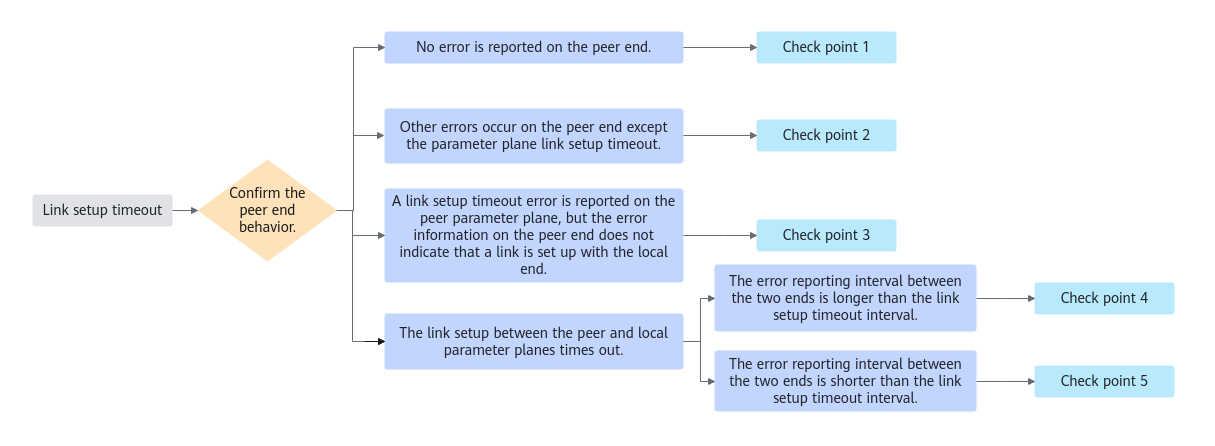
Check point 1:
If no error log is generated on the remote end, the remote end may not deliver the corresponding communication operator synchronously. As a result, the local end cannot receive feedback for the connection setup request from the remote end, causing a waiting timeout.
Check whether the communication operator delivery behavior is consistent on the two ends.
Check point 2:
If other errors occur on the remote end except the parameter plane connection setup timeout, locate the cause of the errors on the remote end.
Check point 3:
If the remote end reports a parameter plane connection setup timeout but the error information indicates that the remote end is setting up a connection with another rank instead of the local end, locate the cause of the parameter plane connection setup timeout on the remote end first.
Check point 4:
If a timeout occurs when the local end and remote end set up a connection on the parameter plane, check whether the error reporting time of the two ends exceeds the connection setup timeout period. If yes, check the root cause of the communication operator delivery timeout on the two ends.
The connection setup timeout period can be specified by HCCL_CONNECT_TIMEOUT. The default value is 120 seconds. You can run the grep -r "HCCL_CONNECT_TIMEOUT" run/plog/ command in the run directory of CANN logs to query the timeout period configured for the current service.
Check point 5:
If the parameter plane connection setup timeout period of the remote end and local end is within the connection setup timeout period, check the network connectivity of the two ends.
- Check whether the TLS switch configurations of the two ends are consistent. If not, the verification fails during socket creation. As a result, the connection setup at both ends times out. You can use the following methods to check the TLS switch configurations of the two ends:
- In the LINK_ERROR_INFO table of the error log, status indicates the TLS status of the current device. UNKNOWN indicates that the status is not obtained, DISABLE indicates that the TLS switch is disabled, and ENABLE indicates that the TLS switch is enabled.
- Run the grep -r "TLS SWITCH" log/run/device-* command in the log of the rank to obtain the TLS status.
run/device-0/device-2849330_20251024153927364.log:[INFO] HCCP(2988,hccp_service.bin):2025-10-24-15:39:26.133.826 [rs_ssl.c:1529]tid:2988,rs_ssl_init(1529) : TLS SWITCH (1)
run/device-1/device-2849331_20251024153928174.log:[INFO] HCCP(30877,hccp_service.bin):2025-10-24-15:39:25.142.466 [rs_ssl.c:1529]tid:30877,rs_ssl_init(1529) : TLS SWITCH (0)
- Run for i in {0..7}; do hccn_tool -i $i -tls -g ; done | grep switch to check the TLS configuration of the node using hccn_tool.
# for i in {0..1}; do hccn_tool -i $i -tls -g ; done | grep switch
dev_id:0, tls switch[0](0:disable, 1:enable), tls preconfigured[1](0:non-preset, 1:preset), tls alarm time threshold[60]days
dev_id:1, tls switch[1](0:disable, 1:enable), tls preconfigured[1](0:non-preset, 1:preset), tls alarm time threshold[60]days
- If the two ends for connection setup are on different ranks, check the network connectivity between the device network ports of the local and remote ends by running the hccn_tool command on one rank to ping the device IP address of the other rank.
hccn_tool -i {node} -ping -g address {Remote end IP address}If the two ranks cannot be pinged or a network port is down, contact the lab administrator to check the configuration of the corresponding NIC and switch.
You need to pay attention to the following:
- The default threshold for generating a detection failure event for the faulty connection is 20s. You can adjust the threshold by setting the connection_fault_detction_time field in the HCCL_DFS_CONFIG environment variable. If this field is set to 0, this function is disabled. If the cluster scale is large or severe inter-device asynchronization occurs, you may need to increase the value of this field to ensure the correctness of the detection result.
- In some complex service scenarios, connection setup timeout and execution timeout may both occur in a single service. You need to perform multiple jumps based on the detection result to locate the fault point. Therefore, you need to check whether the root rank is reached based on the logs of the detected rank. Generally, the root rank of a fault has other errors or has no exception log, or a timeout occurs when the root rank waits for other ranks.