Installing the NPU Driver (Online Installation Using Yum)
This section describes how to quickly install the NPU driver using Yum.
Preparing Users
The following describes how to create installation and running users. If the users already exist, skip this section.
|
Component |
Installation User |
Running User |
|---|---|---|
|
NPU driver |
root |
|
The users used in the example steps in this section are as follows:
- Driver installation user: root
- Running user: Non-root user HwHiAiUser (default running user for the driver)
1 2 |
groupadd HwHiAiUser useradd -g HwHiAiUser -d /home/HwHiAiUser -m HwHiAiUser -s /bin/bash |
For the usage and configuration requirements of the default user HwHiAiUser, see Atlas Hardware Product Account List. You can create other non-root users on your own.
Installing Dependencies and Configuring the Ascend Repository
- Check whether the source is available.
1yum makecacheIf the system reports an error or the waiting time becomes excessive, check whether the network is connected or modify the /etc/yum.repos.d/xxxx.repo file to configure an available repository. (For example, to configure the Huawei mirrored repository, you can see the configuration method of the mirrored repository in the Huawei Mirrors).
- Run the following command to install dependencies.
1yum install -y make dkms gcc kernel-headers-$(uname -r) kernel-devel-$(uname -r)
If an error is reported or any dependency does not exist, rectify the fault by referring to Installing Dependencies Required for Compiling Driver Source Code.
- Configure the Ascend repository. Otherwise, the installation will fail.
curl https://repo.oepkgs.net/ascend/cann/ascend.repo -o /etc/yum.repos.d/ascend.repo && yum makecache
Installing the NPU Driver
|
Product Type |
Installation Command |
||
|---|---|---|---|
|
Ascend 950 products |
|
||
|
Atlas A3 products |
|
||
|
Atlas A2 products |
|
||
|
Atlas training products |
|
||
|
Atlas inference products |
|
1
|
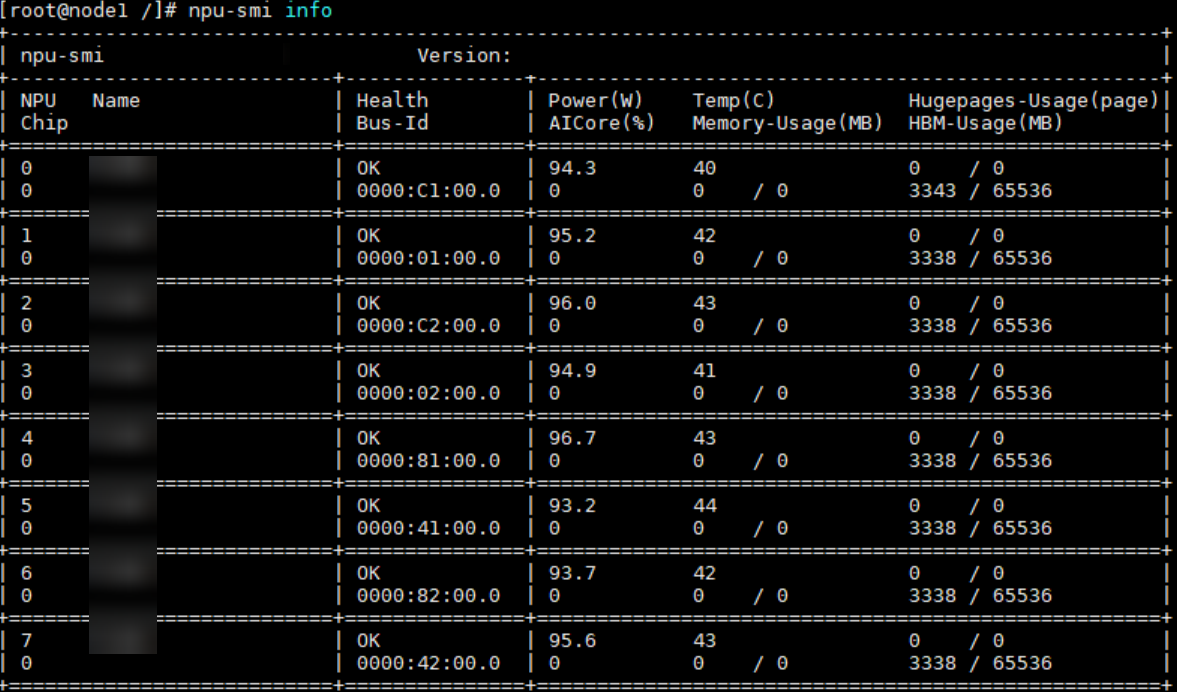
npu-smi info
|
If the driver information is displayed, the driver is loaded. Otherwise, the loading fails. Visit the Support website to seek help in the forum or submit a technical service ticket.