OS Configuration
This section describes how to optimize the Linux kernel page size based on the openEuler OS.
Principle
As the most fundamental memory allocation structure in the operating system, the page table in the Arm64 architecture supports different page sizes, including 4 KB, 16 KB, and 64 KB. Currently, the page table size can only be statically configured and does not support dynamic modification. Page table size is closely correlated with server performance. In inference scenarios, adjusting the page table size based on varying workload requirements can yield substantial performance gains.
Tuning Configuration
This section uses openEuler 22.03 LTS SP4 installed on the Atlas 900 Pod A2 as an example to describe how to perform tuning.
openEuler 22.03 LTS SP4 uses a 4 KB page table by default. Change the page table size to 64 KB and test the inference performance of common NLP models before and after the size change.
Run the following command to query the size of the Linux kernel page table:
getconf PAGESIZE
You can change the size of the Linux kernel page table in either of the following ways:
rpm -ivh --nodeps --force *.rpm
Method 2: Compile and install the source code.
- Install the required dependencies.
yum install -y ncurses-devel bc openssl-devel rpm-build bison flex rsync dwarves elfutils-libelf-devel
- Obtain the kernel source code.
yum -y install kernel-source
The downloaded kernel source code is saved in the /usr/src directory.

- Compile the kernel.
- Open the configuration file.
cd /usr/src/linux-5.10.0-254.0.0.158.oe2203sp4.aarch64
vim .config
In the .config file, change the value of CONFIG_LOCALVERSION to 64k. This parameter is used to display the new kernel version number. This is to distinguish the default kernel from the kernel of 64 KB.
- Make the configuration file take effect and modify the kernel parameter.
make menuconfig
- On the GUI, choose , set Page Size to 64KB, save the settings, and exit.
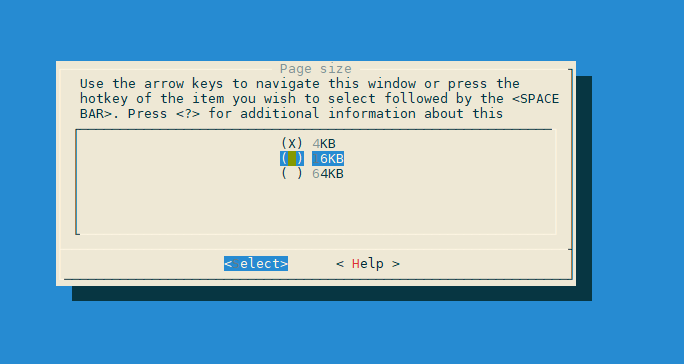
- Run the compilation command.
make rpm-pkg -j
After the compilation is complete, the generated kernel RPM installation package is saved in the /root/rpmbuild/RPMS/aarch64 directory.

- Open the configuration file.
- Install the kernel package.
cd /root/rpmbuild/RPMS/aarch64
rpm -ivh --nodeps --force *.rpm
- Reboot the server.
reboot
- After the restart, check the kernel and page size.
uname -a
The result shows that the page size has been changed to 64 KB.

Performance Test Result
The test models are from MindSpeed LLM. For details, see the official website.
os |
Model |
Experiment No. |
Inference Duration (s) Page Size: 4 KB |
Inference Duration (s) Page Size: 64 KB |
Performance Gains (%) |
|---|---|---|---|---|---|
openEuler 22.03 SP4 |
llama2_7b |
1 |
15.49 |
13.83 |
10.7166 |
2 |
16.02 |
14.18 |
11.4856 |
||
3 |
15.73 |
13.99 |
11.0617 |
||
Average |
15.75 |
14 |
11.0923 |
||
deepseek_r1 |
1 |
10.91 |
9.79 |
10.2658 |
|
2 |
11.03 |
9.79 |
11.2421 |
||
3 |
10.99 |
9.36 |
14.8317 |
||
Average |
10.98 |
9.65 |
12.1166 |