GE Overview
What Is GE?
The Graph Engine (GE) serves as the control center for building and running computational graphs on the Ascend platform. Its key functionalities include graph build, graph build optimization, and graph run control. With the GE capability, algorithm models of mainstream AI frameworks such as PyTorch, TensorFlow, MindSpore, and PaddlePaddle can be converted into computational graphs (Ascend graphs) represented by Ascend intermediate representation (Ascend IR). In addition, the GE graph build acceleration technologies significantly improve the running efficiency of computational graphs on Ascend hardware. Additionally, GE provides unified graph engine APIs and supports user-defined graph structures, helping you quickly deploy neural network services on Ascend hardware.
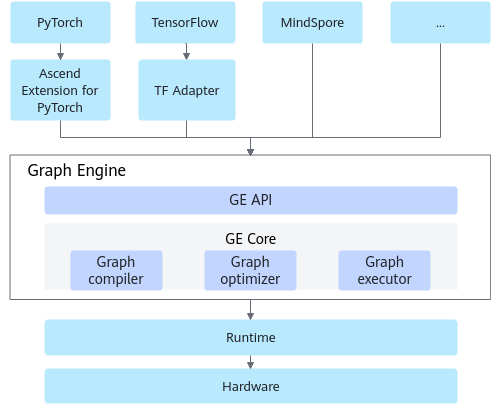
Open Capabilities of GE
- For upper-layer AI framework interconnection and service deployment scenarios: GE provides unified graph engine APIs to connect to upper-layer graph-based open frameworks. Currently, mainstream AI frameworks such as PyTorch (TorchAir graph mode), TensorFlow, MindSpore, and PaddlePaddle are supported. In addition, GE supports user-defined graph structures, helping users efficiently deploy neural network services on Ascend hardware.
- For AI model graph build and run optimization scenarios: GE opens graph build optimization and graph run capabilities, and supports functions such as user-defined graph fusion, enabling users to customize high-performance graph solutions.
GE Entry
GE provides different interconnection solutions in different scenarios, facilitating the use of GE capabilities.
- Running an ONNX or PB model in graph mode
GE provides the ATC command line tool or C++ Parser API to convert the models (in *.onnx/*.pb/*.air format) exported from frameworks such as PyTorch and TensorFlow into offline models (in .om format) that adapt to the AI processor and then run them in graph mode. For details, see:
- Using the GE graph mode in AI frameworks such as PyTorch
- Currently, mainstream AI frameworks such as PyTorch, TensorFlow, MindSpore, and PaddlePaddle can be connected to GE. You only need to migrate and adapt the training code before using the GE capability. This accelerates execution training or online inference tasks on AI processor.
- Connecting the PyTorch framework to the GE
The PyTorch network can be connected to the GE through the TorchAir component of TorchNPU. Torch Ascend Intermediate Representation (TorchAir) is an extended library that supports the graph mode in TorchNPU. It connects to Dynamo of PyTorch to convert the FX (functionalization) graph of PyTorch into a computational graph indicated by Ascend IR. GE is then used to optimize the build of the computational graph and deliver the graph to the Ascend hardware for execution.Figure 2 Software architecture of the Ascend platform in PyTorch graph mode
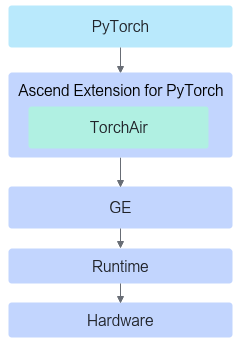
The Ascend compilation backend provided by TorchAir can be passed to the torch.compile API of PyTorch as a parameter to support the graph mode. An example is shown below:
 1
 2
 3
 4
 5
 6
 7
 8
 9
10
11
12
13
14
15
16
17
18
19
20
21
22
23
24
25
26
# Import torch_npu and then torchair.
import torch
import torch_npu
import torchair

# Define a model.
class Model(torch.nn.Module):
    def __init__(self):
        super().__init__()
    def forward(self, x, y):
        return torch.add(x, y)

# Instantiate the model.
model = Model()

# Obtain the default backend provided by the NPU from TorchAir.
config = torchair.CompilerConfig()
npu_backend = torchair.get_npu_backend(compiler_config=config)

# Use the backend of TorchAir to call the compile API for compiling the model.
opt_model = torch.compile(model, backend=npu_backend)

# Run the compiled model.
x = torch.randn(2, 2)
y = torch.randn(2, 2)
opt_model(x, y)
The method is as follows:
- Connecting the TensorFlow Framework to the GE
The TensorFlow 1.15 network is run in graph mode. It can be connected to the GE through TF Adapter to convert the front-end TensorFlow model into a computational graph indicated by Ascend IR. GE is then used to optimize the build of the computational graph and deliver the graph to the Ascend hardware for execution. The TensorFlow 2.6.5 network is run in eager mode (single-operator mode) by default. That is, each operator is executed and returned immediately after being delivered. TensorFlow 2.6.5 provides the tf.function decorator to encapsulate the TF2 operators called in Python functions into a graph for execution, achieving better performance benefits. For current TensorFlow 2.6.5, the Ascend platform supports executing only function operators decorated by tf.function on Ascend hardware with the accelerated mode, that is, the network can be run only in graph mode.
Figure 3 Software architecture of the Ascend platform in TensorFlow graph mode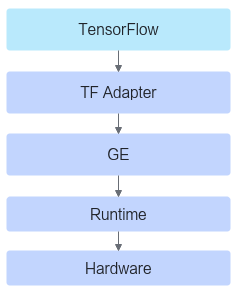
For details about how to migrate the original TensorFlow 1.15 network to the Ascend platform, see TensorFlow 1.15 Model Porting.
For details about how to migrate the original TensorFlow 2.6.5 network to the Ascend platform, see TensorFlow 2.6.5 Model Porting.
- Connecting the MindSpore framework to the GE
The MindSpore network natively supports the GE. You can directly use the GE capability based on the MindSpore framework. For details, visit https://www.mindspore.cn/en.
- Connecting the PaddlePaddle framework to the GE
- Connecting the PyTorch framework to the GE
- For other third-party frameworks, GE provides unified C++ APIs for you to complete adaptation. For details, see Using Graph Engine APIs to Construct a New Graph.
- Currently, mainstream AI frameworks such as PyTorch, TensorFlow, MindSpore, and PaddlePaddle can be connected to GE. You only need to migrate and adapt the training code before using the GE capability. This accelerates execution training or online inference tasks on AI processor.
- Using graph engine APIs to construct a new network
- GE provides unified C++ graph engine APIs for you to customize graph structures and run them on AI processor based on GE. For details, see Using Graph Engine APIs to Construct a New Graph.
- GE provides a set of simplified graph construction APIs in function style. These APIs can be used to construct graphs with less code, improving the usability of graph construction and ensuring foolproof capabilities. For details, see Using ES to Construct Graphs.