Scenario

This section describes the typical service scenarios of graph build and run. You can perform services as required.

Table 1 Graph build and run

Scenario

Description

Applicability

Building a Graph into an Offline Model

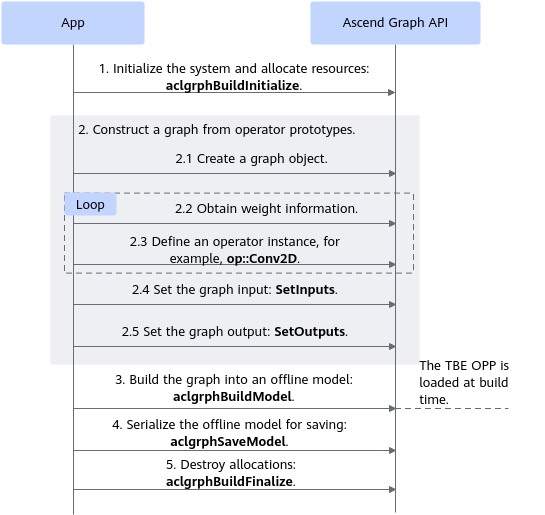
Build a graph and save it as an offline .om model. Load the model through the model loading API, and call the model run API for inference.

For details, see Model Inference in Application Development (C&C++).

All

Building and Running a Graph

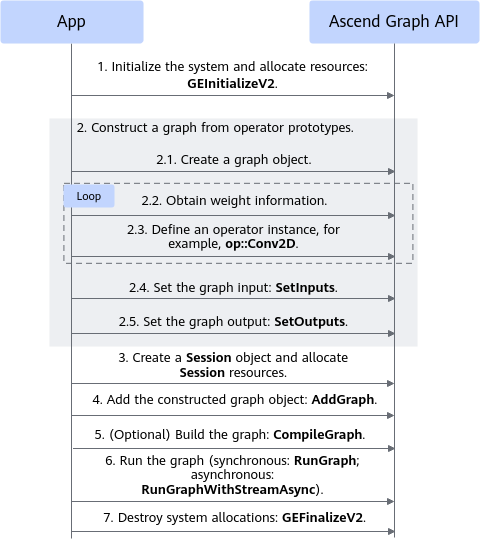
After a graph is constructed, build and run the graph directly. Use AddGraph to load the graph object. When the graph is running, the following two scenarios are involved based on the called API:

  • Synchronous mode: After the graph is loaded, use RunGraph to run the graph synchronously to obtain the result.
  • Asynchronous mode: After the graph is loaded, use RunGraphWithStreamAsync to run the graph asynchronously to obtain the result.

Atlas inference product : supported

Atlas training product : supported

Atlas A2 training product / Atlas A2 inference product : supported

Atlas A3 training product / Atlas A3 inference product : supported

Atlas 350 Accelerator Card: supported

Atlas 200I/500 A2 inference product : not supported

Building a Graph into an Offline Model

In this scenario, a graph is built and saved as an OM offline model. Figure 1 shows the process. For details about services, see Building a Graph into an Offline Model.

Figure 1 Model build process

Building and Running a Graph

Figure 2 shows the workflow of constructing, building, and running a graph. For details about services, see Building and Running a Graph.

Figure 2 Graph build and run