Construction Procedure
Description
You can use the created FlowOperator node to create an instance of FlowGraph, and set the input and output in the instance to construct a graph.
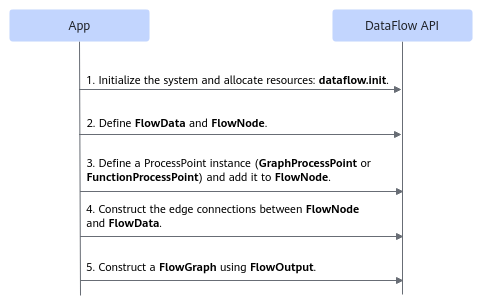
Defining a Node Using the Derivative API of FlowOperator
- Include the header file.
1#include "flow_graph/data_flow.h"
- Create a FlowOperator instance.
The following two types are supported:
- FlowData
1
2
auto data0 = dflow::FlowData("Data0", 0);
auto data1 = dflow::FlowData("Data1", 1);
- FlowNode
1auto node0 = dflow::FlowNode("node0", 2, 1);
Note: The data name and node name in the graph must be unique.
- FlowData
- Set the input of FlowOperator.
The input needs to be set only for FlowOperator of the FlowNode type.
Set the input of FlowOperator through SetInput. The following is an example:1 2 3
auto node0 = dflow::FlowNode("node0", 2, 1) // Create a FlowOperator instance of the FlowNode type. .SetInput(0, data0) // Set data0 as the first input of FlowNode. .SetInput(1, data1); // Set data1 as the second input of FlowNode.
FlowOperator Edge Expression
The edges between FlowOperator nodes are data edges. A data edge is used to specify the input of FlowOperator and expressed as follows.
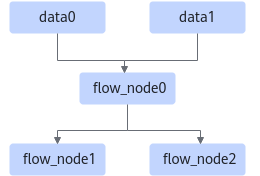
The sample code and comments for the preceding expression are as follows:
1 2 3 4 5 | auto data0 = dflow::FlowData("Data0", 0); auto data1 = dflow::FlowData("Data1", 1); auto node0 = dflow::FlowNode("flow_node0", 2, 2).SetInput(0, data0).SetInput(1, data1); // FlowData has only one output. When the output is used as the input of FlowNode, the output index of FlowData does not need to be passed during input setup. auto node1 = dflow::FlowNode("flow_node1", 1, 1).SetInput(0, flow_node0, 0); // node0 has two outputs. The first output is used as the first input of node1, and the output index (index=0) of node0 needs to be passed during input setup. auto node2 = dflow::FlowNode("flow_node2", 1, 1).SetInput(0, flow_node0, 1); // node0 has two outputs. The second output is used as the first input of node2, and the output index (index=1) of node0 needs to be passed during input setup. |
Creating a FlowGraph Instance
After creating FlowOperator, you need to create a FlowGraph instance and set the input FlowOperator and output FlowOperator in FlowGraph. The main procedure is as follows:
- Include the header file.
1#include "flow_graph/data_flow.h"
- Create a FlowGraph object.
1dflow::FlowGraph flow_graph("flow_graph");
For details about related APIs, see Class FlowGraph.
- Set the input and output nodes of FlowGraph by using the following APIs:
- SetInputs: sets the input node in FlowGraph.
- SetOutputs: sets the output node in FlowGraph.
- SetOutputs (index): specifies one of the FlowNode outputs as the model output, if FlowNode that functions as the output node has multiple outputs.
In the following example, all outputs of node2 are used as the model outputs. For details about how to use only specific outputs of certain nodes as model outputs, see SetOutputs (index).
1 2 3
std::vector<FlowOperator> inputs{data0, data1}; std::vector<FlowOperator> outputs{node2}; flow_graph.SetInputs(inputs).SetOutputs(outputs);
To set more than one FlowData nodes as the input, ensure that the inputs argument sequence is consistent with that specified by index of the FlowData nodes. Otherwise, an error will be reported during model generation. The sample code is as follows:
1 2 3 4 5 6
// Prepare the first input.
auto data0 = dflow::FlowData("Data0", 0);   // Create the data0 node with index being 0.
// Prepare the second input.
auto data1 = dflow::FlowData("Data1", 1);   // Create the data1 node with index being 1.
// Set the input node for FlowGraph.
std::vector<FlowOperator> inputs{data0, data1};