Notify Management
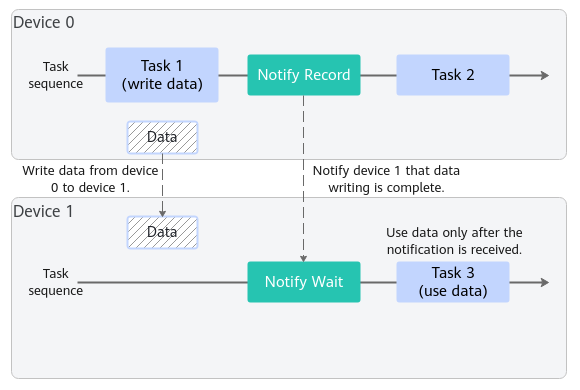
Notify is typically used for synchronization between multiple devices. As shown in the following figure, after sending data to device 1, device 0 uses Notify to notify device 1 that the data has been written.
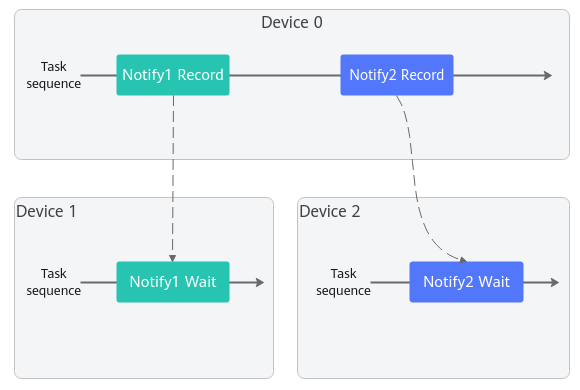
Notify supports only the one-to-one notification. To notify multiple devices, you need to perform the Notify operation multiple times, as shown in the figure.
The main difference between Notify and events is that after Notify Wait is complete, the Notify status is automatically reset. Therefore, a Notify Record task can notify only one Notify Wait task. However, Event Wait does not automatically reset the event status. Therefore, an Event Record task can notify one or more Event Wait tasks. In addition, Notify does not support the timestamp function.
In the scenario where two streams are synchronized on the same device, Notify can achieve the same effect as events.
The following is a code example for calling Notify APIs:
1 2 3 4 5 6 7 8 9 10 11 12 13 14 15 16 17 18 19 20 21 22 23 24 25 |
// Create a stream. aclrtStream stream1; aclrtStream stream2; aclrtCreateStream(&stream1); aclrtCreateStream(&stream2); // Create a Notify. aclrtNotify notify; aclrtCreateNotify(¬ify, ACL_NOTIFY_DEFAULT); // Insert a wait task into stream 2. aclrtWaitAndResetNotify(notify, stream2, 0); // Dispatch compute tasks to stream 2. … // Dispatch the copy task on which the compute task in stream 2 depends to stream 1. … // Insert a record task into stream 1. aclrtRecordNotify(notify, stream1); // Wait until the task is complete. aclrtSynchronizeStream(stream1); aclrtSynchronizeStream(stream2); // Destroy the Notify. aclrtDestroyNotify(notify); |