Media Data Processing Operators
Basic Concepts
The media data processing operator is usually called in two-phase API mode. In the following example, acldvpp indicates the operator API prefix, and Xxx indicates the operator type, for example, EncodeJpeg.
1 2 | aclnnStatus acldvppXxxGetWorkspaceSize(const aclTensor *src, ..., aclTensor *out, ..., uint64_t *workspaceSize, aclOpExecutor **executor); aclnnStatus acldvppXxx(void *workspace, uint64_t workspaceSize, aclOpExecutor *executor, aclrtStream stream); |
The functions of the two-phase APIs are as follows:
- First-phase API acldvppXxxGetWorkspaceSize: This API verifies input parameters, infers the output shape in dynamic shape scenarios, tiles data, and computes the workspace memory size required for operator execution.
- Second-phase API acldvppXxx: This API performs operator computation. It involves DFX (such as dump and overflow/underflow detection) and calls the LaunchKernel API provided by Runtime.
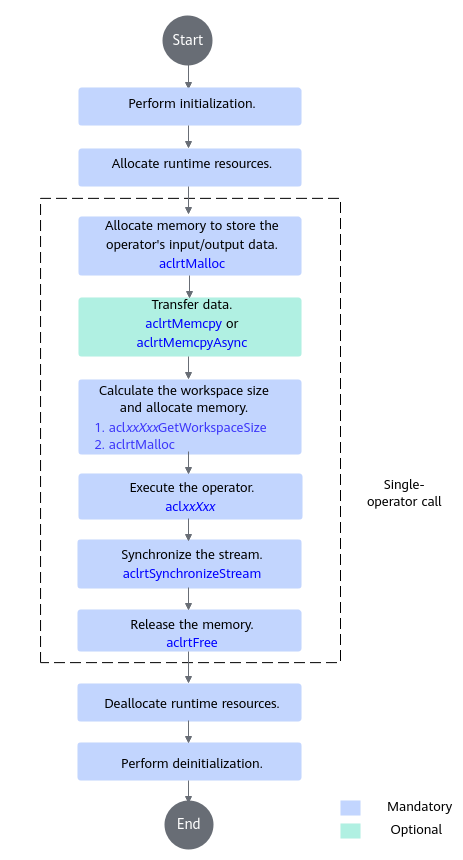
The following figure shows the API call process.
Sample Code
The following uses the JPEG Encoder (JPEGE) operator as an example to describe the basic logic of calling the two-phase APIs of an operator. The call process is similar for other operators. Modify the code based on your actual need.
The JPEGE operator encodes a single-channel (GRAY) or three-channel (RGB) image into a JPEG image. You can use the following sample code for reference and name the file jpege_demo.cpp:
#include <vector>
#include <string>
#include <cstdint>
#include <functional>

#include "acl/acl.h"
#include "acldvpp_op_api.h"
#include <memory>

#define ALIGN_UP(x, a) ((((x) + ((a) - 1U)) / (a)) * (a))

typedef int32_t (*InitFunc)(const char *configPath);
typedef int32_t (*FinalizeFunc)();

InitFunc initFunc;
FinalizeFunc finalizeFunc;

class ScopeGuard {
    public:
    // Noncopyable
    ScopeGuard(ScopeGuard const &) = delete;
    ScopeGuard &operator=(ScopeGuard const &) = delete;

    explicit ScopeGuard(const std::function<void()> &on_exit_scope) : on_exit_scope_(on_exit_scope), dismissed_(false) {}

    ~ScopeGuard() {
        if (!dismissed_) {
            if (on_exit_scope_ != nullptr) {
            try {
                on_exit_scope_();
            } catch (std::bad_function_call &) { }
                catch (...) { }
            }
        }
    }

    void Dismiss() { dismissed_ = true; }

    private:
    std::function<void()> on_exit_scope_;
    bool dismissed_;
};

int64_t GetShapeSize(const std::vector<int64_t>& shape)
{
    int64_t shape_size = 1;
    for (auto i : shape) {
        shape_size *= i;
    }
    return shape_size;
}

// Custom function, which is used to create a tensor.
template <typename T>
int32_t CreateAclTensor(const std::vector<T>& hostData, const std::vector<int64_t>& shape, void** deviceAddr,
    aclDataType dataType, aclTensor** tensor, aclFormat tensorFormat, bool needCopy = true) {
    auto size = GetShapeSize(shape) * sizeof(T);

    // Allocate the device memory.
    aclrtMalloc(deviceAddr, size, ACL_MEM_MALLOC_HUGE_FIRST);
    aclrtMemset(*deviceAddr, size, 0, size);
    // Copy the data from the host to the device.
    aclrtMemcpy(*deviceAddr, size, hostData.data(), size, ACL_MEMCPY_HOST_TO_DEVICE);

    // Compute the access strides of the contiguous tensor.
    std::vector<int64_t> strides(shape.size(), 1);
    for (int64_t i = shape.size() - 2; i >= 0; i--) {
      strides[i] = shape[i + 1] * strides[i + 1];
    }

    // Create an aclTensor.
    *tensor = aclCreateTensor(shape.data(), shape.size(), dataType, strides.data(), 0, tensorFormat,
                              shape.data(), shape.size(), *deviceAddr);
    return 0;
}

int32_t encode_jpeg(aclrtStream stream) {
    constexpr uint32_t jpegeHeaderSize = 640U;
    constexpr uint32_t startAlignBytes = 128U;
    constexpr uint32_t memoryAlignSize = 2097152U; // 2M: 2*1024*1024
    int64_t inChannel = 0;
    uint32_t inWidth = 1920;
    uint32_t inHeight = 1080;

    // 1. Initialize parameters.
    std::vector<int64_t> selfShape = {1, inChannel, inHeight, inWidth}; // Default NCHW
    uint32_t encode_size = ALIGN_UP(inWidth, 16U) * ALIGN_UP(inHeight, 16U) * 3 / 2 +
        jpegeHeaderSize + startAlignBytes;
    encode_size = ALIGN_UP(encode_size, memoryAlignSize);
    std::vector<int64_t> outShape = {encode_size};
    std::vector<float> inputPic(inWidth * inHeight * inChannel, 0.0);
    std::vector<float> outputPic(encode_size, 0.0);
    size_t inputPicSize = inWidth * inHeight * inChannel;

    std::shared_ptr<FILE> srcFp(fopen("./1920x1080_nv12.yuv", "rb"), fclose);
    fread(inputPic.data(), 1, inputPicSize, srcFp.get());

    // 2. Create the input and output, and convert the vector into an aclTensor.
    void* selfDeviceAddr = nullptr;
    void* outDeviceAddr = nullptr;
    aclTensor* self = nullptr;
    aclTensor* out = nullptr;
    CreateAclTensor(inputPic, selfShape, &selfDeviceAddr, aclDataType::ACL_UINT8, &self, aclFormat::ACL_FORMAT_NCHW);
    ScopeGuard autoCloseInTensor([self, selfDeviceAddr] { aclrtFree(self);aclDestroyTensor((const aclTensor *)selfDeviceAddr);});

    // The output tensor shape is modified each time the execution is complete. Therefore, the output tensor construction is placed inside the loop for the performance test. Otherwise, the second execution will be blocked internally.
    // When it is placed inside, the file cannot be retained after the execution is complete because the memory is released in advance.
    CreateAclTensor(outputPic, outShape, &outDeviceAddr, aclDataType::ACL_UINT8, &out, ACL_FORMAT_ND, false);
    ScopeGuard autoCloseOutTensor([out, outDeviceAddr] { aclrtFree(out);aclDestroyTensor((const aclTensor *)outDeviceAddr);});

    // 3. Call the CANN operator library API.
    uint64_t workspaceSize = 0;
    aclOpExecutor* executor;
    const uint32_t quality = 75;
    // Call the first-phase API.
    acldvppEncodeJpegGetWorkspaceSize(self, quality, out, &workspaceSize, &executor);
    // Allocate device memory based on workspaceSize calculated by the first-phase API.
    void* workspaceAddr = nullptr;
    if (workspaceSize > 0) {
        aclrtMalloc(&workspaceAddr, workspaceSize, ACL_MEM_MALLOC_HUGE_FIRST);
    }
    ScopeGuard autoWorkspace([workspaceAddr] { aclrtFree(workspaceAddr); });
    // Call the second-phase API.
    acldvppEncodeJpeg(workspaceAddr, workspaceSize, executor, stream);

    // Obtain the length of the encoded JPEG image.
    int64_t* viewDims = nullptr;
    uint64_t viewDimsNum = 0;
    aclGetViewShape(out, &viewDims, &viewDimsNum);
    std::vector<int64_t> outSize(viewDims, viewDims + viewDimsNum);
    size_t outputPicSize = outSize[0];

    // Obtain the output value and copy the result data from the device memory to the host.
    aclrtMemcpy(outputPic.data(), outputPicSize, outDeviceAddr, outputPicSize, ACL_MEMCPY_DEVICE_TO_HOST);

    std::shared_ptr<FILE> dstFp(fopen("./1920x1080_nv12.jpg", "wb+"), fclose);
    fwrite(outputPic.data(), 1, outputPicSize, dstFp.get());

    return 0;
}

int32_t Init(int32_t deviceId, aclrtContext* context, aclrtStream* stream)
{
    // If the Profiling function is required, call the aclint API for initialization. If the Profiling function is not required, call the acldvppInit API directly.
    initFunc = acldvppInit;
    finalizeFunc = acldvppFinalize;

    auto initFunc(nullptr);
    ScopeGuard autoDeinit([] { finalizeFunc(); });

    aclrtSetDevice(deviceId);
    ScopeGuard autoResetDevice([deviceId] { aclrtResetDevice(deviceId); });

    aclrtCreateContext(context, deviceId);
    ScopeGuard autoDestroyContext([context] { aclrtDestroyContext(context); });

    aclrtSetCurrentContext(*context);

    aclrtCreateStream(stream);
    ScopeGuard autoDestroyStream([stream] { aclrtDestroyStream(stream); });

    autoResetDevice.Dismiss();
    autoDestroyContext.Dismiss();
    autoDestroyStream.Dismiss();
    autoDeinit.Dismiss();
    return 0;
}

// Destroy the stream and context resources, and reset the device.
void UnInit(int32_t deviceId, aclrtContext context, aclrtStream stream)
{
    aclrtDestroyStream(stream);
    aclrtDestroyContext(context);
    aclrtResetDevice(deviceId);
    finalizeFunc();
}

int32_t main()
{

    // Initialize the system, specify the compute device, and create a context and a stream in sequence.
    int32_t deviceId = 0;
    aclrtContext context;
    aclrtStream stream;
    Init(deviceId, &context, &stream);
    // Encode the JPEG image.
    encode_jpeg(stream);

    // Release the resources.
    UnInit(deviceId, context, stream);
    return 0;
}
Build and Running
- Prepare the build script file CMakeLists.txt.
cmake_minimum_required(VERSION 3.14) set(ASCEND_PATH $ENV{ASCEND_HOME_PATH}) # Set the executable file name (for example, opapi_test) and specify the directory where the CPP file to be executed is stored. add_executable(opapi_test jpege_demo.cpp) # Set the library file paths. find_library(NNOPBASE_LIBRARY_DIR libnnopbase.so "${ASCEND_PATH}/lib64") # aclTensor-related APIs find_library(ACLDVPPOP_LIBRARY_DIR libacl_dvpp_op.so "${ASCEND_PATH}/lib64") find_library(DVPPOPBASE_LIBRARY_DIR libdvpp_op_base.so "${ASCEND_PATH}/lib64") find_library(ASCENDCL_LIBRARY_DIR libascendcl.so "${ASCEND_PATH}/lib64") find_library(ASCENDCL_C_SEC_DIR libc_sec.so "${ASCEND_PATH}/lib64") target_link_libraries(opapi_test PRIVATE -Wl,--no-as-needed ${NNOPBASE_LIBRARY_DIR} ${ACLDVPPOP_LIBRARY_DIR} ${ASCENDCL_LIBRARY_DIR} ${ASCENDCL_C_SEC_DIR} ${DVPPOPBASE_LIBRARY_DIR} -Wl,--as-needed ) # Set header file paths. target_include_directories(opapi_test PRIVATE ${ASCEND_PATH}/include/acldvppop/ ${ASCEND_PATH}/include/ ) - Build and run the script.
- Go to the directory where CMakeLists.txt is stored and run the following command to create the build folder to store the generated compilation file.
mkdir -p build
- Go to the directory where build is located, run the cmake command for build, and then run the make command to generate an executable file.
1
2
3
cd build
cmake ..
make
After the build is successful, the executable file opapi_test is generated in the build directory.
- Run the executable file opapi_test.
./opapi_test
- Go to the directory where CMakeLists.txt is stored and run the following command to create the build folder to store the generated compilation file.
Parent topic: Media Data Processing (DVPP)