VENC
This section describes the API call sequence of VENC, and sample code is also provided to help you better understand the process.
The video encoder (VENC) encodes YUV420SP images into H.264/H.265 video streams. For details about the VENC functions and restrictions, see DVPP Media Acceleration Library.
To optimize the video encoding quality, you can set basic parameters when creating a VENC channel or set advanced parameters by calling the corresponding set API. For details, see Optimization of Video Encoding Quality.
API Call Sequence
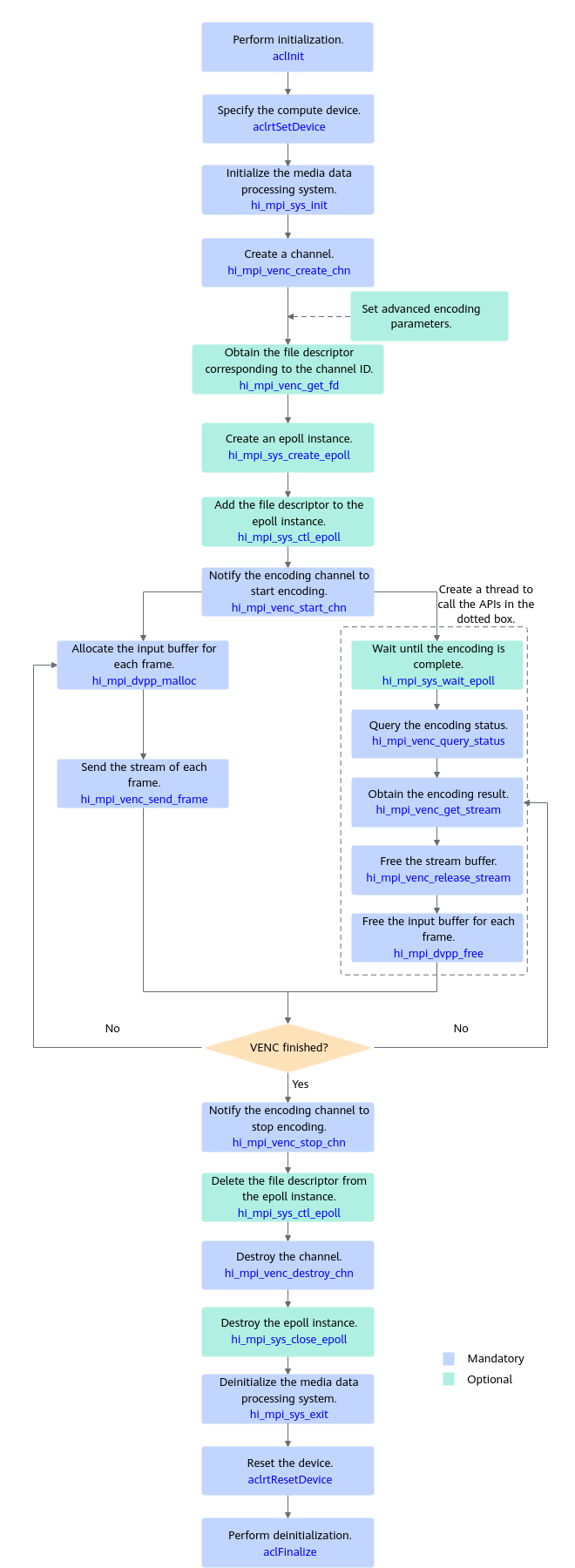
- Initialize resources.
- Call aclInit to initialize the system.
- Call aclrtSetDevice to specify the compute device.
- Call hi_mpi_sys_init to initialize the media data processing system.
- Call hi_mpi_venc_create_chn to create a channel.
After creating a channel, you can set advanced encoding parameters such as the scene mode and stream controller as required. For details, see sections from hi_mpi_venc_set_jpeg_param to hi_mpi_venc_compact_jpeg_tables.
- Call hi_mpi_venc_get_fd to obtain the file descriptor corresponding to the channel ID.
Note: In Open Ctrl CPU form, to ensure compatibility, it is allowed to call the select or poll function of the Linux OS for an older version of an app to wait for the encoding to complete. You are advised to use the API call sequence shown in the preceding figure to ensure the evolution of later versions.
- Call hi_mpi_sys_create_epoll to create a DVPP epoll instance, and then call hi_mpi_sys_ctl_epoll to add the file descriptor corresponding to the encoding channel to the epoll instance.
Skip this step if the select or poll function is used.
- Encode videos.
- Call hi_mpi_venc_start_chn to notify the channel to start encoding.
- Call hi_mpi_dvpp_malloc to allocate the device memory to store the input data.
- Start a user-mode thread and call hi_mpi_sys_wait_epoll to wait for the epoll instance to complete encoding.
- Call hi_mpi_venc_send_frame to feed your stream to the encoder.
- Once the encoding is complete, the hi_mpi_sys_wait_epoll, select, or poll function returns a value. Call hi_mpi_venc_query_status to query the encoding status and call hi_mpi_venc_get_stream to obtain the encoding result.
- Call hi_mpi_venc_release_stream to free the buffer in time when the encoding result is no longer needed. Otherwise, no more encoding task can be performed because the encoding buffer is used up.
- Call hi_mpi_dvpp_free to free the input buffer.
- When the source images have been completely fed, call hi_mpi_venc_stop_chn to stop the channel from receiving new images.
- Destroy allocations.
- Call hi_mpi_sys_ctl_epoll to delete the encoding channel file descriptor from the epoll instance.
- After all encoding tasks are complete, call hi_mpi_venc_destroy_chn to destroy the encoding channel and free the memory.
- Call hi_mpi_sys_close_epoll to destroy the DVPP epoll instance.
- Call hi_mpi_sys_exit to deinitialize the media data processing system.
- Call aclrtResetDevice to reset the device and free the resources on the device.
- Call aclFinalize to deinitialize the system and free the resources used by the acl API in the process.
Optimization of Video Encoding Quality
When implementing the VENC function, you can set basic parameters during channel creation or set advanced parameters by calling the corresponding set API to optimize the video encoding quality. The following optimization settings are available and can be used jointly:
- Settings for H.264 monitoring with the resolution of 720p, GOP of 60, frame rate of 30 FPS, and bit rate of 1 Mbit/s: CBR mode, HI_VENC_SCENE_0, stats_time = 2, profile = 2, and macroblock-level bit rate control = disabled.
- Settings for H.265 movies with the resolution of 1080p, GOP of 30, frame rate of 25 FPS, and bit rate of 2 Mbit/s: CBR mode, HI_VENC_SCENE_1, stats_time = 1, and macroblock-level bit rate control = disabled.
You can optimize the video encoding quality using the following methods:
- Setting basic parameters for overall quality optimization
The encoding quality of videos with different resolutions is related to the video frame rate, GOP, and bit rate. When a channel is created by calling hi_mpi_venc_create_chn, you can set the encoding profile and parameters such as the frame rate, GOP, and bit rate in CBR/VBR/AVBR/CVBR/QVBR mode for H.264/H.265 encoding to optimize the video encoding quality.
- Encoding profile, which is specified by the profile parameter in the hi_venc_chn_attr.venc_attr struct.
- Frame rate, which is specified by the src_frame_rate and dst_frame_rate parameters in the hi_venc_chn_attr.rc_attr struct.
- GOP, which is specified by the gop parameter in the hi_venc_chn_attr.rc_attr struct.
- Bit rate, which is specified by the bit_rate, max_bit_rate, or target_bit_rate parameters in the hi_venc_chn_attr.rc_attr struct.
Table 1 Values of the frame rate, GOP, and bit rate in typical scenarios Picture Quality/Resolution
Frame Rate (FPS)
GOP
Bit Rate (Mbit/s)
4K
3840 x 2160/4096 x 2160
25 or 30
It is recommended that the GOP value be an integral multiple of the frame rate. For example, if the frame rate is 25, the recommended GOP value is 25 or 50.
2K
2560 x 1440
25 or 30
It is recommended that the GOP value be an integral multiple of the frame rate. For example, if the frame rate is 25, the recommended GOP value is 25 or 50.
1080p (Blu-ray)
1920 x 1080
25 or 30
It is recommended that the GOP value be an integral multiple of the frame rate. For example, if the frame rate is 25, the recommended GOP value is 25 or 50.
720p (HD)
1280 x 720
25 or 30
It is recommended that the GOP value be an integral multiple of the frame rate. For example, if the frame rate is 25, the recommended GOP value is 25 or 50.
480p/D1_N (SD)
854 x 480/720 x 480
25 or 30
It is recommended that the GOP value be an integral multiple of the frame rate. For example, if the frame rate is 25, the recommended GOP value is 25 or 50.
576p/D1 (SD)
720 x 576
25 or 30
It is recommended that the GOP value be an integral multiple of the frame rate. For example, if the frame rate is 25, the recommended GOP value is 25 or 50.
270p (smooth)
480 x 270
25 or 30
It is recommended that the GOP value be an integral multiple of the frame rate. For example, if the frame rate is 25, the recommended GOP value is 25 or 50.
CIF P/N
352 x 288/320 x 240
25 or 30
It is recommended that the GOP value be an integral multiple of the frame rate. For example, if the frame rate is 25, the recommended GOP value is 25 or 50.
- Setting advanced parameters for quality tuning
You can call the APIs listed in the following table to set the bit rate control mode, macroblock-level bit rate control parameters, and encoding scene mode to tune video encoding quality.
Table 2 Advanced settings Item
API
Parameter
Description
Bit rate control mode
hi_mpi_venc_create_chn
rc_mode in the hi_venc_chn_attr.rc_attr struct
Set this parameter to CBR if a stable bit rate or a large peak signal to noise ratio (PSNR) and qualified bit rate is required.
Set this parameter to VBR to save the bit rate and improve the subjective quality of encoding.
Set this parameter to AVBR to save the bit rate and improve the subjective quality of encoding with lots of still images in the scene.
Set this parameter to QVBR if a large PSNR is required and there is no strict requirement on the bit rate increase.
Set this parameter to CVBR to save the bit rate and improve the subjective quality of encoding when the bandwidth and storage space can also be used for optimization.
Statistical time of the bit rate control model
hi_mpi_venc_create_chn
stats_time in the hi_venc_chn_attr.rc_attr struct
Set this parameter to a large value in the scenario where long-term bit rate stability is required without considering short-term fluctuations, for example, DVR storage. This setting increases the threshold for re-encoding to cut the number of re-encoding times, but also increases bit rate fluctuations at the same time.
Macroblock-level bit rate control
hi_mpi_venc_set_rc_param
threshold_i, threshold_p, threshold_b, direction, and row_qp_delta in the hi_venc_rc_param struct
Disable this function when encoding complex images with rich details, or when objective indicators such as the PSNR are concerned.
Start QP value of the first frame
hi_mpi_venc_create_chn
first_frame_start_qp in the hi_venc_rc_param struct
In typical scenarios, if the configured bit rate is less than the reference value provided in Table 1 and the first frame of the encoded video is blurry, you are advised to set first_frame_start_qp to the middle value of [min_i_qp, max_i_qp]. For example, if [min_i_qp, max_i_qp] is [30, 40], set first_frame_start_qp to 35. In addition, set max_reencode_times to 0.
Encoding scene mode
hi_mpi_venc_set_scene_mode
hi_venc_scene_mode
Set this parameter to HI_VENC_SCENE_0 for security scenes. Set this parameter to HI_VENC_SCENE_1 for assisted driving, livestreaming, gaming, animations, and movies.
Sample Code
The following is a code snippet of key steps for VENC video encoding. It is for reference only. Do not copy, build, or run it directly. After APIs are called, you need to add exception handling branches and record error logs and info logs.
You can click venc_sample to obtain the sample.
1 2 3 4 5 6 7 8 9 10 11 12 13 14 15 16 17 18 19 20 21 22 23 24 25 26 27 28 29 30 31 32 33 34 35 36 37 38 39 40 41 42 43 44 45 46 47 48 49 50 51 52 53 54 55 56 57 58 59 60 61 62 63 64 65 66 67 68 69 70 71 72 73 74 75 76 77 78 79 80 81 82 83 84 85 86 87 88 89 90 91 92 93 94 95 96 97 98 99 100 101 102 103 |
// 1. Initialize the media data processing system. int32_t ret = hi_mpi_sys_init(); // 2. Create a channel. hi_venc_chn chn = 0; hi_venc_chn_attr attr{}; attr.venc_attr.type = HI_PT_H265; attr.venc_attr.profile = 0; attr.venc_attr.max_pic_width = 128; attr.venc_attr.max_pic_height = 128; attr.venc_attr.pic_width = 128; attr.venc_attr.pic_height = 128; attr.venc_attr.buf_size = 2 * 1024 * 1024; attr.venc_attr.is_by_frame = HI_TRUE; attr.rc_attr.rc_mode = HI_VENC_RC_MODE_H265_VBR; attr.rc_attr.h265_vbr.gop = 30; attr.rc_attr.h265_vbr.stats_time = 1; attr.rc_attr.h265_vbr.src_frame_rate = 30; attr.rc_attr.h265_vbr.dst_frame_rate = 30; attr.rc_attr.h265_vbr.max_bit_rate = 4000; attr.gop_attr.gop_mode = HI_VENC_GOP_MODE_NORMAL_P; attr.gop_attr.normal_p.ip_qp_delta = 3; ret = hi_mpi_venc_create_chn(chn, &attr); // 3. Notify the encoder to start receiving input data. hi_venc_start_param recv_param{}; recv_param.recv_pic_num = -1; ret = hi_mpi_venc_start_chn(chn, &recv_param); // 4. Send the input data. // 4.1 Allocate input buffer. uint8_t* inputAddr = nullptr; int32_t inputSize = 128 * 128 * 3 / 2; ret = hi_mpi_dvpp_malloc(0, &inputAddr, inputSize); // Load the input data into the device buffer. The function VencReadYuvFile is implemented by the user. VencReadYuvFile(streamName, inputAddr, inputSize); // 4.2 Send the input data and start encoding. hi_video_frame_info frame{}; frame.mod_id = HI_ID_VENC; frame.v_frame.width = 128; frame.v_frame.height = 128; frame.v_frame.field = HI_VIDEO_FIELD_FRAME; frame.v_frame.pixel_format = HI_PIXEL_FORMAT_YUV_SEMIPLANAR_420; frame.v_frame.video_format = HI_VIDEO_FORMAT_LINEAR; frame.v_frame.compress_mode = HI_COMPRESS_MODE_NONE; frame.v_frame.dynamic_range = HI_DYNAMIC_RANGE_SDR8; frame.v_frame.color_gamut = HI_COLOR_GAMUT_BT709; frame.v_frame.width_stride[0] = 128; frame.v_frame.width_stride[1] = 128; frame.v_frame.width_stride[2] = 128; frame.v_frame.virt_addr[0] = inputAddr; frame.v_frame.virt_addr[1] = (hi_void *)((uintptr_t)frame.v_frame.virt_addr[0] + 128 * 128); frame.v_frame.frame_flag = 0; frame.v_frame.time_ref = 0; frame.v_frame.pts = 0; ret = hi_mpi_venc_send_frame(chn, &frame, 0); // 5. Obtain the encoding result. //5.1 Create an epoll instance. int32_t epollFd = 0; int32_t fd = hi_mpi_venc_get_fd(chn); ret = hi_mpi_sys_create_epoll(10, &epollFd); hi_dvpp_epoll_event event; event.events = HI_DVPP_EPOLL_IN; event.data = (void*)(unsigned long)(fd); ret = hi_mpi_sys_ctl_epoll(epollFd, HI_DVPP_EPOLL_CTL_ADD, fd, &event); int32_t eventCount = 0; // Before the encoding is complete, timeout occurs. The next step is not performed until the encoding is complete. ret = hi_mpi_sys_wait_epoll(epollFd, events, 3, 1000, &eventCount); // 5.2 Obtain the encoding result. hi_venc_chn_status stat; ret = hi_mpi_venc_query_status(chn, &stat); hi_venc_stream stream; stream.pack_cnt = stat.cur_packs; stream.pack = new hi_venc_pack[stream.pack_cnt]; ret = hi_mpi_venc_get_stream(chn, &stream, 1000); // 5.3 Obtain the encoded streams. // You can directly use the encoded streams, which are stored in the buffer specified by stream.pack[0].addr. // TODO: inference-related code logic // 6. Free the input buffer and release the output streams. ret = hi_mpi_dvpp_free(inputAddr); ret = hi_mpi_venc_release_stream(chn, &stream); delete[] stream.pack; // 7. Notify the encoder to stop receiving input data. ret = hi_mpi_venc_stop_chn(chn); ret = hi_mpi_sys_ctl_epoll(epollFd, HI_DVPP_EPOLL_CTL_DEL, fd, NULL); ret = hi_mpi_sys_close_epoll(epollFd); // 8. Destroy the channel. ret = hi_mpi_venc_destroy_chn(chn); // 9. Deinitialize the media data processing system. ret = hi_mpi_sys_exit(); // .... |