VDEC
This section describes the API call sequence of VDEC, and sample code is also provided to help you better understand the process.
The video decoder (VDEC) decodes H.264/H.265 video streams into YUV/RGB images. For details about the VDEC functions and restrictions, see DVPP Media Acceleration Library.
API Call Sequence
Figure 1 Process of calling the VDEC video decoding function
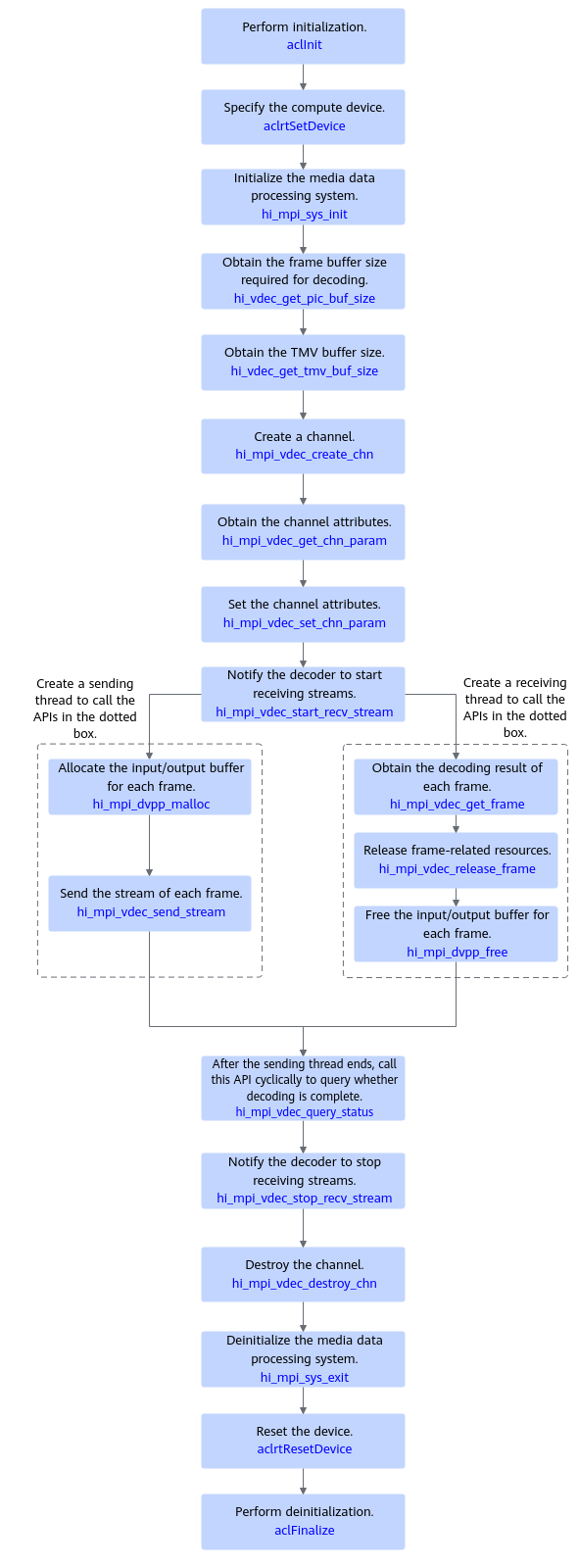
The current system supports decoding H.264 and H.265 video streams. The key APIs are described as follows:
- Call aclInit to initialize the system.
- Call aclrtSetDevice to specify the compute device.
- Call hi_mpi_sys_init to initialize the media data processing system.
- Call hi_vdec_get_pic_buf_size to obtain the size of the frame buffer required for decoding and call hi_vdec_get_tmv_buf_size to obtain the size of the temporal motion vector (TMV) buffer. The data is required for creating a channel.
- Call hi_mpi_vdec_create_chn to create a channel.
- Call hi_mpi_dvpp_malloc to allocate the device memory to store the input or output data.
- Before decoding, call hi_mpi_vdec_start_recv_stream to notify the decoder to start receiving streams, and then call hi_mpi_vdec_send_stream to send the streams to be decoded. hi_mpi_vdec_send_stream is an asynchronous API. The API call only delivers a task. You also need to call hi_mpi_vdec_get_frame to obtain the decode result data. You can call hi_mpi_vdec_release_frame to release frame-related resources. After the decoding is complete, call hi_mpi_vdec_stop_recv_stream to notify the decoder to stop receiving streams.
- Call hi_mpi_dvpp_free to free the input and output buffers.
- Call hi_mpi_vdec_destroy_chn to destroy the channel.
- Call hi_mpi_sys_exit to deinitialize the media data processing system.
- Call aclrtResetDevice to reset the device and free the resources on the device.
- Call aclFinalize to deinitialize the system and free the resources used by the acl API in the process.
Sample Code
The following is a code snippet of key steps for VDEC video decoding. It is for reference only. Do not copy, build, or run it directly. After APIs are called, you need to add exception handling branches and record error logs and info logs.
You can click vdec_sample to obtain the sample.
1 2 3 4 5 6 7 8 9 10 11 12 13 14 15 16 17 18 19 20 21 22 23 24 25 26 27 28 29 30 31 32 33 34 35 36 37 38 39 40 41 42 43 44 45 46 47 48 49 50 51 52 53 54 55 56 57 58 59 60 61 62 63 64 65 66 67 68 69 70 71 72 73 74 75 76 77 78 79 80 81 82 83 84 85 86 87 88 89 90 91 92 93 94 95 96 97 98 99 100 101 102 103 104 105 106 107 108 109 110 111 112 113 114 115 116 117 118 119 |
// .... // 1. Initialize the media data processing system. int32_t ret = hi_mpi_sys_init(); // 2. Create a channel. hi_vdec_chn chnId; hi_vdec_chn_attr chnAttr; hi_pic_buf_attr buf_attr{1920, 1080, 0, 8, HI_PIXEL_FORMAT_YUV_SEMIPLANAR_420, HI_COMPRESS_MODE_NONE}; chnAttr.type = HI_PT_H264; chnAttr.mode = HI_VDEC_SEND_MODE_FRAME; chnAttr.pic_width = 1920; chnAttr.pic_height = 1080; chnAttr.stream_buf_size = 1920 * 1080 * 3 / 2; chnAttr.frame_buf_cnt = 16; chnAttr.frame_buf_size = hi_vdec_get_pic_buf_size(HI_PT_H264, &buf_attr); chnAttr.video_attr.ref_frame_num = 12; chnAttr.video_attr.temporal_mvp_en = HI_TRUE; chnAttr.video_attr.tmv_buf_size = hi_vdec_get_tmv_buf_size(HI_PT_H264, 1920, 1080); ret = hi_mpi_vdec_create_chn(chnId, &chnAttr); // 3. Set channel attributes. hi_vdec_chn_param chnParam; ret = hi_mpi_vdec_get_chn_param(chnId, &chnParam); chnParam.video_param.dec_mode = HI_VIDEO_DEC_MODE_IPB; chnParam.video_param.compress_mode = HI_COMPRESS_MODE_HFBC; chnParam.video_param.video_format = HI_VIDEO_FORMAT_TILE_64x16; chnParam.display_frame_num = 3; chnParam.video_param.out_order = HI_VIDEO_OUT_ORDER_DISPLAY; ret = hi_mpi_vdec_set_chn_param(chnId, &chnParam); // 4. The decoder starts receiving streams. ret = hi_mpi_vdec_start_recv_stream(chnId); //5. Send streams. // 5.1 Allocate input buffer. uint8_t* inputAddr = nullptr; // inputsize indicates the buffer size occupied by each stream. The following uses 1024 bytes as an example. You need to calculate the actual buffer size. int32_t inputSize = 1024; ret = hi_mpi_dvpp_malloc(0, &inputAddr, inputSize); //Directly load the input stream data into the device buffer. // Load the input stream into the device buffer. The ReadStreamFile function is defined by the user. ReadStreamFile(streamName, inputAddr, inputSize); // 5.2 Allocate output buffer. uint8_t* outputAddr = nullptr; // The size of the buffer occupied by the output image data is related to the format of the output image. int32_t outputSize = 1920 * 1080 * 3 / 2; ret = hi_mpi_dvpp_malloc(0, &outputAddr, outputSize); // 5.3 Construct a structure for storing an input stream. hi_vdec_stream stream; stream.addr = inputAddr; stream.len = inputSize; stream.end_of_frame = HI_TRUE; stream.end_of_stream = HI_FALSE; stream.need_display = HI_TRUE; // 5.4 Construct a structure for storing an output result. hi_vdec_pic_info outPicInfo; outPicInfo.width = 1920; outPicInfo.height = 1080; outPicInfo.width_stride = 1920; outPicInfo.height_stride = 1080; outPicInfo.pixel_format = HI_PIXEL_FORMAT_YUV_SEMIPLANAR_420; outPicInfo.vir_addr = outputAddr; outPicInfo.buffer_size = outputSize; // 5.5 Send a stream. ret = hi_mpi_vdec_send_stream(chnId, &stream, &outPicInfo, 0); // 6. Receive the decoding result. // 6.1 Obtain the decoding result. hi_video_frame_info frame; hi_vdec_stream stream; hi_vdec_supplement_info stSupplement; ret = hi_mpi_vdec_get_frame(chnId, &frame, &stSupplement, &stream, 0); if (ret == HI_SUCCESS) { decResult = frame.v_frame.frame_flag; if (decResult == 0) { // 0: Decode success printf("[%s][%d] Chn %u GetFrame Success, Decode Success \n",__FUNCTION__, __LINE__, chnId); } else if (decResult == 1) { // 1: Decode fail printf("[%s][%d] Chn %u GetFrame Success, Decode Fail \n",__FUNCTION__, __LINE__, chnId); } else if (decResult == 2) { // 2:This result is returned for the second field of printf("[%s][%d] Chn %u GetFrame Success, No Picture \n", __FUNCTION__, __LINE__, chnId); } else if (decResult == 3) { // 3: Reference frame number set error printf("[%s][%d] Chn %u GetFrame Success, RefFrame Num Error \n",__FUNCTION__, __LINE__, chnId); } else if (decResult == 4) { // 4: Reference frame size set error printf("[%s][%d] Chn %u GetFrame Success, RefFrame Size Error \n",__FUNCTION__, __LINE__, chnId); } } // 6.2 Obtain the decoding result. // You can directly use the output image data of VDEC in the buffer specified by frame.v_frame.virt_addr[0]. // TODO: inference-related code logic // 6.3 Free the input and output buffers. ret = hi_mpi_dvpp_free(frame.v_frame.virt_addr[0]); ret = hi_mpi_dvpp_free(stream.addr); // 6.4 Free resources. ret = hi_mpi_vdec_release_frame(chnId, &frame); // 7. The decoder stops receiving streams. ret = hi_mpi_vdec_stop_recv_stream(chnId); // 8. Destroy the channel. ret = hi_mpi_vdec_destroy_chn(chnId); // 9. Deinitialize the media data processing system. ret = hi_mpi_sys_exit(); // .... |
Parent topic: DVPP Image/Video Processing