VENC
This section describes the API call sequence of VENC, and sample code is also provided to help you better understand the process.
The video encoder (VENC) encodes YUV420SP images into H.264/H.265 video streams. For details about the VENC functions and restrictions, see DVPP Media Acceleration Library.
API Call Sequence
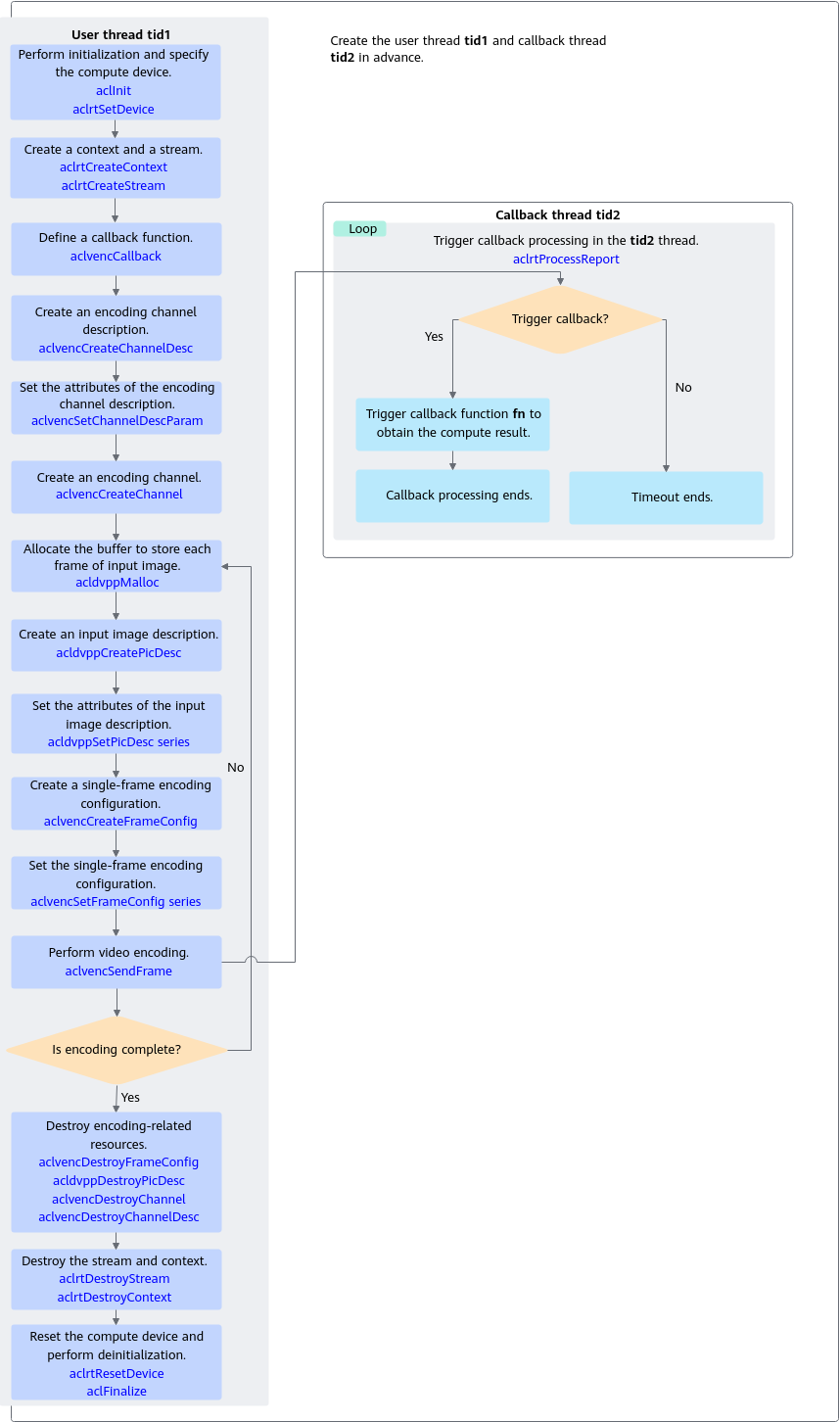
This module implements video encoding. The key APIs are described as follows:
- Call aclvencCreateChannel to create a video encoding channel.
- Perform the following steps before creating a video encoding channel.
- Call aclvencCreateChannelDesc to create a channel description.
- Call aclvencSetChannelDescParam to set the channel description, including the thread, callback function, video coding protocol, and input image format.
- The callback function needs to be created by the user in advance. It is used to obtain the encoding output and destroy allocations in a timely manner. For details about the callback function prototype, see aclvencCallback.
After the encoding is complete, free the input buffer and destroy the image description in the callback function in a timely manner. The output buffer is managed by the system, and therefore does not need to be freed by the user.
- The user needs to create a thread and define a thread function in advance. Once aclrtProcessReport is called in the thread function, the created callback function in 1.b.i will be triggered after a specified period of time.

aclvencSetChannelDescParam is recommended for setting the channel description attributes. You can set a particular attribute by passing the corresponding enum value to this API call.
The aclvencSetChannelDesc series APIs of earlier versions are also supported, where each attribute is set using a separate API.
- The callback function needs to be created by the user in advance. It is used to obtain the encoding output and destroy allocations in a timely manner. For details about the callback function prototype, see aclvencCallback.
- The following APIs are encapsulated in aclvencCreateChannel and do not need to be called separately:
- aclrtCreateStream: explicitly creates a stream. It is internally used by VENC.
- aclrtSubscribeReport: subscribes to a thread for handling the callback function in a stream. The callback function and thread are specified by the aclvencSetChannelDescParam API.
- Perform the following steps before creating a video encoding channel.
- Call aclvencSendFrame to encode YUV420SP images into an H.264/H.265 video stream.
- Perform the following steps before encoding a video stream:
- Call acldvppCreatePicDesc to create an input image description, and call the acldvppSetPicDesc series APIs to set the input image attributes such as the buffer address, buffer size, and image format.
- Call aclvencCreateFrameConfig to create a single-frame encoding configuration, and call the aclvencSetFrameConfig series APIs to set the switch for forcibly restarting the I-frame interval and the end of stream (EOS) flag.
- During video encoding, aclrtLaunchCallback is encapsulated in aclvencSendFrame to insert a callback function that needs to be executed to the stream. aclrtLaunchCallback does not need to be called separately.
- After video encoding, use the callback function to obtain the result:
- Perform the following steps before encoding a video stream:
- Call aclvencDestroyChannel to destroy the channel.
- The channel is destroyed only after the transmitted frames are encoded and the callback function is processed.
- The following APIs are encapsulated in aclvencDestroyChannel and do not need to be called separately:
- aclrtUnSubscribeReport: unsubscribes from a thread, so that the callback function in the stream is no longer handled by the specified thread.
- aclrtDestroyStream: destroys a stream.
- After destroying the channel, call aclvencDestroyChannelDesc to destroy the channel description.
- After destroying the channel description, destroy the thread created in 1.b.ii.
Sample Code
The following is a code snippet of key steps for VENC video encoding. It is for reference only. Do not copy, build, or run it directly. After APIs are called, you need to add exception handling branches and record error logs and info logs.
You can click venc_image to obtain the sample.
1 2 3 4 5 6 7 8 9 10 11 12 13 14 15 16 17 18 19 20 21 22 23 24 25 26 27 28 29 30 31 32 33 34 35 36 37 38 39 40 41 42 43 44 45 46 47 48 49 50 51 52 53 54 55 56 57 58 59 60 61 62 63 64 65 66 67 68 69 70 71 72 73 74 75 76 77 78 79 80 81 82 83 84 85 86 87 88 89 90 91 92 93 94 95 96 97 98 99 100 101 102 103 104 105 106 107 108 |
// 1. Create a thread for executing the callback function and a thread function. static bool runFlag = true; void *ThreadFunc(void *arg) { // Notice: create context for this thread int deviceId = 0; aclrtContext context = nullptr; aclError ret = aclrtCreateContext(&context, deviceId); INFO_LOG("process callback thread start "); while (runFlag) { // Notice: timeout 1000ms (void)aclrtProcessReport(1000); } // ...... ret = aclrtDestroyContext(context); return (void*)0; } int createThreadErr = pthread_create(&threadId_, nullptr, ThreadFunc, nullptr); // 2. Create a callback function. void callback(acldvppPicDesc *input, acldvppStreamDesc *outputStreamDesc, void *userdata) { // Obtain the video encoding result and write it to a file. void *outputDev = acldvppGetStreamDescData(outputStreamDesc); uint32_t streamDescSize = acldvppGetStreamDescSize(outputStreamDesc); if (!Utils::WriteToFile(g_outFileFp, outputDev, streamDescSize)) { ERROR_LOG("write file:%s failed.", g_outFile.c_str()); } INFO_LOG("success to callback, stream size:%u", streamDescSize); } // 3. Create a video encoding channel description, and set the description attributes. The thread and callback function need to be created in advance. // vencChannelDesc_ is of type aclvdecChannelDesc. vencChannelDesc_ = aclvencCreateChannelDesc(); aclError ret = aclvencSetChannelDescThreadId(vencChannelDesc_, threadId_); ret = aclvencSetChannelDescCallback(vencChannelDesc_, callback); ret = aclvencSetChannelDescEnType(vencChannelDesc_, enType_); ret = aclvencSetChannelDescPicFormat(vencChannelDesc_, format_); ret = aclvencSetChannelDescPicWidth(vencChannelDesc_, 128); ret = aclvencSetChannelDescPicHeight(vencChannelDesc_, 128); ret = aclvencSetChannelDescKeyFrameInterval(vencChannelDesc_, 16); // 4. Create the channel for processing the video stream and the single-frame encoding configuration. ret = aclvencCreateChannel(vencChannelDesc_); // vencFrameConfig_ is of type aclvencFrameConfig. vencFrameConfig_ = aclvencCreateFrameConfig(); // 5.Allocate device buffer dataDev to store the input video data for encoding. // Read image data. const char *fileName = "../dvpp_venc_128x128_nv12.yuv"; FILE *fp = fopen(fileName, "rb+"); fseek(fp, 0, SEEK_END); long fileLenLong = ftell(fp); fseek(fp, 0, SEEK_SET); auto fileLen = static_cast<uint32_t>(fileLenLong); uint32_t dataSize = fileLen; // Call aclrtGetRunMode to obtain the run mode of the software stack. If ACL_DEVICE is returned, allocate and use the device buffer. If ACL_HOST is returned, transfer the input image data to the device by using the aclrtMemcpy call. After the data transfer is complete, the buffer needs to be freed in a timely manner. aclrtRunMode runMode; ret = aclrtGetRunMode(&runMode); if(runMode == ACL_HOST){ void *dataHost = malloc(fileLen); size_t readSize = fread(dataHost, 1, fileLen, fp); void *dataDev = nullptr; ret = acldvppMalloc(&dataDev, dataSize); ret = aclrtMemcpy(dataDev, dataSize, dataHost, fileLen, ACL_MEMCPY_HOST_TO_DEVICE); // Free the buffer in a timely manner after data transfer is complete. free(dataHost); } else { ret = acldvppMalloc(&dataDev, dataSize); } // 6. Perform video encoding. size_t g_vencCnt = 16; // 6.1 Create the description information about the input image and set the input buffer address and buffer size. inputPicputDesc_ = acldvppCreatePicDesc(); ret = acldvppSetPicDescData(inputPicputDesc_, dataDev); ret = acldvppSetPicDescSize(inputPicputDesc_, dataSize); // 6.2 Set the single-frame encoding configuration data. The frame is not the EOS. ret = aclvencSetFrameConfigEos(vencFrameConfig_, 0); ret = aclvencSetFrameConfigForceIFrame(vencFrameConfig_, 0); // 6.3 Create output stream description information. acldvppStreamDesc *outputStreamDesc = nullptr; // 6.4 Perform video encoding. while (g_vencCnt > 0) { ret = aclvencSendFrame(vencChannelDesc_, inputPicputDesc_, static_cast<void *>(outputStreamDesc), vencFrameConfig_, nullptr); g_vencCnt--; } // 6.5 Set the single-frame encoding configuration data. The frame is the EOS. ret = aclvencSetFrameConfigEos(vencFrameConfig_, 1); ret = aclvencSetFrameConfigForceIFrame(vencFrameConfig_, 0); // 6.6 Encode the last video frame. ret = aclvencSendFrame(vencChannelDesc_, nullptr, nullptr, vencFrameConfig_, nullptr); // 7. Destroy allocations. (void)aclvencDestroyChannel(vencChannelDesc_); (void)aclvencDestroyChannelDesc(vencChannelDesc_); (void)acldvppDestroyPicDesc(inputPicputDesc_); (void)aclvencDestroyFrameConfig(vencFrameConfig_); // Free the buffer and destroy the thread. (void)acldvppFree(inBufferDev_); void *res = nullptr; int joinThreadErr = pthread_join(threadId_, &res); ...... |
You can call aclvencSetChannelDescParam to set the channel description attributes and call aclvencGetChannelDescParam to obtain the attribute values of the channel description. The sample code is as follows:
// Set the callback function.
void *func = (void *)callback;
aclvencSetChannelDescParam(vencChannelDesc_, ACL_VENC_CALLBACK_PTR, 8, &func);
// Obtain the callback function.
void *func1 = nullptr;
aclvencGetChannelDescParam(vencChannelDesc_, ACL_VENC_CALLBACK_PTR, 8, &len, &func1);

// Set the input image format.
acldvppPixelFormat format = PIXEL_FORMAT_YUV_SEMIPLANAR_420;
aclvencSetChannelDescParam(vencChannelDesc_, ACL_VENC_PIXEL_FORMAT_UINT32, 4, &format);
// Obtain the input image format.
acldvppPixelFormat format1 = PIXEL_FORMAT_YUV_SEMIPLANAR_420;
aclvencGetChannelDescParam(vencChannelDesc_, ACL_VENC_PIXEL_FORMAT_UINT32, 4, &len, &format1);

// Set the image width.
uint32_t width = 128;
aclvencSetChannelDescParam(vencChannelDesc_, ACL_VENC_PIC_WIDTH_UINT32, 4, &width);
// Obtain the image width.
uint32_t width1 = 0;
aclvencGetChannelDescParam(vencChannelDesc_, ACL_VENC_PIC_WIDTH_UINT32, 4, &len, &width1);

// Set the image height.
uint32_t height = 128;
aclvencSetChannelDescParam(vencChannelDesc_, ACL_VENC_PIC_HEIGHT_UINT32, 4, &height);
// Obtain the image height.
uint32_t height1 = 0;
aclvencGetChannelDescParam(vencChannelDesc_, ACL_VENC_PIC_HEIGHT_UINT32, 4, &len, &height1);

// Set the address of the encoding output buffer.
ret = acldvppMalloc(&buf, bufSize);
aclvencSetChannelDescParam(vencChannelDesc_, ACL_VENC_BUF_ADDR_PTR, 8, &buf);
// Obtain the address of the encoding output buffer.
void *buf1 = nullptr;
aclvencGetChannelDescParam(vencChannelDesc_, ACL_VENC_BUF_ADDR_PTR, 8, &len, &buf1);