Dynamic Batch/Dynamic Image Size/Dynamic Dimension (Setting Multi-Dimension Profiles)
This section describes the key APIs, API call sequence, and sample code for the dynamic batch/dynamic image size/dynamic dimension function.
API Call Sequence
The model inference workflow in the dynamic-shape input scenario is similar to that in the scenario described in Model Inference with Static-Shape Inputs. Both workflows include initialization and deinitialization, runtime resource allocation and deallocation, model building, model loading, model execution, and model unloading.
This section focuses on the differences between the two scenarios.
- During model building: You need to set the dynamic batch size, dynamic image size, and dynamic dimensions (ND format).
If the dynamic batch size feature is involved during model inference, call the acl API to set the batch size. The batch size supported by the model has been configured during model building. For example, the dynamic_batch_size parameter of ATC is used during model building. For details about this parameter, see "Command-Line Options > Basic Options > Input Options > --dynamic_batch_size" in Ascend Tensor Compiler (ATC).
If the dynamic image size feature is involved during model inference, call the acl API to set the image size. The image size supported by the model has been configured during model building. For example, the dynamic_image_size parameter of ATC is used during model building. For details about this parameter, see "Command-Line Options > Basic Options > Input Options > --dynamic_image_size" in Ascend Tensor Compiler (ATC).
If the dynamic dimensions (ND format only) feature is involved during model inference, call the acl API to set the dimensions. The dimensions supported by the model have been configured during model building. For example, the dynamic_dims parameter of ATC is used during model building. For details about this parameter, see "--dynamic_dims" in Ascend Tensor Compiler (ATC).
After model building, the inputs of dynamic batch size, dynamic image size, and dynamic dimensions are added to the generated OM model. During model inference, the input values are provided.
Assume that the batch size of input a is dynamic. In the generated OM model, input b is added to describe the batch size of input a.
- When the model is executed, prepare the data structure of input a. For details, see Preparing Input/Output Data Structure for Model Execution.
The shape of the input tensor supports multiple profiles and can be determined only before model execution. Therefore, you are advised to call aclmdlGetInputSizeByIndex and aclmdlGetOutputSizeByIndex to obtain the memory size required by the inputs and outputs. The APIs obtain the memory of the maximum profile to ensure sufficient memory. After the model is executed, you can call aclmdlGetCurOutputDims to obtain the actual dimensions of the output tensor.
- For details about how to prepare the data structure and set the data of input b, see 2.
- When the model is executed, prepare the data structure of input a. For details, see Preparing Input/Output Data Structure for Model Execution.
- Before model inference
- Prepare the data structures of the inputs of dynamic batch size, dynamic image size, and dynamic dimensions.
- Before allocating memory for the inputs of dynamic batch size, dynamic image size, and dynamic dimensions, call aclmdlGetInputIndexByName to obtain the index of the input in the model based on the input name (fixed to ACL_DYNAMIC_TENSOR_NAME).
 ACL_DYNAMIC_TENSOR_NAME is a macro defined as follows:
#define ACL_DYNAMIC_TENSOR_NAME "ascend_mbatch_shape_data"
- Pass the input index to aclmdlGetInputSizeByIndex to obtain the input buffer size.
- Pass the size obtained in 2.b to the aclrtMalloc API to allocate buffer.
Do not initialize the buffer manually; otherwise, the service will be unavailable. After the API calls described in 2.b, the system automatically initializes the buffer.
- Call aclCreateDataBuffer to create data of the aclDataBuffer type to store the buffer address and buffer size of the inputs of dynamic batch size, image size, and dimensions.
- Call aclmdlCreateDataset to create data of type aclmdlDataset, and call aclmdlAddDatasetBuffer to add data of type aclDataBuffer to data of type aclmdlDataset.
- Before allocating memory for the inputs of dynamic batch size, dynamic image size, and dynamic dimensions, call aclmdlGetInputIndexByName to obtain the index of the input in the model based on the input name (fixed to ACL_DYNAMIC_TENSOR_NAME).
- Set the dynamic batch size, dynamic image size, and dynamic dimensions.
Figure 1 API call sequence
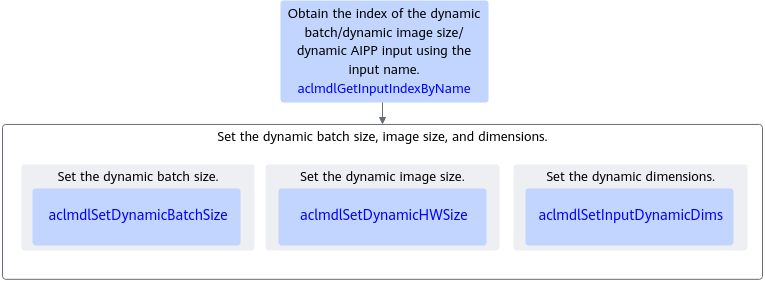
- Call aclmdlGetInputIndexByName to obtain the index of an input based on the input name (fixed to ACL_DYNAMIC_TENSOR_NAME).
- Set the dynamic batch size, dynamic image size, and dynamic dimensions.
- Call aclmdlSetDynamicBatchSize to set the dynamic batch size.
The configured batch size must be among the batch size profiles set during model building.
aclmdlGetDynamicBatch can be called to obtain the batch size profiles supported by the model.
- Call aclmdlSetDynamicHWSize to set the dynamic image size.
The configured image size must be among the image size profiles set during model building.
You can also call the aclmdlGetDynamicHW API to obtain the image size profiles supported by the model.
- Call aclmdlSetInputDynamicDims to set the dynamic dimensions.
The configured dimensions must be among the dimension profiles set during model building.
You can also call aclmdlGetInputDynamicDims to obtain the dimension size profiles supported by the model.
- Call aclmdlSetDynamicBatchSize to set the dynamic batch size.
- Prepare the data structures of the inputs of dynamic batch size, dynamic image size, and dynamic dimensions.
Sample Code for Dynamic Batch
The following is a code snippet of key steps for model inference. It is for reference only. Do not copy, build, or run it directly. Following the API calls, add exception handling branches and specify log printing of error and information levels.
You can click YOLOV3_dynamic_batch_detection_picture to obtain the sample.
1 2 3 4 5 6 7 8 9 10 11 12 13 14 15 16 17 18 19 20 21 22 23 24 25 26 27 28 29 30 31 32 33 |
...... // 1. Load the model and then set the dynamic batch size. ...... // 2. Prepare the model description modelDesc_, model inputs input_, and model outputs output_. // ...... // 3. Customize a function to set the dynamic batch size. int ModelSetDynamicInfo() { size_t index; // 3.1 Obtain the indexes the inputs with dynamic batch size. The input name is fixed to ACL_DYNAMIC_TENSOR_NAME. aclError ret = aclmdlGetInputIndexByName(modelDesc_, ACL_DYNAMIC_TENSOR_NAME, &index); // 3.2 Set the batch size. // modelId_ indicates the ID of the model that is successfully loaded, input_ indicates data of the aclmdlDataset type, index indicates the input index of the dynamic batch input, and batchSize indicates the batch size (8 for example). uint64_t batchSize = 8; ret = aclmdlSetDynamicBatchSize(modelId_, input_, index, batchSize); // ...... } // 4. Customize a function to execute the model. int ModelExecute(int index) { aclError ret; // 4.1 Customize a function to set the dynamic batch size. ret = ModelSetDynamicInfo(); // 4.2 Execute the model. modelId_ indicates the ID of a successfully loaded model, input_ indicates the model inputs, and output_ indicates the model outputs. ret = aclmdlExecute(modelId_, input_, output_); // ...... } // 5. Process the model inference result. ...... |
Sample Code for Dynamic Image Size
The following is a code snippet of key steps for model inference. It is for reference only. Do not copy, build, or run it directly. Following the API calls, add exception handling branches and specify log printing of error and information levels.
You can click YOLOV3_dynamic_batch_detection_picture to obtain the sample.
1 2 3 4 5 6 7 8 9 10 11 12 13 14 15 16 17 18 19 20 21 22 23 24 25 26 27 28 29 30 31 32 33 34 |
...... // 1. Load the model and then set the dynamic image size. ...... // 2. Prepare the model description modelDesc_, model inputs input_, and model outputs output_. ...... // 3. Customize a function to set the dynamic image size. int ModelSetDynamicInfo() { size_t index; // 3.1 Obtain the indexes of the inputs with dynamic image size. The input name is fixed to ACL_DYNAMIC_TENSOR_NAME. aclError ret = aclmdlGetInputIndexByName(modelDesc_, ACL_DYNAMIC_TENSOR_NAME, &index); // 3.2 Set the image size. modelId_ indicates the ID of a successfully loaded model, input_ indicates data of type aclmdlDataset, and index indicates the index of the input with dynamic image size. uint64_t height = 224; uint64_t width = 224; ret = aclmdlSetDynamicHWSize(modelId_, input_, index, height, width); // ...... } // 4. Call a user-defined function to execute the model. int ModelExecute(int index) { aclError ret; // 4.1 Call the user-defined function to set the dynamic image size. ret = ModelSetDynamicInfo(); // 4.2 Execute the model. modelId_ indicates the ID of a successfully loaded model, input_ indicates the model inputs, and output_ indicates the model outputs. ret = aclmdlExecute(modelId_, input_, output_); // ...... } // 5. Process the model inference result. ...... |
Sample Code for Dynamic Dimensions (ND Format Only)
The following is a code snippet of key steps for model inference. It is for reference only. Do not copy, build, or run it directly. Following the API calls, add exception handling branches and specify log printing of error and information levels.
1 2 3 4 5 6 7 8 9 10 11 12 13 14 15 16 17 18 19 20 21 22 23 24 25 26 27 28 29 30 31 32 33 34 35 36 37 |
...... // 1. Load the model and then set the runtime dimensions. ...... // 2. Prepare the model description modelDesc_, model inputs input_, and model outputs output_. ...... // 3. Customize a function to set the dynamic dimensions. int ModelSetDynamicInfo() { size_t index; // 3.1 Obtain the indexes of the inputs with dynamic dimensions. The input name is fixed to ACL_DYNAMIC_TENSOR_NAME. aclError ret = aclmdlGetInputIndexByName(modelDesc_, ACL_DYNAMIC_TENSOR_NAME, &index); // 3.2 Set the runtime dimensions, including the dimension count (dimCount) and the size of each dimension. modelId_ indicates the ID of a successfully loaded model, input_ indicates data of type aclmdlDataset, and index indicates the index of the input with dynamic dimensions. aclmdlIODims currentDims; currentDims.dimCount = 4; currentDims.dims[0] = 8; currentDims.dims[1] = 3; currentDims.dims[2] = 224; currentDims.dims[3] = 224; ret = aclmdlSetInputDynamicDims(modelId_, input_, index, ¤tDims); // ...... } // 4. Call a custom function to execute the model. int ModelExecute(int index) { aclError ret; // 4.1 Call the custom function to set the dynamic dimensions. ret = ModelSetDynamicInfo(); //4.2 Execute the model. modelId_ indicates the ID of a successfully loaded model, input_ indicates the model inputs, and output_ indicates the model outputs. ret = aclmdlExecute(modelId_, input_, output_); // ...... } // 5. Process the model inference result. ...... |