Failure in Creating a VDEC Channel When the Computing Power Template Does Not Contain DVPP in the Ascend Virtual Instance Scenario
Symptom
A VDEC channel cannot be created.
A log example on the device is as follows:
pid 0 usr chn 0 device 0 chn 0 vf_id 1 has created chn num(0) is full, max chn num = 0

In EP mode, after running the decoding process, log in to the host and run the msnpureport -a command in the directory on which you have the read, write, and execute permissions to export the log information of the device.
In RC mode, log in to the board environment and run the cat /proc/umap/vdec command to export decoding information.
Possible Cause
According to the error log, the maximum number of channels in the Ascend virtual instance scenario is 0. It is suspected that the computing power template does not contain the DVPP capability, so the VDEC channel fails to be created.
Solution
- Check the computing template resource information.
In
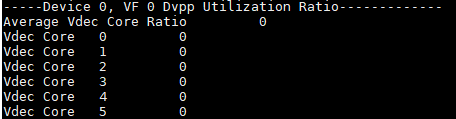
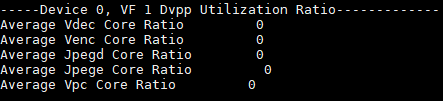
Ascend EP form, log in to the host and run the msnpureport -a command in a directory on which you have the read, write, and execute permissions to export the device log information. Go to the directory with the corresponding timestamp based on the export time and open the module_info\dev-os-0\dvpp\dvpp_proc.log file to check the number of VDEC cores in VF 1.In
Ascend RC form, log in to the board environment and run the cat /proc/umap/sys command to check the number of VDEC cores in VF 1.As shown in the following figure, the VDEC channel fails to be created only when no VDEC core is allocated in VF 1. In this case, an error occurs.
- If the DVPP capability is required, you can use a computing power template that has the DVPP capability. The template information is as follows:
Table 1 Ascend virtual instance configuration ( Atlas inference products )Name (of Compute Group)
Specification
Number of AI Cores in Compute Resources
Memory (GB)
AI CPU (device_aicpu in Compute Resources)
VPC
JPEGD
JPEGE
VENC
VDEC
Total resources
1
8
The value is the same as the value of memory_size obtained by calling dsmi_get_memory_info.
7
12
16
8
3
12
vir04
1/2
4
memory_size/2
4
6
8
4
2
6
vir04_3c
1/2
4
memory_size/2
3
6
8
4
1
6
vir04_4c_dvpp
1/2
4
memory_size/2
4
12
16
8
3
12
vir04_3c_ndvpp
1/2
4
memory_size/2
3
0
0
0
0
0
vir02
1/4
2
memory_size/4
2
3
4
2
1
3
vir02_1c
1/4
2
memory_size/4
1
3
4
2
0
3
vir01
1/8
1
memory_size/8
1
1
2
1
0
1
In the 2P scenario of the
Atlas inference products , the names of the computing power templates corresponding to p0 are listed in the above table, and the names of the computing power templates corresponding to p1 are marked with p1, for example, p1_vir04.