Obtaining Fault IDs from Device Logs and Rectifying RAS Hardware Faults
RAS hardware faults refer to faults related to hardware reliability, availability, and serviceability. You can search for the solution in the error code manual of the corresponding version based on the value of event_id (RAS hardware error code) in the log.
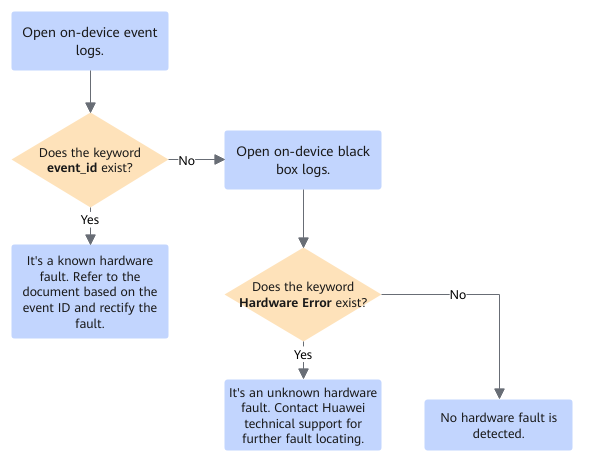
- On the host server, use the msnpureport tool to export on-device system logs and other maintenance and debugging information, including slogs, syslogs, event logs, and black box logs.
Run the msnpureport tool command in a directory (for example, /var/log/npu/report) on which you have the read, write, and execute permissions.
The following is an example of the msnpureport tool command:msnpureport -f
The exported logs and files are stored in the /var/log/npu/report directory by default.
- From the event logs collected in 1 (slog/dev-os-id/run/event/event_*.log), find the log content of the corresponding device around the time when the fault occurs, and check whether the keyword event_id exists in the log. If not, go to 3. If so, click Health Management Fault Definition to obtain the manual of the corresponding version and refer to the solution provided within.
If the time in the slog is not around the time when the error occurs, the old log may have been overwritten or deleted. In this case, event_id related to the error cannot be found.
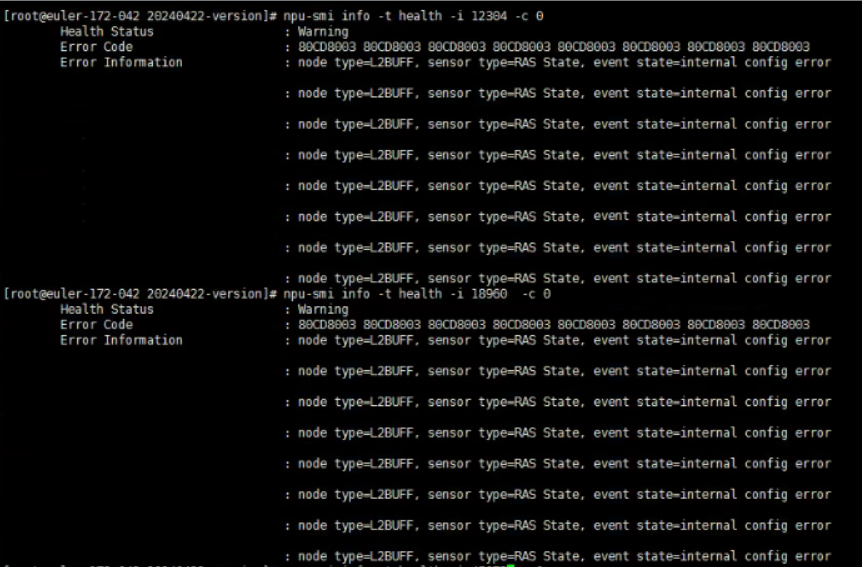
You can run the npu-smi command to query the health status of a specified chip. If an RAS fault occurs, you can query the event IDs of the last eight faults, which can be used as a reference for fault locating.
The following is an example of the npu-smi command (id indicates the device ID, and chip_id indicates the chip ID. You can run the npu-smi info command to obtain the device ID and chip ID first):
npu-smi info -t health -i id -c chip_id
The following is an example of the query result.
- From the black box logs collected in 1, find the black box logs of the corresponding device around the time when the fault occurs in the hisi_logs/device-id/*/bbox directory, and check whether the keyword Hardware Error exists in the logs. If not, no hardware failure has been identified. If so, an unknown hardware fault occurs, and it is necessary to contact technical support for further fault locating. After obtaining the logs, click here to contact technical support.