Abnormal Termination of Applications Due to Environment Variable Access Conflicts
Symptom
In a multi-device training scenario, multiple core dumps occur and the application terminates unexpectedly.
Possible Cause
- Generate a core dump file.
- On a physical machine, running the ulimit -c unlimited command can generate a core dump file when the program breaks down.
If you do not need to generate a core dump file after locating the fault, run the ulimit -c 0 command.
- In a Docker, add the --ulimit core=-1 setting to the Docker startup command.
- On a physical machine, running the ulimit -c unlimited command can generate a core dump file when the program breaks down.
- Run the training script. If the process breaks down, a core dump file is generated in the current directory.
- Use the GDB tool to debug the core file and print stack information.
Enter the GDB mode and debug the core dump file. An example command is as follows. In this command, python3 indicates the name of the executable application that generates the core dump file, which can be changed as required. The core dump file name needs to be changed to the actual name.
gdb python3 core*.*
After the command is executed, the GDB tool prints to the screen the code where the exception occurred, its corresponding function, file name, and line number. The top of the stack information contains information about the bottom-level call stack, which is convenient for fault locating. The following is an example of stack information:
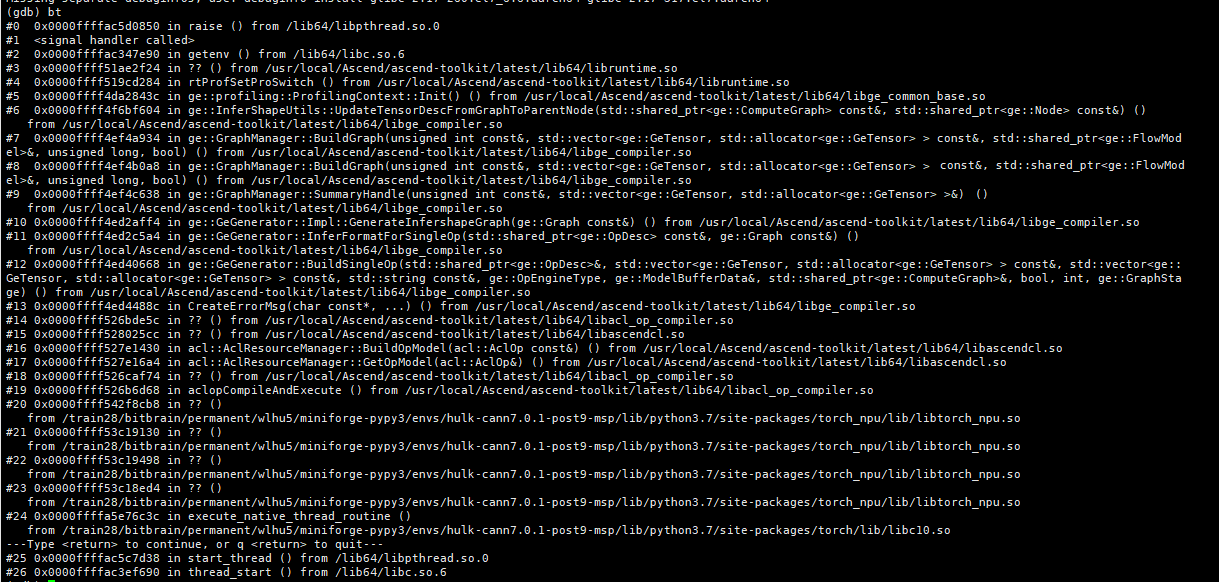
Note that debugging the core dump file and printing stack information should be done in the operating environment where the exception occurred. If you switch to a different environment, the debugged stack information may be inaccurate.
If the GDB tool is not installed in the environment, install it using a package manager (such as apt-get install gdb and yum install gdb). For details about the installation procedure and usage, see GDB official documentation.
- Analyze the stack information.
After the core dump file is generated and the printed stack information is checked, it is found that the application exits abnormally when the getenv() function is used. Therefore, it can be preliminarily determined that there may be an issue with the use of the getenv() function, and this function is used to read environment variables.
In the application, if read and write operations, such as getenv and putenv, are executed on environment variables simultaneously, environment variable access conflicts may occur, causing an application exception.
- Check whether the training script contains the operation of writing environment variables, which can cause conflicts with the getenv operation of reading environment variables.
Environment variables can be implemented using commands, APIs, and configurations, including the export command, putenv/getenv/setenv/unsetenv/clearenv function, os.environ, and os.getenv. You can check these methods in the training script. If these methods exist, environment variable access conflicts may occur, causing application exceptions.
In this example, the training script contains the following code that sets environment variables, which actually calls the putenv function in C language. The putenv function conflicts with the getenv function used during operator compilation.
os.environ["xxxxxxxxx"] = "xxxxxxxxx"
Solution
Modify the user application's code logic, and remove the logic of dynamically setting environment variables in the code. You can set the environment variables before executing the application.