BatchMatMulV2ReshapeFusionPass
Description
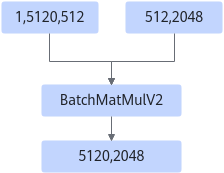
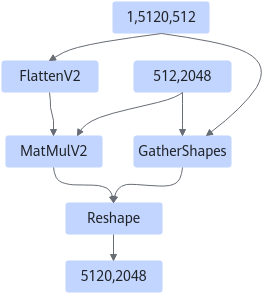
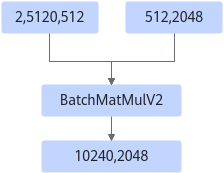
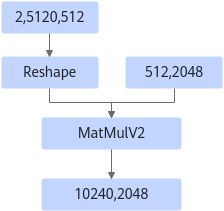
The fusion is classified into the following scenarios:
Scenario 1: In the special case of MatMulV2+Reshape, the output is 4D and is transposed. The fused Transpose node improves performance. The shape of the Reshape node must be (m,n) -> (m,1,tp,n/tp), where tp indicates the number of tensor parallel split groups. The perm parameter of the Transpose node can only be set to [0,2,1,3] or [0,2,3,1].
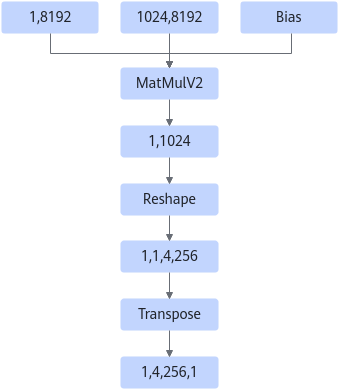
After:
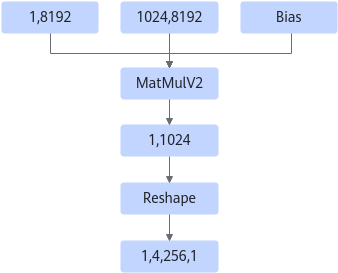
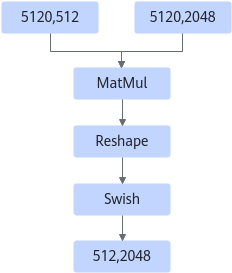
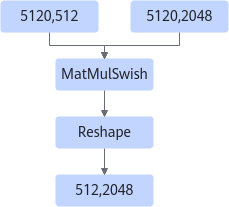
Scenario 2: For MatMul+Reshape+Swish fusion, the rear Reshape ensures the fusion of MatMul+Swish.
After:
Constraints
- The fusion node is BatchMatmulV2, MatMulV2, or MatMul.
- The input data type cannot be INT4 or INT8.
- When the input optype is BatchMatMulV2, the left matrix must be 3D and the right matrix must be 2D.
- When the input optype is MatMulV2, the dtype of the left input of the input node must be fp16.
- In dynamic scenarios, the left and right matrices cannot be transposed.
- In static scenarios, the left matrix must not be transposed, and the left and right matrices cannot be in NZ format. When the matrix is 3 x 2 dimensions, batch × m cannot be greater than max(int64).
- In static scenarios, if BatchMatMulV2 is followed by Add, Relu, AddN, or Mul operators, the graph fusion patterns take effect when the batch dimension is greater than 50 and the M dimension is less than 32 or when M is 1 and the batch dimension is greater than 1.
- In static scenarios, for a single BatchMatMulV2 with a large batch size, the graph fusion patterns take effect when the batch dimension is greater than 4096 and the M dimension is less than 64 or when M is 1 and the batch dimension is greater than 1.
- In
Atlas inference products , this fusion pattern takes effect only in trustlist cases.
Applicable Products
Parent topic: Graph Fusion Patterns