Tensor Decomposition
Tensor decomposition converts a convolution into a stack of two smaller ones by decomposing its convolution kernel to reduce the inference overhead. If the user model involves huge convolution workloads and most of the convolution kernels have shapes larger than (64, 64, 3, 3), tensor decomposition is recommended. In other cases, skip this step and proceed to quantization.
Currently, tensor decomposition is supported under the following conditions:
- group = 1, dilation = (1,1), stride < 3
- kernel_h > 2, kernel_w > 2
The preceding are the basic conditions for tensor decomposition. AMCT will have a final check on your model.
Only when the original TensorFlow model has a Conv2D layer and the layer meets the preceding conditions, the Conv2D layer can be decomposed into two smaller Conv2D layers. Then, you can use AMCT to convert the original TensorFlow model into a quantizable model deployable on the AI processor for better inference performance.
This step is optional.
Restrictions
For Conv2D layers with large shapes, the decomposition process might be time-consuming or terminated abnormally. To prevent this problem, refer to the following before starting decomposition:
- Reference performance specifications of the decomposition tool:
- CPU: Intel(R) Xeon(R) CPU E5-2699 v4 @ 2.20GHz
- Memory: 512 GB
Time taken to decompose a single convolutional layer:
- About 25s for shape (512, 512, 5, 5).
- About 16s for shape (1024, 1024, 3, 3).
- About 78s for shape (1024, 1024, 5, 5).
- About 63s for shape (2048, 2048, 3, 3).
- About 430s for shape (2048, 2048, 5, 5).
- Memory consideration:
It takes about 32 GB memory to decompose a convolution kernel with shape (2048, 2048, 5, 5).
API Call Sequence
Figure 1 shows the API call sequence. For the decomposition example, see Sample List.
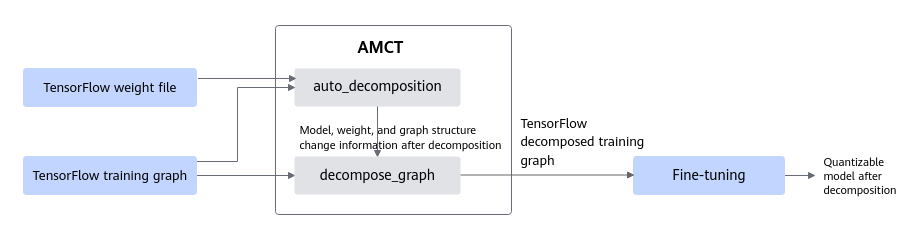
The workflow goes through the following steps:
- Call the auto_decomposition API to perform tensor decomposition on the original TensorFlow model, generating a new model file.
- Call the decompose_graph API to load the graph change information (*.pkl) obtained in 1 to decompose the TensorFlow training graph and load the model weight file obtained in 1 to output the decomposed training graph.
- Fine-tune the decomposed model to output a model that can be quantized. You can perform Post-Training Quantization or Quantization Aware Training on the model.
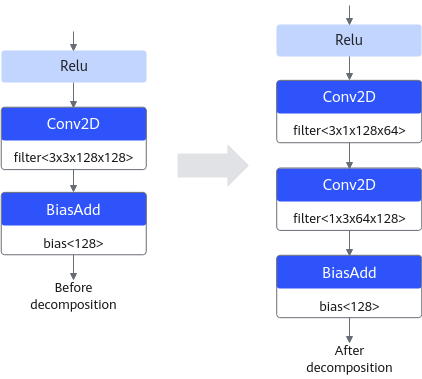
Figure 2 shows the resnet_v2_50 model before and after decomposition.
Example
- Call the auto_decomposition API to decompose the original TensorFlow model.
1
2
3
4
5
from amct_tensorflow.tensor_decompose import auto_decomposition
meta_path = "src_path/xxx.meta"     # Set the meta file path.
ckpt_path = "src_path/xxx"          # Set the ckpt file path. If the src_path folder holds files xxx.data-XXXXX-of-XXXXX and xxx.index, set this path to src_path/xxx.
save_path = "decomposed_path/xxx"   # Set the resultant path. If it is set to decomposed_path/xxx, files such as xxx.data-XXXXX-of-XXXXX will be generated in the decomposed_path directory
auto_decomposition(meta_path, ckpt_path, save_path)  # Start tensor decomposition.
- Modify the existing training code, call the decompose_graph API to decompose the graph in the code, and fine-tune the decomposed model based on the weight file generated after decomposition.
The session and estimator modes are supported. Select the mode that best suits your situation.

The following sample code is for reference only. The asterisk (*) indicates user code while the ellipsis (...) indicates omitted user code.
- Session mode
 1
 2
 3
 4
 5
 6
 7
 8
 9
10
11
12
13
14
15
16
17
from amct_tensorflow.tensor_decompose import decompose_graph
save_path = "decom_path/xxx"                        # Set the resultant path, which is the same as the save_path set in step 1.
# ...
net_output = build_net(net_input, ...)              # (*) Build a network graph.
decompose_graph(save_path)                          # Decompose the graph. Note that this step must be performed after the network graph is built and before the optimizer is applied.
variables_to_restore = tf.global_variables()        # Set all variables in the graph.
restorer = tf.train.Saver(variables_to_restore)     # Set the variables to be restored to all variables in the graph.
loss = build_loss(net_output, ...)                  # (*) Build loss.
optimizer = build_optimizer(...)                    # (*) Build an optimizer.
train_op = optimizer.minimize(loss, ...)            # (*) Optimize loss by applying the optimizer.
# ...
variables_to_init = [v for v in tf.global_variables() if v not in variables_to_restore]  # Set the variables not to be restored.
init = tf.variables_initializer(variables_to_init)  # Prepare for initializing the variables not to be restored.
with tf.Session() as sess:                          # (*) Set the training session.
    sess.run(init)                                  # Initialize the variables not to be restored.
    restorer.restore(sess, save_path)               # Load the required variables from the weight file generated after decomposition.
# ...
- Estimator mode
 1
 2
 3
 4
 5
 6
 7
 8
 9
10
11
12
from amct_tensorflow.tensor_decompose import decompose_graph
save_path = "decom_path/xxx"                  # Set the resultant path, which is the same as the save_path set in .
# ...
def model_fn(features, labels, ...):          # (*) Define the estimator model function.
    net_output = build_net(net_input, ...)    # (*) Build a network graph.
    decompose_graph(save_path)                # Decompose the graph. Note that this step must be performed after the network graph is built and before the optimizer is applied.
    loss = build_loss(net_output, ...)        # (*) Build loss.
    optimizer = build_optimizer(...)          # (*) Build an optimizer.
    train_op = optimizer.minimize(loss, ...) # (*) Optimize loss by applying the optimizer.
# ...
estimator = tf.estimator.Estimator(model_fn, warm_start_from=save_path, ...)  # (*) Build an estimator. Use warm_start_from to load the model weights generated after decomposition.
# ...
- Session mode