Performance Analysis in Cluster Training Scenarios
Scenario
A cluster consists of multiple nodes, which are management in a unified manner on the management page. Each node has an independent system. In cluster scenarios, the tool collects profile data of each node, generates a PROF_XXX directory on each node, and pre-parses and summarizes all PROF_XXX directories to OBS. You need to manually copy all PROF_XXX directories summarized by OBS to an environment where the cluster data can be displayed and analyzed.
Currently, cluster data can be displayed and analyzed using MindStudio Insight.
Profiling Process
The following figure shows the overall process of profile data collection.
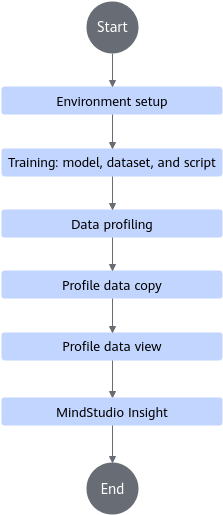
Environment Setup
Restrictions
In cluster scenarios, profile data of a maximum of 128 nodes can be collected. If eight devices are configured for each node, profile data of a maximum of 1024 devices can be collected.
Profile Data Collection
After the environment is set up, you can collect profile data in the cluster scenario as follows:
- Use msprof Profiling Commands for profiling.
- Use the Ascend PyTorch Profiler APIs to collect PyTorch profile data.
- Set up a distributed training environment and prepare the distributed training script used after model porting. For details, see Model Porting in Traditional Model Performance Tuning Guide.
- Refer to Getting Started with Performance Analysis in PyTorch Training Scenarios to modify the training script and start distributed training for profiling.