task_time (Task Scheduler Information)
The timeline information of Task Scheduler data is displayed at the Ascend Hardware level in the msprof_*.json file, and the summary information is summarized in the task_time_*.csv file to identify the scheduling duration during AI task running.
Applicable Products
Product |
Supported |
|---|---|
√ |
|
√ |
|
√ |
|
√ |
|
√ |
|
√ |
|
√ |
Task Scheduler Data in msprof_*.json
The Task Scheduler data in the msprof_*.json file is displayed in each stream of Ascend Hardware. By recording the execution time of each task in different accelerators during AI task running, scheduling durations can be intuitively determined.
The following is an example of the Task Scheduler data in the msprof_*.json file:
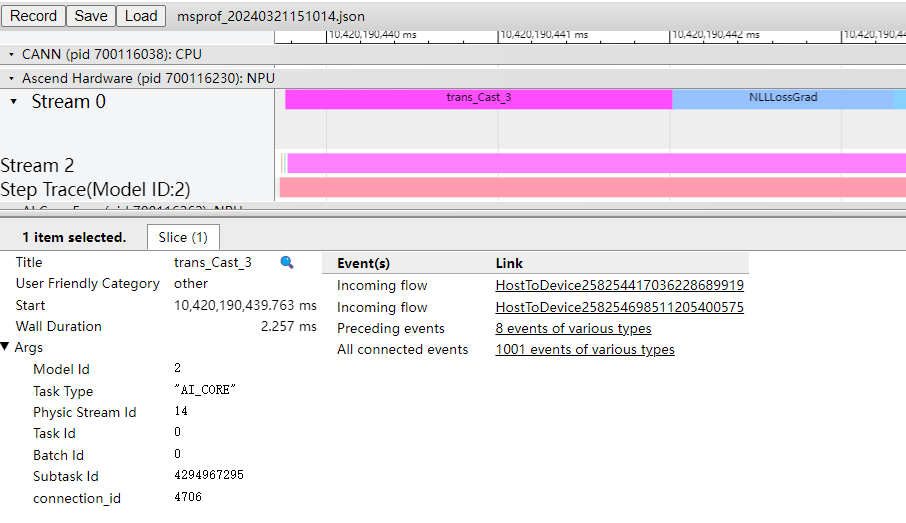
See the following table for more details.
Field |
Description |
|---|---|
Title |
API name of a component. |
Start |
Start point on the timeline, which is automatically aligned with that in chrome trace (ms). |
Wall Duration |
Time taken by the calls to an API (ms). |
Model Id |
Model ID. |
Task Type |
Type of the accelerator that executes the task, such as AI_CORE, AI_VECTOR_CORE, or AI_CPU. |
Stream Id |
ID of the stream where a task is located. The stream ID under Ascend Hardware is the complete logic stream ID of the task, and the stream ID attribute of each API in the timeline on the right is the physical stream ID of the API. |
Task Id |
Task ID. |
Batch Id |
Number of times that the task ID changes. |
Subtask Id |
Subtask ID. |
connection_id |
ID of the connection between a CANN API and an NPU operator when the former is delivered to the latter. |
Receive Time |
Time when the device receives information about a memory copy task, in μs. This field is displayed only for the MemcopyAsync API. |
Start Time |
Time when a memory copy task starts to copy data, in μs. This field is displayed only for the MemcopyAsync API. |
End Time |
Time when a memory copy task ends to copy data, in us. This field is displayed only for the MemcopyAsync API. |
size(B) |
Amount of data to be copied, in bytes. This field is displayed only for the MemcopyAsync API. |
bandwidth(GB/s) |
Copy bandwidth, in GB/s. This field is displayed only for the MemcopyAsync API. |
operation |
Copy type, such as host-to-device or device-to-host. This field is displayed only for the MemcopyAsync API. |
task_time_*.csv File (Atlas inference products ) (Atlas training products ) (Atlas A2 training products ) (Atlas A3 training products /Atlas A3 inference products ) (Atlas 200I/500 A2 inference products ) (Ascend 950PR /Ascend 950DT )
The following shows the file content format.

By examining the operator with highest time consumption in a task, you can determine whether the operator is faulty based on its specific implementation.
Field |
Description |
|---|---|
Device_id |
Device ID. |
kernel_name |
Kernel name. If N/A is displayed, the operator is a non-compute operator. |
kernel_type |
Kernel type, including KERNEL_AICORE, KERNEL_AICPU, and more. |
stream_id |
ID of the stream where a task is located. |
task_id |
Task ID. |
task_time(us) |
Task duration, including scheduling time to the accelerator, execution time on the accelerator, and response end time. The unit is μs. |
task_start(us) |
Task start time (μs). |
task_stop(us) |
Task end time (μs) |