Obtaining Device Information
Applicability
Product |
Supported |
|---|---|
√ |
|
√ |
|
√ |
|
√ |
|
√ |
|
√ |
Function
After the profiling is complete, you can use the get_msprof_info.py script tool to obtain device information from the device_{id} or host directory under PROF_XXX. The following table describes the functionality and path get_msprof_info.py.
Script Name |
Functionality |
Path |
|---|---|---|
get_msprof_info.py |
Obtains device information. |
${INSTALL_DIR}/tools/profiler/profiler_tool/analysis/interface. Replace ${INSTALL_DIR} with the CANN component directory. For example, if the installation is performed by the root user, the default file storage path is /usr/local/Ascend/cann. |
Command Format
python3 get_msprof_info.py -dir <dir> [-help]
Command-line Options
Option |
Description |
Optional/Required |
|---|---|---|
-dir, or --collection-dir |
Directory of collected profile data. In non-cluster scenarios, set this parameter to the host or device_{id} directory under PROF_XXX. In cluster scenarios, set this parameter to the parent directory of PROF_XXX. |
Required |
-h or --help |
Help information. |
Optional |
Example
- Log in to the environment where the tool is located as the running user.
- Switch to the directory where the get_msprof_info.py script is located.
- Run the get_msprof_info.py script. An example command is as follows:
- Non-cluster scenario
python3 get_msprof_info.py -dir /home/1/PROF_000001_20220129014731273_KEDKPORHMAGPGD/device_0
- Cluster scenario
python3 get_msprof_info.py -dir /home/1/
Table 3 Command-line options Option
Description
Optional/Required
-dir, or --collection-dir
Directory of collected profile data. In a non-cluster scenario, set this parameter to the host or device_{id} directory under PROF_XXX. In a cluster scenario, set this parameter to the parent directory of PROF_XXX.
Required
-h or --help
Help information.
Optional
- Non-cluster scenario
Output Description
In non-cluster scenarios, the output is printed, as shown in Figure 1. Table 4 describes corresponding fields. In cluster scenarios, the /query/cluster_info.json file is generated in the directory specified by -dir to store information about each node, as shown in Figure 2. Table 5 describes corresponding fields.

Field |
Description |
|---|---|
collection_info |
Information collection. |
Collection end time |
End time of information collection. |
Collection start time |
Start time of information collection. |
Result Size |
Size of the information data, in MB. |
device_info |
Device information. |
AI Core Number |
Number of AI Cores. |
AI CPU Number |
Number of AI CPUs. |
Control CPU Number |
Number of Ctrl CPUs. |
Control CPU Type |
Ctrl CPU Type. |
Device Id |
Device ID. |
TS CPU Number |
Number of TS CPUs. |
host_info |
Host information. |
cpu_info |
Host CPU information. |
CPU ID |
Host CPU ID. |
Name |
Host CPU name. |
Type |
Host CPU type. |
Frequency |
Host CPU frequency. |
Logical_CPU_Count |
Number of logical CPUs on the host. |
cpu_num |
Number of host CPUs. |
Host Computer Name |
Host device name. |
Host Operating System |
Host OS. |
model_info |
Model information. |
Device Id |
Device ID. |
iterations |
Iteration statistics. |
Iteration Number |
Number of iterations. |
Model Id |
Model ID, which is displayed based on the number of models. |
version_info |
Version information. |
analysis_version |
Parsing version information. |
collection_version |
Collection version information. |
drv_version |
Driver version information. |
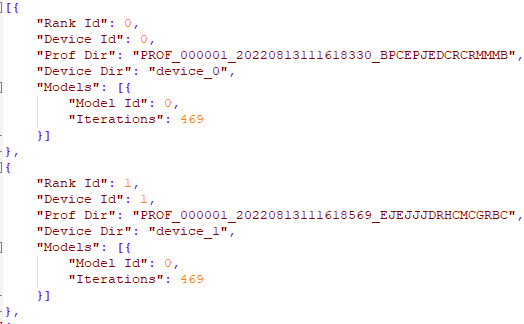
Field |
Description |
|---|---|
Rank Id |
Node ID that uniquely identifies a device in the cluster scenario. |
Device Id |
Device ID, which is not the unique identifier of a device in the cluster scenario. |
Prof Dir |
In the cluster scenario, the current rank ID corresponds to the PROF_XXX directory on the device. |
Device Dir |
device_{id} directory in the PROF_XXX directory in the cluster scenario. |
Models |
Model information, including all model IDs of the device corresponding to the current rank ID and the number of iterations in the model. |