Preparing Dump Data and Computational Graph Files on NPU
Precautions
- You have completed the development, compilation, and execution of the training or online inference network to ensure a functional project is available.
- The data dump process in this section is for reference only. For details, see TensorFlow 1.15 Model Porting.
- Dump data is generated in every iteration. If the training dataset is large, the dump data volume in each iteration increases accordingly. You are advised to control the number of iterations to one. In foundation model training scenarios, dumping a large amount of data typically requires a significant amount of time. One solution is to use dump_data to enable the operator statistics function, use the statistics to identify potentially abnormal operators, and then proceed to dump the abnormal operators.
- In multi-device environments, differing process startup times for each device will result in multiple timestamped directories during data dump.
- When the command is executed in a container, the generated data is stored in the container.
- If the training/online inference network contains random factors, remove them before dumping.
- Ensure that your code is the same as the code for the training/online inference on the GPUs in terms of the network structure, operator, optimizer, and parameter initialization policy. Otherwise, the comparison is meaningless.
- Performing training and evaluation within the same script is not recommended. Doing so will generate two sets of dump data, which can easily lead to confusion during analysis.
- Currently, only the AI CPU, AI Core, and HCCL operators support data dump.
Dump Parameter Configuration
- In Estimator mode, collect dump data using dump_config in NPURunConfig. Before NPURunConfig is created, instantiate a DumpConfig class for dump configuration, including the dump path, iterations to dump, and the dump mode (operator inputs or outputs).
 1
 2
 3
 4
 5
 6
 7
 8
 9
10
11
12
from npu_bridge.npu_init import *

# dump_path: dump path. Create the specified path in advance in the training/online inference environment (either in a container or on the host). The running user configured during installation must have the read and write permissions on this path.
# enable_dump: dump enable.
# dump_step: iterations to dump.
# dump_mode: dump mode, selected from input, output, and all.
dump_config = DumpConfig(enable_dump=True, dump_path = "/home/output", dump_step="0|5|10", dump_mode="all")

config = NPURunConfig(
  dump_config=dump_config,
  session_config=session_config
  )
- In sess.run mode, set the dump parameters by setting the session configuration items enable_dump, dump_path, dump_step, and dump_mode.
 1
 2
 3
 4
 5
 6
 7
 8
 9
10
11
12
13
14
15
config = tf.ConfigProto()

custom_op =  config.graph_options.rewrite_options.custom_optimizers.add()
custom_op.name =  "NpuOptimizer"
custom_op.parameter_map["use_off_line"].b = True

custom_op.parameter_map["enable_dump"].b = True
custom_op.parameter_map["dump_path"].s = tf.compat.as_bytes("/home/output")
custom_op.parameter_map["dump_step"].s = tf.compat.as_bytes("0|5|10")
custom_op.parameter_map["dump_mode"].s = tf.compat.as_bytes("all")
custom_op.parameter_map["dump_layer"].s = tf.compat.as_bytes("nodename1 nodename2 nodename3")
config.graph_options.rewrite_options.remapping = RewriterConfig.OFF

with tf.Session(config=config) as sess:
  print(sess.run(cost))

Operator overflow/underflow may occur during TensorFlow model training/online inference. In this case, do not directly perform accuracy comparison; otherwise, the comparison result will be inaccurate. For details about how to collect overflow/underflow data, see Collecting and Analyzing Data of Overflow/Underflow Operators.
Obtaining Dump Data and Computational Graph Files
- Run the training/online inference script to generate the dump data file and computational graph file.Dump data and computational graphs are necessary in the follow-up accuracy analysis. Therefore, you need to configure the environment variables to dump graph files before training.
export DUMP_GE_GRAPH=2
export DUMP_GRAPH_PATH=/home/dumpgraph    # Specifies the graph dump path. If it is not set, the dump graphs are stored in the training script path.
The dump data file is generated in the directory specified by {dump_path}, that is, the {dump_path}/{time}/{device_id}/{model_name}/{model_id}/{data_index} directory. For example, if {dump_path} is set to /home/output, the dump data file is stored in the /home/output/20200808163566/0/ge_default_20200808163719_121/11/0 directory.
Table 1 Path format of a dump file Path Key
Description
Remarks
dump_path
Path for storing the dump data. (If a relative path is set, the corresponding absolute path applies.)
-
time
Dump time.
Format: YYYYMMDDHHMMSS
device_id
Device ID.
-
model_name
Subgraph name.
If the model_name directory contains more than one folder, dump data in the folder with the same name as the computational graph is used.
Periods (.), forward slashes (/), backslashes (\), and spaces in model_name are replaced with underscores (_).
model_id
Subgraph ID.
--
data_index
Iterations to dump.
If dump_step is specified, data_index is equal to dump_step. If it is not specified, data_index starts at 0 and is incremented by 1 with each dump.
- Select a computational graph file.
- Method 1:
After the training script is executed, you might find that more than one GE graph file is generated to the training script directory. To select the right computational graph file, save the TensorFlow model as a .pb file and view the .pb model. Choose the name of a random compute operator as the search keyword, and search for the keyword in the generated graph files. The graph that gives a match is the desired computational graph file, whose name is indicated by the name field under graph.
- Method 2:Search for the keyword Iterator in all dump files whose names end with _Build.txt. Record the name of the computational graph file, which will be used in accuracy analysis.
grep Iterator *_Build.txt
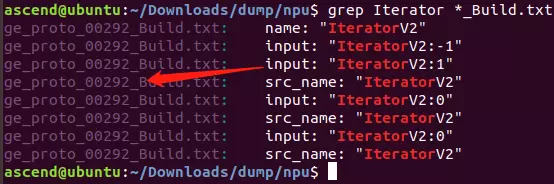
As shown in the preceding figure, ge_proto_00292_Build.txt is the required computational graph file.
- Method 1:
- Select the dump data file.
- Open the computational graph file found in Step 2 and record the value of the name field in the first graph. In the following example, record the value "ge_default_20240613143502_1".
 1
 2
 3
 4
 5
 6
 7
 8
 9
10
11
12
13
graph {
  name: "ge_default_20240613143502_1"
  op {
    name: "atomic_addr_clean0_71"
    type: "AtomicAddrClean"
    attr {
      key: "_fe_imply_type"
      value {
        i: 6
      }
    }
  }
}
- Go to the directory for storing the dump file named after the timestamp. The following folders exist in the directory:

- Find the folder whose name is the recorded value, for example, ge_default_20240613143502_1. The files in the folder are the required dump data files.
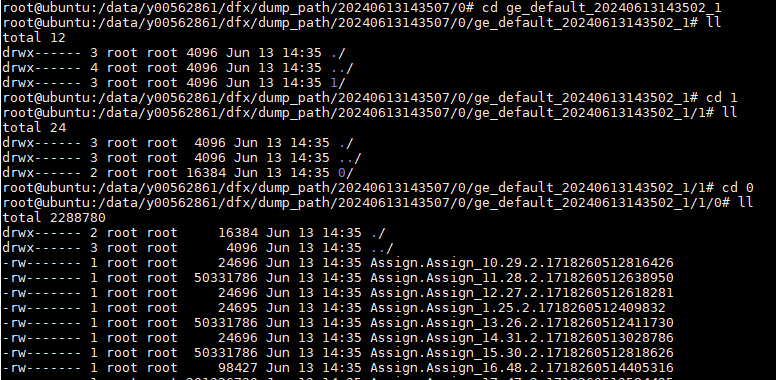
The dump data file is named in {op_type}.{op_name}.{task_id}.{stream_id}.{timestamp} format.
For the following products, the file name may be in other formats:
Atlas A2 training products /Atlas A2 inference products Atlas A3 training products /Atlas A3 inference products - {op_type}.{op_name_lxsliceN}.({stream_id}.){task_id}.{timestamp}.{task_type}.{context_id}.{thread_id}.{device_id}
- {op_type}.{op_name}.({stream_id}.){task_id}.{timestamp}.{task_type}.{context_id}.{thread_id}.{device_id}
- Periods (.), forward slashes (/), backslashes (\), and spaces in op_type or op_name in the dump file are replaced with underscores (_).
- If the filename exceeds the OS filename length limit (typically 255 characters), the dump file will be renamed to a string of random numbers. You can check the mapping.csv file in the same directory for the name mapping relationship.
- No dump data will be generated for the following operators during graph execution:
- Operators confirmed not to execute on the device before graph execution, including conditional operators (such as if, while, for, and case), data operators (such as Data, RefData, and Const), and data flow operators (such as StackPush, StackPop, Concat, and Split).
- Operators marked by the GE during graph optimization to skip execution on the device. For such operators, the _no_task attribute of attr in the dump graph is true.
- Operators located on unreachable execution branches in the graph.
- Open the computational graph file found in Step 2 and record the value of the name field in the first graph. In the following example, record the value "ge_default_20240613143502_1".