Heterogeneous Compile Procedure
BiSheng Compiler supports AI CPU heterogeneous compile. The specifications are as follows:
- AI CPU device function definition: The function needs to be defined in the .aicpu file, or the syntax needs to be specified using the -x aicpu option.
- AI CPU kernel heterogeneous call: The call needs to be completed in the .cce/.asc file, or the syntax needs to be specified using -x cce/asc.
That is, the .cce/.asc file cannot contain the AI CPU device function definition. The file can contain only the AI Core device function definition and the heterogeneous call of AI Core/AI CPU kernel using <<<>>>.
After the programming is complete in the .aicpu file and .cce/.asc file, compile the two types of files separately and then link them. The following figure shows the details.
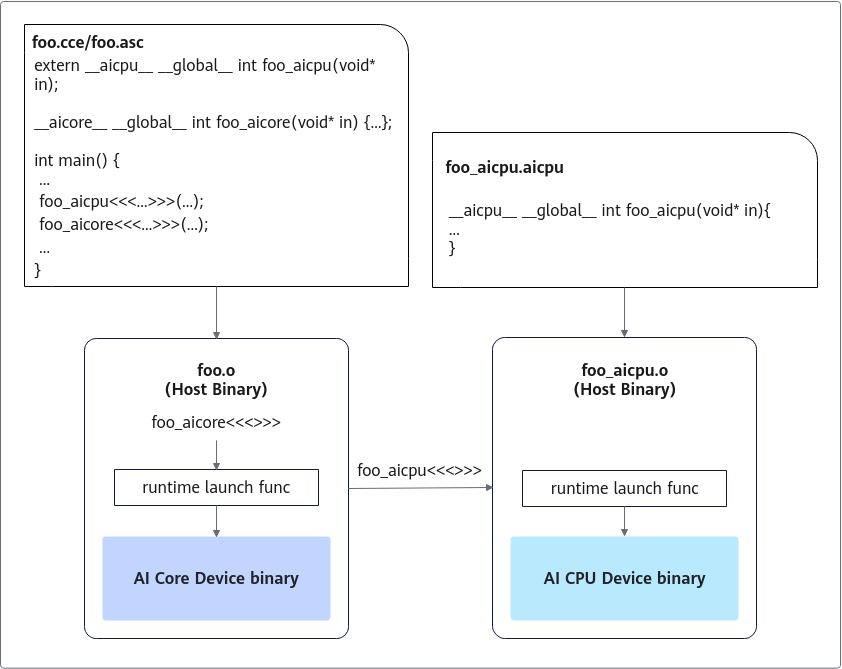
To compile heterogeneous programs, perform the following steps:
- Obtain the path of the BiSheng Compiler program (bisheng) from the CANN release package, and set environment variables. Replace ${INSTALL_DIR} with the CANN component directory. For example, if the installation is performed by the root user, the default file storage path is /usr/local/Ascend/cann.
# Set environment variables of the compiler. For example: export PATH=${INSTALL_DIR}/compiler/ccec_compiler/bin:$PATH - Develop code. The basic procedure of compiling an AI CPU heterogeneous program is as follows:
- Create an .aicpu file (or specify the syntax using -x aicpu during compile).
- Write the device kernel function in the .aicpu file.
- Create a .cce/.asc file (or specify the syntax using -x cce/asc during compile).
- Include the required Runtime management header files in the .cce file.
- Declare the AI CPU kernel function to be called in the .cce file using extern.
- Create the device and stream by calling the Runtime API.
- Allocate device memory, and copy the input data to the device memory as required.
- Run the kernel function of the AI CPU device through the <<<>>> kernel launch symbol.
- Copy the output data to the host memory as required, and release the device memory.
- Obtain the dynamic link library and the header file location of Runtime. In this example, compile dependencies and their locations are as follows.
Compile Dependency
Description
Short For
Path of the runtime dynamic link library
${INSTALL_DIR}/lib64/
$RT_LIBPATH
Runtime dynamic link library
For details about the libraries to be linked, see Compile, Link, and Library Usage.
$RT_LIB
Runtime header file
${INSTALL_DIR}/include
$RT_INC
- Compile and execute compile commands, and generate executable files through several steps. In the following example, the development environment and the runtime environment are the same. This section describes only the overall compile process. The code cannot run in meaningless scenarios. For details about the running example, see Compile, Link, and Library Usage.foo.aicpu: contains the AI CPU device code.
// Simplified writing. These commands are used as a demo and cannot be run in meaningless scenarios. __global__ __aicpu__ int foo_aicpu(void* buf) { return 0; }foo.cce: contains AI CPU calls using <<<>>>.// Simplified writing. These commands are used as a demo and cannot be run in meaningless scenarios. extern __global__ __aicpu__ int foo_aicpu(void* buf); // The CCE file can contain AI Core function definitions and calls. __global__ __aicore__ void foo_aicore(__gm__ int* buf) { *buf = 1; } int main(int argc, char* argv[]) { aclrtStream stream; aclrtCreateStream(&stream); int a[100]; foo_aicpu<<<1, nullptr, stream>>>((void*)a, sizeof(a)); foo_aicore<<<5, nullptr, stream>>>(a); return 0; }The compile commands are as follows:
# Function: Compile the .aicpu and .cce files step by step, and link the files to generate the executable file foo.
# Compile commands:
$bisheng -O2 foo.aicpu -c -o foo.aicpu.o
$bisheng --npu-arch=dav-2201 -O2 foo.cce -c -o foo.cce.o
$bisheng foo.aicpu.o foo.cce.o -o foo -I$RT_INC -L$RT_LIBPATH -l$RT_LIB