JPEGD Functions and Restrictions
Function Description
JPEG Decoder (JPEGD) implements .jpg, .jpeg, .JPG, and .JPEG image decoding.
- JPEGD supports image rotation during image decoding.
If the input stream contains orientation information (the orientation of the camera to the scene when the image is captured), JPEGD parses the orientation information during decoding and rotates the image by 90º, 180º, or 270º, or mirrors the image. The width stride, height stride, and output buffer of the rotated image must meet the restrictions described in Restrictions on Image Formats, Width and Height Alignment, and Buffers. If the stream of the input image is abnormal, JPEGD fails to read the orientation information. As a result, the image rotation function cannot be implemented.
For the product models below, if the height of the original image is an odd number and the rotation is to swap the width and height, black borders will exist in the odd borders after rotation. In this case, align the odd borders downwards to an even number (to remove the black borders). Take a JPEGD 422 image as an example. If the original size is 200 × 101 and the size after rotation is 101 × 200, the actual region should be 100 × 200. Take a JPEGD 440 image as an example, if the original size is 201 × 101 and the size after rotation is 100 × 201, the actual region should be 100 × 200.Ascend 950PR /Ascend 950DT Atlas A3 training products /Atlas A3 inference products Atlas A2 training products /Atlas A2 inference products Atlas 200I/500 A2 inference products
- JPEGD supports retaining the source image format during image decoding.
The image encoding formats before and after decoding remain consistent. For example, if the source format is JPEG(440), the destination format is YUV440SP with V component before U component or YUV440SP with U component before V component.
Use the source image format for decoding in either of the following ways:
- In the JPEGD decoding API call, set the output format to HI_PIXEL_FORMAT_UNKNOWN to get a semi-planar output in the source format with V component before U component. For example, if the source format is JPEG(440) and the destination format is set to HI_PIXEL_FORMAT_UNKNOWN, the JPEGD destination format is YUV440SP with V component before U component.
In this method, however, the destination format is unknown. Therefore, you must allocate the output buffer as large as possible to ensure that the output image can be stored properly, or you can obtain the size of the decoded output buffer using the hi_mpi_dvpp_get_image_info call.
If the JPEGD destination image will be fed to a model for inference, you are advised to set the output image format to HI_PIXEL_FORMAT_UNKNOWN. In this case, JPEGD decodes with the source format preserved (ensure that the JPEGD destination format is supported by the model) to avoid inference accuracy drop.
- From the input source JPEG image, obtain the width, height, width stride, height stride, output buffer, and format of the output image by using the hi_mpi_dvpp_get_image_info call, and then set the output format by using the JPEGD decoding API based on the information obtained through the hi_mpi_dvpp_get_image_info call.
- In the JPEGD decoding API call, set the output format to HI_PIXEL_FORMAT_UNKNOWN to get a semi-planar output in the source format with V component before U component. For example, if the source format is JPEG(440) and the destination format is set to HI_PIXEL_FORMAT_UNKNOWN, the JPEGD destination format is YUV440SP with V component before U component.
Resolution Restrictions
|
Model |
Resolution Range |
|---|---|
|
|
32 × 32 to 8192 × 8192 |
|
|
32 × 32 to 16384 × 16384 |
Output Resolution Range
JPEGD decodes images without changing the image resolution. Therefore, the output image resolution is the same as the input image resolution.
APIs for Buffer Allocation and Freeing
During JPEGD image decoding, call hi_mpi_dvpp_malloc to allocate the input and output buffers on the device, and hi_mpi_dvpp_free to free the input and output buffers. The buffer lifetime is managed by the user. The size of the input buffer refers to the actual size occupied by the input image. For details about the size of the output buffer, see the formula in Table 1.
For the following product models, you can also call aclrtMalloc and aclrtFree to allocate and free the input and output buffers on the device. The buffer lifetime is managed by the user.
hi_mpi_dvpp_malloc allocates a dedicated buffer for processing media data. However, the address space of the dedicated buffer is limited. If buffer planning is considered or buffer resources are limited, you are advised to allocate a buffer by calling aclrtMalloc. When calling aclrtMalloc to allocate a buffer, you are advised to allocate the buffer of the ACL_MEM_MALLOC_HUGE_FIRST type. Huge page buffers are preferred because they have better performance.
Restrictions on Image Formats, Width and Height Alignment, and Buffers
JPEGD supports only Huffman coding and does not support arithmetic encoding, progressive JPEG format, or JPEG 2000 format. The color space of the input image must be YUV with YUV components in the ratio of 4:4:4, 4:2:2, 4:2:0, 4:0:0, or 4:4:0.
If the JPEGD destination image will be used as the input of VPC, to decode with the source format preserved, check whether VPC supports the JPEGD destination format by referring to VPC Restrictions. If VPC does not support the JPEGD destination format, reconfigure a JPEGD destination format that is also supported by VPC.
For details about the definition of the output image format, see hi_pixel_format. For details about the concepts such as width stride and height stride, see Basic Concepts.
|
Input Format (YUV) |
Output Image Format |
Output Width and Height |
Output Width Stride, Height Stride, and Buffer Size |
|---|---|---|---|
|
jpeg(444) |
YVU444SP 8bit |
No alignment requirements. |
Width stride: Round up the width to the nearest multiple of 64. Height stride: Round up the height to the nearest multiple of 16. Buffer size (in bytes) ≥ Width stride × Height stride × 3 |
|
YUV444SP 8bit |
|||
|
YUV420SP NV12 8-bit |
Width: a multiple of 2 Height: a multiple of 2 |
Width stride: Round up the width to the nearest multiple of 64. Height stride: Round up the height to the nearest multiple of 16. Buffer size (in bytes) ≥ Width stride × Height stride × 3/2 |
|
|
YUV420SP NV21 8-bit |
|||
|
jpeg(422) |
YVU422SP 8bit |
Width: a multiple of 2 Height: No alignment requirements. |
Width stride: Round up the width to the nearest multiple of 64. Height stride: Round up the height to the nearest multiple of 16. Buffer size (in bytes) ≥ Width stride × Height stride × 2 |
|
YUV422SP 8bit |
|||
|
YUV420SP NV12 8-bit |
Width: a multiple of 2 Height: a multiple of 2 |
Width stride: Round up the width to the nearest multiple of 64. Height stride: Round up the height to the nearest multiple of 16. Buffer size (in bytes) ≥ Width stride × Height stride × 3/2 |
|
|
YUV420SP NV21 8-bit |
|||
|
jpeg(420) |
YUV420SP NV12 8-bit |
Width: a multiple of 2 Height: a multiple of 2 |
Width stride: Round up the width to the nearest multiple of 64. Height stride: Round up the height to the nearest multiple of 16. Buffer size (in bytes) ≥ Width stride × Height stride × 3/2 |
|
YUV420SP NV21 8-bit |
|||
|
jpeg(400) |
YUV420SP NV12 8-bit |
Width: a multiple of 2 Height: a multiple of 2 |
Width stride: Round up the width to the nearest multiple of 64. Height stride: Round up the height to the nearest multiple of 16. Buffer size (in bytes) ≥ Width stride × Height stride × 3/2 |
|
YUV420SP NV21 8-bit |
|||
|
YUV400 8bit |
No alignment requirements. |
Width stride: Round up the width to the nearest multiple of 64. Height stride: Round up the height to the nearest multiple of 16. Buffer size (in bytes) ≥ Width stride × Height stride |
|
|
jpeg(440) |
YVU440SP 8bit |
Width: No alignment requirements. Height: a multiple of 2 |
Width stride: Round up the width to the nearest multiple of 64. Height stride: Round up the height to the nearest multiple of 16. Buffer size (in bytes) ≥ Width stride × Height stride × 2 |
|
YUV440SP 8bit |
|||
|
YUV420SP NV12 8-bit |
Width: a multiple of 2 Height: a multiple of 2 |
Width stride: Round up the width to the nearest multiple of 64. Height stride: Round up the height to the nearest multiple of 16. Buffer size (in bytes) ≥ Width stride × Height stride × 3/2 |
|
|
YUV420SP NV21 8-bit |
Requirements for Software and Hardware
- Hardware requirements
- A maximum of four Huffman tables are supported, including two direct current (DC) coefficient tables and two alternating current (AC) coefficient tables.
- A maximum of three quantization tables are supported.
- Only 8-bit sampling precision is supported.
- Only sequentially-encoded images can be decoded.
- Only JPEG decoding based on discrete cosine transform (DCT) is supported.
- Only one start of scan (SOS) marker is allowed for image decoding.
- Software requirements
- A maximum of three SOS flags are supported for image decoding.
- Decoding of abnormal image with insufficient data in minimum coded units (MCUs) is supported.
Accuracy Restrictions
In the event of JPEGD+VPC cascade, widthStride x heightStride of the JPEGD output image must be a multiple of 64 x 16, so there are some invalid paddings. Therefore, when executing VPC functions such as resizing, set hi_vpc_pic_info.picture_width and hi_vpc_pic_info.picture_height to the original width and height of the input image. As such, VPC will automatically crop the image based on the width and height of the source image and then resize the image, eliminating the impact of invalid data on image accuracy.
Precautions
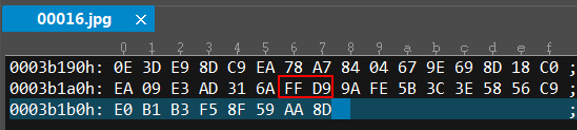
If user-defined data exists after the end of image (EOI) marker 0xFFD9, JPEGD clears the 8-byte data after the EOI during decoding. If you want to retain the user-defined data, read it to the buffer and back it up before sending it to JPEGD.
To check whether user-defined data exists after the EOI flag in an image, use the binary viewing tool to open the image. For example, user-defined data exists after the EOI flag FFD9 in the following figure.