FusedAddTopkDivOperation
Applicable Products
Hardware Model |
Supported |
|---|---|
Atlas 350 accelerator cards |
x |
√ |
|
√ |
|
x |
|
x |
|
x |
Description
Fuses the functions of the Sigmoid, Add, GroupTopk, Gather, ReduceSum, RealDiv, and Muls operators.
An operator supports two modes: regular (physical expert) and logical expert.
First, an expert score of [bs, expert_num] is obtained after the sigmoid activation function and the Add bias are performed on each expert. Then, for each group, DeepSeek V3 performs a group-level top-k selection and an expert-level top-k selection to choose k experts.
In regular mode, these experts are used as the IDs of physical experts and are directly output to guide subsequent communication operators to send each token to the cards corresponding to the k experts.
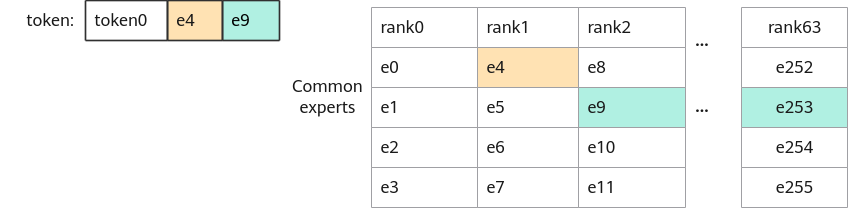
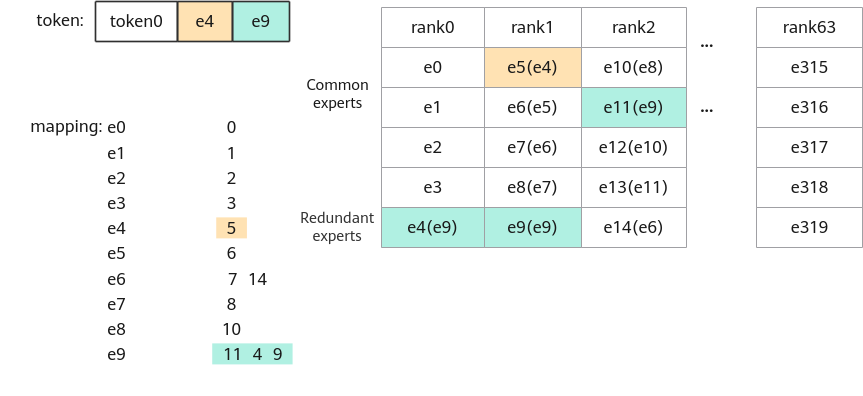
When there are redundant experts, each physical expert is on a different device. This leads to the idea of logical experts. Each device has its own set of logical experts. One physical expert can be mapped to many logical experts. Logical expert ID/Number of experts on each device = Rank ID of the corresponding device; logical expert ID%Number of experts on each device = Expert's position on the device.
In logical expert mode, mappingNum is added to show how many logical experts each physical expert maps to, and mappingTable lists the IDs of those logical experts. The operator uses a pseudo-random logic to randomly select a logical expert for mapping and updates the output indices to match the logical expert's ID.
Definition
struct FusedAddTopkDivParam {
    uint32_t groupNum = 1;
    uint32_t groupTopk = 1;
    uint32_t n = 1;
    uint32_t k = 0;
    ActivationType activationType = ACTIVATION_SIGMOID;
    bool isNorm = true;
    float scale = 1.0f;
    bool enableExpertMapping = false;
    uint8_t rsv[27] = {0};
};
Parameters
Member |
Type |
Default Value |
Value Range |
Mandatory |
Description |
|---|---|---|---|---|---|
groupNum |
uint32_t |
1 |
>0 |
Yes |
Number of groups. |
groupTopk |
uint32_t |
1 |
>0 |
Yes |
Select k groups. |
n |
uint32_t |
1 |
>0 |
Yes |
Select n maximum values in a group and sum them up. |
k |
uint32_t |
1 |
>0 |
Yes |
Select the top k values. |
activationType |
ActivationType |
ACTIVATION_SIGMOID |
ACTIVATION_SIGMOID |
Yes |
Activation type. |
isNorm |
bool |
true |
true/false |
Yes |
Normalized or not. |
scale |
float |
1.0 |
- |
Yes |
Multiplication coefficient after normalization. |
enableExpertMapping |
bool |
false |
true/false |
Yes |
Whether to enable the mapping from physical experts to logical experts. If this parameter is set to false, two tensors are input. If this parameter is set to true, four tensors are input. |
rsv[27] |
uint8_t |
{0} |
All values are 0. |
No |
Reserved, which is used to ensure API compatibility between versions. |
Input
Parameter |
Dimension |
Data Type |
Format |
Description |
|---|---|---|---|---|
x |
[a, b] |
float16/float32/bf16 |
ND |
Input tensor. |
addNum |
[b] |
float16/float32/bf16 |
ND |
Input tensor, which is used to add to x. The data type and format are the same as those of x. |
mappingNum |
[b] |
int32 |
ND |
This parameter is not used when enableExpertMapping is set to false. When enableExpertMapping is set to true, an input tensor is used, indicating the number of logical experts to which each physical expert is actually mapped. |
mappingTable |
[b, c] c<=128 |
int32 |
ND |
This parameter is not used when enableExpertMapping is set to false. When enableExpertMapping is set to true, an input tensor is used, indicating the mapping table between physical experts and logical experts. |
Output
Parameter |
Dimension |
Data Type |
Format |
Description |
|---|---|---|---|---|
y |
[a, k] |
float32 |
ND |
Output tensor. |
indices |
[a, k] |
int32 |
ND |
Output tensor. |
Constraints
- b is an integer multiple of groupNum.
- groupTopk <= groupNum.
- k <= b.
- b >= groupNum × n.
- b <= groupNum × 32.
- If b >= 32, groupNum = 8.
- max_redundant_expert_num indicates the maximum number of redundant experts. Currently, a maximum of 128 redundant experts are supported.
- Element value in mapping_num: 0 <= Element value < c.
- Meaning: a = bs, b = expert_num, c = max_redundant_expert_num.