Operator and Graph Build
AICORE_NUM
Number of AI Cores used for operator build. The corresponding options parameter is ge.aicoreNum.
Argument: "integer 1|integer 2", separated by a vertical bar (|).
- Scenario 1: For the following products, integer 1 indicates the number of Cube Cores in the AI Core used for operator build, and integer 2 indicates the number of Vector Cores in the AI Core used for operator build. Both integer 1 and integer 2 must be greater than 0 and less than or equal to the maximum numbers of Cube Cores and Vector Cores included in the AI processor.
Ascend 950PR /Ascend 950DT Atlas A3 training products /Atlas A3 inference products Atlas A2 training products /Atlas A2 inference products - Scenario 2: For the following products, only integer 1 needs to be configured in the format of "integer 1|", indicating the number of AI Cores used for operator build. If integer 2 is configured, it does not take effect.
Atlas 200I/500 A2 inference products Atlas inference products Atlas training products
Restrictions:
- For scenario 1 of the argument:
You can view the maximum number of Cube Cores and Vector Cores contained in different AI processors in the ${INSTALL_DIR}/<arch>-linux/data/platform_config/xxx.ini file. As shown in the following figure, there are 24 Cube Cores and 48 Vector Cores on the AI processor.
[SoCInfo]
# Use the default parameter values, which are the maximum values.
ai_core_cnt=24
cube_core_cnt=24
vector_core_cnt=48
- For scenario 2 of the argument:
You can view the maximum number of AI Cores contained in different AI processors in the "${INSTALL_DIR}/<arch>-linux/data/platform_config/xxx.ini" file. As shown in the following figure, there are 10 AI Cores on the AI processor.
[SoCInfo]
# Use the default parameter value, which indicates the maximum number of AI Cores.
ai_core_cnt=10
vector_core_cnt=8
- If the operator build cache function is enabled (OP_COMPILER_CACHE_MODE set to enable or force; default value: enable) and this parameter is configured, it takes effect only during the first build. To make this parameter take effect during non-initial compilation, you need to clear the cache of the compilation disk.
Replace ${INSTALL_DIR} with the CANN component directory. For example, if the installation is performed by the root user, the default file storage path is /usr/local/Ascend/cann. <arch> indicates the OS architecture, and xxx varies depending on the product.
Configuration example:
- Configuration example for scenario 1:
{ge::ir_option::AICORE_NUM, "24|48"} - Configuration example for scenario 2:
{ge::ir_option::AICORE_NUM, "10|"}
Or
{ge::ir_option::AICORE_NUM, "10"}
Applicable products:
All processors
Relationships between AI Cores, Cube Cores, and Vector Cores:
The definition of a Core helps you better understand the relationships between AI Cores, Cube Cores, and Vector Cores. A Core is a compute core with an independent scalar compute unit. Generally, the scalar compute unit provides multiple functions for the compute core, such as the single instruction multiple data (SIMD) instruction dispatch. The scalar compute unit is also called the intra-core scheduling unit. The AI data processing core unit varies with products. Currently, there are the following types:
- The AI data processing core unit is an AI Core:
- In an AI Core, a Cube and a Vector share a Scalar scheduling unit, for example,
Atlas training products .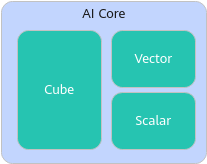
- In an AI Core, a Cube and a Vector have their own Scalar scheduling units, which are also called a Cube Core and a Vector Core. In this case, a Cube Core and a group of Vector Cores are defined as an AI Core. The number of AI Cores is usually calculated based on the number of Cube Cores, for example,
Atlas A2 training products /Atlas A2 inference products .
- In an AI Core, a Cube and a Vector share a Scalar scheduling unit, for example,
- The AI data processing core units are AI Cores and independent Vector Cores. The AI Cores and Vector Cores have independent Scalar scheduling units, for example,
Atlas inference products .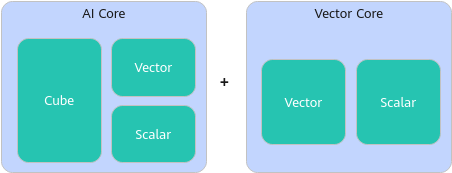
CORE_TYPE
Core type used during graph build. If the graph contains Cube operators, the value can only be AiCore. The corresponding options parameter is ge.engineType.
Arguments:
- VectorCore
- AiCore (default)
Configuration example:
{ge::ir_option::CORE_TYPE, "AiCore"}
Applicable products:
- BS9SX2A AI Processor: not supported
- BS9SX2A AI Processor: not supported
- BS9SX2A AI Processor: not supported
- MC62CM12A AI Processor: not supported
Atlas inference product : supported- MC62CM12A AI Processor: not supported
OP_COMPILER_CACHE_MODE
Disk cache mode for operator build. The corresponding options parameter is ge.op_compiler_cache_mode.
Arguments:
- enable (default): Cache is enabled for operator build. If it is enabled, operators with the same build configurations and operator configurations will not be built repeatedly, thus accelerating the build speed.
- force: Cache is enabled for operator build, with the cache forcibly refreshed. That is, the existing cache is cleared up before the operator is rebuilt and added to the cache. Therefore, the implementation when force is used is different from that when enable is used. For example, for Python changes, dependency library changes, or repository changes after operator optimization, you need to set this parameter to force to clear up the existing cache and then change it to enable to prevent the cache from being forcibly refreshed during each build.
- disable: Cache is disabled for operator build, resulting in operator rebuild.
Configuration example:
{ge::ir_option::OP_COMPILER_CACHE_MODE, "enable"}
Instructions:
- To specify the disk cache path for operator build, use this parameter together with OP_COMPILER_CACHE_DIR.
- When you enable the operator build cache function, set the disk space of the cache folder with the configuration file (the op_cache.ini file automatically generated in the path specified by OP_COMPILER_CACHE_DIR after operator build) or environment variables.
- Using the op_cache.ini configuration file:
If the op_cache.ini file does not exist, manually create it. Open the file and add the following information:
# Configure the file format (required). The automatically generated file contains the following information by default. When manually creating a file, enter the following information:
[op_compiler_cache]
# Limit the disk space of the cache folder on a chip, in MB. The value must be an integer and defaults to 500.
max_op_cache_size=500
# Set the percentage of the cache space to be reserved. The value range is [1, 100]. The default value is 50. For example, 80 indicates that when the cache space is insufficient, cache files will be deleted to keep 80% of the cache space available.
remain_cache_size_ratio=50
- The op_cache.ini file takes effect only when the values of max_op_cache_size and remain_cache_size_ratio in the preceding file are valid.
- If the size of the build cache file exceeds the value of max_op_cache_size and the cache file is not accessed for more than half an hour, the cache file will be aged. (Operator build will not be interrupted due to the size of the build cache file exceeding the set limit. Therefore, if max_op_cache_size is set to a small value, the size of the actual build cache file may exceed the configured value.)
- To disable the build cache aging function, set max_op_cache_size to -1. In this case, the access time is not updated when the operator cache is accessed, the operator build cache is not aged, and the default disk space of 500 MB is used.
- If multiple users use the same cache path, you are advised to use the configuration file to set the cache path. In this scenario, the op_cache.ini file affects all users.
- Using environment variables
In this scenario, the environment variable ASCEND_MAX_OP_CACHE_SIZE is used to limit the storage space of the cache folder of a chip. When the build cache space reaches the specified value and the cache file is not accessed for more than half an hour, the cache file is aged. The environment variable ASCEND_REMAIN_CACHE_SIZE_RATIO is used to set the ratio of the cache space to be reserved.
A configuration example is provided as follows:
# The ASCEND_MAX_OP_CACHE_SIZE environment variable defaults to 500, in MB. The value must be an integer.
export ASCEND_MAX_OP_CACHE_SIZE=500
# The value range of the ASCEND_REMAIN_CACHE_SIZE_RATIO environment variable is [1, 100]. The default value is 50, in percentage. For example, 80 indicates that when the cache space is insufficient, cache files will be deleted to keep 80% of the cache space available.
export ASCEND_REMAIN_CACHE_SIZE_RATIO=50
- The argument configured through environment variables takes effect only for the current user.
- To disable the build cache aging function, set the environment variable ASCEND_MAX_OP_CACHE_SIZE to -1. In this case, the access time is not updated when the operator cache is accessed, the operator build cache is not aged, and the default disk space of 500 MB is used.
If both the op_cache.ini file and environment variable are configured, the configuration items in the op_cache.ini file are read first. If neither the op_cache.ini file nor the environment variable is configured, the system default values are read: 500 MB disk space and 50% reserved cache space.
- Using the op_cache.ini configuration file:
- If this parameter is set to force, the existing cache will be cleared. Therefore, it is not recommended for parallel program compilation. Otherwise, the cache used by other models may be cleared, causing compilation failures.
- disable and force are recommended for publishing the final model.
- If the repository changes after operator tuning, set this parameter to force to refresh the cache. Otherwise, the new tuning repository cannot be applied, and the tuning application fails to be executed.
- When the debugging function is enabled:
- If OP_DEBUG_LEVEL is set to a non-zero value, the OP_COMPILER_CACHE_MODE parameter configuration does not take effect, the operator build cache function is disabled, and all operators are recompiled.
- If OP_DEBUG_CONFIG is not empty and OP_DEBUG_LIST is not configured, the OP_COMPILER_CACHE_MODE parameter configuration does not take effect, the operator build cache function is disabled, and all operators are recompiled.
- If OP_DEBUG_CONFIG is not empty and OP_DEBUG_LIST is configured in the configuration file:
- For operators in the list, ignore the configuration of OP_COMPILER_CACHE_MODE and continue to recompile them.
- For operators out of the list, if OP_COMPILER_CACHE_MODE is set to enable or force, the cache function is enabled. If OP_COMPILER_CACHE_MODE is set to disable, the cache function is disabled and the operators are recompiled.
Applicable products:
All processors
OP_COMPILER_CACHE_DIR
Disk cache directory for operator build. The corresponding options parameter is ge.op_compiler_cache_dir.
Format: The path can contain letters, digits, underscores (_), hyphens (-), and periods (.).
Default value: $HOME/atc_data
Configuration example:
{ge::ir_option::OP_COMPILER_CACHE_MODE, "enable"},
{ge::ir_option::OP_COMPILER_CACHE_DIR, "/home/test/data/atc_data"}
Restrictions:
- To specify the disk cache path for operator build, use this option together with OP_COMPILER_CACHE_MODE.
- If the specified directory exists and is valid, a kernel_cache subdirectory is automatically created. If the specified directory does not exist but is valid, the system automatically creates this directory and the kernel_cache subdirectory.
- Do not store other self-owned content in the default cache directory. The self-owned content will be deleted together with the default cache directory during software package installation or upgrade.
- The non-default cache directory specified by this parameter cannot be deleted. The directory will not be deleted during software package installation or upgrade.
- In addition to OP_COMPILER_CACHE_DIR, the environment variable ASCEND_CACHE_PATH can be used to set the disk cache directory for operator build. The priorities of the configuration methods are as follows: OP_COMPILER_CACHE_DIR > ASCEND_CACHE_PATH > default cache directory.
Applicable products:
All processors
OPTIMIZATION_SWITCH
Fusion pattern (pass) control switch used during operator build. The corresponding options parameter is ge.optimizationSwitch.
The difference between this parameter and FUSION_SWITCH_FILE is as follows: This parameter applies to all patterns. It can be used to specify a fusion pattern without a JSON file. FUSION_SWITCH_FILE can only be used to disable the graph fusion and UB fusion patterns, and a JSON file needs to be configured separately. If both parameters are set and the same fusion pattern is configured, the setting of OPTIMIZATION_SWITCH takes precedence.
Argument: Passname1:on;Passname2:off. Multiple key-value pairs can be concatenated. key is the pass name, and value can be set to on (enabled) or off (disabled). Case-sensitive matching is not supported. Multiple groups of configurations are separated by semicolons (;). For details about the fusion patterns that can be configured, see Fusion Pattern List.
Configuration example:
{ge::ir_option::OPTIMIZATION_SWITCH, "Passname1:on;Passname2:off"}
Applicable products:
All processors