--precision_mode
Applicable Products
Product |
Supported (√/x) |
|---|---|
√ |
|
√ |
|
√ |
|
√ |
|
√ |
Description
Sets the precision mode of a model.
See Also
- When this option is set to allow_mix_precision, if you wish to adjust the precision based on the built-in tiling policy, specify which operators allow precision reduction and which operators do not. For details, see --modify_mixlist.
- In the inference scenario, --precision_mode can be used to set the global precision mode of a network model, but it may result in performance or accuracy problems on particular operators. Therefore, you can use --keep_dtype to keep the computation precision of these operators unchanged during the compilation of the original network model. However, --keep_dtype does not take effect when --precision_mode is set to must_keep_origin_dtype.
Figure 1 shows the associated options.
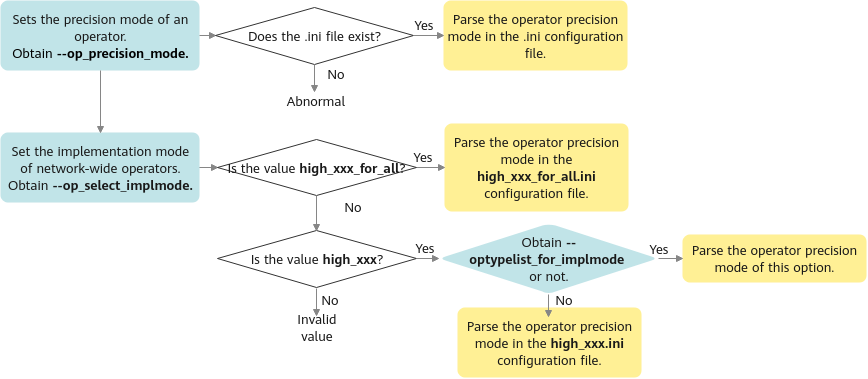
To set the operator precision mode:
- Obtain the --op_precision_mode option and check whether the .ini configuration file exists. If the file exists, parse the file and read the operator precision mode. Otherwise, an error is reported.
- If the --op_precision_mode option does not exist, read --op_select_implmode.
- Check whether this option is set to high_xxx_for_all. If yes, parse the high_xxx_for_all.ini file and read the operator precision mode.
- If the high_xxx option is configured, check whether --op_select_implmode is configured. If yes, read the operator precision mode specified by this option. If no, parse the high_xxx.ini file and read the operator precision mode.
Arguments
Arguments:
- force_fp32/cube_fp16in_fp32out:force_fp32 has the same effect as that of cube_fp16in_fp32out. The system selects a processing mode based on cube or vector operators. cube_fp16in_fp32out is newly added to the new version. For cube operators, this option has clearer semantics.
- For cube operators, the system processes the computation based on the operator implementation.
- The preferred input data type is float16 and the output data type is float32.
- If the float16 input data and float32 output data types are not supported, set both the input and output data types to float32.
- If the float32 input and output data types are not supported, set both the input and output data types to float16.
- If the float16 input and output data types are not supported, an error is reported.
- For vector operators, float32 is forcibly selected for operators supporting both float16 and float32, even if the original precision is float16.
This argument is invalid if your model contains operators not supporting float32, for example, an operator that supports only float16. In this case, float16 is retained. If the operator does not support float32 and it is configured to the blocklist of precision reduction (by setting precision_reduce to false), the counterpart AI CPU operator supporting float32 is used. If the AI CPU operator is not supported, an error is reported.
- For cube operators, the system processes the computation based on the operator implementation.
- force_fp16:
Forces float16 for operators supporting both float16 and float32.
- allow_fp32_to_fp16:
- For cube operators, float16 is used.
- For vector operators, preserve the original precision for operators supporting float32; else, forces float16.
- must_keep_origin_dtype:
Retain the original precision.
- If the precision of an operator in the original graph is float16, and the implementation of the operator in the AI Core does not support float16 but supports only float32 and bfloat16, the system automatically uses high-precision float32.
- If the precision of an operator in the original graph is float16, and the implementation of the operator in the AI Core does not support float16 but supports only bfloat16, the AI CPU operator of float16 is used. If the AI CPU operator is not supported, an error is reported.
- If the precision of an operator in the original graph is float32, and the implementation of the operator in the AI Core does not support float32 but supports only float16, the AI CPU operator of float32 is used. If the AI CPU operator is not supported, an error is reported.
The bfloat16 type is supported only by the following product models:
Atlas A2 products Atlas A3 products Atlas 200I/500 A2 inference products - allow_mix_precision/allow_mix_precision_fp16:
allow_mix_precision has the same effect as that of allow_mix_precision_fp16, indicating that mixed precision of float16 and float32 is used for neural network processing. allow_mix_precision_fp16 is newly added to the new version, which has clearer semantics for easy understanding.
In this mode, float16 is automatically used for certain float32 operators based on the built-in tuning policies. This will improve system performance and reduce memory footprint with minimal accuracy degradation.
If this mode is used, you can view the value of the precision_reduce option in the built-in tuning policy file ${INSTALL_DIR}/opp/built-in/op_impl/ai_core/tbe/config/<soc_version>/aic-<soc_version>-ops-info.json in the OPP installation directory.
- If it is set to true, the operator is on the mixed precision trustlist and its precision will be reduced from float32 to float16.
- If it is set to false, the operator is on the mixed precision blocklist and its precision will not be reduced from float32 to float16.
- If an operator does not have the precision_reduce option configured, the operator is on the graylist and will follow the same precision processing as the upstream operator.
- allow_mix_precision_bf16:
Mixed precision of bfloat16 and float32 is used for neural network processing. In this mode, bfloat16 is automatically used for certain float32 operators on the original model based on the built-in tuning policy. This will improve system performance and reduce memory footprint with minimal accuracy degradation. If bfloat16 and float32 are not supported, the AI CPU operators are used for computation. If AI CPU operators are also not supported, an error is reported during execution.
If this mode is used, you can view the value of the precision_reduce option in the built-in tuning policy file ${INSTALL_DIR}/opp/built-in/op_impl/ai_core/tbe/config/<soc_version>/aic-<soc_version>-ops-info.json in the OPP installation directory.
- If it is set to true, the operator is on the mixed precision trustlist and its precision will be reduced from float32 to bfloat16.
- If the field value is false, the operator is on the mixed precision blocklist and its precision will not be reduced from float32 to bfloat16.
- If an operator does not have the precision_reduce option configured, the operator is on the graylist and will follow the same precision processing as the upstream operator.
This option is supported only by the following product models:
Atlas A2 products Atlas A3 products Atlas 200I/500 A2 inference products - allow_fp32_to_bf16:
- For cube operators, bfloat16 is used.
- For vector operators, the original precision should be preserved. If the operators in the original model support float32, the original precision float32 is preserved. If the operators do not support float32, the precision is reduced to bfloat16. If bfloat16 and float32 are not supported, the AI CPU operators are used for computation. If AI CPU operators are also not supported, an error is reported during execution.
This option is supported only by the following product models:
Atlas A2 products Atlas A3 products Atlas 200I/500 A2 inference products
The default values are as follows:
Atlas 200I/500 A2 inference products inference scenario: force_fp16Atlas inference products inference scenario: force_fp16Atlas training products inference scenario: force_fp16Atlas A3 products inference scenario: force_fp16Atlas A2 products training scenario: must_keep_origin_dtypeAtlas A3 products training scenario: must_keep_origin_dtypeAtlas training products training scenario: allow_fp32_to_fp16
Suggestions and Benefits
The accuracy and performance of the network model vary according to the configured precision mode.
Accuracy ranked from high to low: force_fp32 > must_keep_origin_dtype > allow_fp32_to_fp16 > allow_mix_precision > force_fp16
Performance ranked from high to low: force_fp16 >= allow_mix_precision > allow_fp32_to_fp16 > must_keep_origin_dtype > force_fp32
Examples
--precision_mode=force_fp16
Dependencies and Restrictions
None