Locating Memory OOM Errors
You can perform the following steps to locate a fault. If the fault persists, contact technical support. After obtaining the logs, click here to contact technical support.
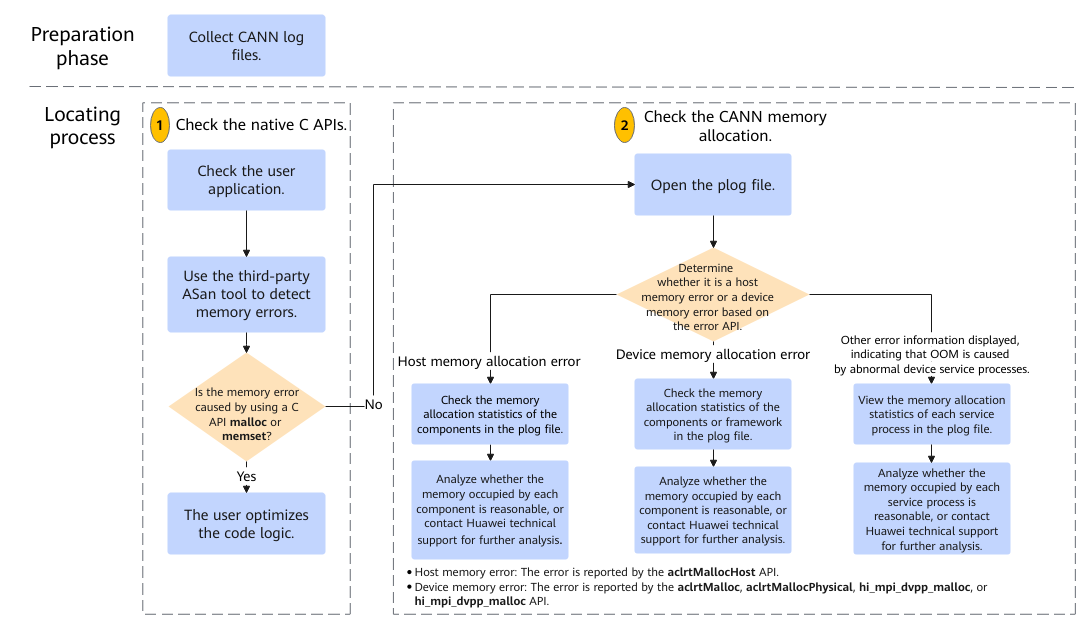
In the preparation phase, you need to collect CANN log files. For details about how to collect CANN log files (including application logs and on-device system logs), see Collecting Memory OOM Error Information. The following uses ${HOME}/err_log_info/ as an example of directory for storing collected logs.
The locating process is as follows:
- Check the native C APIs.
Check whether a standard C API malloc or memset is used to allocate the host memory for the application. If so, use the third-party ASan tool to detect memory errors and optimize the code logic.
- Check the CANN memory allocation.In the host application log file ${HOME}/err_log_info/log/[run|debug]/plog/plog-pid _*.log, find the log generated around the time when the OOM error occurs and determine the error type based on the error API.
- If the error information indicates that the aclrtMallocHost API provided by CANN is used to allocate the host memory, OOM is caused by the host memory error.
In this case, search for the keyword mem_stats in the log file and check the memory allocation statistics of components. For details, see Checking Memory Statistics of Each CANN Component. If the memory occupied by each component does not meet the expectation, contact technical support for further locating.
- If the error information indicates that the aclrtMalloc, aclrtMallocPhysical, and hi_mpi_dvpp_malloc APIs provided by CANN are used to allocate the device memory, OOM is caused by the device memory error.
In this case, search for the keyword mem_stats in the log file and check the memory allocation statistics of the components or framework. For details, see Checking Memory Statistics of Each CANN Component. If the memory occupied by each component does not meet the expectation, contact technical support for further locating.
- If other error information is displayed, OOM is caused by abnormal device service processes. In this case, search for the keyword DEV_PROC_MEM in the log file and view the memory statistics of each service process. For details, see Checking the Memory Statistics of the Device Service Processes. If the memory occupied by each service process does not meet the expectation, contact technical support for further locating.
- If the error information indicates that the aclrtMallocHost API provided by CANN is used to allocate the host memory, OOM is caused by the host memory error.