Performance-based Automatic Quantization
Performance-based automatic quantization aims at achieving the optimal performance of a quantized model. It generates mixed precision models based the on-board profile data of the original model and quantized model and then outputs the final performance-optimal model with little degradation in model accuracy based on the on-board profile data of all the said models.
No manual tuning of the quantization configuration file is required in this process, which greatly simplifies the optimization flow and improves the quantization efficiency.
This product does not support performance-based automatic quantization.
Overview
Before starting performance-based automatic quantization, set up the Neural Compute Agent-Neural Compute Server (NCA-NCS) environment, which builds a distributed call framework.
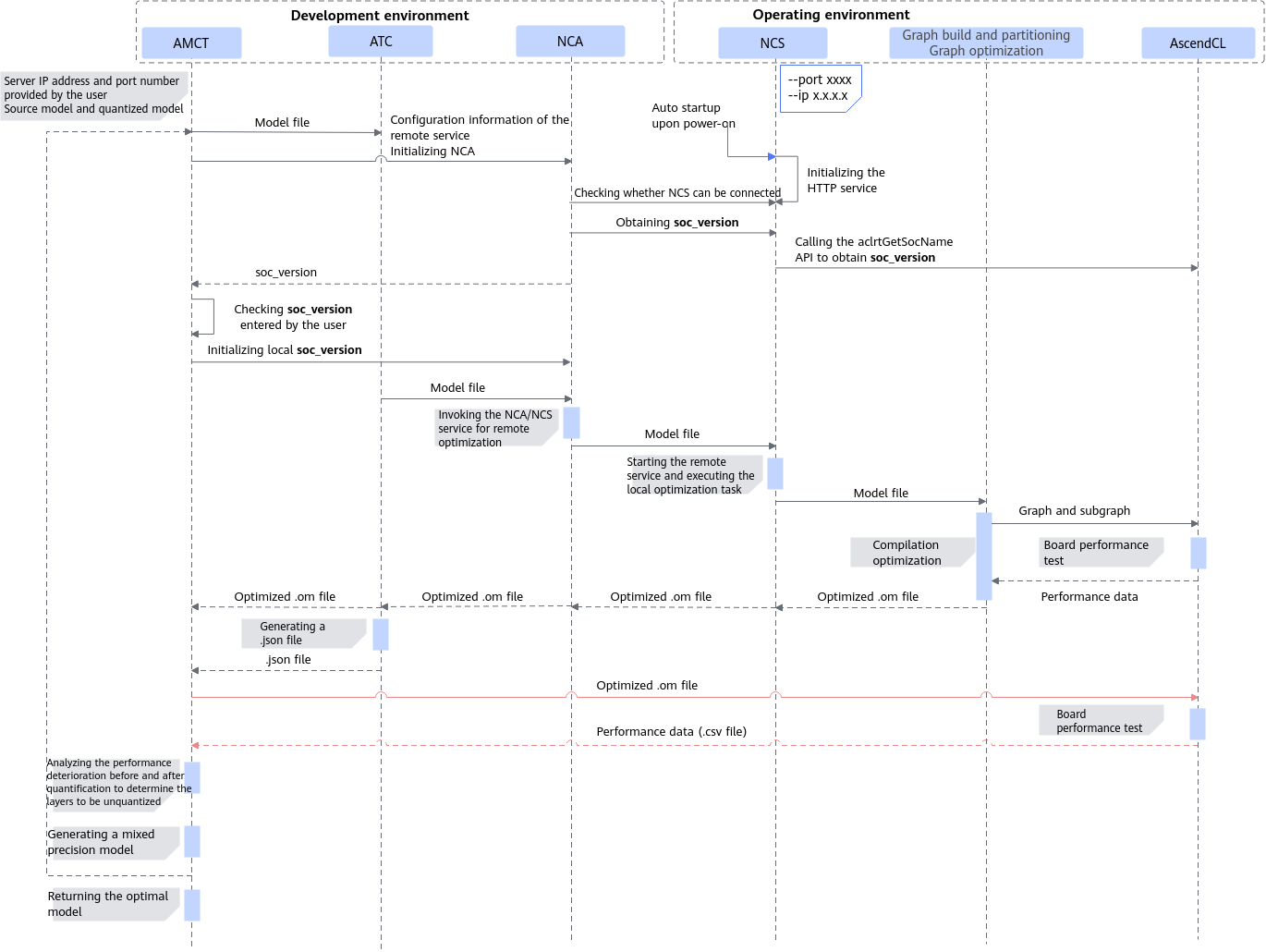
- NCS: encapsulates acl APIs and responds to the remote board access request with the requested profile data.
- NCA: sends the board access request from the service end to the remote NCS server and then returns the received profile data to the service end.
The following figure shows the environment setup.
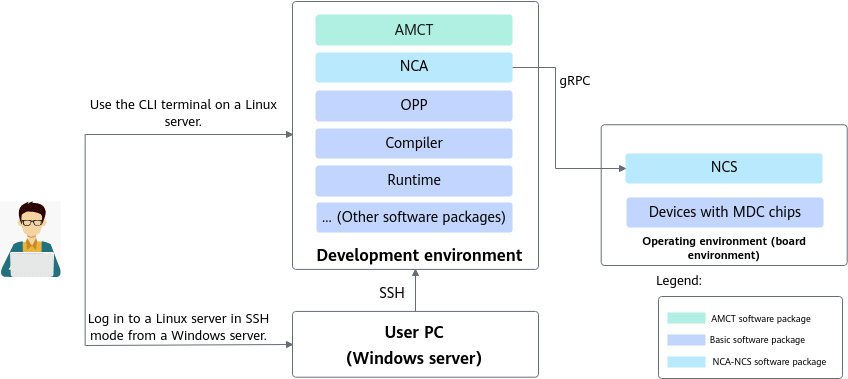
Install NCA, OPP, Compiler, and Runtime on the server where AMCT is located, and deploy NCS on the board. For details about how to install the NCA package, see Deploying the Environment. For details about how to install and start the NCS, see AOE Tuning Tool > AOE (Ascend RC) > Software Installation > NCS Installation and Startup (Operating Environment). For details about how to install other packages, see CANN Software Installation.
Deploying the Environment
- Environment setup
- (Optional) Set the software installation path.
Specify the installation path by setting the following environment variable. After the installation command is executed, the software is installed to the specified path.
export ASCEND_HOME_PATH=${INSTALL_DIR}${INSTALL_DIR} indicates the software installation path. Setting the environment variable by running the export command takes effect immediately yet only in the current window. You can set permanent environment variables by modifying the ~/.bashrc file.
- Run the vi ~/.bashrc command in any directory as the installation user and append the preceding command to the file.
- Save the file and run the source ~/.bashrc command for the environment variable to take effect.

If the installation path is set repeatedly by using the environment variable described in 1.a and the --install-path=path option in the installation command as described in 1.b, the installation path set in --install-path=path takes precedence.
- If the --install-path=path option is not included in the installation command, the installation path specified by the ASCEND_HOME_PATH environment variable is used.
- If neither of the preceding methods is used, the default installation path is used, that is, $HOME/Ascend for a non-root user or /usr/local/Ascend for the root user.
For details about the --install-path option, see Supported Command-Line Options.
- Switch to the amct/third_party directory and run the following command as the AMCT installation user:
./Ascend-nca-{software version}-{os.arch}.run --fullFor the available command-line options, see Supported Command-Line Options. The installation is successful if you see the following information:
[INFO]: Nca package installed successfully!
- Default installation path:
- For the root user: /usr/local/Ascend
- For a non-root user: $HOME/Ascend
- Installation log path:
- For the root user: /var/log/ascend_seclog/ascend_install.log
- For a non-root user: $HOME/var/log/ascend_seclog/ascend_install.log
- Path of the file that records the installation path, installation mode, and running user information: ${INSTALL_DIR}/<version>/tools/nca/ascend_install.info
where ${INSTALL_DIR} indicates the installation path, and <version> the package version.

- The NCA can also be uninstalled, upgraded, and decompressed. For details, see Common Operations on the NCA Package.
- Default installation path:
- (Optional) Set the software installation path.
- Environment variables
After environment setup, set the following environment variable. The following uses the default installation path for ${INSTALL_DIR} as an example.
source ${INSTALL_DIR}/bin/setenv.bash
API Call Sequence
Before performing performance-based automatic quantization, ensure that:
- The board environment is ready for inference.
- The NCA-NCS environment has been set up, and the NCS service has been started. For details, see Deploying the Environment.
Figure 3 shows the API call sequence.
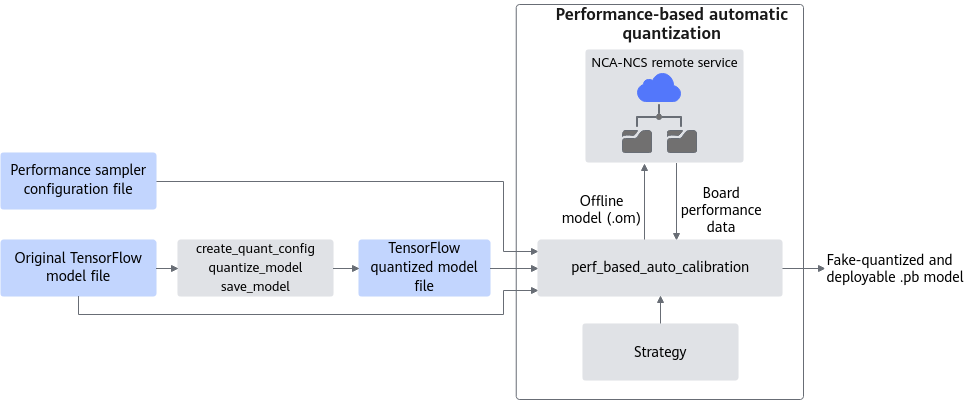
The workflow goes through the following steps:
- Call the create_quant_config, quantize_model, and save_model APIs to quantize the original model and save the quantized model.
In this step, you can obtain the quantization configuration file (containing quantizable layer configuration of the quantized model) and corresponding quantization information file quant_info (containing quantization factors, parameter shapes, and quantization auxiliary layers).
- Create a performance sampler configuration file by referring to Performance Sampler Configuration File and set parameters (for example, soc_version and distribute_config) related to running on the board.
- Call the perf_based_auto_calibration API to output the performance-optimal model.
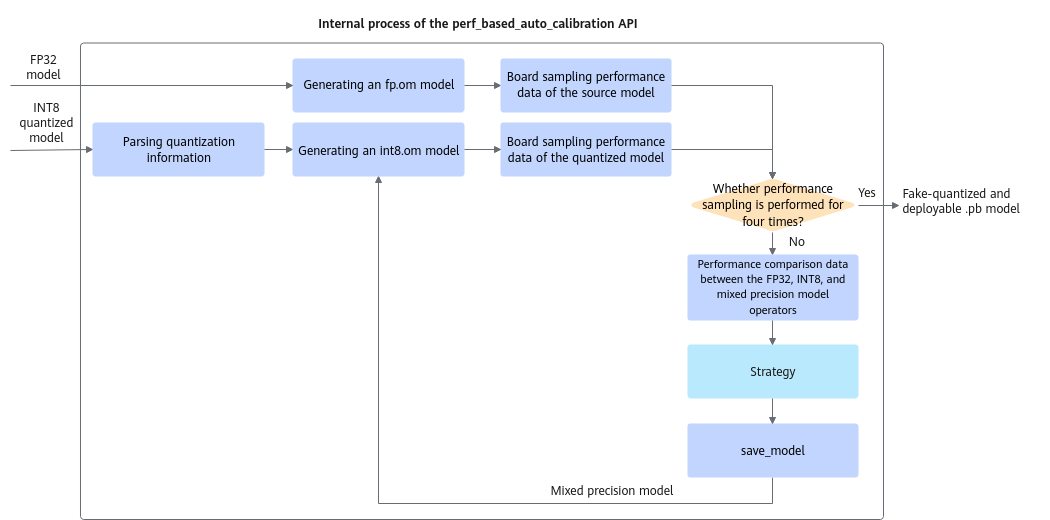
- Obtain the quantization information file quant_info from the quantized model obtained in 1. This file contains quantization factors, parameter shapes, and quantization auxiliary layers. If the number of input channels of the quantization layer in the file is less than or equal to 16 and the operator is of the Conv2D type, quantization is not performed. The prior knowledge information for unquantization is obtained.
- Run the original model (fp.om) and quantized model (int8.om) on the board for their profile data.
- Use ATC to convert fp.om and int8.om into JSON files (operator mapping files). Based on the files, match operators in the original model and quantized model to compare the profile data before and after quantization.
- Perform prior-based unquantization by using quant_info (only the Conv2D operators whose number of input channels of the quantization layers is less than or equal to 16 are dequantized). Next, call the quantization strategy module in perf_based_auto_calibration to generate the unquantization strategy based on the profile data comparison result obtained in 3.c. Then, generate a new quantization configuration file (stored in the tmp directory) based on the generated unquantization strategy and generate the first mixed-precision model.
- Run the said mixed-precision model on the board to compare the profile data between the first mixed-precision model and the original model.
- Generate a new unquantization strategy based on the profile data comparison result obtained in the previous step and that between the quantized model and original model. Generate a new quantization configuration file (stored in the tmp directory) based on the generated strategy, and produce the second mixed-precision model.
- Run the second mixed-precision model on the board, and output the performance-optimal model on the entire network based on the first mixed-precision model, quantized model, and original model.
Figure 4 shows the principles.
Example
The following is an example of calling the performance-based automatic quantization API to produce the performance-optimal mixed-precision model based on the original model and quantized model.
- Take the following steps to get started. Update the sample code based on your situation.
- Tweak the arguments passed to AMCT API calls as required.
- Import the AMCT package and set the log level.
1
2
import amct_tensorflow as amct
amct.set_logging_level(print_level='info', save_level='info')
- (Optional) Run inference on the original model for quantization in the TensorFlow environment based on the test dataset to validate the inference script and environment setup. (Update the sample code based on your situation.)
This step is recommended as it guarantees a properly functioning original model for inference with acceptable accuracy. You can use a subset from the test dataset to improve the efficiency.
1user_do_inference(ori_model, test_data)
- Quantize the original model based on the test dataset in the TensorFlow environment and save the quantized model. (Update the sample code based on your situation.)
1quant_model_file = user_do_calibration(ori_model, test_data)
- Run the performance-based automatic quantization tool to output the model with the optimal performance.
1
2
3
4
5
6
7
8
outputs = model_outputs
sampler_config_file = './sampler_config_file.cfg'
save_dir = './result/user_model'
amct.perf_based_auto_calibration(original_model_file=ori_model,
                                 quantized_model_file=quant_model_file,
                                 outputs=outputs,
                                 sampler_config_file=sampler_config_file,
                                 save_dir=save_dir)
The following is an example of the ./sampler_config_file.cfg file. For the field description, see Performance Sampler Configuration File.
ascend_sampler_config: { soc_version: Ascend610 input_shape: "input:32,224,224,3" distribute_config:{ ip:'xx.xx.xx.xx' port:'8000' } log: null atc: { options: [ {key: "input_format", value: "NHWC"}, {key: "mode", value: "1"} ] } } - (Optional) Run inference on the quantized model user_model_quantized.pb in the TensorFlow environment based on the test dataset to test the accuracy. (Update the sample code based on your situation.)
Compare the accuracy of the fake-quantized model with that of the original model (see 2).
1
2
quant_model = './results/user_model_quantized.pb'
user_do_inference(quant_model, test_data)