venc_set_roi_attr
Applicable Products
Product |
Supported |
|---|---|
x |
|
x |
|
x |
|
x |
|
√ |
|
√ |
Description
Sets the ROI attributes of an H.264/H.265 channel. This is used to limit the QP value of the ROI so that it is different from that of other ROIs. For details about the ROI encoding function, see ROI Encoding Function.
Prototype
- C Prototype
1hi_s32 hi_mpi_venc_set_roi_attr(hi_venc_chn chn, const hi_venc_roi_attr *roi_attr)
- Python Function
1ret = acl.himpi.venc_set_roi_attr(chn, roi_attr)
Parameters
Parameter |
Description |
|---|---|
chn |
Int, encoding channel ID.
|
roi_attr |
Dict, ROI parameter dictionary. See hi_venc_roi_attr. |
Return Value
Return Value |
Description |
|---|---|
ret |
Int, error code.
|
Restrictions
- This API is used to set the ROI attributes of an H.264/H.265 channel.
- This API must be called after an encoding channel is created and before the channel is destroyed. If this API is called during encoding, the configuration takes effect after the next frame is encoded.
- It is recommended that this API be called after an encoding channel is created and before encoding is started, to reduce the number of the API calls during encoding.
- Before calling this API, you are advised to call acl.himpi.venc_get_roi_attr to obtain the ROI configuration of the current channel.
- After this MPI is called to set the ROI attributes, if the current frame is checked to be encoded as a P-Skip frame, the effect of the P-Skip frame takes priority.
- After this API is called, some ROI QP values may not be the configured values. In an encoding process, residuals of some code blocks are 0, no data needs to be quantized. As a result, a QP value does not take effect, which is normal and does not affect encoding effects.
ROI Encoding Function
ROI encoding is used to encode a region of interest (ROI).
You can configure an ROI to limit its QP value. This can limit the QP value of the ROI so that it is different from that of other ROIs. Currently, only H.264 and H.265 channels support ROI settings. Eight ROIs are provided for users at the same time.
The eight regions can be overlaid with each other and the overlay priority ranges from 0 to 7. The overlay priority indicates the final QP value of image regions when the regions are overlaid. The final QP value is set according to the region with the highest priority. ROIs can be configured in absolute or relative QP mode.
- Absolute QP: The QP value of an ROI is the user-defined QP value.
- Relative QP: The QP value of an ROI is the sum of the QP value generated during bit rate control and the user-defined QP offset.
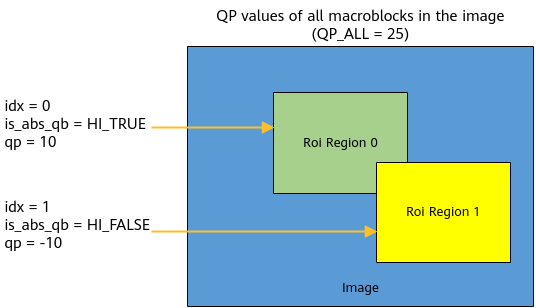
The following figure is used as an example, where the QP values of all macroblocks in the image are 25. ROI 0 is set to the absolute QP mode, with the QP value of 10 and the index of 0. ROI 1 is set to the relative QP mode, with the QP value of –10 and the index of 1. When the two regions are overlaid, the QP is set according to the region with the highest priority (ROI 1). The QP value of ROI 0 except the overlapping part is 10. The QP value of ROI 1 is 15 (25 – 10).