BIOS Configuration
This section describes how to perform high-performance configuration using the BIOS on the Ascend AI Processor.
Configuring the High-Performance Mode
Principle: Generally, the Ascend AI Processor provides two power policies: Efficiency and Performance.
- Efficiency indicates the energy-saving mode, where the CPU supports dynamic voltage and frequency scaling (DVFS) to adjust its operating frequency dynamically based on the workload.
- Performance indicates the performance mode, where dynamic frequency scaling is disabled, forcing the CPU to run at a fixed maximum frequency.
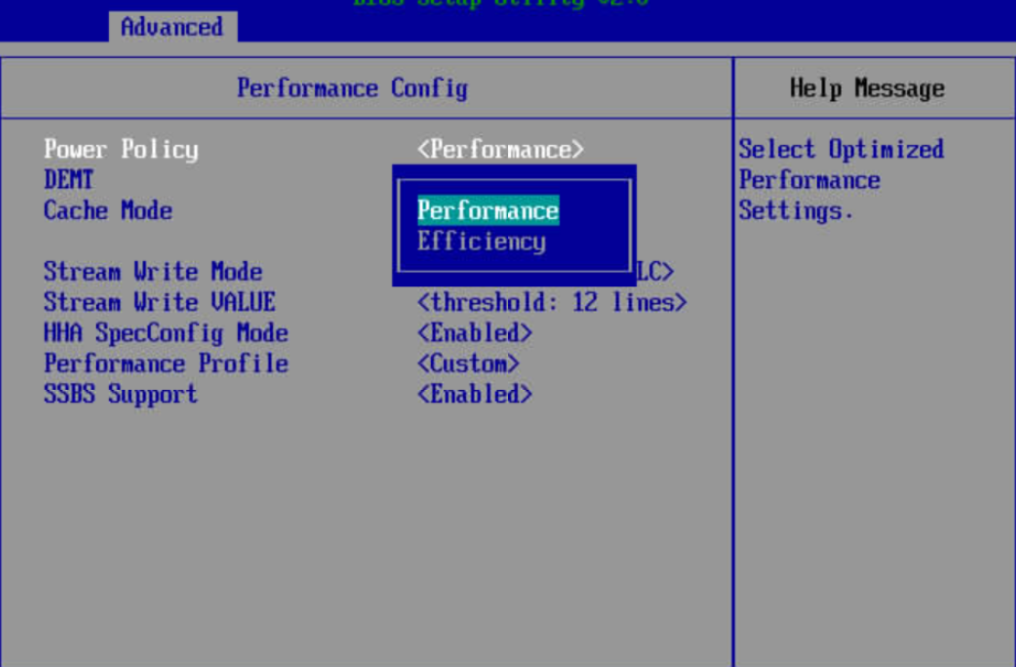
Tuning configuration: Set Power Policy to Performance to achieve optimal performance.
Disadvantage: Enabling the high-performance mode results in higher power consumption.
Recommended use: It is advised to enable the high-performance mode for inference tasks. This effectively boosts CPU performance and reduces CPU stalls, thereby enhancing overall model performance.
The laboratory installed openEuler 22.03 SP4 on the Atlas 800T A2 and deployed the Llama-7B and Qwen2-7B models to study their inference performance before and after enabling the high-performance mode. The following experimental data were tested based on MindIE. Due to differences in hardware and software environments, the data below is for reference only and does not serve as a performance standard.
|
Model |
Concurrency |
Input Length |
Experiment No. |
Default Efficiency (Tokens/s) |
performance (Tokens/s) |
Performance Gains (%) |
|---|---|---|---|---|---|---|
|
Llama-7B |
8 |
128 |
1 |
75.4373 |
76.1809 |
0.99 |
|
2 |
75.3953 |
76.0922 |
0.92 |
|||
|
3 |
75.4051 |
76.0719 |
0.88 |
|||
|
Average |
75.4126 |
76.1150 |
0.93 |
|||
|
8 |
256 |
1 |
76.5359 |
77.5444 |
1.32 |
|
|
2 |
76.5362 |
77.3321 |
1.04 |
|||
|
3 |
77.0832 |
77.9778 |
1.16 |
|||
|
Average |
76.7184 |
77.6181 |
1.17 |
|||
|
Qwen2-7B |
8 |
128 |
1 |
83.5893 |
84.6158 |
1.23 |
|
2 |
83.4479 |
84.4310 |
1.18 |
|||
|
3 |
83.3766 |
84.3732 |
1.20 |
|||
|
Average |
83.4713 |
84.4733 |
1.20 |
|||
|
8 |
256 |
1 |
84.7990 |
85.8575 |
1.25 |
|
|
2 |
84.7267 |
85.5879 |
1.02 |
|||
|
3 |
84.8510 |
86.2523 |
1.65 |
|||
|
Average |
84.7922 |
85.8992 |
1.31 |
Configuration method: Access the BIOS through the BMC and set Power Policy to Performance under Advanced > Performance Config > Power Policy.
Modifying the Memory Refresh Rate
Principle: DRAM memory utilizes capacitors to store data. Due to leakage currents, the electrical charge dissipates over time, preventing long-term data retention. Therefore, continuous recharging is required, a process known as memory refresh. Refresh operations cannot be executed simultaneously with read/write operations, meaning that refreshes negatively impact memory performance. The BIOS provides an Auto option for the memory refresh rate, which automatically adjusts the refresh rate based on the operating temperature. Compared to the default 32 ms configuration, this option can enhance memory performance.
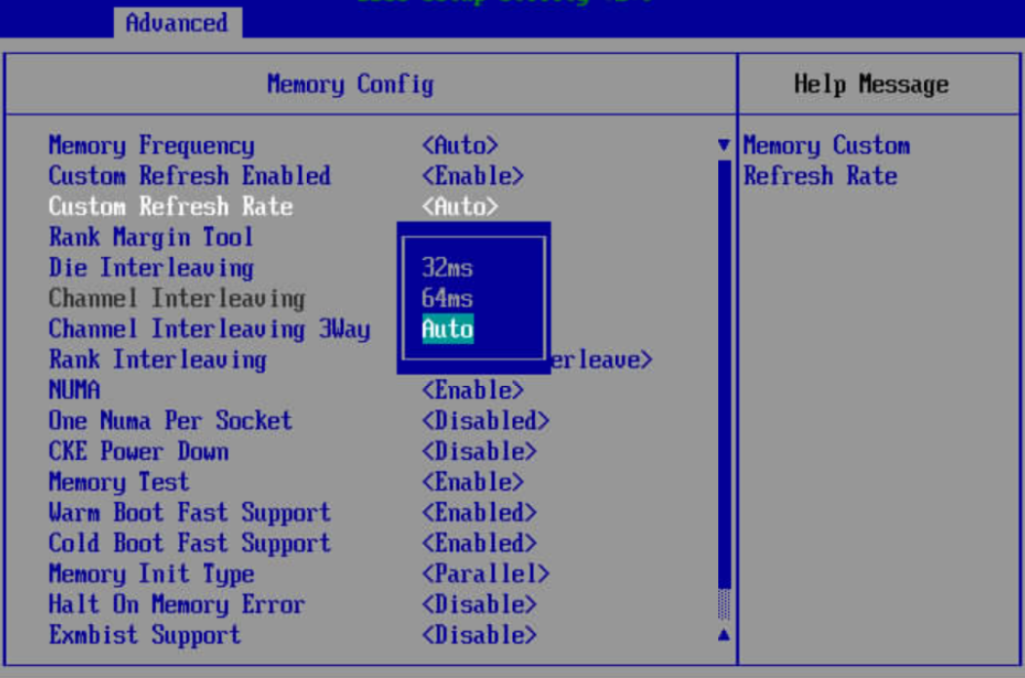
Tuning configuration: Set the memory refresh rate option to Auto.
Recommended use: Dynamically adjusting the memory refresh rate can improve memory copy performance to a certain extent, thereby boosting overall model performance.
The laboratory installed openEuler 22.03 SP4 on the Atlas 800T A2 and deployed the Llama-7B and Qwen2-7B models to study the impact of different memory refresh rates on the inference performance of the models. The following experimental data were tested based on MindIE. Due to differences in hardware and software environments, the data below is for reference only and does not serve as a performance standard.
|
Model |
Concurrency |
Input Length |
Request Count |
Experiment No. |
Default: 32 ms (Tokens/s) |
auto (Tokens/s) |
Performance Gains (%) |
|---|---|---|---|---|---|---|---|
|
Llama-7B |
8 |
128 |
2000 |
1 |
75.4373 |
80.4640 |
6.66 |
|
2 |
75.3953 |
80.3319 |
6.55 |
||||
|
3 |
75.4051 |
80.4814 |
6.73 |
||||
|
Average |
75.4126 |
80.4258 |
6.65 |
||||
|
8 |
256 |
2000 |
1 |
76.5359 |
81.8636 |
6.96 |
|
|
2 |
76.5362 |
81.8073 |
6.89 |
||||
|
3 |
77.0832 |
81.7618 |
6.07 |
||||
|
Average |
76.7184 |
81.8109 |
6.64 |
||||
|
Qwen2-7B |
8 |
128 |
2000 |
1 |
83.5893 |
87.0385 |
4.13 |
|
2 |
83.4479 |
87.1340 |
4.42 |
||||
|
3 |
83.3766 |
86.9090 |
4.24 |
||||
|
Average |
83.4713 |
87.0272 |
4.26 |
||||
|
8 |
256 |
2000 |
1 |
84.7990 |
87.9068 |
3.66 |
|
|
2 |
84.7267 |
87.8995 |
3.74 |
||||
|
3 |
84.8510 |
87.8859 |
3.58 |
||||
|
Average |
84.7922 |
87.8974 |
3.66 |
Configuration method: Access the BIOS through the BMC and set Custom Refresh Rate to Auto under Advanced > Memory Config > Custom Refresh Rate.
Modifying the CPU Prefetching Configuration
Principle: When the CPU reads data from the memory into its internal high-speed Cache, it leverages the principle of locality. In addition to retrieving the currently requested data, the CPU prefetches surrounding data into the Cache. If this prefetched data matches the data required for the next access, system performance is enhanced.
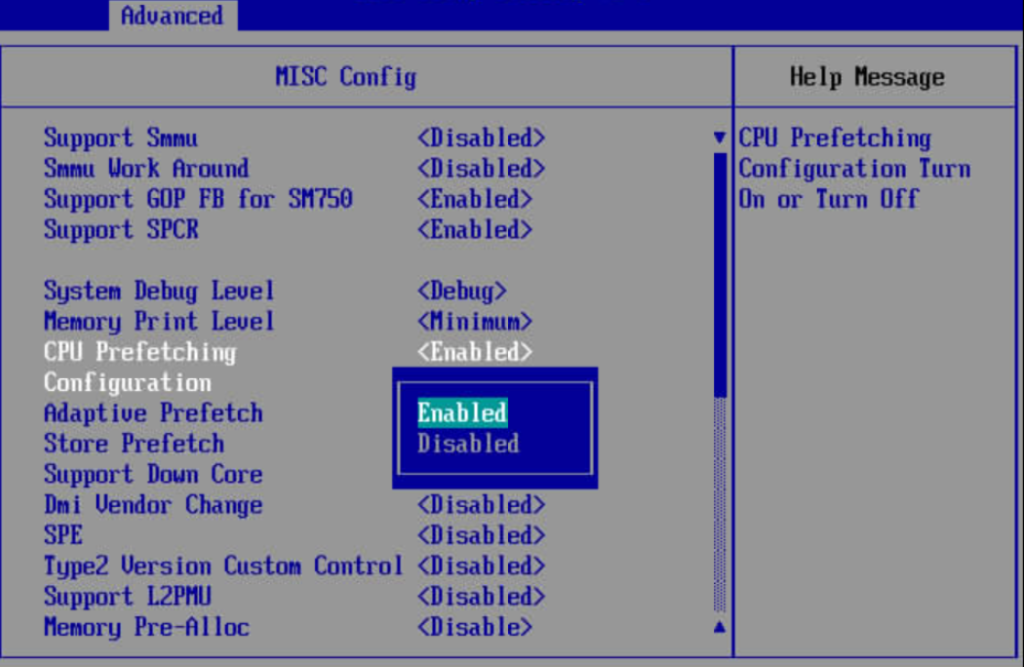
Tuning configuration: Enable CPU prefetching.
Disadvantage: CPU prefetching yields a high cache hit rate in scenarios where data access is highly concentrated, making it suitable to enable. Conversely, in scenarios with scattered data access, CPU prefetching should be disabled.
Recommended use: For inference tasks, enabling the CPU prefetching feature can effectively improve CPU data-reading performance, thereby boosting overall model performance.
The laboratory installed openEuler 22.03 SP4 on the Atlas 800T A2 and deployed the Llama-7B and Qwen2-7B models to study their inference performance before and after enabling CPU prefetching. The following experimental data were tested based on MindIE. Due to differences in hardware and software environments, the data below is for reference only and does not serve as a performance standard.
|
Model |
Concurrency |
Input Length |
Experiment No. |
CPU Prefetching Enabled by Default (Tokens/s) |
CPU Prefetching Disabled (Tokens/s) |
Performance Gains (%) |
|---|---|---|---|---|---|---|
|
Llama-7B |
8 |
128 |
1 |
75.4373 |
74.7984 |
-0.85 |
|
2 |
75.3953 |
74.6472 |
-0.99 |
|||
|
3 |
75.4051 |
74.6587 |
-0.99 |
|||
|
Average |
75.4126 |
74.7014 |
-0.94 |
|||
|
8 |
256 |
1 |
76.5359 |
75.9913 |
-0.71 |
|
|
2 |
76.5362 |
75.9398 |
-0.78 |
|||
|
3 |
77.0832 |
76.4258 |
-0.85 |
|||
|
Average |
76.7184 |
76.1190 |
-0.78 |
|||
|
Qwen2-7B |
8 |
128 |
1 |
83.5893 |
82.1724 |
-1.70 |
|
2 |
83.4479 |
81.9364 |
-1.81 |
|||
|
3 |
83.3766 |
82.0396 |
-1.60 |
|||
|
Average |
83.4713 |
82.0495 |
-1.70 |
|||
|
8 |
256 |
1 |
84.7990 |
83.6620 |
-1.34 |
|
|
2 |
84.7267 |
83.0590 |
-1.97 |
|||
|
3 |
84.8510 |
83.9055 |
-1.11 |
|||
|
Average |
84.7922 |
83.5422 |
-1.47 |
Configuration method: Access the BIOS through the BMC and set CPU Prefetching Configuration to Enabled under Advanced > MISC Config > CPU Prefetching Configuration.
Disabling SMMU
Principle: The System Memory Management Unit (SMMU) primarily handles the translation from virtual addresses to physical addresses. However, the SMMU can introduce additional page table lookup overhead and latency, thereby degrading overall system performance.
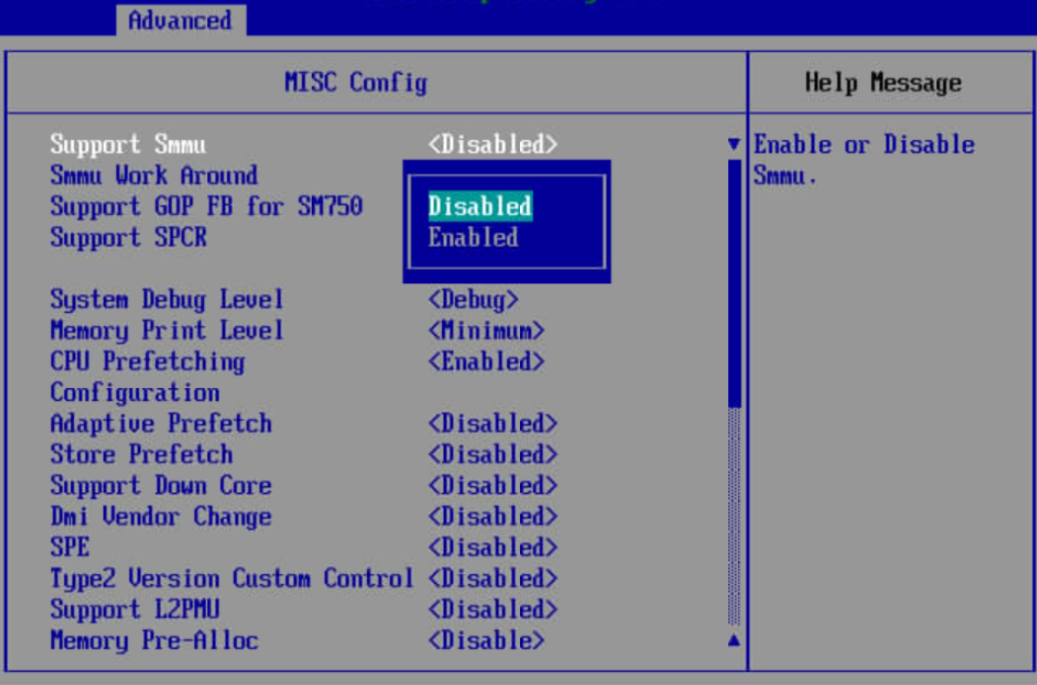
Tuning configuration: Disable SMMU.
Recommended scenario: Disabling SMMU in non-VM environments (such as BMSs or Docker containers) helps to enhance model performance.
The laboratory installed openEuler 22.03 SP4 on the Atlas 800T A2 and deployed the Llama-7B and Qwen2-7B models to study their inference performance before and after enabling SMMU. The following experimental data were tested based on MindIE. Due to differences in hardware and software environments, the data below is for reference only and does not serve as a performance standard.
|
Model |
Concurrency |
Input Length |
Experiment No. |
SMMU Disabled by Default (Tokens/s) |
SMMU Enabled (Tokens/s) |
Performance Gains (%) |
|---|---|---|---|---|---|---|
|
Llama-7B |
8 |
128 |
1 |
75.4373 |
74.9460 |
-0.65 |
|
2 |
75.3953 |
74.7320 |
-0.88 |
|||
|
3 |
75.4051 |
75.0313 |
-0.50 |
|||
|
Average |
75.4126 |
74.9031 |
-0.68 |
|||
|
8 |
256 |
1 |
76.5359 |
75.7005 |
-1.09 |
|
|
2 |
76.5362 |
75.6460 |
-1.16 |
|||
|
3 |
77.0832 |
75.8298 |
-1.63 |
|||
|
Average |
76.7184 |
75.7254 |
-1.29 |
|||
|
Qwen2-7B |
8 |
128 |
1 |
83.5893 |
81.5155 |
-2.48 |
|
2 |
83.4479 |
81.7802 |
-2.00 |
|||
|
3 |
83.3766 |
82.2530 |
-1.35 |
|||
|
Average |
83.4713 |
81.8496 |
-1.94 |
|||
|
8 |
256 |
1 |
84.7990 |
82.8234 |
-2.33 |
|
|
2 |
84.7267 |
82.7696 |
-2.31 |
|||
|
3 |
84.8510 |
82.7741 |
-2.45 |
|||
|
Average |
84.7922 |
82.7890 |
-2.36 |
Configuration method: Access the BIOS through the BMC and set Support Smmu to Disabled under Advanced > MISC Config > Support Smmu.