Development Process
This section describes the detailed development process for integrating a Triton operator into a graph.
Environment Setup
- Install the CANN software package by referring to Environment Setup and set environment variables.
- Install Triton-Ascend by referring to Triton-Ascend Installation Guide.
For details about the sample for integrating a Triton operator into a graph, click Here.
Generating an .npubin File
You need to call the compile API provided by Triton-Ascend to compile the operator kernel and generate the corresponding .npubin file. The following uses the AddCustom custom operator as an example (the file name is AddCustom.py). The sample code is as follows:
1 2 3 4 5 6 7 8 9 10 11 12 13 14 15 16 17 18 19 20 21 22 23 24 25 26 27 28 29 30 31 32 33 34 35 36 37 38 39 40 41 42 43 44 45 46 47 |
# Compute Kernel import torch import torch_npu # torch_npu plugin import triton import triton.language as tl # Triton language module # Define a Triton kernel function to implement vector addition of x and y. @triton.jit def add_kernel(x_ptr, # Pointer to the first input vector. y_ptr, # Pointer to the second input vector. output_ptr, # Pointer to the output vector. n_elements, # Length of the vector. BLOCK_SIZE: tl.constexpr, # Number of elements processed by each program. ): # Obtain the ID of the current program. pid = tl.program_id(axis=0) # We use a 1D launch grid so axis is 0. # Calculate the start position of the current program. block_start = pid * BLOCK_SIZE # Generate the offset list of the elements processed by the current program. offsets = block_start + tl.arange(0, BLOCK_SIZE) # Create a mask to prevent out-of-bounds access. mask = offsets < n_elements # Load x and y from DRAM, and use the mask to avoid out-of-bounds access. x = tl.load(x_ptr + offsets, mask=mask) y = tl.load(y_ptr + offsets, mask=mask) # Compute x + y. output = x + y # Write the result back to DRAM. tl.store(output_ptr + offsets, output, mask=mask) # Define the block size. BLOCK_SIZE_VALUE = 1024 # Create a Triton AST source code object. add_kernel_ast = triton.compiler.ASTSource( fn=add_kernel, signature={ 'x_ptr': '*fp32', 'y_ptr': '*fp32', 'output_ptr': '*fp32', 'n_elements': 'i32', }, constants={ 'BLOCK_SIZE': BLOCK_SIZE_VALUE # Define a constant as the block size. } ) # Compile the kernel. compiled = triton.compile(add_kernel_ast) |
Run the following command in the preceding script path:
1
|
python3 AddCustom.py |
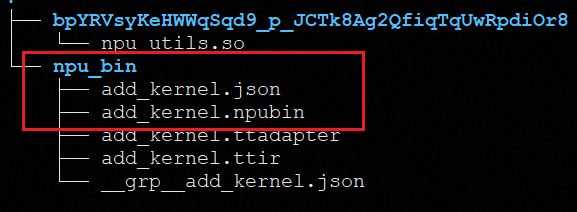
After the execution is successful, the .npubin, .json, .ttir, and .ttadapter files are generated in the ~/.triton/cache directory. See Figure 1.
Developing the Deliverable for Integrating an Operator into a TensorFlow Graph
TensorFlow supports custom operators. Therefore, you need to provide a deliverable for integrating a custom operator into a TensorFlow graph. The following uses TensorFlow 1.15 as an example. You need to create the prototype registration file custom_add_custom.cc with the following content:
1 2 3 4 5 6 7 8 9 10 11 12 13 14 15 16 17 18 19 20 21 22 23 24 25 26 27 |
#include "tensorflow/core/framework/op.h" #include "tensorflow/core/framework/op_kernel.h" #include "tensorflow/core/framework/shape_inference.h" #include "tensorflow/core/framework/common_shape_fns.h" using namespace tensorflow; // Register the operator prototype by using the REGISTER_OP API provided by TensorFlow. REGISTER_OP("AddCustom") // TensorFlow registered operator name .Input("x: T") // Operator prototype. The input parameter is x and the type is T. .Input("y: T") // Operator prototype. The input parameter is y and the type is T. .Output("z: T") // Operator prototype. The output parameter is z and the type is T. .Attr("T: {float, double, int32}") // Supported range of the T type .SetShapeFn(shape_inference::BroadcastBinaryOpShapeFn); // Shape inference of the operator. BroadcastBinaryOpShapeFn is a built-in function provided by TensorFlow. The output shape is inferred from the input shape, that is, the input and output shapes are the same. // CPU implementation of the TensorFlow custom operator class AddCustomOp : public OpKernel { public: explicit AddCustomOp(OpKernelConstruction* context) : OpKernel(context) {} // The current operator does not support CPU devices. Implement this function to throw an exception, indicating that the operator does not support CPU devices. void Compute(OpKernelContext* context) override { OP_REQUIRES(context, false, errors::Unimplemented("AddCustomOp is not supported on CPU")); } }; // Register the CPU implementation of the TensorFlow custom operator. REGISTER_KERNEL_BUILDER(Name("AddCustom").Device(DEVICE_CPU), AddCustomOp); |
Run the following command to compile the preceding code. After the compilation is successful, the libcustom_ops.so file is generated in the outputs directory of the current path. In the subsequent operator calling script, you can use the load_op_library API to load the libcustom_ops.so file as a Python module to call the custom operator.
1 2 3 4 5 6 7 8 9 10 11 12 13 |
#! /bin/bash SCRIPT_DIR=$(dirname "(realpath "$0")") cd $SCRIPT_DIR || exit rm -rf outputs mkdir outputs TF_CFLAGS=( $(python3 -c 'import tensorflow as tf; print(" ".join(tf.sysconfig.get_compile_flags()))') ) // Obtain the TensorFlow compilation option. TF_LFLAGS=( $(python3 -c 'import tensorflow as tf; print(" ".join(tf.sysconfig.get_link_flags()))') ) // Obtain the TensorFlow link option. SOURCE_FILES=$(find . -name '*.cc') // Include the .cc file for TensorFlow operator registration and CPU kernel implementation. g++ -std=c++14 -shared $SOURCE_FILES -o outputs/libcustom_ops.so -fPIC ${TF_CFLAGS[@]} ${TF_LFLAGS[@]} -O2 // Compilation command. The generated file is libcustom_ops.so. For TensorFlow, the .so file can be loaded as a Python module by using load_op_library to call the custom operator. |
Developing the Deliverable for Integrating an Operator into a GE Graph
- Download the project for integrating a Triton operator into a graph to any directory. The internal structure is as follows:
1
2
3
4
5
6
7
custom_op/
├── src/
|   └── custom_op.cpp               // Source code file of the custom operator
├── CMakeLists.txt                  // CMake file
├── gen_npu_supported_ops_json.sh   // File generation script
├── README.md                       // Readme
└── run.sh                          // Execution script
- Go to the src directory of the preceding custom project and compile the custom_op.cpp file. The following is an example:
AddCustom is the implementation class for you to define Triton operators. It is inherited from EagerExecuteOp and is used to implement the Execute function.
The main process is as follows:
- Load the operator binary from the .npubin file.
- Obtain the kernel handle.
- Construct the kernel parameter structure.
- Call the acl Launch Kernel API to start the compute task of the corresponding operator.
  1
  2
  3
  4
  5
  6
  7
  8
  9
 10
 11
 12
 13
 14
 15
 16
 17
 18
 19
 20
 21
 22
 23
 24
 25
 26
 27
 28
 29
 30
 31
 32
 33
 34
 35
 36
 37
 38
 39
 40
 41
 42
 43
 44
 45
 46
 47
 48
 49
 50
 51
 52
 53
 54
 55
 56
 57
 58
 59
 60
 61
 62
 63
 64
 65
 66
 67
 68
 69
 70
 71
 72
 73
 74
 75
 76
 77
 78
 79
 80
 81
 82
 83
 84
 85
 86
 87
 88
 89
 90
 91
 92
 93
 94
 95
 96
 97
 98
 99
100
101
102
103
#include "graph/custom_op.h"
#include "acl/acl_rt.h"
#include "exe_graph/runtime/eager_op_execution_context.h"
using namespace ge;
class AddCustom : public EagerExecuteOp {
 public:
  graphStatus Execute(gert::EagerOpExecutionContext *ctx) {
    // Obtain the kernel handle from the .npubin file.
    const char *bin_path = "./add_kernel.npubin";        // Binary file path of the custom operator
    aclrtBinHandle bin_handle = nullptr;                 // Binary handle
    aclrtFuncHandle func_handle = nullptr;               // Handle of the kernel function
    // Configure the binary loading options.
    aclrtBinaryLoadOption binary_load_option;
    aclrtBinaryLoadOptions binary_load_options;
    binary_load_option.type = ACL_RT_BINARY_LOAD_OPT_LAZY_LOAD;  // Specify whether to load the operator to the device after the operator binary is parsed and the operator is registered.
    binary_load_option.value.isLazyLoad = 0U;

    binary_load_options.numOpt = 1;
    binary_load_options.options = &binary_load_option;

    // Load the operator binary file.
    aclError ret = ACL_ERROR_NONE;
    ret = aclrtBinaryLoadFromFile(bin_path, &binary_load_options, &bin_handle);
    if (ret != ACL_ERROR_NONE) {
      std::cerr << __FILE__ << ":" << __LINE__ << " aclError: " << ret << std::endl;
    }
    // Obtain the kernel function handle add_kernel from the binary file.
    ret = aclrtBinaryGetFunction(bin_handle, "add_kernel", &func_handle);
    if (ret != ACL_ERROR_NONE) {
      std::cerr << __FILE__ << ":" << __LINE__ << " aclError: " << ret << std::endl;
    }

    // Obtain the input tensor of the operator.
    const gert::Tensor *input_x = ctx->GetInputTensor(0);
    const gert::Tensor *input_y = ctx->GetInputTensor(1);
    // Obtain the data address.
    void *x_addr = input_x->GetAddr();
    void *y_addr = input_y->GetAddr();

    // Allocate device memory for the output tensor.
    StorageShape &output_shape = input_x->GetShape();
    size_t tensor_size = input_x->GetSize();
    DataType data_type = input_x->GetDataType();
    const StorageFormat &format = input_x->GetFormat();
    gert::Tensor *output_z =
        ctx->MallocOutputTensor(0, output_shape, format, data_type, tensor_size, gert::TensorPlacement::kOnDeviceHbm);
    void *z_addr = output_z->GetAddr();

    // Obtain the number of elements to be processed and the grid values.
    int64_t n_elements = input_x->GetShapeSize();
    int32_t grid_x = 16;
    int32_t grid_y = 1;
    int32_t grid_z = 1;
    int32_t block_num = grid_x * grid_y * grid_z;

    // Assemble args to construct the kernel parameter structure.
    // The first three and last three parameters of args are fixed. The middle parameters are user-defined and must match the kernel function's signature and type.
    // According to the kernel implementation in the current example, the two inputs of AddCustom must have the same shape. The broadcast mode is not supported. For example, Shape1 = [2,3,4] and Shape2 = [4] are not supported.
    struct __attribute__((packed)) {
      // void *ffts_addr __attribute__((aligned(8))); // Note: If the device is the Atlas A3 training product/Atlas A3 inference product, this parameter is required.
      void *sync_block_lock __attribute__((aligned(8)));
      void *workspace_addr __attribute__((aligned(8)));
      const void *arg0 __attribute__((aligned(8)));
      const void *arg1 __attribute__((aligned(8)));
      void *arg2 __attribute__((aligned(8)));
      int32_t arg3 __attribute__((aligned(4)));
      int32_t grid_x __attribute__((aligned(4)));
      int32_t grid_y __attribute__((aligned(4)));
      int32_t grid_z __attribute__((aligned(4)));
    } args = {
       // nullptr, // This parameter is required if the device is the Atlas A3 training product/Atlas A3 inference product.
        nullptr, nullptr, input_x->GetAddr(), input_y->GetAddr(), z_addr, static_cast<int32_t>(n_elements),
    };
    // Obtain the stream.
    void *stream = ctx->GetStream();
    // Start the kernel function asynchronously.
    // Prototype:
    // aclError aclrtLaunchKernelWithHostArgs(aclrtFuncHandle func_handle,
    //                                      uint32_t block_num,
    //                                      aclrtStream stream,
    //                                      aclrtLaunchKernelCfg *cfg,
    //                                      void *hostArgs,
    //                                      size_t size,
    //                                      aclrtPlaceHolderInfo *placeHolderArray,
    //                                      size_t placeHolderNum);
    // func_handle[in]: kernel function handle
    // block_num  [in]: number of cores on which the kernel function runs
    // stream     [in]: task stream
    // cfg        [in]: configuration information delivered by the task. If not required, set it to nullptr.
    // hostArgs   [in]: address of the kernel function parameter
    // size       [in]: number of bytes occupied by the parameter
    // placeHolderArray[in]: placeholder array
    // placeHolderNum[in]: number of placeholder arrays
    ret = aclrtLaunchKernelWithHostArgs(func_handle, static_cast<uint32_t>(block_num), stream, nullptr,
                                        static_cast<void *>(&args), sizeof(args), nullptr, 0);
    if (ret != ACL_ERROR_NONE) {
      std::cerr << __FILE__ << ":" << __LINE__ << " aclError: " << ret << std::endl;
    }
    return GRAPH_SUCCESS;
  }
};
// Register the custom operator so that it can be identified and called during graph build. The registration name AddCustom matches the operator name in the graph and must be the same as that configured in the frontend.
REG_AUTO_MAPPING_OP(AddCustom);
For details about the aclrtBinaryLoadFromFile, aclrtBinaryGetFunction, and aclrtLaunchKernelWithHostArgs APIs, see Kernel Loading and Execution.
For details about the GetAddr, GetShape, GetSize, GetDataType, GetFormat, and GetShapeSize APIs, see Basic Data Structures and APIs.
For details about other APIs, see EagerExecuteOp, Execute, GetInputTensor, MallocOutputTensor, GetStream, and REG_AUTO_MAPPING_OP.
- After the development is complete, execute the run.sh script under custom_op for building.
bash run.sh
If the information shown in the below figure is displayed, the build is successful.

Set the environment variables as prompted.
export ASCEND_CUSTOM_OPP_PATH=/home/your_path/TritonOp/custom_op/build_out:$ASCEND_CUSTOM_OPP_PATH
Result Verification
After all the preceding steps are done, you can use the following script to verify the function of the GE graph. The following is an example of calling the script based on TensorFlow 1.15. Assume that the file name is run_add_custom_tf_1.15.py.
1 2 3 4 5 6 7 8 9 10 11 12 13 14 15 16 17 18 19 20 21 22 23 24 25 26 27 28 29 30 31 32 33 34 35 36 37 38 39 40 41 42 43 44 45 46 47 48 49 50 51 52 53 54 55 56 57 58 59 60 61 62 63 64 65 66 |
#!/usr/bin/python3 # coding=utf-8 import os import tensorflow as tf import numpy as np from npu_bridge.npu_init import * # Import the NPU initialization module. tf.enable_resource_variables() # Enable resource variables. # Relative tolerance of the np.allclose comparison function atol = 0.001 # Absolute tolerance of the np.allclose comparison function rtol = 0.001 def main(unused_argv): custom_op_lib = tf.load_op_library(os.path.join("./outputs/libcustom_ops.so")) # Load the custom operator library. You can modify the path based on the compilation result directory in . # Define the input data. shape_params = (8, 2048) dtype_params = np.float32 # Generate two random input tensors with values ranging from –2 to 2. x_data = np.random.uniform(-2, 2, size=shape_params).astype(dtype_params) y_data = np.random.uniform(-2, 2, size=shape_params).astype(dtype_params) # Define the input placeholder (in TensorFlow 1.x style). x = tf.compat.v1.placeholder(dtype_params, shape=shape_params) y = tf.compat.v1.placeholder(dtype_params, shape=shape_params) # Define two addition operations. tf_z = tf.math.add(x, y) # Call the native TensorFlow operator (built-in addition operation of TensorFlow). ac_z = custom_op_lib.add_custom(x, y) # Call the AddCustom custom operator built by Triton. # Configure the session to support NPU acceleration. config = tf.ConfigProto() custom_op = config.graph_options.rewrite_options.custom_optimizers.add() # Use the NPU optimizer and enable the dynamic build mode. custom_op.name = "NpuOptimizer" # Disable remapping and memory optimization to avoid interfering with the execution of the custom operator. config.graph_options.rewrite_options.remapping = RewriterConfig.OFF config.graph_options.rewrite_options.memory_optimization = RewriterConfig.OFF custom_op.parameter_map["compile_dynamic_mode"].b = True # First session: Run the built-in TensorFlow addition operation and obtain the reference result (golden). with tf.Session(config=config) as sess: sess.run(tf.global_variables_initializer()) # Initialize variables. tf_golden = sess.run(tf_z, feed_dict={x: x_data, y: y_data}) # Perform the TensorFlow addition operation. # Second session: Run the custom Triton addition operation and obtain the result. with tf.Session(config=config) as sess: sess.run(tf.global_variables_initializer()) # Initialize variables. ac_golden = sess.run(ac_z, feed_dict={x: x_data, y: y_data}) # Perform the custom addition operation. # Convert the result to the specified data type to ensure consistency for comparison. np.array(tf_golden).astype(dtype_params) np.array(ac_golden).astype(dtype_params) # Use the np.allclose function to check whether the outputs of TensorFlow and Triton are the same. cmp_result = np.allclose(tf_golden, ac_golden, atol=atol, rtol=rtol) if cmp_result: print("The result of tf and ac is the same.") else: print("The result of tf and ac is different.") if __name__ == '__main__': tf.app.run() |
Run the following command to execute the preceding file:
1
|
python3 run_add_custom_tf_1.15.py > triton.log |
After the execution is complete, run the following command:
cat triton.log | grep "The result of tf and ac is the same"
If the information shown in the below figure is displayed, the test case is successfully executed.
