Creating a UDF Through a Project
Development Process
The following figure shows the process of developing UDFs using a project.
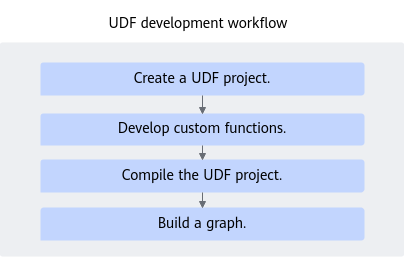
Creating a UDF Project
UDF projects are classified into the following types. Create UDF projects based on application scenarios.
- Using UDF: In this scenario, users do not call third-party dependent libraries or NN functions that have been implemented. Instead, they compile UDF-related files to implement custom functions.
- Calling NN functions: In this scenario, the functions required by users can be carried by the existing NN functions. Users can simply call the NN functions through UDF.
Create a project using the tool. For details, see Tool for Creating Python UDF Projects.
Developing a UDF
This includes the compilation of user-defined processing functions during Python UDF development. This part describes the UDF development process. The code of this part can be automatically generated using a template.
The implementation of UDFs consists of two parts:
- UDF implementation file: code implementation of user-defined functions. The file name extension is .py. There are two scenarios: UDF Implementation File (by Using UDF) and UDF Implementation File (by Calling NN).
- UDF encapsulation and registration file: The .cpp file is generated based on the tool or defined by the user based on the specifications. The file is used to obtain the user-defined Python UDF, encapsulate it into a C++ function, and call FLOW_FUNC_REGISTRAR to register the function.

- The single-processor scenario allows one input with one or multiple outputs, or multiple inputs with one output.
- The two-processor scenario allows one input with one output only.
- The following uses the Add function as an example to describe how to develop, compile, construct, and verify UDFs.
UDF Implementation File (by Using UDF)
You need to develop UDFs in the workspace/src_python/xxx.py file of the project. func_add.py is used as an example.
Function analysis:
This function implements the Add function. It converts two inputs into a NumPy array, performs the addition operation, and outputs the result.
Specifying the input and output:
The Add function has two inputs and one output.
Notes:
The function name defined in the Python file must be the same as the Python module name obtained from the .cpp file.
For example, if the initialization function defined in the Python file is init_flow_func, the name of the Init function in the .cpp file should also be init_flow_func for the search of Python module attributes. For details, see the code below.
Function implementation:
Initialization function and implementation function (multiple implementation functions are allowed).
When compiling the UDF code, import the dataflow.data_type and dataflow.flow_func modules.
flow_func exposes common APIs for UDF compilation, and data_type encapsulates common data types. You can view the module content after importing it.
1 2 3 4 5 | import dataflow.flow_func as ff import dataflow.data_type as dt # Define a class. class Add(): # The class name is related to the actually developed UDF. |
- Initialization function, which is used to perform initialization. The following is an example:
 1
 2
 3
 4
 5
 6
 7
 8
 9
10
11
12
13
14
    @ff.init_wrapper() # This description is mandatory. In wrapper, C++ objects and open Python objects are converted.
    def init_flow_func(self, meta_params):  # The input parameter can contain only meta_params, which is of the MetaParams type.
        name = meta_params.get_name()
        ff.logger.info("func name is %s", name)
        input_num= meta_params.get_input_num()
        ff.logger.info("input num %d", input_num)
        device_id = meta_params.get_running_device_id()
        ff.logger.info("device id %d", device_id)
        out_type = meta_params.get_attr_tensor_dtype("out_type")
        if out_type[0] != ff.FLOW_FUNC_SUCCESS:
             ff.logger.error("get dtype failed")
             return ff.FLOW_FUNC_FAILED
        self.count = 0
        return ff.FLOW_FUNC_SUCCESS
- Implementation function.
 1
 2
 3
 4
 5
 6
 7
 8
 9
10
11
12
13
14
15
16
17
18
19
20
21
22
23
24
25
26
27
28
29
30
31
32
33
34
35
36
37
38
39
40
41
42
43
44
45
46
@ff.proc_wrapper() # This description is mandatory. In wrapper, C++ objects and open Python objects are converted.
def Add1(self, run_context, input_flow_msgs): # The input parameter can contain only objects of the MetaRunContext and FlowMsg types.
    for msg in input_flow_msgs:
        ff.logger.error("msg code %d", msg.get_ret_code())
        if msg.get_ret_code() != ff.FLOW_FUNC_SUCCESS:
            ff.logger.error("invalid input")
            return ff.FLOW_FUNC_FAILED
    # There should be only two inputs in the add method.
    if input_flow_msgs.__len__() != 2:
        ff.logger.error("invalid input")
        # Return the error codes defined in the flow_func module.
        return ff.FLOW_FUNC_ERR_PARAM_INVALID
    tensor1 = input_flow_msgs[0].get_tensor()
    tensor2 = input_flow_msgs[1].get_tensor()

    dtype1 = tensor1.get_data_type()
    dtype2 = tensor2.get_data_type()
    # The data types of the two inputs should be the same.
    if dtype1 != dtype2:
        ff.logger.error("input data type is not same")
        return ff.FLOW_FUNC_FAILED
    ff.logger.info("element size %d", tensor1.get_data_size())
    ff.logger.event("data type is same")
    shape1 = tensor1.get_shape()
    shape2 = tensor2.get_shape()
    if shape1 != shape2:
        ff.logger.error("input data shape is not same")
        return ff.FLOW_FUNC_FAILED
    ff.logger.info("shape is same")
    # Allocate the output message object.
    out = run_context.alloc_tensor_msg(shape1, dt.DT_INT32)
    data_size = out.get_tensor().get_data_size()
    ff.logger.error("data_size %d", data_size)
    ele_cnt = out.get_tensor().get_element_cnt()
    ff.logger.error("ele_cnt %d", ele_cnt)
    np1 = tensor1.numpy()
    np2 = tensor2.numpy()
    a = out.get_tensor().numpy()
    # Obtain the tensor to further obtain the array data in it, and perform the addition operation.
    a[...] = np1 + np2
    ff.logger.event("prepare to set output in add1")
    if run_context.set_output(0, out) != ff.FLOW_FUNC_SUCCESS:
        ff.logger.error("set output failed")
        return ff.FLOW_FUNC_FAILED
    self.count += 1
    return ff.FLOW_FUNC_SUCCESS
- If you need to define multiple functions, you can define multiple implementation functions in the same class.
UDF Implementation File (by Calling NN)
You need to develop UDFs in the workspace/src_python/xxx.py file of the project.
Function analysis:
This function implements addition.
Specifying the input and output:
The function contains two inputs and one output.
Function implementation:
Initialization function and implementation function (multiple implementation functions are allowed).
When compiling the UDF code, import the dataflow.data_type and dataflow.flow_func modules.
flow_func exposes common APIs for UDF compilation, and data_type encapsulates common data types. You can view the module content after importing it.
1 2 3 4 5 | import dataflow.flow_func as ff import dataflow.data_type as dt # Define a class. class Add(): # The class name is related to the actually developed UDF. |
- Initialization function, which is used to perform initialization. The following is an example:
1 2 3 4 5 6 7 8 9 10 11 12 13 14
@ff.init_wrapper() # This description is mandatory. In wrapper, C++ objects and open Python objects are converted. def init_flow_func(self, meta_params): # The input parameter can contain only meta_params, which is of the MetaParams type. name = meta_params.get_name() ff.logger.info("func name is %s", name) input_num= meta_params.get_input_num() ff.logger.info("input num %d", input_num) device_id = meta_params.get_running_device_id() ff.logger.info("device id %d", device_id) out_type = meta_params.get_attr_tensor_dtype("out_type") if out_type[0] != ff.FLOW_FUNC_SUCCESS: ff.logger.error("get dtype failed") return ff.FLOW_FUNC_FAILED self.count = 0 return ff.FLOW_FUNC_SUCCESS
- Add(): user-defined computation processing function. The UDF framework calls this method after receiving the data of the input tensor.Example:
1 2 3 4 5 6 7 8 9 10 11 12 13 14
@ff.proc_wrapper() # This description is mandatory. In wrapper, C++ objects and open Python objects are converted. def AddNN(self, run_context, input_flow_msgs): # The input parameter can contain only objects of the MetaRunContext and FlowMsg types. ret = run_context.run_flow_model("invoke_graph", input_flow_msgs, 1000) if ret[0] != ff.FLOW_FUNC_SUCCESS: ff.logger.error("run nn failed") return ff.FLOW_FUNC_FAILED ff.logger.event("run nn success") i = 0 for out in ret[1]: if run_context.set_output(i, out) != ff.FLOW_FUNC_SUCCESS: ff.logger.error("set output failed") return ff.FLOW_FUNC_FAILED i = i + 1 return ff.FLOW_FUNC_SUCCESS
- If you need to define multiple functions, you can define multiple implementation functions in the same class.
UDF Encapsulation and Registration
To develop UDFs with Python, prepare Python files and C++ API call files. You are advised to use the tool to generate them or customize them. The following is an example.
C++ classes must inherit MetaMultiFunc. The core content in a C++ file consists of the following three parts:
Init function:
1 2 3 4 5 6 7 8 9 10 11 12 13 14 15 16 17 18 19 20 21 22 23 24 25 26 27 28 29 30 31 32 33 34 35 36 37 38 | int32_t Init(const std::shared_ptr<MetaParams> ¶ms) override { FLOW_FUNC_LOG_DEBUG("Init enter"); PyAcquire(); ScopeGuard gilGuard([this]() { PyRelease(); }); int32_t result = FLOW_FUNC_SUCCESS; try { PyRun_SimpleString("import sys"); std::string append = std::string("sys.path.append('") + params->GetWorkPath() + "')"; PyRun_SimpleString(append.c_str()); constexpr const char *pyModuleName = "func_add"; // Must match the file name of the Python UDF, for example, func_add. constexpr const char *pyClzName = "Add"; FLOW_FUNC_LOG_INFO("Load py module name: %s", pyModuleName); auto module = py::module_::import(pyModuleName); FLOW_FUNC_LOG_INFO("%s.%s import success", pyModuleName, pyClzName); pyModule_ = module.attr(pyClzName)(); if (CheckProcExists() != FLOW_FUNC_SUCCESS) { FLOW_FUNC_LOG_ERROR("%s.%s check proc exists failed", pyModuleName, pyClzName); return FLOW_FUNC_FAILED; } if (py::hasattr(pyModule_, "init_flow_func")) { // Must match the initialization function name defined in the Python UDF, for example, init_flow_func. result = pyModule_.attr("init_flow_func")(params).cast<int32_t>(); if (result != FLOW_FUNC_SUCCESS) { FLOW_FUNC_LOG_ERROR("%s.%s init_flow_func result=%d", pyModuleName, pyClzName, result); return result; } FLOW_FUNC_LOG_INFO("%s.%s init_flow_func success", pyModuleName, pyClzName); } else { FLOW_FUNC_LOG_INFO("%s.%s has no init_flow_func method, no need init", pyModuleName, pyClzName); } } catch (std::exception &e) { FLOW_FUNC_LOG_ERROR("init failed: %s", e.what()); result = FLOW_FUNC_FAILED; } FLOW_FUNC_LOG_DEBUG("FlowFunc Init end."); return result; } |
proc() function:
1 2 3 4 5 6 7 8 9 10 11 12 13 14 15 16 17 18 19 20 21 22 23 | int32_t AddProc1( const std::shared_ptr<MetaRunContext> &runContext, const std::vector<std::shared_ptr<FlowMsg>> &inputFlowMsgs) { FLOW_FUNC_LOG_INFO("enter"); PyAcquire(); ScopeGuard gilGuard([this]() { PyRelease(); }); int32_t result = FLOW_FUNC_SUCCESS; try { result = pyModule_.attr("Add1")(runContext, inputFlowMsgs).cast<int32_t>(); // The name of attr must match that of the processing function defined in the Python UDF, for example, Add1, Add2, Sub1, and AddNN. if (result != FLOW_FUNC_SUCCESS) { FLOW_FUNC_LOG_ERROR(".Add Add return %d", result); return result; } FLOW_FUNC_LOG_INFO("call Add result: %d", result); } catch (std::exception &e) { FLOW_FUNC_LOG_ERROR("proc failed: %s", e.what()); result = FLOW_FUNC_FAILED; } return result; } // If you compile multiple processing functions in the same UDF (Python) class, you can use multiple C++ functions to call different Python attributes to implement multiple functions. int32_t AddProc2( const std::shared_ptr<MetaRunContext> &runContext, const std::vector<std::shared_ptr<FlowMsg>> &inputFlowMsgs) |
Use the FLOW_FUNC_REGISTRAR macro to declare the implementation class as a function name, and register it to the UDF framework.
1 2 3 | FLOW_FUNC_REGISTRAR(Add) .RegProcFunc("Add1", &Add::AddProc1); .RegProcFunc("Add2", &Add::AddProc2); |
UDF Project Build
Create the build and release directories in the udf_py_ws_sample directory.
After the build is complete, the built .so file is generated in workspace/release.
- Create the build directory.
mkdir -p build
- Create the release directory.
mkdir -p release
- Go to the build directory.
cd build
- Build the project.
- In a non-cross compilation scenario (the architectures of the development environment and operating environment are the same), the following is an example: Compile the .so file of the x86_64 type, set target lib to libadd.so, and use g++ as the compiler.
cmake .. -DTOOLCHAIN=g++ -DRELEASE_DIR=../release -DRESOURCE_TYPE=X86 -DUDF_TARGET_LIB=add && make
- -DTOOLCHAIN: name of the compiler. For example, g++.
- -DRELEASE_DIR: path for storing the target file after compilation.
- -DRESOURCE_TYPE: type of the compiled resource (x86, AArch, or Ascend).
- x86: Set this value to x86 if the target .so file needs to be deployed on the host with the x86 architecture.
- AArch: Set this value to AArch if the target .so file needs to be deployed on the host of the AArch type.
- Ascend: Set this value to Ascend if the target .so file needs to be deployed on the device.
- -DUDF_TARGET_LIB: name of the target .so file after compilation. For example, if add is set, libadd.so is generated.
- In the cross compilation scenario (the development environment is x86_64 and the operating environment is AArch64), compile .so files of the Ascend type and set target lib to libadd.so. The compiler is ${INSTALL_DIR}/toolkit/toolchain/hcc/bin/aarch64-target-linux-gnu-g++. Replace ${INSTALL_DIR} with the CANN component directory. For example, if the installation is performed by the root user, the default file storage path is /usr/local/Ascend/cann.For example:
cmake .. -DTOOLCHAIN=${INSTALL_DIR}/toolkit/toolchain/hcc/bin/aarch64-target-linux-gnu-g++ -DRELEASE_DIR=../release -DRESOURCE_TYPE=Ascend -DUDF_TARGET_LIB=add && make
- In a non-cross compilation scenario (the architectures of the development environment and operating environment are the same), the following is an example: Compile the .so file of the x86_64 type, set target lib to libadd.so, and use g++ as the compiler.
FlowGraph Construction
After the UDF is constructed, use FlowNode and FuncProcessPoint to construct a FlowGraph. The following is an example:
1 2 3 4 5 6 7 8 9 10 11 12 13 14 | # Define inputs. data0 = df.FlowData() data1 = df.FlowData() # Define a FuncProcessPoint to implement the FlowNode of the Add function. pp0 = df.FuncProcessPoint(compile_config_path="./add_func.json") flow_node0 = df.FlowNode(input_num=2, output_num=1) flow_node0.add_process_point(pp0) # Construct edge connections. flow_node0_out = flow_node0(data0, data1) # Construct a FlowGraph. dag = df.FlowGraph([flow_node0_out]) |